I wanted to test an Openfiler as a solution for HA and vMotion with ESX Server and vCenter. Using Openfiler is a great way to save some money on expensive SANs and for home lab testing and learning, this choice is just great.
I did not have 3 physical boxes (2 for ESX hosts and one for Openfiler) so I opted for a hybrid solution, where I’m actually running one ESX server inside of VMware workstation. Just temporarily, until I build my own lab.
OpenFiler iSCSI Storage
See the schema below. I was trying to do a step-by-step guide on how-to configure and run a successful iSCSI connection with ESX Server.
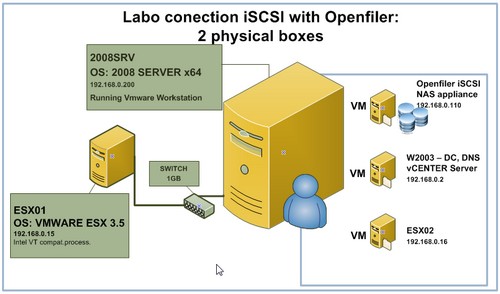
- There is box 1: In this box I will run ESX Server. It's a hardware compatible PC with Inte VT compatible Core 2 duo processor and local SATA drive. One NIC network card. 1 Gigabyte of RAM
- And box 2: Where I will run 2008 Server x64 with 8gigs of RAM and where I run VMware Workstation. Inside of WMware Workstation I will run Openfiler and a Second ESX server. Also there is a VM running 2003 DC as a DNS server. Like this I'll ‘save' on one more physical box on which I would otherwise installed the second ESX Server. I've posted an article before which was based on a whitepaper from Xtravirt.com, about how-to run ESX Server on VMware Workstation., which is explaining what to do and how to create the ESX VM.
For an Openfiler I'll be using VMware Virtual Appliance that you can download here (x86 VMware Virtual appliance). If you want another version (like x64) or ISO image just go to this url and choose the version you need. I'll be using VMware Workstation to actually run the Openfiler Virtual Machine. I know the performances will not be excellent but to test all this stuff it'll be just fine.
There is some good documentation about the actual architecture of Openfiler you can have look here.
1.Add Second virtual hard disk to your VM
Before you first start your Openfiler VM, add a second virtual hard disk (as an SCSI hard disk). Like this Openfiler will detect this disk at startup and then you'll be able to use this disk for your data.
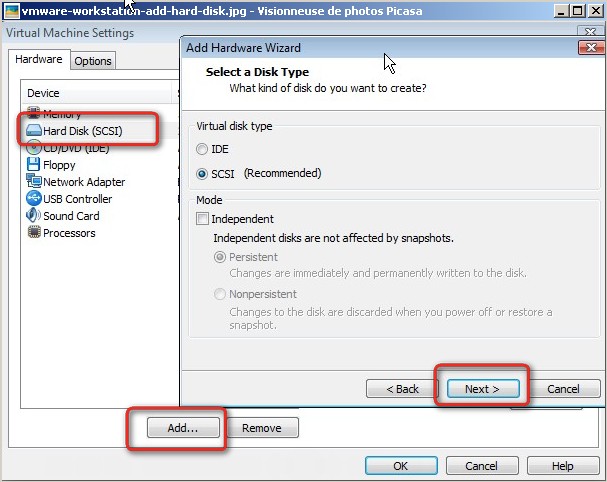
2. Start Openfiler VM
Then log In remotely via web browser to the ip address which was assigned via DHCP. You will see an image like this. Login with a “Openfiler” as a login and with “password” as a password.
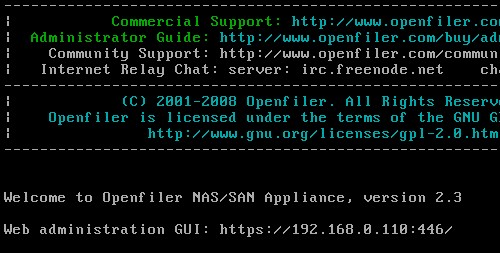
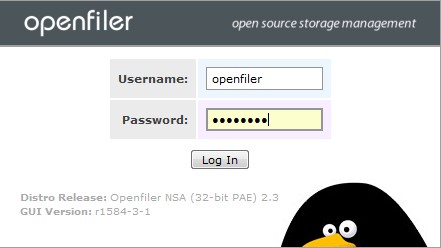
3. Then you need to configure Openfiler as a iSCSI target. What's this? Basicaly that Openfiler will be acting as a server.
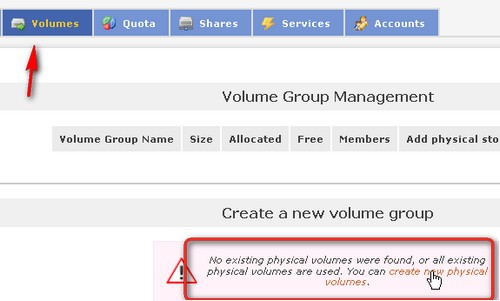
- First create physical volume. Go to Volumes and click on the link (see image below).
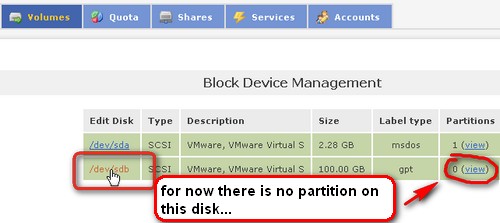
- Then create a partition on this volume. Clic on /dev/sdb
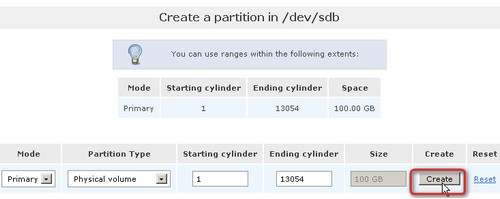
You will get onto a page which looks like this one… Click on the button Create. (if you are curious you can click to see on the drop down box…)
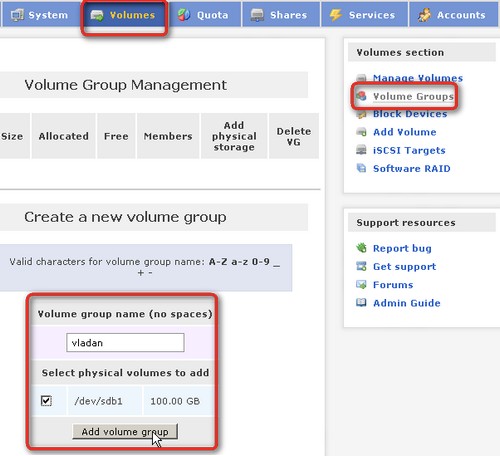
- Then Create a Volume Group. Give it some name and click the button Add Volume Group
- Then add a volume at Volumes, then Add Volume.
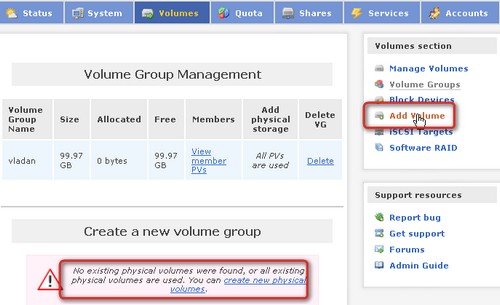
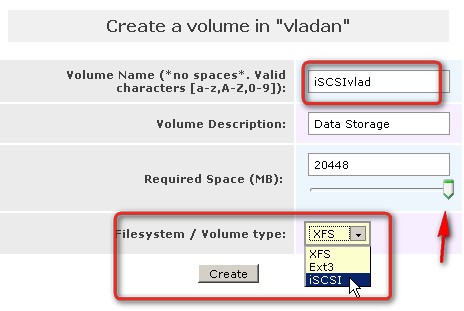
You will then be directed to the page where you can fill the name for your iSCSI volume and also Description. You then must pull the button indicated with the slider bar to the right to specify how big the volume should be. Don't forgot to use the drop down box to select iSCSI as a type of volume.
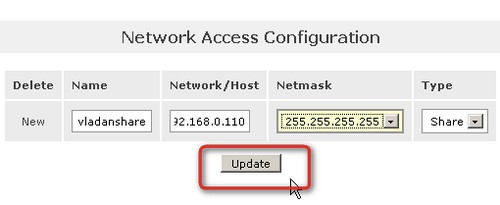
4. Go to General Tab and edit the properties of the volume.
Just go to general tab and click on Network Setup. Now, fill in the IP adress of Openfiler VM, set the subnet mask, select Share, and then click on the button Update.
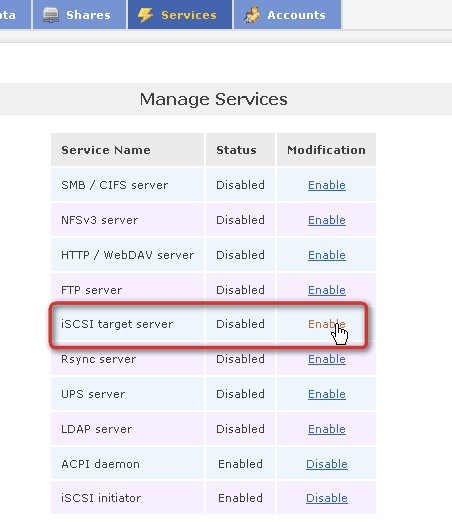
5. Go and enable the iSCSI target
To be able to do that you must go to Services and click on a link to enable the iSCSI target.
That's about it. Next you need to configure vSphere to see the Openfiler NAS and to use this shared storage for your VMotion or High availability tests. You can find follow-up article here – How-to connect ESXi, vSphere to Openfiler iSCSI NAS.









I had an issue with this post. The side bar was not working in IE. THen after few days I found a solution.
http://www.vladan.fr/the-sidebar-is-not-showing-in-ie/
I don’t see anything after ‘Volume Group’ above. You mention a slider bar, don’t see it in IE or Firefox
Again I’m having an issue with this post. The think is that this post is a HUGE post. I’m thinking about to converting this to PDF or I’ll make it as a WordPress page…. It’s just cut off…. I’ll try to restore.
Stay Tuned… -:)
For Now I recovered the 1st part of the article…. (With the Autosave feature of the WordPress Blog…)
Hi!
i have done successfully:)
if any one wants to know about how to configure open filer then mail me at [email protected]
Ifran,
great news… -:). That’s for the how-to is for…. have a nice day.
hi,
what kind of performance are you getting from openfiler?
i have it running on esx as a guest.
testing via ftp
good upload speed 260mbit/sec
slow download speed 86mbit/sec
any ideas?
I just finished adding a second hard drive 500 Gb. I did not really eval, yet. I’m gonna have look. Now I have a physical box for my Openfiler, with 3 drives, no RAID.. To maximize capacity..
it's a drop-down menu. I don't think that you have another choice there… -:)
Hello
I liked your 2 articles. One of the bests that I found so far. I have one question and hopefully you will be able to share some light. During the Open Filer configuration (in my case my OF is a VM) for example sake I selected 192.168.1.60 with a subnet mask 255.255.255.0 all my other VMs ( 2 ESX 3.5) are also on the same IP address range and same subnetmask . (I can ping them with no problem) . QUESTION: in your instructions for NETWORK ACCESS CONFIGURATION on OF you added another IP Address and the subnetmask was 255.255.255.255 (can I use the same IP address and subnet as my OF box or it has to be a totally diferent one ?
Now in your VMware storage config instructions when you build your VMKERNEL in your instructions you select a FREE IP address ?( shouldn't you use the same IP for OF?) another thing that I noticed is that your subnet mask for the VMKERNEL is now 255.255.255.0 and not 255.255.255.255.
I think in these 2 steps when I try to config my OF and after my VMKernel I'm getting confused. When I scan my ISCSI it does not show anything.
🙁
Thanks for any assistance on this
Neo
Hi,
I beleive that for the Network aces configuration I only filled in the Network adress. (from which network you'll access the target…)
You should use different IP adress in the same range. If not you'll get a IP adress conflict….
Hope this helps.
Vladan
Thanks Vladan
Neo
Brilliant setup guide. I would not have been able to set this up at this pace without your guide.
Thank You.
Thanks a loy Vladan.
Great article. I had issues configuring Opefiler however using this article I could successfully configure iscsi share.
Hello,
I have a question,
If i have 2 networked ESX hosts (ESX1 and ESX2) and i have Openfiler installed as a VM on ESX1, can the iSCSI volume be seen by ESX2 aswell if i tired to add it?
Also if i have a local hard disk on ESX2 can that space be allocated to Openfiler which is a VM on ESX1?
Hi Pal,
Sure think, the iSCSI volume can be seen by 2 or more ESX hosts… -:) As for the second part you would have to format as a local datastore for your ESX2 and then in your Openfiler VM you ADD a New Disk which will be located on that datastore you just created.
Hope it helps you..
Vladan
Thanks for the quick reply Vladan.
I’ve just made a purchase of 2 HP ML115 and a Cisco SLM2008 switch for a home lab setup.
I’m still drawing up a plan on how i will share the storage between the two hosts and my above post was my initial idea.
i have done everything as u say bur when o rescan storage adapters it does not show me the iqn of openfiler (despite the fact that i see it in the properties of iscsi software adapter). I also see the vmware machine in iscsi targets).
Hi!
Is possible to configure Openfiler iSCSI in a vmware workstation and other two workstations with CentOS to make a cluster with pacemaker?
I don’t have access to vsphere and I would like to make a little lab for my home with these specs.
Thanks and sorry for my English!
Why not? Desktop virtualization software VMware Workstation is not a bare metal hypervisor, but for a lab it’s just perfect.