
Upgrading VMware vCenter SQL Database? Try this tool before the upgrade process. When upgrading to vSphere 5 there is also an upgrade of the vCenter Server SQL database. If you're want to make sure that the upgrade process will go fine, you can use small script, which will check the DB for errors. Could be handy…. The tool has been released by VMware and you can get a support on it if you're experiencing problems. See the link at the end of the article.
For which upgrades this tool can be used? You can use this tool in it's first version – v. 1.0 with those scenarios:
– On a VirtualCenter 2.5 Update 6 or later database before you upgrade to vCenter Server 4.x
– On a vCenter Server 4.0.x database before you upgrade to vCenter Server 4.1 or 5.0
– On a vCenter Server 4.1.x database before you upgrade to vCenter Server 5.0
How to run the pre-upgrade check tool?
Prerequisites:
– Install a 32-bit JDK 1.6 update 19 or later on the machine where is vCenter Installed, and make sure that Java is included in the PATH environment variable (if you don't the script won't work). Make sure that you put the path INFRONT of the other paths and reboot the computer. How to do it?
Control Panel > System > (Vista/7/W2008) Advanced system settings > Switch to Advanced tab > Environment variables > Choose System Variables (for all users) or User Variables (for this login user only) > Select variable PATH > Choose Edit (for modifying an existing variable) > In variable Value, INSERT your JDK's “bin” directory.
For exemple: “c:Program Filesjavajdk1.7.0bin”), followed by a semi-colon ;
– For Microsoft SQL databases, verify that the TCP/IP Protocol is enabled. In the SQL Configuration Manager, under SQL Server Network Configuration, select Protocols for <your_vCenter_Server_db_instance>, and, in the right-hand panel, enable TCP/IP.
The actual process :
01. The tool can be downloaded here : https://download3.vmware.com/software/dbchecker_20/DBPreUpgradeChecker.zip
(7.8Mb download only).
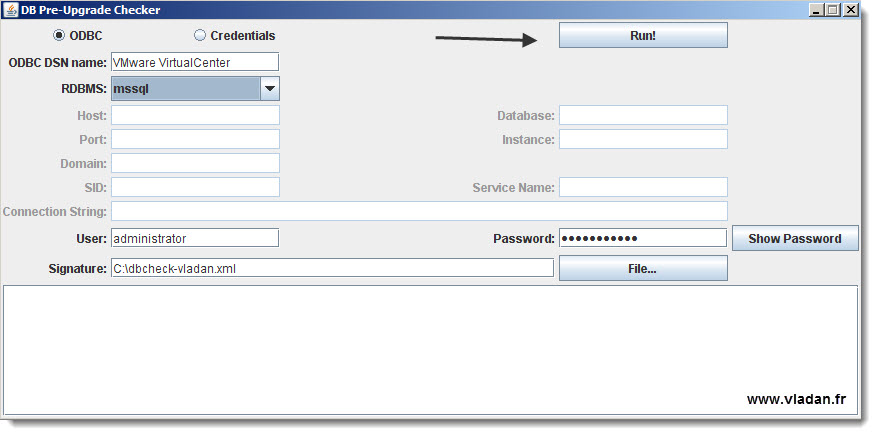
02. Unzip and Execute the .bat script, you'll be presented with a GUI screen where you can choose with the radio button ODBC or CREDENTIALS. If you don't fill the required fields the RUN button stays grayed out…. Like for example the location of the Signature file…..
A quick quote from the source:
The Pre-Upgrade Checker compares your VCDB database signature profile with a known correct standard for your VCDB database version. A database signature profile is a representation of database structure and dependent objects. The Pre-Upgrade Checker creates a signature profile configuration file for your existing (pre-upgrade) database and compares it with the known correct signature profile for your VCDB database version. If the Pre-Upgrade Checker identifies a difference between your database signature profile and the known VCDB signature profile, the check fails. If your VCDB database signature profile matches the known signature profile, the check verifies that your database can be upgraded.
The Pre-Upgrade Checker also performs the following checks.
– Check for multiple schemas in the customer database.
– Database user and role check. Checks that the given database user has the correct privilege to upgrade.
– Table and structure check. No data checks are included in this check.
– SQL compatibility mode check for Microsoft SQL Server. Determines whether the compatibility mode is set to an appropriate and supported level.
To get support for the Pre-Upgrade Checker, use your existing vCenter Server support contract to file a support request with VMware Global Support Services (GSS) at https://www.vmware.com/support/contacts/file-sr.html.
Source: KB article 2004286 – Using the VMware vCenter Database Pre-Upgrade Checker




