
In my earlier post covering the general availability of Veeam Backup & Replication 13.1, I focused on the big picture: expanded hypervisor support, refinements to the Veeam Software Appliance, security posture improvements, and upgrade considerations. Today I want to zoom in on one of the more specialized (and still relatively under-discussed) capabilities introduced or matured in 13.1: the Application Backup Repository (ABR).
This is one of those features that does not dominate the marketing headlines yet solves a very practical problem for many environments — protecting application-native backups, dumps, and exports that fall outside classic image-level or plug-in workflows.
What Is the Application Backup Repository?
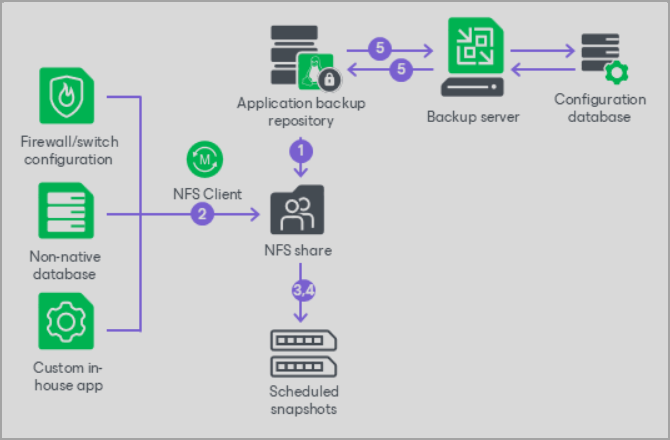
Screenthot from Veeam's site
An Application Backup Repository turns a Veeam Hardened Repository (deployed via the Veeam Infrastructure Appliance) into a managed pool of virtual volumes, each presented as its own NFS share. Applications write their native data directly to the NFS target. Veeam sits underneath and handles the rest: scheduled immutable snapshots, retention, access control, and integration into the broader backup infrastructure.
The applications themselves remain unaware of Veeam. They simply dump or export data to the NFS path on their own schedule (cron, RMAN scripts, DBaaS export jobs, network device configuration backups, container volume dumps, etc.). Veeam then converts those writes into protected restore points.
Supported use cases explicitly called out include:
- Native incremental database solutions such as Oracle RMAN Incremental Merge
- Containerized workloads (Proxmox LXC, Docker, and similar)
- DBaaS exports
- Network device configuration backups (firewalls, switches)
- Custom in-house applications or any tool that can write to NFS
How It Actually Works
- Deploy a Veeam Infrastructure Appliance in Hardened Repository mode.
- Through the Veeam Host Management console, request (and typically get Security Officer approval for) enabling the Application Backup Repository role. Enabling NFS does expand the attack surface slightly, which is why the extra approval step exists.
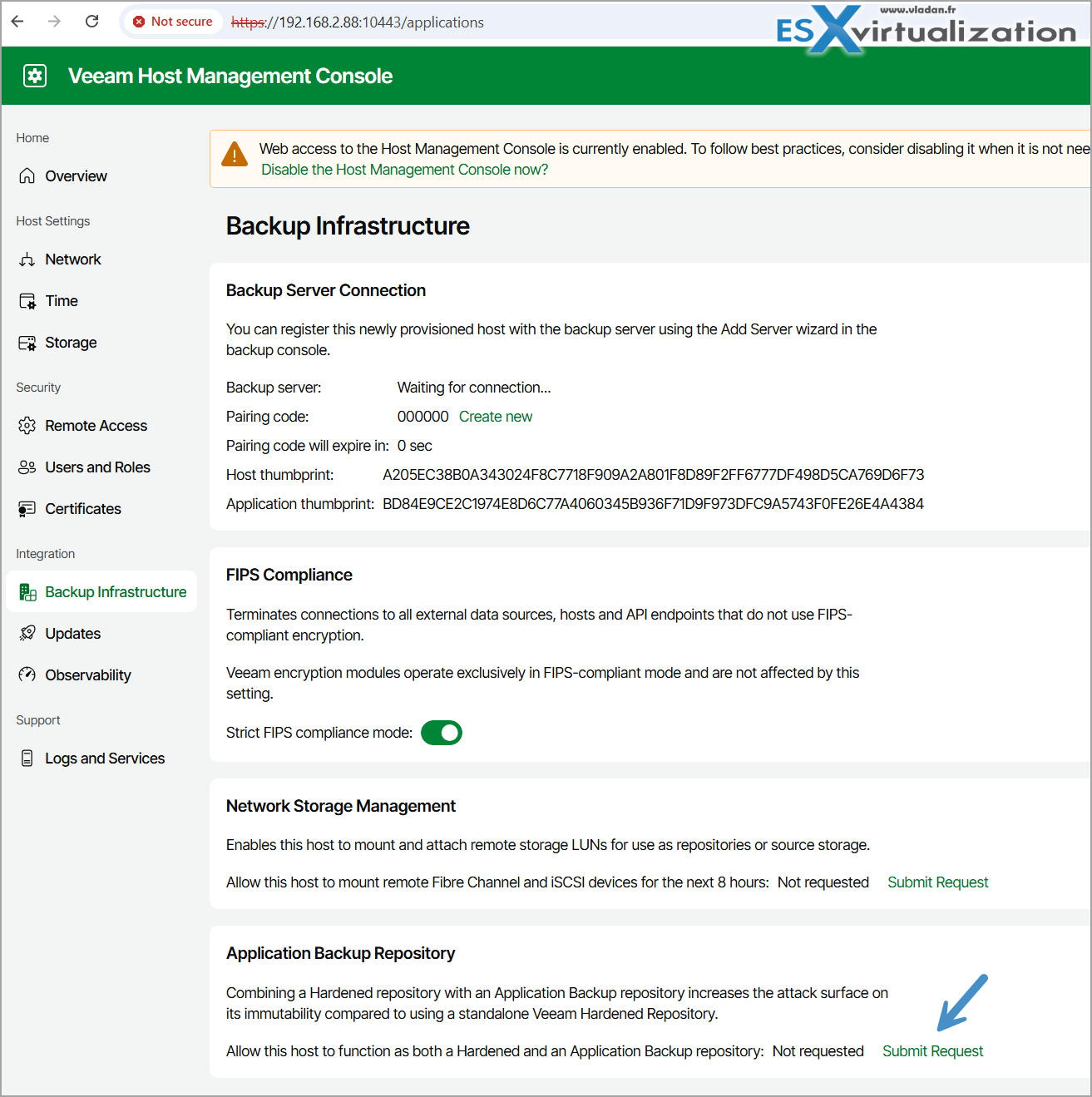
Screenshot from the lab
3. Add local disk(s) and configure the repository via the New Application Backup Repository wizard — define the storage pool, NFS export path, permissions (including Kerberos options), and snapshot schedule.
4. Applications mount the NFS share and write their data.
5. On schedule, Veeam creates a file-system (ZFS-based) snapshot of the dataset, applies an immutability hold matching the retention period, and registers the snapshot as a restore point in the backup console.
From there you have solid recovery options:
- Revert Snapshot — roll the entire NFS share back to a previous point in time. Applications continue using the same path.
- Export Snapshot — temporarily expose a read-only copy of an older snapshot for granular browsing and selective recovery without affecting the live share.
- Further protection via Backup Copy jobs into regular Veeam repositories or tape.
Why This Feature Is Worth Your Attention
Many organizations still have “orphaned” backup processes — RMAN jobs writing to plain NFS, container hosts dumping volumes, network teams exporting configs, or legacy applications with their own export tools. These often sit outside the main Veeam protection umbrella and lack proper immutability or secondary copies.
The ABR brings those workloads under the same console, reporting, and security model you already use for VMs and agents. You keep the application’s preferred native method while gaining Veeam’s snapshot management, immutability, and Backup Copy capabilities.
It pairs particularly well with the hardened repository philosophy that Veeam has pushed strongly since the early Linux repository days and fully embraced with the Infrastructure Appliance in the v13 family.
Considerations and Limitations
- Only local disks are supported for the ABR storage pool (no remote iSCSI or Fibre Channel for the ABR volumes themselves).
- Minimum recommended resources for the appliance role are modest (4 cores / 8 GB RAM), but size according to the expected write volume and number of concurrent NFS clients.
- Because NFS services are involved, follow the security guidance carefully and restrict client access.
- The feature is available with Veeam Universal License editions.
Getting Started
If you already run (or plan to deploy) the Veeam Infrastructure Appliance / Hardened Repository, enabling the Application Backup Repository role is a relatively light additional step. I recommend testing it first with a non-critical application export job so you can validate the snapshot schedule, immutability behavior, and recovery workflows.
Official documentation is solid:
- Application Backup Repositories – User Guide
- How Application Backup Repository Works
- Deploying Application Backup Repository
- What’s New in Veeam Backup & Replication 13.1 (PDF)
The Application Backup Repository is a good example of the quieter but highly practical improvements in 13.1. It extends Veeam’s reach into application-centric and “anything that can write to NFS” scenarios without forcing every workload into an agent or image-level model.
If you have workloads currently dumping data to plain NFS shares, this is definitely worth evaluating in the lab.
Here are somethe latest posts focused on Veeam technology (the recent ones, not the early-version archives):
- Veeam Agent for Microsoft Windows 13.1.1.700 (Free Edition) – Technical Overview and What You Can Achieve
- Veeam Backup & Replication 13.1 Released Today – Major Update to the Veeam Data Platform
- Veeam Live OS ISO: How to Recover Access to a Locked Veeam Software Appliance (Admin Guide)
- Migrating from Veeam Backup & Replication 12.x on Windows to Veeam 13 on Linux (Veeam Software Appliance)
- Veeam Backup & Replication Q1 2026 Updates: Deep Dive into v13 Capabilities, Patches, and Emerging AI Governance Features
- Veeam v13 Download Available – Start your download engines!
- Unlock your Veeam v13 With Windows-Based Console for VBR 13
- Veeam Backup and Replication Plug-in for XCP-NG Enters Public Beta: Powering Up Xen Hypervisor Backups
- Veeam Backup Appliance 13.0 ISO automated installation
- Veeam VHR ISO v2 – 2025 Download and Install
- FREE ISO to Download – Veeam Hardened ISO Repository As a Community Preview
More posts from ESX Virtualization:
- How to update your ESXi 7.x or 8.x to the latest ESXi 8.0U3k via command line
- Veeam Bare Metal Recovery from Recovery partition
- Veeam Backup and Replication Upgrade on Windows – Yes we can
- Securing Your Backups On-Premises: How StarWind VTL Fits Perfectly with Veeam and the 3-2-1 Rule
- VMware Alternative – OpenNebula: Powering Edge Clouds and GPU-Based AI Workloads with Firecracker and KVM
- Another VMware Alternative Called Harvester – How does it compare to VMware?
- VMware vSphere 9 Standard and Enterprise Plus – Not Anymore?
- Vulnerability in your VMs – VMware Tools Update
- VMware ESXi FREE is FREE again!
- No more FREE licenses of VMware vSphere for vExperts – What’s your options?
- VMware Workstation 17.6.2 Pro does not require any license anymore (FREE)
- Two New VMware Certified Professional Certifications for VMware administrators: VCP-VVF and VCP-VCF
- Patching ESXi Without Reboot – ESXi Live Patch – Yes, since ESXi 8.0 U3
- Update ESXi Host to the latest ESXi 8.0U3b without vCenter
- Upgrade your VMware VCSA to the latest VCSA 8 U3b – latest security patches and bug fixes
- VMware vSphere 8.0 U2 Released – ESXi 8.0 U2 and VCSA 8.0 U2 How to update
- What’s the purpose of those 17 virtual hard disks within VMware vCenter Server Appliance (VCSA) 8.0?
- VMware vSphere 8 Update 2 New Upgrade Process for vCenter Server details
- What’s New in VMware Virtual Hardware v21 and vSphere 8 Update 2?
- vSphere 8.0 Page
- ESXi 7.x to 8.x upgrade scenarios
- VMware vCenter Server 7.03 U3g – Download and patch
- Upgrade VMware ESXi to 7.0 U3 via command line
- VMware vCenter Server 7.0 U3e released – another maintenance release fixing vSphere with Tanzu
- What is The Difference between VMware vSphere, ESXi and vCenter
- How to Configure VMware High Availability (HA) Cluster
Stay tuned through RSS, and social media channels (Twitter, FB, YouTube)





Leave a Reply