
ESX Virtualization

VMware ESXi, vSphere, VMware Backup, Hyper-V... how-to, videos....

Nakivo Backup and Replication - #1 Backup solution for Virtual, physical, cloud, NAS and SaaS

Menu
  • Certification
      • VCP-VVF Administrator
          • vcp-vvf-2.
        • Close
      • VCP-DCV vSphere 8
          • vcp2024-125.
        • Close
    • Close
  • VMware
    • Configuration Maximums
    • vSphere
      • VVF 9 and VCF 9
      • vSphere 8.0
      • vSphere 7.0
      • vSphere 6.7
      • vSphere 6.5
      • vSphere 6.0
      • Close
    • VMworld
      • VMware EXPLORE 2024
      • VMware EXPLORE 2023
      • VMware EXPLORE 2022
      • VMworld 2019
      • VMworld 2018
      • VMworld 2017
      • VMworld 2016
      • VMworld 2015
      • VMworld 2014
      • VMworld 2013
      • VMworld 2012
      • VMworld 2011
      • Close
    • Close
  • XCP-NG
    • XCP-NG
    • Close
  • Proxmox
    • Proxmox
    • Close
  • Microsoft
    • Windows Server 2012
    • Windows Server 2016
    • Windows Server 2019
    • Windows Server 2025
    • Close
  • Categories
    • Tips – VMware, Microsoft and General IT tips and definitions, What is this?, How this works?
    • Server Virtualization – VMware ESXi, ESXi Free Hypervizor, VMware vSphere Server Virtualization, VMware Cloud and Datacenter Virtualization
    • Backup – Virtualization Backup Solutions, VMware vSphere Backup and ESXi backup solutions.
    • Desktop Virtualization – Desktop Virtualization, VMware Workstation, VMware Fusion, VMware Horizon View, tips and tutorials
    • How To – ESXi Tutorials, IT and virtualization tutorials, VMware ESXi 4.x, ESXi 5.x and VMware vSphere. VMware Workstation and other IT tutorials.
    • Free – Free virtualization utilities, ESXi Free, Monitoring and free backup utilities for ESXi and Hyper-V. Free IT tools.
    • Videos – VMware Virtualization Videos, VMware ESXi Videos, ESXi 4.x, ESXi 5.x tips and videos.
    • Home Lab
    • Reviews – Virtualization Software and reviews, Disaster and backup recovery software reviews. Virtual infrastructure monitoring software review.
    • Close
  • Partners
    • NAKIVO
    • StarWind
    • Xorux
    • Close
  • This Web
    • News
    • ESXi Lab
    • About
    • Advertise
    • Archives
    • Disclaimer
    • Privacy policy
    • PDFs and Books
    • Close
  • Free

vCenter Support Assistant 5.1 – free plugin for vCenter

By Vladan SEGET | Last Updated: January 27, 2013

Shares

vCenter support assistant 5.1 is available as a free download from VMware website. Not only you can use this product to create and fill support requests, but also to generate and collect logs with direct upload capability. vCenter support assistant 5.1 is available is virtual appliance, which gets deployed from OVF file.

This product is an interesting help for customers. To make the creating and filling requests more easy, and at the same time collect and send log bundles. vCenter Support Assistant is compatible not only with the latest vSphere 5.1, but also with older releases, like 4.1 and 5.0. Before you had to follow those steps for creating support requests at VMware.

vCenter Support Assistant helps not only with vSphere but also with other VMware products – as long as you have an active SnS contract or you'll have to have paid-for incident pack. Two types of support requests are available through the product:

  • Support requests
  • Feature requests (for products you have entitlements)
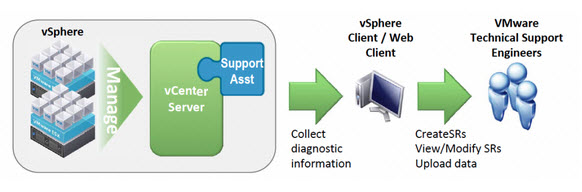
VMware vCenter Support Assistan 5.1

The support assistant can be used to view and modify existing OR generate and upload log support bundles for existing support requests OR atach additional files to an existing support requests.

The product is available in two formats. OVF and OVA. Any of those can be used through the vSphere Client with connection to vCenter or direct connection to the host. Once deployed and registered, you can use the vSphere Client (legacy) or the new vSphere Web Client.

In network configurations, where vCenter does not have direct access to the internet, the vCenter support assistant has to have an access to the Internet.

System Requirements:

  • vCenter Server 4.1 or later
  • vCPUs: 2
  • vRAM: 2GB
  • Disk space: 1.3GB for thin provisioning; 155GB for thick provisioning

To use the plugin, go to:

  • vSphere Client: Home tab -> Solutions and Applications
  • vSphere Web Client: Home tab -> Classic solutions

A quick quote from the product page:

VMware vCenter Support Assistant provides users with an easy-to-use, time-saving application for filing and managing Support Requests, and for generating and uploading vSphere and vCenter Server diagnostic files

vCenter Support Assistant 5.1 – product video:

See all the details about the system and product requirements from this page.

Go and download this product from the product page here.

Did you liked this article? Please SHARE….

Vote !
Shares

| Filed Under: Free Stuff Tagged With: vCenter support assistant, vCenter Support Assistant 5.1

About Vladan SEGET

This website is maintained by Vladan SEGET. Vladan is as an Independent consultant, professional blogger, vExpert x17, Veeam Vanguard x11, VCAP-DCA/DCD, ESX Virtualization site has started as a simple bookmarking site, but quickly found a large following of readers and subscribers.

Connect on: Facebook. Feel free to network via Twitter @vladan.

Private Sponsors


Featured

  • Thinking about HCI? G2, an independent tech solutions peer review platform, has published its Winter 2023 Reports on Hyperconverged Infrastructure (HCI) Solutions.
Click to Become a Sponsor

Most Recent

  • Nakivo 11.2 With Proxmox 9.1 and VMware vSphere 9 Support Released
  • Ready for Voyage? Try Voyager Linux Distro – A Slick, Hybrid Distro That Just Works
  • VMware Releases ESXi 8.0 Update 3i – Build 25205845: Bug Fixes, Security Patches, and How to Upgrade Your Hosts
  • WinBoat – Running Windows Apps on Linux with Seamless Integration? Yes, Please!
  • VMware Workstation Pro 25H2U1 Released: Why You Should Update Now
  • StarWind VSAN for Hyper-V: Synchronous Replication for High-Availability Shared Storage
  • Veeam Backup & Replication Cybersecurity Improvements – Recon Scanner 3.0 and Malware Scanning in Backups
  • Diving Deep into Nakivo Backup & Replication: Lesser-Known Features, Multiplatform Flexibility, and Licensing Options for Cost-Effective Data Protection
  • Thinware SimpleVM – A Free-Forever Hypervisor Alternative for VMware Admins Tired of Broadcom’s Rising Costs
  • Shadow Wearables in Enterprise Environments: The Hidden Risks of Connected Devices

Veeam Vanguard x12

Get new posts by email:


Deals

Support us on Ko-Fi


Buy Me a Coffee at ko-fi.com

Friendly Websites and Blogs

  • vBlog.io
  • VMware Engineer Jobs
 

YouTube

…

Find us on Facebook

ESX Virtualization

…

Copyright © 2026 ·Dynamik-Gen · Genesis Framework · Hosted with HostColor.com
