
As someone who has managed multiple on-premises Exchange environments over the years, I’ve dealt with my fair share of database corruption issues. Some are minor annoyances; others can disrupt business operations for hours.
Recently, I had to handle a corruption incident in a small IT firm running Exchange Server 2016, and that’s when I truly tested Stellar Repair for Exchange. This review covers my real experience from that incident including features, the step-by-step process I followed, pros, cons, and my final verdict.
What Made Me Try Stellar Repair for Exchange?
A few months ago, I was managing an Exchange Server 2016 environment for a small IT firm when we suddenly faced a database corruption issue. After an unexpected power outage overnight, one of our mailbox databases roughly 60–70 GB refused to mount and showed a Dirty Shutdown state.
I tried using Eseutil for soft recovery, but a couple of missing log files made it impossible to bring the database back online. With several users unable to access email and pressure building, I needed a clean, reliable way to recover their mailboxes quickly. That’s when I turned to Stellar Repair for Exchange to scan the corrupted EDB and extract the mailboxes we urgently needed.
Features I Found Most Useful
While Exchange Recovery tool has a long list of features, these were the ones that actually mattered in my situation:
1. EDB File Repair (Corrupted or Inaccessible Databases)
The software can scan and repair corrupted EDB files without depending on log files, which was exactly my problem missing logs.
2. Mailbox-Level Recovery
Instead of forcing me to restore the entire database, Stellar Repair for Exchange let me extract only the mailboxes I needed, saving a lot of time.
3. Preview of Recovered Items
The detailed preview helped me confirm that emails, attachments, and folders were intact before exporting.
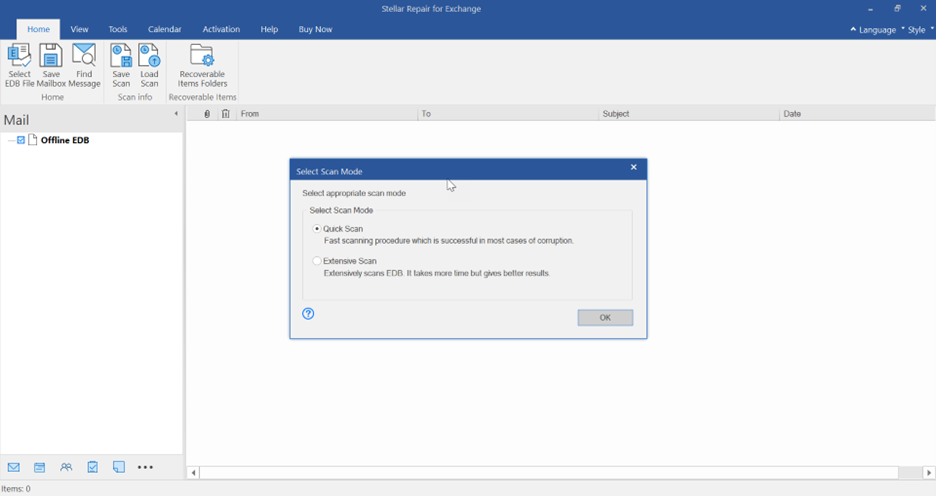
4. Running the Scan
The scan completed faster than I expected. For a 60–70 GB EDB, it didn’t take long.
Once done, it displayed all mailboxes in a tree format.
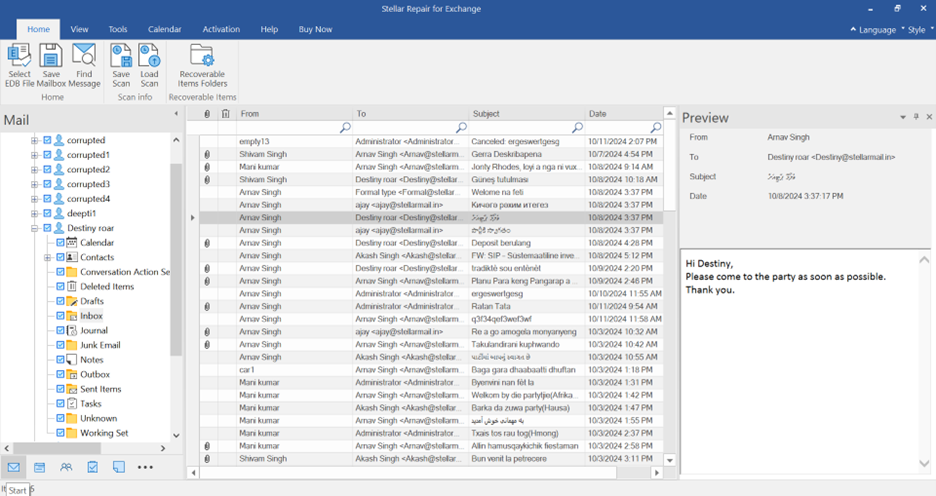
5. Previewing Mail Items
Before exporting, I clicked through several mailboxes:
- Inbox
- Sent Items
- Deleted Items
- Calendar
- Attachments
Everything seemed intact, and I could even preview corrupted items that wouldn’t open in Outlook earlier.
6. Exporting the Mailboxes
Because people needed immediate access, I exported the recovered mailboxes to PST files and imported them into fresh mailboxes.
For one user, I also tried direct export to Exchange, and it worked perfectly.
7. Validating the Data
I opened the PST files in Outlook, verified metadata, read/unread states, folder hierarchy, and attachments, everything was correct.
8. Closing the Recovery
After users confirmed they could access all necessary emails, I documented the recovery using Stellar’s exportable logs.
Pros
1. It Actually Works When Native Tools Fail
Eseutil couldn’t help me, but Stellar Repair for Exchange recovered every mailbox I needed.
2. Easy to Use; Even for Non-Exchange Experts
The GUI is clean, intuitive, and requires no deep Exchange knowledge.
3. Selective Recovery Saves Time
I didn’t need the whole database, just specific mailboxes. Stellar Repair for Exchange made this very easy.
4. Works Without Log Files
Missing logs would’ve made native recovery almost impossible. Stellar Repair for Exchange didn’t require them.
5. Fast and Reliable
Recovery time was much shorter than expected for a database of this size.
6. Multiple Export Options
Being able to export to PST, Exchange, or Office 365 made the process flexible.
Cons
1. Pricing Can Be High for Small Businesses
It’s not cheap, especially for smaller firms. But in emergencies, it pays for itself.
Final Verdict
In this real-life situation, Stellar Repair for Exchange essentially saved the day. I had a corrupted Exchange database stuck in Dirty Shutdown, missing log files, and an anxious user base waiting to regain access to their mailboxes.
Here’s what mattered most to me:
- It recovered every mailbox I needed.
- The data was clean and intact.
- Users were back online quickly.
- I didn’t risk data loss with eseutil /p.
- The whole process was straightforward and stress-free.
If you manage Exchange environments, this is one tool you’ll be glad you have when things go wrong. It’s reliable, intuitive, and gets the job done when native tools fall short.
Note: this post has come from our partner at Stellar.
More posts from ESX Virtualization:
- Veeam Backup and Replication Upgrade to v13 on Windows – Yes we can
- 3 New Advanced Certifications from VMware/Broadcom Released
- Winux OS – Why I like it?
- VMware Alternative – OpenNebula: Powering Edge Clouds and GPU-Based AI Workloads with Firecracker and KVM
- Proxmox 9 (BETA 1) is out – What’s new?
- Another VMware Alternative Called Harvester – How does it compare to VMware?
- VMware vSphere 9 Standard and Enterprise Plus – Not Anymore?
- VMware vSphere Foundation (VVF 9) and VMware Cloud Foundation (VCF 9) Has been Released
- Vulnerability in your VMs – VMware Tools Update
- VMware ESXi FREE is FREE again!
- No more FREE licenses of VMware vSphere for vExperts – What’s your options?
- VMware Workstation 17.6.2 Pro does not require any license anymore (FREE)
- Two New VMware Certified Professional Certifications for VMware administrators: VCP-VVF and VCP-VCF
- Patching ESXi Without Reboot – ESXi Live Patch – Yes, since ESXi 8.0 U3
- Update ESXi Host to the latest ESXi 8.0U3b without vCenter
- Upgrade your VMware VCSA to the latest VCSA 8 U3b – latest security patches and bug fixes
- VMware vSphere 8.0 U2 Released – ESXi 8.0 U2 and VCSA 8.0 U2 How to update
- What’s the purpose of those 17 virtual hard disks within VMware vCenter Server Appliance (VCSA) 8.0?
- VMware vSphere 8 Update 2 New Upgrade Process for vCenter Server details
- What’s New in VMware Virtual Hardware v21 and vSphere 8 Update 2?
- vSphere 8.0 Page
- ESXi 7.x to 8.x upgrade scenarios
- VMware vCenter Server 7.03 U3g – Download and patch
- Upgrade VMware ESXi to 7.0 U3 via command line
- VMware vCenter Server 7.0 U3e released – another maintenance release fixing vSphere with Tanzu
- What is The Difference between VMware vSphere, ESXi and vCenter
- How to Configure VMware High Availability (HA) Cluster
Stay tuned through RSS, and social media channels (Twitter, FB, YouTube)





Leave a Reply