
A slightly different post today. This is something I like to see as it saving resources and saving the planet. Fighting planned obsolescence in schools. Inspired by a fantastic initiative from the City of Blois in France – where they're ditching Microsoft's Windows 10 end-of-life drama for Linux-based PrimTux on old laptops. I'm diving into how this approach revives aging hardware, slashes costs, and keeps education rolling without breaking the bank. If you've got dusty laptops from the pre-Windows 11 era, this is your wake-up call. Let's break it down.
The Windows Obsolescence Trap
Microsoft pulls the plug on Windows 10 support in October 2025, leaving over 400 million PCs worldwide in the dust. For schools, that's a nightmare—functional machines suddenly “obsolete” because they lack the fancy TPM chips or beefy CPUs for Windows 11. In Blois, France, 34 elementary schools rely on 277 computers, with 154 hit hard by this shift. Upgrading means shelling out for new gear, and we're talking €450 minimum per laptop, plus licenses and endless subscriptions for Office 365.
It's not just inconvenient. it's environmentally reckless and a straight-up dictate from Big Tech. As Rachid Meress, Blois' Deputy Mayor for Digital, puts it: “This decision is incomprehensible – environmental nonsense that forces local authorities, associations, and families to trash perfectly good hardware.”
Sound familiar? In my IT world, I've seen enterprises wrestle with similar EOL cycles, forking over thousands for hardware refreshes when virtualization could stretch resources further. But for schools on tight budgets, it's a non-starter.
Enter Linux – and specifically PrimTux, a kid-friendly distro tailored for primary education. The distro is originaly based on Linux Mint, btw. Blois is experimenting with it in three schools (Victor-Hugo, Malala-Yousafzai, and Tourville), reconditioning 50 laptops already and aiming for 50 more by year's end. This isn't some half-baked hack – it's a strategic pivot to free, open-source tech that turns e-waste into educational gold.
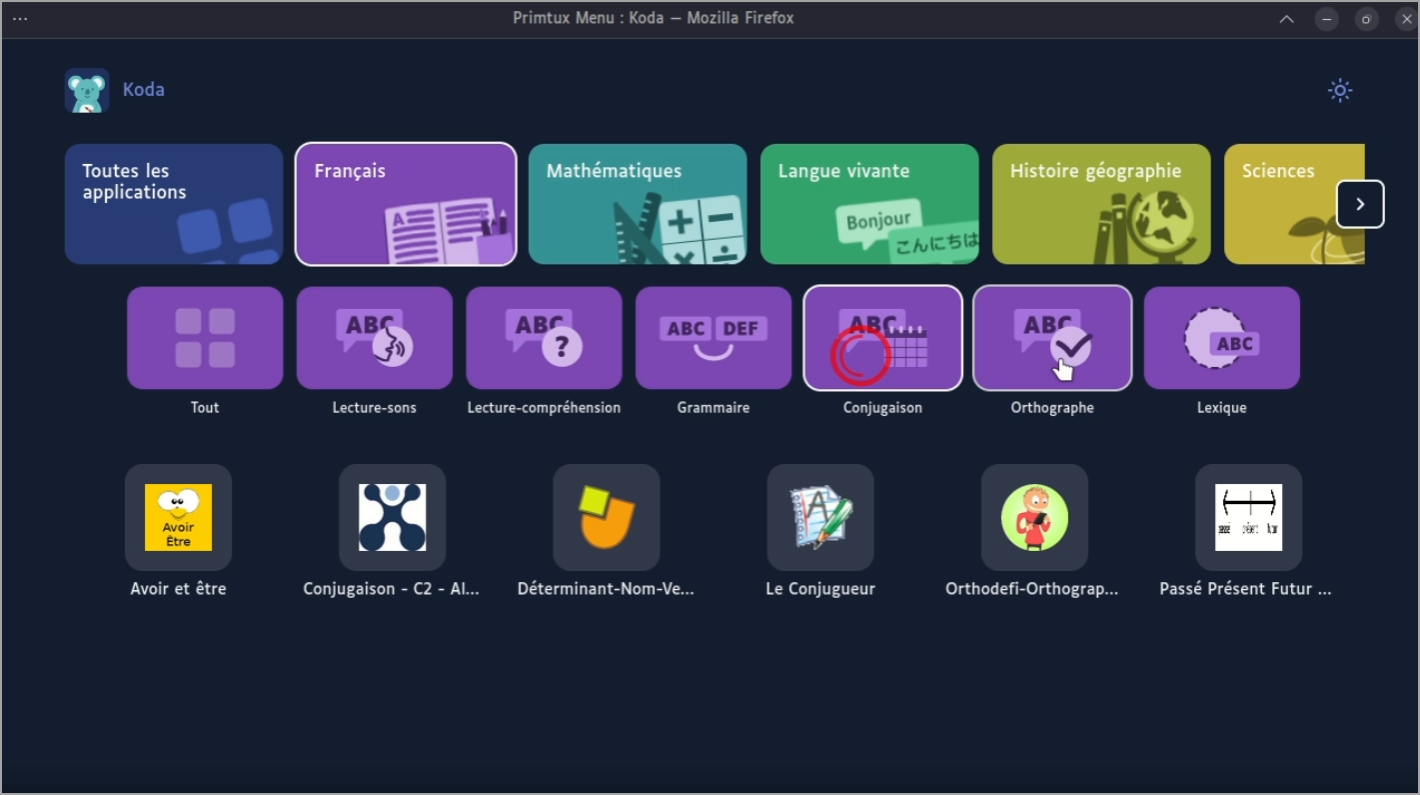
Based on Linux Mint
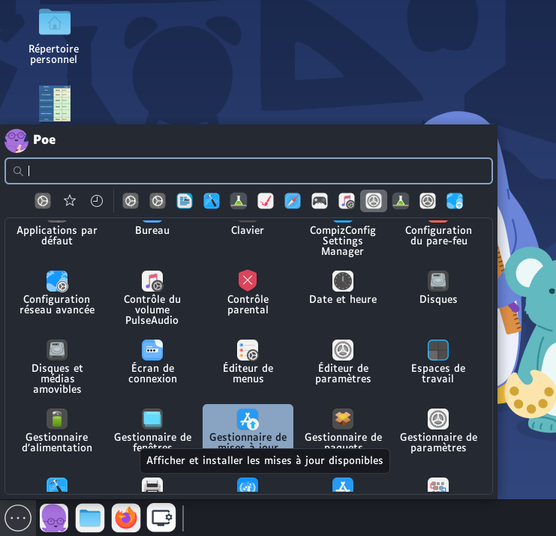
PrimTux: Linux Tailored for Young Learners and Old Hardware
PrimTux—short for “Primaire” (primary school) and “Linux”—is a breath of fresh air in the open-source world. Developed by a passionate community of teachers and tech enthusiasts, it's a complete, free OS designed to run on low-power or ancient laptops. Think 10-year-old Dells or HPs that wheeze under Windows but hum along happily with PrimTux. It includes a treasure trove of educational apps aligned with French school curricula, from math games to language tools, all in an intuitive interface that kids take to like ducks to water.
What sets PrimTux apart? It's built by educators, for educators. As creator Stéphane Deudon says, “It's very simple to use—children are immediately at ease, and adults shouldn't fear the change; seize it!” No steep learning curves here: The desktop is colorful, gamified, and distraction-free, with parental controls and progress trackers baked in. Plus, it's supported by France's National Education Ministry as part of their “digital commons” strategy, meaning Blois is pioneering this at a city level with regular feedback loops from teacher reps (ERUNs).

Under the teacher's profile (or parents profile) , you can add new apps and do basic management of the machine.
User “Poe”, has admin rights, is a password protected account. The password of Poe is “tuxprof” ( compatible with AZERTY et QWERTY keyboards).
Key Advantages of PrimTux-Powered Old Laptops
Running PrimTux on refurbished hardware isn't just viable—it's superior for schools in ways that echo broader Linux wins.
- Ultra-Lightweight – PrimTux is optimized for machines with minimal RAM (as low as 2GB) and older CPUs. It boots in seconds, sips battery life, and multitasks smoothly—think running educational simulations or collaborative docs without lag. In Blois' trial, these laptops, once sidelined by Windows 10's creeping resource demands, now handle full class sessions. Compared to Windows' telemetry and auto-updates that chew through cycles, this efficiency can extend battery life by 30-50%, crucial for portable school setups.
- Educational Focus with Built-In Pedagogy – PrimTux comes pre-loaded with cycle-specific tools – geometry apps for CP/CE1, reading aids for CE2/CM1. It's open for contributions, so teachers can add custom resources. Kids learn digital literacy organically, understanding open-source ethics early. The Ministry's backing ensures alignment with national programs, turning laptops into teaching aids rather than distractions.
- Rock-Solid Security and Reliability – Linux's permission model means fewer vulnerabilities, and PrimTux inherits that with sandboxed apps. No need for pricey antivirus—updates roll out seamlessly without reboot marathons. For schools, this translates to less downtime and safer browsing, vital when kids are exploring online resources.
- Sustainability and Longevity – By fighting obsolescence, PrimTux adds 5-10 years to each laptop's life. Blois' “short-circuit” reconditioning—with help from local training centers like CCI Campus Centre—keeps carbon footprints low.
- Eco-friendly IT – Reuse, don't replace. In my virtualization world, this mirrors consolidating VMs to green up data centers.
- Community-Driven Evolution – Users contribute code, share lesson plans, and get free support via forums. It's collaborative, much like open-source hypervisors, fostering a sense of ownership among teachers and students.
Try it online!
Yes, you can try the distro live on the internet.
Switching to PrimTux costs peanuts. In Blois, reconditioning a laptop runs €0-50—mostly for minor parts like SSD swaps or cleaning. That's versus €450+ for a new Windows machine, not counting €100-200 annual licenses per device for OS and software bundles. For 154 affected laptops? Windows would mean €70,000+ upfront; PrimTux? Under €7,700, with zero recurring fees.
Installation is a breeze: Download the ISO (free), flash to USB, and migrate data in under an hour. Dual-boot if you're cautious, or go full wipe for purity. Local involvement—like Blois' apprentices—adds training value, turning the process into a skill-building exercise. No hardware upgrades needed; PrimTux laughs at Windows 11's gatekeeping.
Ongoing? Patches are free and frequent, software from repos costs nothing – LibreOffice instead of Microsoft 365 (€70/year per user). Scalability shines: If Blois expands (as planned, to all classes), it's sustainable without budget hikes. And for families? They envision loan/donation programs via associations, democratizing access.
Contrast with Windows' ecosystem lock-in: Forced upgrades every 3-5 years, subscription traps, and vendor bloatware that inflates maintenance.
The choice is fast done! Congratulations.
If you live in France or you are expat in France with kids learning french, this is the distro you want to have at home -:)
Source: Blois city
Primtux webiste here. All info, including download is there -:) Enjoy.
More posts from ESX Virtualization:
- Winux OS – Why I like it?
- VMware Alternative – OpenNebula: Powering Edge Clouds and GPU-Based AI Workloads with Firecracker and KVM
- Proxmox 9 (BETA 1) is out – What’s new?
- Another VMware Alternative Called Harvester – How does it compare to VMware?
- VMware vSphere 9 Standard and Enterprise Plus – Not Anymore?
- VMware vSphere Foundation (VVF 9) and VMware Cloud Foundation (VCF 9) Has been Released
- Vulnerability in your VMs – VMware Tools Update
- VMware ESXi FREE is FREE again!
- No more FREE licenses of VMware vSphere for vExperts – What’s your options?
- VMware Workstation 17.6.2 Pro does not require any license anymore (FREE)
- Two New VMware Certified Professional Certifications for VMware administrators: VCP-VVF and VCP-VCF
- Patching ESXi Without Reboot – ESXi Live Patch – Yes, since ESXi 8.0 U3
- Update ESXi Host to the latest ESXi 8.0U3b without vCenter
- Upgrade your VMware VCSA to the latest VCSA 8 U3b – latest security patches and bug fixes
- VMware vSphere 8.0 U2 Released – ESXi 8.0 U2 and VCSA 8.0 U2 How to update
- What’s the purpose of those 17 virtual hard disks within VMware vCenter Server Appliance (VCSA) 8.0?
- VMware vSphere 8 Update 2 New Upgrade Process for vCenter Server details
- What’s New in VMware Virtual Hardware v21 and vSphere 8 Update 2?
- vSphere 8.0 Page
- ESXi 7.x to 8.x upgrade scenarios
- VMware vCenter Server 7.03 U3g – Download and patch
- Upgrade VMware ESXi to 7.0 U3 via command line
- VMware vCenter Server 7.0 U3e released – another maintenance release fixing vSphere with Tanzu
- What is The Difference between VMware vSphere, ESXi and vCenter
- How to Configure VMware High Availability (HA) Cluster
Stay tuned through RSS, and social media channels (Twitter, FB, YouTube)





Leave a Reply