
One of the latest news from Windows Server 2025 dev is probbably the Native NVMe support. I was quite a suprised that this wasn't already in, when this server software went out. But anyways. What does it mean?
Previously, (including in Windows Server 2022 and earlier), Windows treated NVMe drives as SCSI devices. This required translating NVMe commands into SCSI equivalents, adding overhead like extra processing steps, locking mechanisms, and kernel latency.
NVMe is designed for flash storage with massive parallelism: up to 64,000 queues per device, each supporting up to 64,000 commands simultaneously. The old SCSI path limited this to a single-queue model (e.g., SATA-like with only 32 commands max), capping throughput and efficiency on modern hardware (especially PCIe Gen4/Gen5 enterprise SSDs capable of millions of IOPS).
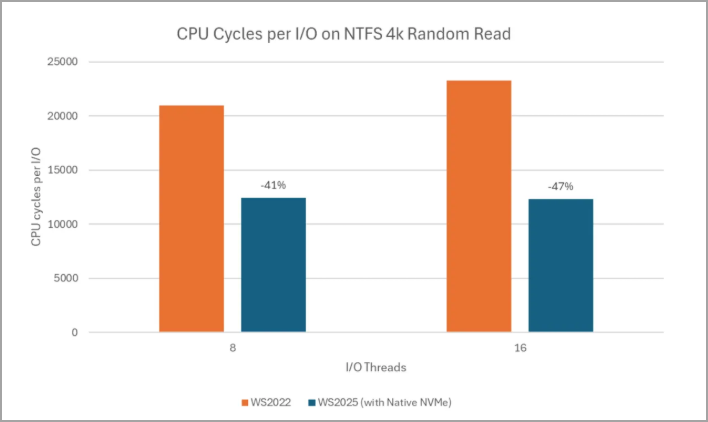
The native path eliminates translation layers, uses lock-free I/O paths, supports direct multi-queue submission, and optimizes for modern multi-core CPUs.
But let's get back to the update and where it came from. The Microsoft's latest Long-Term Servicing Channel (LTSC) release, became generally available on November 1, 2024. It focuses on enhanced security, hybrid cloud integration, improved performance (including AI-capable workloads), and flexibility for on-premises, hybrid, and edge environments. Key Recent Developments (as of January 2026) is Native NVMe Support:
This is a major highlight in late 2025. It's native NVMe I/O in Windows Server 2025 (via the October 2025 cumulative update, with opt-in enabled by default in some configurations). This eliminates legacy SCSI emulation (translation) layers, delivering significant gains in storage throughput, lower latency, reduced CPU overhead, and better efficiency for modern NVMe SSDs. Microsoft described it as ushering in a “new era” for storage performance, especially for demanding workloads. This feature had been anticipated since earlier roadmaps and promises up to doubled performance in some scenarios compared to prior versions.
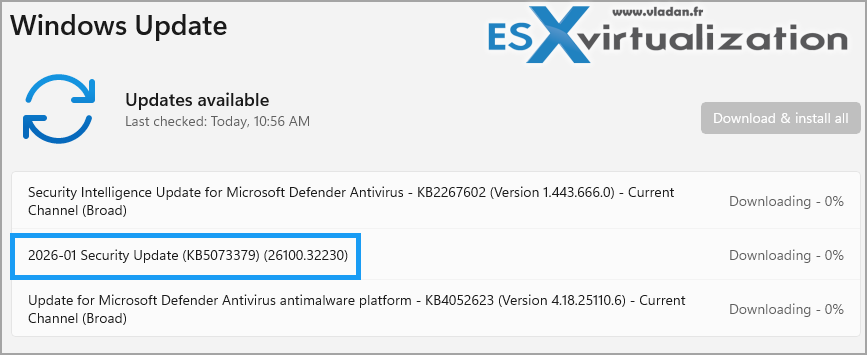
Latest Cumulative Update: The most recent patch is from January 13, 2026 (Patch Tuesday “B” release): KB5073379 for OS build 26100.32230. This includes security fixes, performance improvements, and ongoing hardening. Related updates also rolled out for aligned client versions like Windows 11 24H2/25H2.
Ongoing Security and Features:
- Credential Guard enabled by default on compatible hardware.
- Active Directory enhancements for better domain management.
- Hotpatching via Azure Arc (subscription-based for fewer reboots on security updates).
- GPU partitioning and live migration for Hyper-V to support AI/ML workloads.
- DTrace as a native tool for real-time performance monitoring.
- Deprecations like legacy protocols (e.g., NTLM phased toward Kerberos, WINS retirement in modernization efforts).
Known issues are tracked on Microsoft's release health dashboard, with some notes on optional upgrade classification from older versions (e.g., Windows Server 2022/2019 in-place upgrades treated as optional). The lifecycle provides mainstream support until November 2029 and extended until 2034.
How to Enable It
This feature is opt-in (disabled by default for stability during rollout) and requires the October 2025 (or later) cumulative update installed.Steps (run as administrator):Apply the latest cumulative update for Windows Server 2025.
Enable via registry (single key for Server 2025):
reg add “HKEY_LOCAL_MACHINE\SYSTEM\CurrentControlSet\Policies\Microsoft\FeatureManagement\Overrides” /v 1176759950 /t REG_DWORD /d 1 /f
…and reboot the host.
Verify in Device Manager: NVMe devices should appear under Storage disks (not Disk drives).
Alternatively, use the provided Group Policy MSI from Microsoft to add and enable the policy under:Local Computer Policy > Computer Configuration > Administrative Templates > KB5066835 251014_21251 Feature Preview > Windows 11, version 24H2, 25H2 (it applies to Server 2025 too).
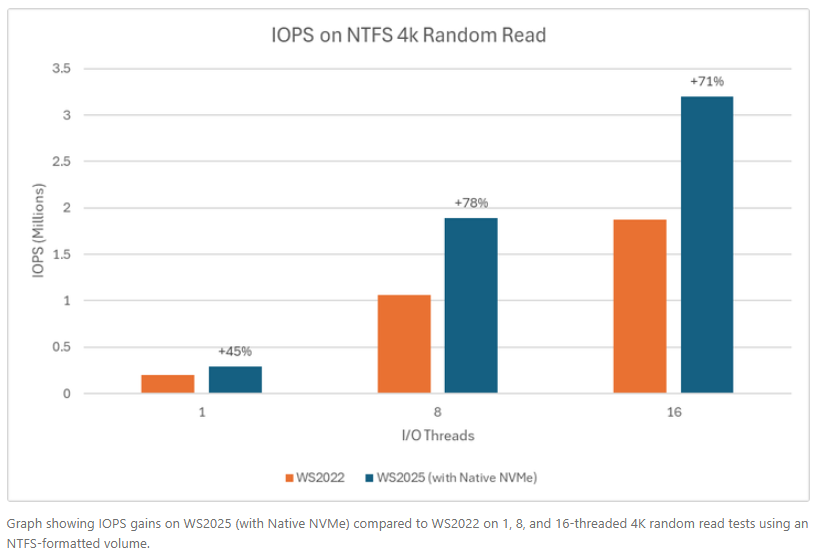
Prerequisites: Drives must use the in-box Windows NVMe driver (StorNVMe.sys). Vendor-specific drivers (e.g., from Samsung, Intel) may not benefit or could conflict—stick to Microsoft's for gains.
Test in non-production first; results depend on your SSDs (enterprise PCIe Gen5 sees the most uplift; some consumer drives show minimal or no change).
Screenshot from Microsoft.
Benefits for Workloads
- SQL Server / OLTP: Shorter transactions, higher IOPS, lower tail latency.
- Hyper-V virtualization: Faster VM boots, checkpoints, live migrations, reduced storage contention.
- File servers: Quicker large-file ops, metadata (copy/backup/restore).
- AI/ML/analytics: Faster dataset access, ETL, caching.
For full details on new features, check Microsoft's official “What's new” page. Evaluation ISOs are available, and updates are listed in the Windows Server 2025 update history.
Source: Microsoft
More posts from ESX Virtualization:
- Veeam Backup and Replication Upgrade on Windows – Yes we can
- Securing Your Backups On-Premises: How StarWind VTL Fits Perfectly with Veeam and the 3-2-1 Rule
- Winux OS – Why I like it?
- VMware Alternative – OpenNebula: Powering Edge Clouds and GPU-Based AI Workloads with Firecracker and KVM
- Proxmox 9 (BETA 1) is out – What’s new?
- Another VMware Alternative Called Harvester – How does it compare to VMware?
- VMware vSphere 9 Standard and Enterprise Plus – Not Anymore?
- VMware vSphere Foundation (VVF 9) and VMware Cloud Foundation (VCF 9) Has been Released
- Vulnerability in your VMs – VMware Tools Update
- VMware ESXi FREE is FREE again!
- No more FREE licenses of VMware vSphere for vExperts – What’s your options?
- VMware Workstation 17.6.2 Pro does not require any license anymore (FREE)
- Two New VMware Certified Professional Certifications for VMware administrators: VCP-VVF and VCP-VCF
- Patching ESXi Without Reboot – ESXi Live Patch – Yes, since ESXi 8.0 U3
- Update ESXi Host to the latest ESXi 8.0U3b without vCenter
- Upgrade your VMware VCSA to the latest VCSA 8 U3b – latest security patches and bug fixes
- VMware vSphere 8.0 U2 Released – ESXi 8.0 U2 and VCSA 8.0 U2 How to update
- What’s the purpose of those 17 virtual hard disks within VMware vCenter Server Appliance (VCSA) 8.0?
- VMware vSphere 8 Update 2 New Upgrade Process for vCenter Server details
- What’s New in VMware Virtual Hardware v21 and vSphere 8 Update 2?
- vSphere 8.0 Page
- ESXi 7.x to 8.x upgrade scenarios
- VMware vCenter Server 7.03 U3g – Download and patch
- Upgrade VMware ESXi to 7.0 U3 via command line
- VMware vCenter Server 7.0 U3e released – another maintenance release fixing vSphere with Tanzu
- What is The Difference between VMware vSphere, ESXi and vCenter
- How to Configure VMware High Availability (HA) Cluster
Stay tuned through RSS, and social media channels (Twitter, FB, YouTube)





Leave a Reply