
ESX Virtualization

VMware ESXi, vSphere, VMware Backup, Hyper-V... how-to, videos....

Nakivo Backup and Replication - #1 Backup solution for Virtual, physical, cloud, NAS and SaaS

Menu
  • Certification
      • VCP-VVF Administrator
          • vcp-vvf-2.
        • Close
      • VCP-DCV vSphere 8
          • vcp2024-125.
        • Close
    • Close
  • VMware
    • Configuration Maximums
    • vSphere
      • VVF 9 and VCF 9
      • vSphere 8.0
      • vSphere 7.0
      • vSphere 6.7
      • vSphere 6.5
      • vSphere 6.0
      • Close
    • VMworld
      • VMware EXPLORE 2024
      • VMware EXPLORE 2023
      • VMware EXPLORE 2022
      • VMworld 2019
      • VMworld 2018
      • VMworld 2017
      • VMworld 2016
      • VMworld 2015
      • VMworld 2014
      • VMworld 2013
      • VMworld 2012
      • VMworld 2011
      • Close
    • Close
  • Proxmox
    • Proxmox
    • Close
  • Microsoft
    • Windows Server 2012
    • Windows Server 2016
    • Windows Server 2019
    • Windows Server 2025
    • Close
  • Categories
    • Tips – VMware, Microsoft and General IT tips and definitions, What is this?, How this works?
    • Server Virtualization – VMware ESXi, ESXi Free Hypervizor, VMware vSphere Server Virtualization, VMware Cloud and Datacenter Virtualization
    • Backup – Virtualization Backup Solutions, VMware vSphere Backup and ESXi backup solutions.
    • Desktop Virtualization – Desktop Virtualization, VMware Workstation, VMware Fusion, VMware Horizon View, tips and tutorials
    • How To – ESXi Tutorials, IT and virtualization tutorials, VMware ESXi 4.x, ESXi 5.x and VMware vSphere. VMware Workstation and other IT tutorials.
    • Free – Free virtualization utilities, ESXi Free, Monitoring and free backup utilities for ESXi and Hyper-V. Free IT tools.
    • Videos – VMware Virtualization Videos, VMware ESXi Videos, ESXi 4.x, ESXi 5.x tips and videos.
    • Home Lab
    • Reviews – Virtualization Software and reviews, Disaster and backup recovery software reviews. Virtual infrastructure monitoring software review.
    • Close
  • Partners
    • NAKIVO
    • StarWind
    • Xorux
    • Close
  • This Web
    • News
    • ESXi Lab
    • About
    • Advertise
    • Archives
    • Disclaimer
    • Privacy policy
    • PDFs and Books
    • Close
  • Free

NTFS Permissions Reporter to quickly check directory permissions on file servers

By Vladan SEGET | Last Updated: February 21, 2020

Shares

Another cool tool from Chris Wright called NTFS Permissions Reporter which allows you to create reports on directory permissions on file servers. The reporting is very fast, and allows you to see which users and groups have access to which directories. Chris also programmed another tool which I've reported on called AD Tidy and which allows you to find inactive computer accounts in Active Directory.

The NTFS Permission Reporter creates a menu in Windows explorer, so to verify a permission from a mapped network drive. You can of course start the tool normally and then choose a mapped drive or shared remote folder which you want to check. The tool supports Windows XP and above and can also on x64 systems. Reporting can be exported as HTML file for archiving or e-mailing purposes. Usually tools like those are part of the consultants toolbox, and I'm definitely will add it to my Free Tools page, because the free version does already nice job.
NTFS Permission ReporterNTFS Permissions Reporter – Free version features:
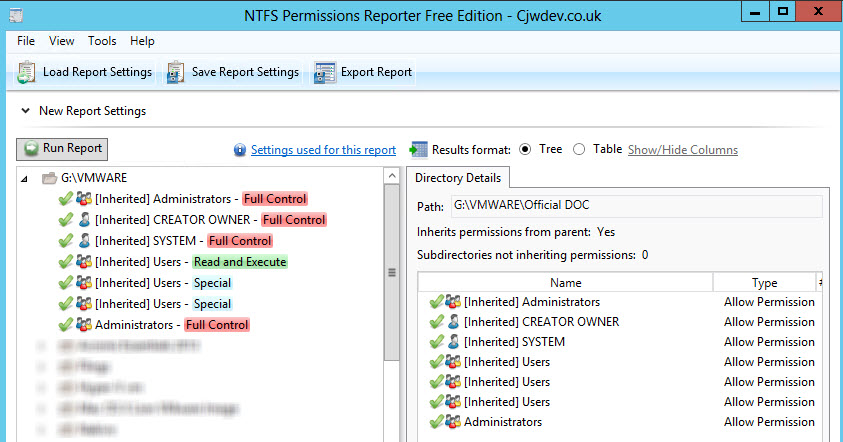
  • Powerful – With options such as being able to view group members (and nested group and primary group members) directly within the report
  • Fast – Intelligent caching helps make this one of the fastest permissions reporting tools available
  • Accessible – Just right click on any directory in Windows Explorer and choose Report Permissions to see permissions for the full directory tree
  • Accurate – Unlike some other tools out there, you will always get accurate representations of permissions with NTFS Permissions Reporter
  • User Friendly – Designed to be easy to use and modern, you can be running your first report within seconds of launching the application for the first time
  • Exportable – Easily export report results to file (HTML file in free edition, additional formats in standard edition)
  • Multi-Domain Friendly – Correctly reports display names and other account details for accounts in external trusted domains

The standard version Features:

  • More export formats – to export into CSV or XLSX,
  • E-mail the results directly from within the tool
  • Create filters that allows you to exclude permissions you're not interested in
  • Command line support for scheduling or loading the filters each time you run the application
  • Free Lifetime upgrades

NTFS Permission Reporter

Prerequisites:

  • Microsoft .NET Framework 4.0 Client Profile (.NET 4.0 requires WIC, which is built in to XP SP3 and above)

Source: CJWDEV


Shares
4/5 - (1 vote)

| Filed Under: Free Stuff Tagged With: NTFS Permissions Reporter

About Vladan SEGET

This website is maintained by Vladan SEGET. Vladan is as an Independent consultant, professional blogger, vExpert x17, Veeam Vanguard x11, VCAP-DCA/DCD, ESX Virtualization site has started as a simple bookmarking site, but quickly found a large following of readers and subscribers.

Connect on: Facebook. Feel free to network via Twitter @vladan.

Private Sponsors


Featured

  • Thinking about HCI? G2, an independent tech solutions peer review platform, has published its Winter 2023 Reports on Hyperconverged Infrastructure (HCI) Solutions.
Click to Become a Sponsor

Most Recent

  • Recovering a Corrupted Exchange Database with Stellar Repair for Exchange
  • Commvault at AWS re:Invent 2025: Pioneering AI-Enhanced Cyber Resilience with Cloud Unity
  • How to Set Up pfSense Community Edition as a Firewall Using VMware Workstation Pro 17 (2025 Edition)
  • HPE Morpheus VM Entreprise and Morpheus VM Essentials updates released – v8.0.11
  • Veeam Backup and Replication Upgrade on Windows – Yes we can
  • Commvault’s Cloud Unity Platform: Revolutionizing Enterprise Resilience in the AI Era
  • Securing Your Backups On-Premises: How StarWind VTL Fits Perfectly with Veeam and the 3-2-1 Rule
  • 3 New Advanced Certifications from VMware/Broadcom Released
  • VMUG Connect 2026: Your Ticket to Unlocking VMware’s Next-Gen Innovations
  • Veeam 100 Summit Prague 2025

Get new posts by email:


Deals

Support us on Ko-Fi


Buy Me a Coffee at ko-fi.com

VMware Engineer Jobs

VMware Engineer Jobs

YouTube

…

Find us on Facebook

ESX Virtualization

…

Copyright © 2025 ·Dynamik-Gen · Genesis Framework · Hosted with HostColor.com

