
Today I want to talk about Commvault and what they are showing at AWS re:Invent 2025 (December 1-5 in Las Vegas). If you follow my blog, you will know that I already wrote a big post about their new Commvault Cloud Unity platform. Commvault with Cloud Unity platform will have plenty of demos there in Las Vegas. All the technologies we have talked in our previous article will be showcased at re:Invent 2025 in Las Vegas.
What is Commvault Cloud Unity in simple words?
Commvault Cloud Unity is the new version of Commvault Cloud. It puts all your backups and recovery in one single place – on-prem, AWS, Azure, Google Cloud, Microsoft 365, everything. One login, one policy, one report. No more jumping between 10 different tools when ransomware hits. You have all necessary tools to stay protected, or recover quickly.
The best new “weapons” against ransomware
- Threat Scan Advanced – Scans every backup for malware and early ransomware signs. Finds hidden infections fast. This is like a smart guard that checks every backup file for signs of trouble (called indicators of compromise, or IoCs). It uses AI to look for malware, unusual changes, or early signs of encryption. If attackers try to encrypt your backups, the scan finds them right away. It can quarantine bad files and alert you. In tests, this cuts your response time by 55% – instead of days to find the problem, you know in hours. For AWS admins, it scans S3 buckets and EC2 instances automatically.
- Synthetic Recovery (patent-pending) – This is a new patent-pending tool that cleans your data during restore. It rebuilds files from good parts only, removing any malware on the fly. Official page.
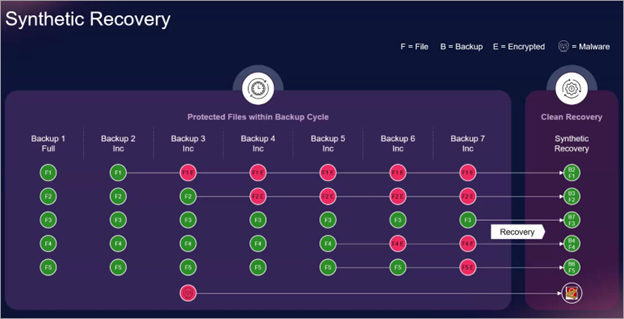
Cleanroom Recovery – This creates a safe, isolated test area (like a virtual sandbox) in AWS or Azure to try your recovery before touching production. It sets up everything automatically – VMs, networks, apps – so you can check if it all works. You test if the restored data runs without issues or hidden threats. No risk to your real systems. For hybrid setups, it even tests Active Directory changes. We have detailed the technology in one of our previous posts here.
Cloud Adaptive Fabric – This is the behind-the-scenes engine that makes backups scale with your cloud growth. It adjusts storage and speed automatically as your AWS workloads change – no extra cost, no manual changes.
Identity Protection for Active Directory / Entra ID – Ransomware often starts by stealing admin passwords or messing with user accounts. This feature watches your Active Directory (AD) 24/7, logs every change, and spots bad ones like deleted admins or new hidden accounts. It rolls back with one click (early access early 2026).
Model Context Protocol (MCP) – Talk to your backups with ChatGPT or Claude in normal English. MCP lets you use AI chat tools (like ChatGPT Enterprise or Claude) to manage backups in plain English. It connects safely to Cloud Unity. More about Commvault MCP here.
Data Rooms – This builds secure “rooms” where you can give teams access to backup data for AI training, but with controls. It masks sensitive info and auto-deletes access after a set time (like 7 days). Safe way to give production data to AI teams – access auto-expires and sensitive data can be masked. More info about Commvault Data Rooms here.
Apache Iceberg Backup and Restore – Apache Iceberg is an open-source, high-performance table format designed for large-scale analytic datasets, enabling the use of SQL-like tables in data lakes. It handles massive datasets efficiently on Amazon S3. But protecting those tables from ransomware or accidental deletions can be challenging. That's where Clumio by Commvault steps in with dedicated backup and recovery for Iceberg tables managed by AWS Glue and S3.
Screenshot from Commvault website below
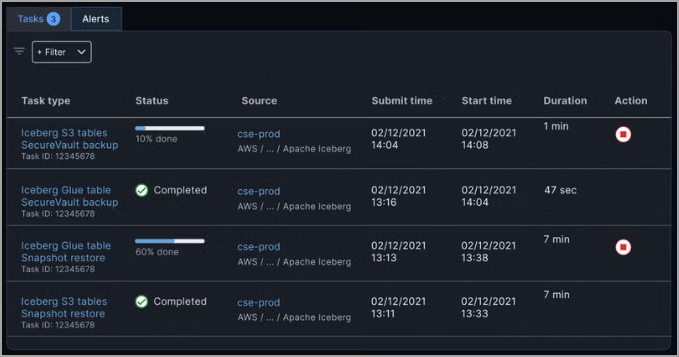
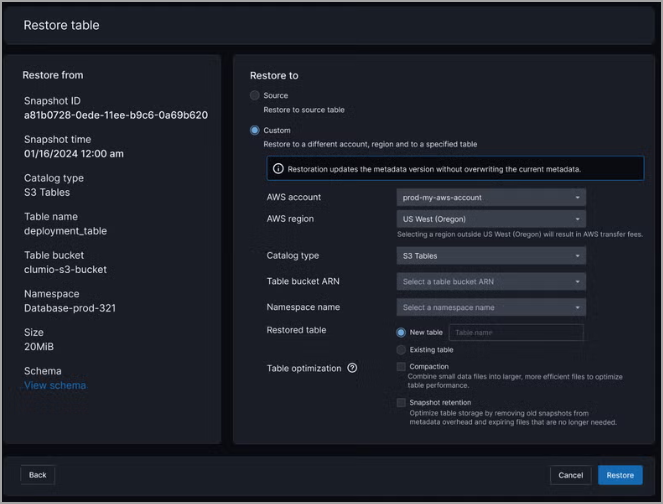
It delivers lightning-fast, transactionally consistent backups that are air-gapped and immutable, unlike basic Iceberg snapshots. You get unlimited retention for compliance without slowing down your lakehouse, plus flexible restores like point-in-time rollbacks, cross-region or cross-account transfers, and in-place fixes to keep your analytics pipelines humming. The system is fully integrated with AWS, it's encrypted end-to-end for cyber resilience. Check it out here.
Screenshot from Commvault website below
Clumio Backtrack for Amazon DynamoDB – Commvault just made Amazon DynamoDB safer with the new Clumio Backtrack for DynamoDB. It gives you true point-in-time recovery down to the single item level – something native DynamoDB backups can’t do easily. You can instantly rewind one table, one partition, or even one specific record to any second in the past (up to 35 days) without restoring the whole database and without paying for expensive continuous backups or PITR the whole time.
Perfect for AWS users
- Full protection for EC2, S3, RDS, EFS, FSx, Aurora, DocumentDB, EKS…
- Object-level recovery in S3 thanks to Clumio Backtrack (Commvault bought Clumio)
- Works with S3 Glacier Instant Retrieval and S3 Express One Zone
- Apache Iceberg table support for AI pipelines
All official AWS integrations – Commvault + AWS page
What to see at AWS re:Invent 2025
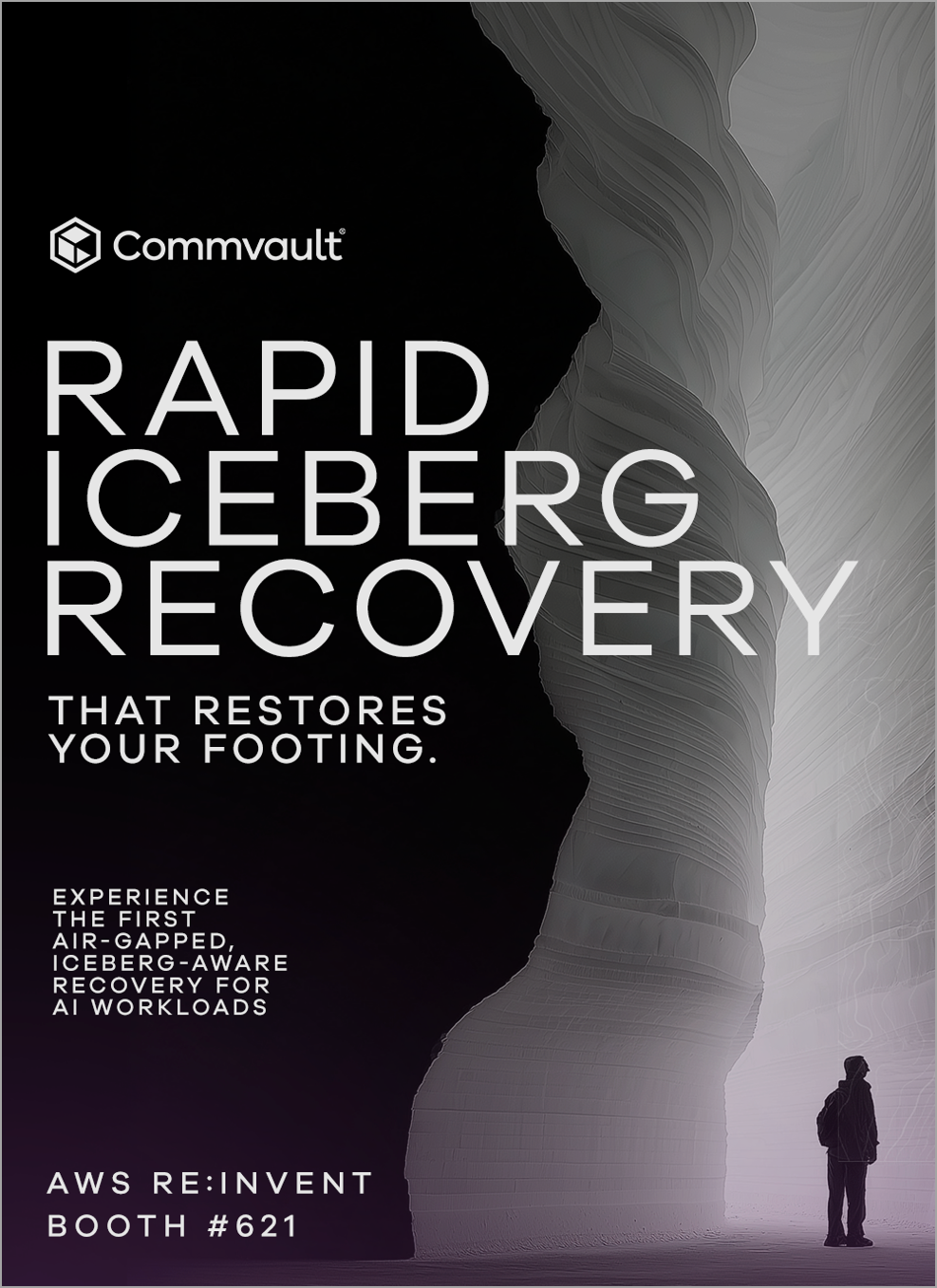
- Commvault booth #621 – live demos of Synthetic Recovery, Cleanroom, and MCP
- Networking dinner on Wednesday 3rd December at Sinatra (Wynn) – register here
- Breakout Session -3rd December – Best practices to simplify resilience at scale for Gen AI data & apps – register here
- Happy Hour – re:Fuel before re:Play – 4th December – register here
Commvault Cloud Unity Platform page here.
Registration to re:Invent 2025 here.
If you go to re:Invent, stop by booth 621 and ask for the Synthetic Recovery demo.
Final Words
Synthetic recovery looks really promising and from what I saw, it seems really innovative and extremely helpful. Other technologies, such as Entra rollback is definitely excellent technology. Monitoring changes on Entra is quite challenging. Knowing you can roll back all changes to certain point in time is reassuring. The whole Cloud Unity Platform has all the tools you'll ever need to find ransomware efficiently.
More posts from ESX Virtualization:
- Veeam Backup and Replication Upgrade to v13 on Windows – Yes we can
- 3 New Advanced Certifications from VMware/Broadcom Released
- Winux OS – Why I like it?
- VMware Alternative – OpenNebula: Powering Edge Clouds and GPU-Based AI Workloads with Firecracker and KVM
- Proxmox 9 (BETA 1) is out – What’s new?
- Another VMware Alternative Called Harvester – How does it compare to VMware?
- VMware vSphere 9 Standard and Enterprise Plus – Not Anymore?
- VMware vSphere Foundation (VVF 9) and VMware Cloud Foundation (VCF 9) Has been Released
- Vulnerability in your VMs – VMware Tools Update
- VMware ESXi FREE is FREE again!
- No more FREE licenses of VMware vSphere for vExperts – What’s your options?
- VMware Workstation 17.6.2 Pro does not require any license anymore (FREE)
- Two New VMware Certified Professional Certifications for VMware administrators: VCP-VVF and VCP-VCF
- Patching ESXi Without Reboot – ESXi Live Patch – Yes, since ESXi 8.0 U3
- Update ESXi Host to the latest ESXi 8.0U3b without vCenter
- Upgrade your VMware VCSA to the latest VCSA 8 U3b – latest security patches and bug fixes
- VMware vSphere 8.0 U2 Released – ESXi 8.0 U2 and VCSA 8.0 U2 How to update
- What’s the purpose of those 17 virtual hard disks within VMware vCenter Server Appliance (VCSA) 8.0?
- VMware vSphere 8 Update 2 New Upgrade Process for vCenter Server details
- What’s New in VMware Virtual Hardware v21 and vSphere 8 Update 2?
- vSphere 8.0 Page
- ESXi 7.x to 8.x upgrade scenarios
- VMware vCenter Server 7.03 U3g – Download and patch
- Upgrade VMware ESXi to 7.0 U3 via command line
- VMware vCenter Server 7.0 U3e released – another maintenance release fixing vSphere with Tanzu
- What is The Difference between VMware vSphere, ESXi and vCenter
- How to Configure VMware High Availability (HA) Cluster
Stay tuned through RSS, and social media channels (Twitter, FB, YouTube)


Leave a Reply