ESX Virtualization

VMware ESXi, vSphere, VMware Backup, Hyper-V... how-to, videos....

Nakivo Backup and Replication - #1 Backup solution for Virtual, physical, cloud, NAS and SaaS

Menu
  • Certification
      • VCP-VVF Administrator
          • vcp-vvf-2.
        • Close
      • VCP-DCV vSphere 8
          • vcp2024-125.
        • Close
    • Close
  • VMware
    • Configuration Maximums
    • vSphere
      • VVF 9 and VCF 9
      • vSphere 8.0
      • vSphere 7.0
      • vSphere 6.7
      • vSphere 6.5
      • vSphere 6.0
      • Close
    • VMworld
      • VMware EXPLORE 2024
      • VMware EXPLORE 2023
      • VMware EXPLORE 2022
      • VMworld 2019
      • VMworld 2018
      • VMworld 2017
      • VMworld 2016
      • VMworld 2015
      • VMworld 2014
      • VMworld 2013
      • VMworld 2012
      • VMworld 2011
      • Close
    • Close
  • XCP-NG
    • XCP-NG
    • Close
  • Proxmox
    • Proxmox
    • Close
  • Microsoft
    • Windows Server 2012
    • Windows Server 2016
    • Windows Server 2019
    • Windows Server 2025
    • Close
  • Categories
    • Tips – VMware, Microsoft and General IT tips and definitions, What is this?, How this works?
    • Server Virtualization – VMware ESXi, ESXi Free Hypervizor, VMware vSphere Server Virtualization, VMware Cloud and Datacenter Virtualization
    • Backup – Virtualization Backup Solutions, VMware vSphere Backup and ESXi backup solutions.
    • Desktop Virtualization – Desktop Virtualization, VMware Workstation, VMware Fusion, VMware Horizon View, tips and tutorials
    • How To – ESXi Tutorials, IT and virtualization tutorials, VMware ESXi 4.x, ESXi 5.x and VMware vSphere. VMware Workstation and other IT tutorials.
    • Free – Free virtualization utilities, ESXi Free, Monitoring and free backup utilities for ESXi and Hyper-V. Free IT tools.
    • Videos – VMware Virtualization Videos, VMware ESXi Videos, ESXi 4.x, ESXi 5.x tips and videos.
    • Home Lab
    • Reviews – Virtualization Software and reviews, Disaster and backup recovery software reviews. Virtual infrastructure monitoring software review.
    • Close
  • Partners
    • NAKIVO
    • StarWind
    • Xorux
    • Close
  • This Web
    • News
    • ESXi Lab
    • About
    • Advertise
    • Archives
    • Disclaimer
    • Privacy policy
    • PDFs and Books
    • Close
  • Free

OneVirt Viewer Free Tool can Collects licensing informations accross many vCenter Servers

By Vladan SEGET | Last Updated: May 1, 2019

New Free Application – collects data and licensing information from multiple vCenters.

This Free application, which is multi-OS (Windows, MAC and Linux) permits to collect licensing informations (keys) accross multiple  vCenter servers. In fact you can add multiple vCenter Servers to the dashboard and display the licensing information on the screen or export in a CSV file format.

If we compare it to RV Tools? It's different in many ways and I would say… complementary, so it's definitely worth to look.

The application has been written by Anton Heyward from hyperadvisor.com.  It's a Free application (registration is required), which needs java installed on the system from which you'll be using it. The website of the tool can be found at onevirt.com

A quick quote from the author's page:

My intention for this application was to make my life easier by collecting licensing information during the recent and future times of renewals. Not to mention just keeping track of what license keys are out there because you might find duplicates. I haven’t really seen anything in the wild that will do this in the same way that the tool does today

A small screenshot from my lab with 2 ESXi 5.0 hosts and one vCenter. The possibility to add several vCenters for large installations might be useful and to track your license numbers in the time with evolution of vSphere. The product suports vSphere 4 and 5 installations.
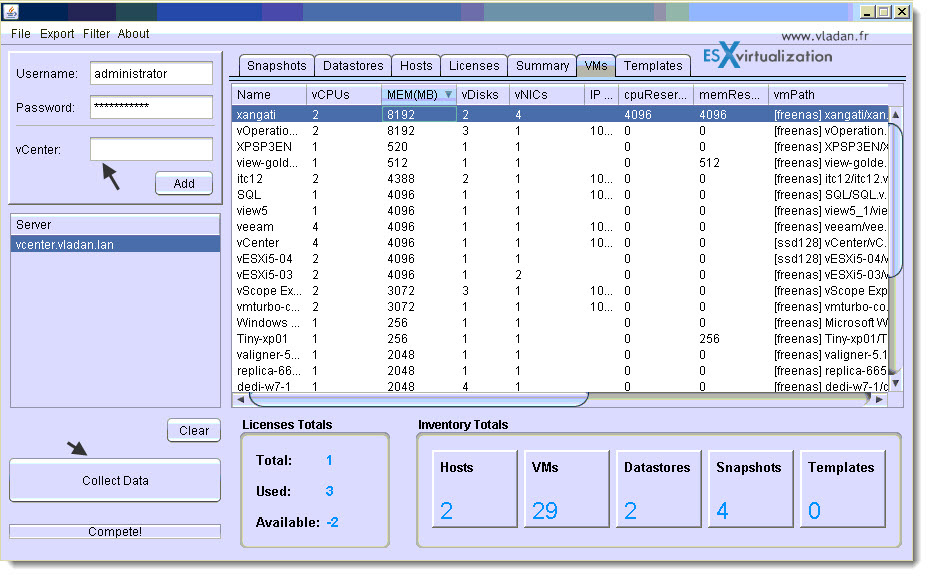
OneVirt Viewer - cross platform free tool for VMware vShere

Collected information:

Licenses: vCenter, vSphere Edition, License Key, Qty, Used, Available, Licensed By.
Hosts: Name, Id, Build, Product, Version, vCenter, IP Address, Subnet Mask, Mac Address, MTU Setting, Maintenance Mode, Power State, CPU Mhz, Processor Qty, Core Qty, CPU Model, Memory, NIC Qty, HBA Qty, Hardware Model, Hardware Vendor.
VMs: Name, vCPU Qty, vRAM(MB), vDisk Qty, vNIC Qty, IP Address, CPU Reservation, Memory Reservation, FT Status, VM Path, Power State, vCenter, Host, Guest OS, vHardware Version, VM Tools Status.
Templates: Name, vCPU Qty, vRAM(MB), vDisk Qty, vNIC Qty, IP Address, VM Path, Power State, vCenter, Host, Guest OS, vHardware Version, VM Tools Status.
Snapshots: Name,Created, Id, Quiesced, VM Guest, and vCenter
Datastores: Name, Capacity(GB),Freespace(GB), Type, Maintenance Mode, Shared, vCenter
Summary: A summary or count of Licenses, Hosts, VMs, Templates, Snapshots, and Datastores is presented.
Source: Hyperadvisor.com

Enjoy… -:)

Vote !
facebookShare on Facebook
TwitterPost on X
FollowFollow us
PinterestSave

| Filed Under: Free Stuff Tagged With: collect licensing numbers vSphere, free tool vsphere, onevirt

About Vladan SEGET

This website is maintained by Vladan SEGET. Vladan is as an Independent consultant, professional blogger, vExpert x17, Veeam Vanguard x11, VCAP-DCA/DCD, ESX Virtualization site has started as a simple bookmarking site, but quickly found a large following of readers and subscribers.

Connect on: Facebook. Feel free to network via Twitter @vladan.

Private Sponsors


Featured

  • Thinking about HCI? G2, an independent tech solutions peer review platform, has published its Winter 2023 Reports on Hyperconverged Infrastructure (HCI) Solutions.
Click to Become a Sponsor

Most Recent

  • Veeam Backup & Replication 13.1: The Features That Actually Matter (and Why You Should Move Now)
  • How to update your ESXi 7.x or 8.x to the latest ESXi 8.0U3k via command line
  • Veeam Live OS ISO: How to Recover Access to a Locked Veeam Software Appliance (Admin Guide)
  • AnduinOS: A Clean, Windows-Friendly Ubuntu Distro That Brings New Life to Older PCs
  • Veeam Backup & Replication 13.1 Released Today – Major Update to the Veeam Data Platform
  • StarWind V2V Converter: The Free Swiss Army Knife for VM Migrations and Its Powerful Automation Capabilities
  • Veeam Bare Metal Recovery from Recovery partition
  • Turning Your NAS into a Powerful, Budget-Friendly Backup Appliance with NAKIVO
  • Migrating from Veeam Backup & Replication 12.x on Windows to Veeam 13 on Linux (Veeam Software Appliance)
  • StarWind VSAN Free vs Paid: Real Production Savings with Software-Defined Storage

Veeam Vanguard x12

Get new posts by email:


Deals

Support us on Ko-Fi


Buy Me a Coffee at ko-fi.com

Friendly Websites and Blogs

  • vBlog.io
  • VMware Engineer Jobs
 

YouTube

…

Find us on Facebook

ESX Virtualization

…

Copyright © 2026 ·Dynamik-Gen · Genesis Framework · Hosted with HostColor.com