
If you've been following my blog for a while (It’s up since 2008!), you know I usually dive into virtualization topics like VMware updates, Proxmox, XCP-NG, and other virtualization alternatives, or backup solutions from vendors like Nakivo and Veeam. But today, I want to shift gears a bit and talk about something that's becoming increasingly relevant in modern IT landscapes: shadow wearables and connected objects in enterprise environments.
As someone who's spent years tinkering with lab setups and advising on secure infrastructures as consultant, I've seen how seemingly innocent gadgets can turn into major headaches for IT admins. With the rise of IoT and wearables, enterprises are facing new challenges that blend consumer tech with corporate security.
In this post, I'll break down what shadow wearables are, explore their technical underpinnings, highlight real-world risks with examples (including a chilling case from ZDNet France), and offer some practical advice on mitigation.
What Are Shadow Wearables and Why Do They Matter in Enterprises?
First off, let's define the term. “Shadow wearables” is an extension of the concept of shadow IT – those unauthorized tools or apps employees sneak into the workplace to boost productivity. But here, we're talking about wearable devices like smartwatches, fitness trackers, AR glasses, or even smart rings that connect to networks or collect data without official approval. These aren't your enterprise-issued badges or RFID tags; they're consumer-grade gadgets that employees bring from home.
In enterprise environments, connected objects (often lumped under IoT) include everything from smart thermostats in office buildings to wearables on employees. According to industry reports, the global wearable market is exploding, with shipments expected to hit over 500 million units by 2026.
But in a corporate setting, these devices can bypass IT policies, creating blind spots. Technically, they often rely on protocols like Bluetooth Low Energy (BLE), Wi-Fi, or NFC for connectivity.
For instance, a smartwatch might pair with a smartphone via BLE, syncing data to the cloud over cellular or Wi-Fi. In an enterprise, this could mean pulling corporate emails, calendar invites, or even accessing VPN tunnels indirectly through the paired device.
Why does this matter? Enterprises deal with sensitive data—think healthcare records, financials, or defense blueprints. Shadow wearables introduce vectors for data exfiltration, malware injection, or unauthorized surveillance. Unlike traditional endpoints, they're mobile, always-on, and often lack robust security features. Many run on lightweight OSes like Wear OS or watchOS, with limited patching cycles, making them ripe for exploits.
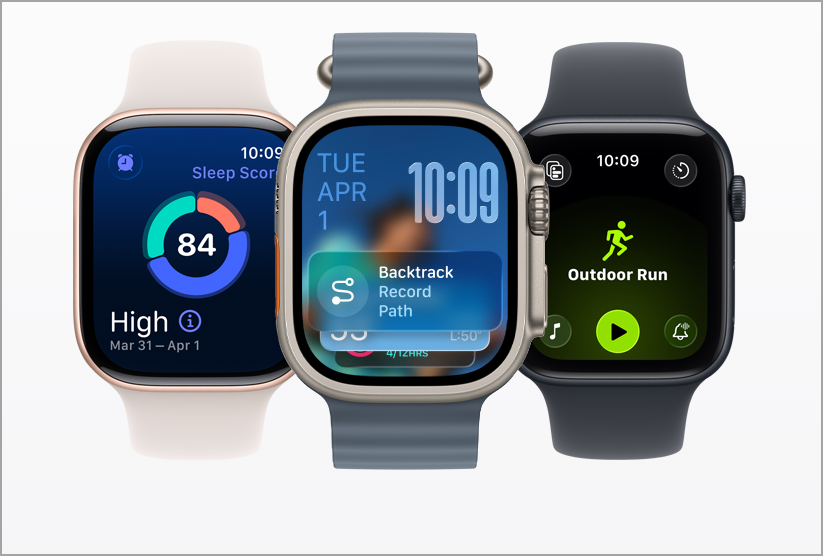
Technical Vulnerabilities: How Shadow Wearables Expose Networks
Let's get technical. Wearables typically operate with constrained resources—limited CPU, memory, and battery – which means security often takes a backseat. Here's a breakdown of key vulnerabilities:
- Connectivity Protocols and Weak Encryption: Most wearables use BLE for short-range communication. BLE 4.0 and earlier versions had known flaws, like insufficient key exchange during pairing, allowing man-in-the-middle (MITM) attacks. Even BLE 5.x, while improved with features like LE Secure Connections, can fall back to legacy modes if not configured properly. For example, a hacker could intercept data packets during syncing, capturing heart rate data or, worse, snippets of corporate notifications pushed to the device.
- Data Collection and Storage Issues: These devices hoard personal data—location via GPS, biometrics (heart rate, steps), and sometimes audio/video. Storage is often unencrypted or uses weak algorithms like AES-128 without proper key management. In an enterprise, if a wearable syncs with a corporate app (e.g., a fitness tracker integrated with wellness programs), it could leak PII. Cloud backends like Garmin Connect or Fitbit's servers add another layer; breaches there have exposed millions of users' data, including geolocation trails that could reveal office layouts or employee routines.
- Integration with Enterprise Systems: Wearables can act as bridges. Pair a smartwatch with a corporate-managed smartphone, and suddenly you've got an unmanaged endpoint accessing the network. Tools like Android's Nearby Share or Apple's Continuity could inadvertently share files. In more advanced setups, AR glasses (e.g., for field service) might connect to enterprise AR platforms, but if shadow versions are used, they bypass MDM (Mobile Device Management) controls. MDM solutions like Microsoft Intune or Jamf can enforce policies on phones, but wearables often require extensions or aren't fully supported.
Firmware and Update Risks – Unlike servers or laptops, wearables rarely receive timely updates. A vulnerability in the chipset (e.g., Qualcomm's Snapdragon Wear) could persist for months. Attackers might exploit this via over-the-air (OTA) attacks or physical tampering. In enterprise terms, this means a compromised wearable could serve as a pivot point for lateral movement—imagine injecting malware that hops to the paired device and then to the corporate LAN.
Quantifying the risk – Studies show that up to 70% of enterprises have no policies for wearables, leading to “shadow IoT” sprawl.
And with ransomware on the rise, a single weak link could cost millions.
Real-World Examples: From Innocent Mistakes to Espionage Threats
Theory is one thing, but real-world cases drive the point home. Let's look at some examples, starting with the ZDNet France.
- The Dassault Aviation Incident (France, 2026): In a high-security defense environment, a 19-year-old temp worker at Dassault Aviation's Cergy plant was caught wearing Ray-Ban Meta smart glasses while assembling Rafale fighter jets. These glasses, equipped with cameras and microphones, were used to record procedures for personal reference—nothing malicious, he claimed. But in a restricted zone, this violated policies on unauthorized recording. French authorities detained him for 48 hours on suspicions of harming national interests, fearing data leaks to foreign entities. Ultimately, no espionage was found, but he faced prosecution for illegal recording.

Technically, the glasses connect via Bluetooth to a phone app, storing footage in the cloud. In an enterprise like Dassault, this could expose proprietary blueprints or assembly techniques. It's a classic shadow wearable case: a consumer gadget evading detection until it's too late.
- Garmin Data Breach (2020, with Ongoing Implications): Garmin's ecosystem was hit by ransomware, encrypting user data and halting services. While not purely enterprise, many companies use Garmin wearables for employee wellness programs. The breach exposed location data, which in a corporate context could map out executive travel patterns or facility visits. Hackers demanded ransom, and recovery took days—imagine that disrupting a logistics firm's operations where wearables track fleet drivers.
- Corporate Espionage via AR Glasses: In manufacturing, unauthorized AR headsets have been used to overlay instructions but also to capture trade secrets. A report from the AREA (Augmented Reality for Enterprise Alliance) highlights how wearables can enable “nightmare scenarios” like surveilling air-gapped systems or tracking user behavior for targeted attacks.
For instance, a hacked pair of smart glasses could record PINs or tokens, bypassing physical security.
These examples underscore how shadow wearables amplify risks in sensitive sectors like defense, healthcare, and finance. Even benign intent can lead to legal woes or data loss.
Mitigating the Risks: Best Practices for Enterprise IT
So, how do you tame the beast? As an IT pro, I've always advocated for proactive measures. Here's a step-by-step approach:
- Develop Clear Policies: Start with a BYOD (Bring Your Own Device) extension for wearables. Ban unauthorized connected objects in sensitive areas, and require approval for any integrations. Use tools like NAC (Network Access Control) to detect and quarantine unknown devices.
- Leverage MDM and EMM: Extend Enterprise Mobility Management to wearables. Solutions like VMware Workspace ONE or Cisco Meraki can manage supported devices, enforcing encryption, remote wipe, and app restrictions. For unsupported ones, use API integrations to monitor pairings.
- Network Segmentation and Monitoring: Isolate IoT traffic on separate VLANs. Tools like Splunk or Wireshark can sniff for anomalous BLE/Wi-Fi activity. Implement zero-trust models where wearables must authenticate via certificates.
- Employee Education and Audits: Train staff on risks – use the Dassault case as a cautionary tale. Conduct regular audits with tools like Nessus for vulnerability scanning on connected devices.
- Technical Safeguards: Mandate strong pairing (e.g., BLE Secure), enable device firewalls, and use encryption like TLS 1.3 for cloud syncs. For AR/VR wearables, sandbox apps to prevent data leakage.
Final Words
Shadow wearables and connected objects are here to stay (or come with numbers), offering productivity boosts but at a cost to security. From technical flaws in protocols to real-world blunders like the Dassault incident, the risks are tangible. Enterprises must evolve policies and tools to keep pace, or risk becoming the next headline.
What do you think? Have you encountered shadow wearables in your environment? Share your experiences in the comments – I'd love to hear.
More posts from ESX Virtualization:
- Veeam Backup and Replication Upgrade on Windows – Yes we can
- Securing Your Backups On-Premises: How StarWind VTL Fits Perfectly with Veeam and the 3-2-1 Rule
- Winux OS – Why I like it?
- VMware Alternative – OpenNebula: Powering Edge Clouds and GPU-Based AI Workloads with Firecracker and KVM
- Proxmox 9 (BETA 1) is out – What’s new?
- Another VMware Alternative Called Harvester – How does it compare to VMware?
- VMware vSphere 9 Standard and Enterprise Plus – Not Anymore?
- VMware vSphere Foundation (VVF 9) and VMware Cloud Foundation (VCF 9) Has been Released
- Vulnerability in your VMs – VMware Tools Update
- VMware ESXi FREE is FREE again!
- No more FREE licenses of VMware vSphere for vExperts – What’s your options?
- VMware Workstation 17.6.2 Pro does not require any license anymore (FREE)
- Two New VMware Certified Professional Certifications for VMware administrators: VCP-VVF and VCP-VCF
- Patching ESXi Without Reboot – ESXi Live Patch – Yes, since ESXi 8.0 U3
- Update ESXi Host to the latest ESXi 8.0U3b without vCenter
- Upgrade your VMware VCSA to the latest VCSA 8 U3b – latest security patches and bug fixes
- VMware vSphere 8.0 U2 Released – ESXi 8.0 U2 and VCSA 8.0 U2 How to update
- What’s the purpose of those 17 virtual hard disks within VMware vCenter Server Appliance (VCSA) 8.0?
- VMware vSphere 8 Update 2 New Upgrade Process for vCenter Server details
- What’s New in VMware Virtual Hardware v21 and vSphere 8 Update 2?
- vSphere 8.0 Page
- ESXi 7.x to 8.x upgrade scenarios
- VMware vCenter Server 7.03 U3g – Download and patch
- Upgrade VMware ESXi to 7.0 U3 via command line
- VMware vCenter Server 7.0 U3e released – another maintenance release fixing vSphere with Tanzu
- What is The Difference between VMware vSphere, ESXi and vCenter
- How to Configure VMware High Availability (HA) Cluster
Stay tuned through RSS, and social media channels (Twitter, FB, YouTube)


Leave a Reply