
Hello everyone, Vladan here. If you've been following my blog over the years, you know I've spent countless hours breaking down virtualization platforms. I invested a lot of time into VMware because it was the best virtualization platform. However, From the depths of VMware's vSphere ecosystem, passing through some Hyper-V, to solid open-source contenders like Proxmox VE and XCP-ng, times are changing. (Have I forgot OpenNebula , Harvester or Platform 9?) The future without Broadcom/VMware seems bright as long as those platforms are stable, performant and they gain enough momentum from the backup vendors.
Here we are In February 2026, with Broadcom's VMware licensing changes (per-core minimums, mandatory bundles for advanced features, and the shift toward VMware Cloud Foundation or vSphere Foundation) still fresh and painful for many budgets, organizations continue to hunt for credible alternatives. Today, let's take a detailed look at NexaVM's nSSV (Secure Server Virtualization), a platform that's attracting attention as a straightforward, performant, and cost-effective way to break free from vendor lock-in. I'll cover its architecture, key technologies, networking and security, installation and management, and—crucially—a clear-eyed assessment of which core VMware features are present and which are missing or limited.
What is NexaVM nSSV? Where the product came from?
NexaVM Technologies AG, based in Lugano, Switzerland, brings nSSV to market as a complete enterprise virtualization solution emphasizing simplicity, openness, and efficiency. While the company itself is relatively new to broad commercialization (with roots tracing back to around 2005 and product development kicking off more actively in the mid-2010s), the underlying technology has a longer pedigree—it's been refined and deployed in production environments, including by a Alibaba hyperscaler (Alicloud), giving it roughly 10 years of real-world maturity behind it, so it is not new product.
So yes, this isn't a brand-new-from-scratch hypervisor, rather a battle-tested tech, now packaged and offered openly to enterprises seeking an alternative to proprietary stacks.
nSSV is a converged Type-1 hypervisor platform built on an optimized KVM foundation, delivering software-defined compute, networking, and basic storage integration—all hardware-independent and running on commodity x86 servers (with ARM support for edge or power-efficient scenarios). It's designed for workloads ranging from traditional servers and VDI to cloud-native and edge computing, promising up to 80% better hardware consolidation through intelligent dynamic resource allocation, predictive balancing, and real-time adjustments to CPU, memory, and I/O.
For VMware veterans, the operational model (includign the great UI) feels reassuringly familiar: centralized management, live migrations, high availability, and resource pooling, but delivered with a lighter footprint, transparent subscription pricing (and even perpetual licensing possibility!), and no escalating per-core or add-on fees.
While their pricing isn't officially listed on their website (which is a shame), some Reddit post from late 2025/early 2026 described a setup for 3 hosts (with 2 CPUs each, no limits on RAM, disks, or cores) at around €4,500 as a perpetual license. This was positioned as a low-cost alternative to high VMware renewals (e.g., €22,000/year in one complaint thread).
This really annoys me that pricing isn't listed though. Back in a day, even VMware had their pricing of product listed, and sold online. You picked up your CC and buy let's say vSphere Essentials PLUS or vSphere Enterprise Plus license directly! Now everything is hidden…. anyways.
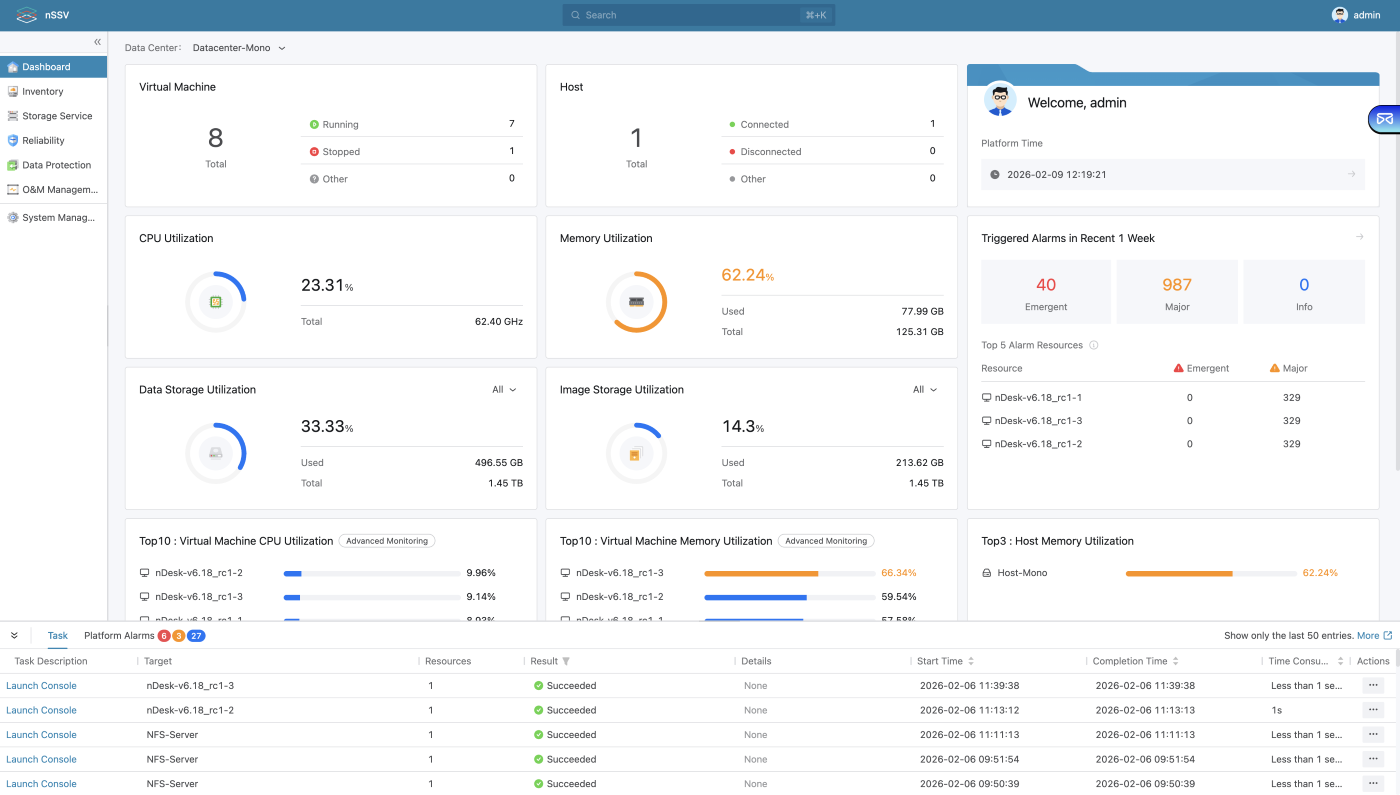
UI and Look and feel
Note: They have YouTube channel where you can see videos of Installation, Initialization, VM creation etc, etc….
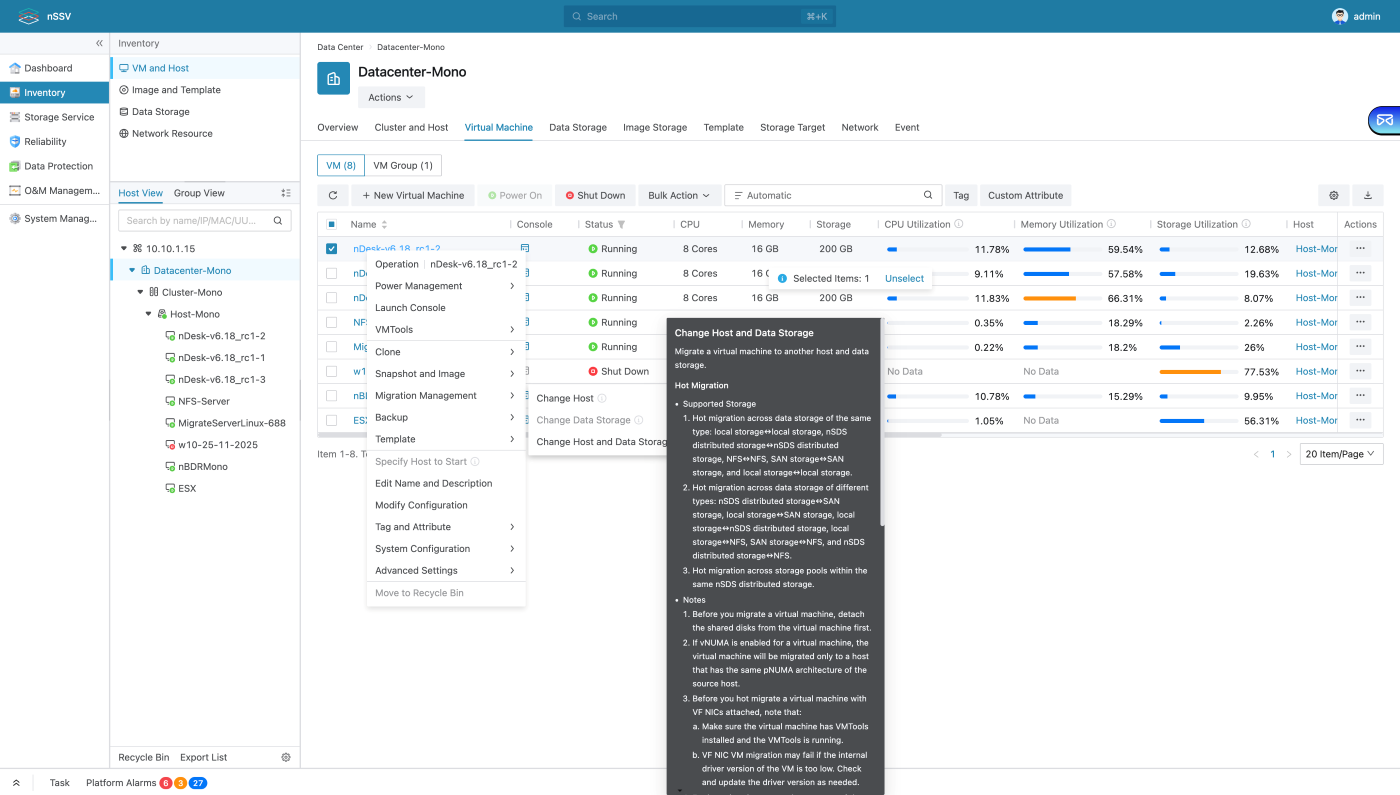
Example of migration possibilities (click to enlarge).
Architecture and Key Technologies
nSSV scales modularly—from a single node for small setups or labs to multi-thousand-node clusters with zero planned downtime for expansion. The hypervisor leverages KVM with enterprise enhancements: NUMA-aware CPU scheduling, EPT optimizations for reduced virtualization overhead, memory ballooning and overcommitment, transparent page sharing, and compression to maximize density.
Resource management is proactive: predictive algorithms anticipate workload spikes and trigger migrations or reallocations automatically (kind like a DRS but apparently baked in natively). Storage integrates with software-defined options (e.g., Ceph-compatible), local pools with RAID/ZFS-like resilience, thin provisioning, snapshots, and replication for HA. All managed through UI.
Compared to VMware where you need a vCenter server VM to be up and running, nSSV's management runs from the host, and its redundancy is ensured by replicating the data to another host (it's that simple as that). The management layer uses a lightweight, web-based console for oversight of clusters, monitoring, alerting, reporting, and operations. Extensive open RESTful APIs support automation with Ansible, Terraform, or custom tooling. HA provides automatic VM restarts on host failures, with multi-level failover mechanisms.
Performance is boosted by OVS-DPDK for networking (ultra-low latency packet handling) and SR-IOV for direct hardware passthrough, making it suitable for high-throughput or latency-sensitive applications.
Networking and Security Features
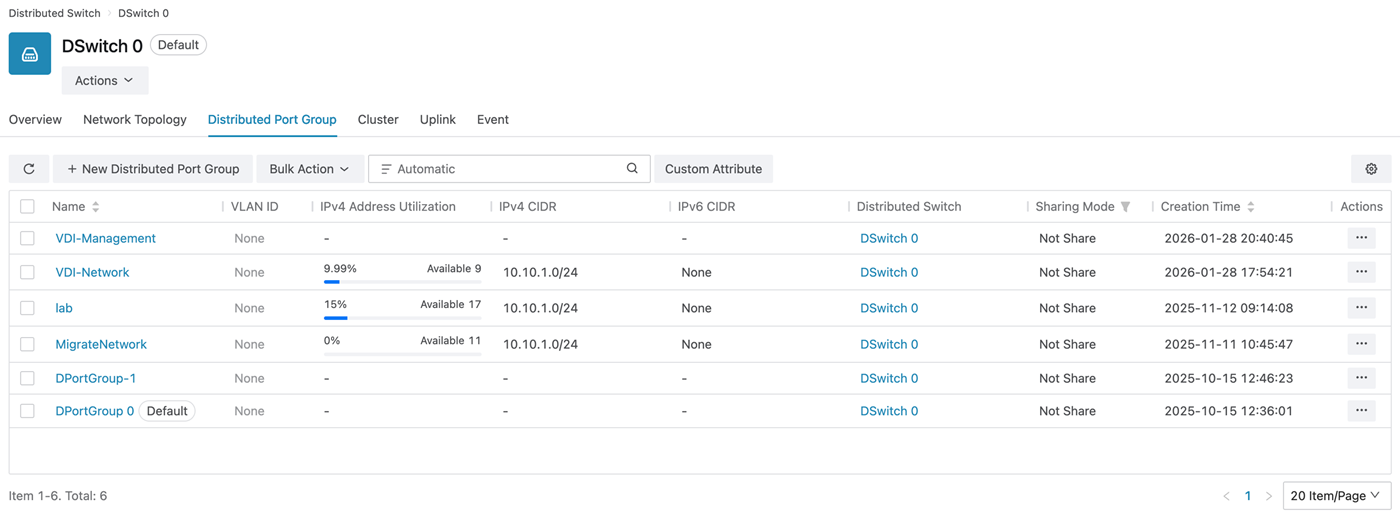
Networking stands out with a distributed virtual switch powered by OVS-DPDK: port groups, 802.1Q VLANs, integrated DHCP/DNS services, security groups, a distributed firewall with micro segmentation, and anti-spoofing protections. Cutting CPU overhead significantly in busy environments delivering capabilities comparable to advanced vSphere networking without separate licensing.
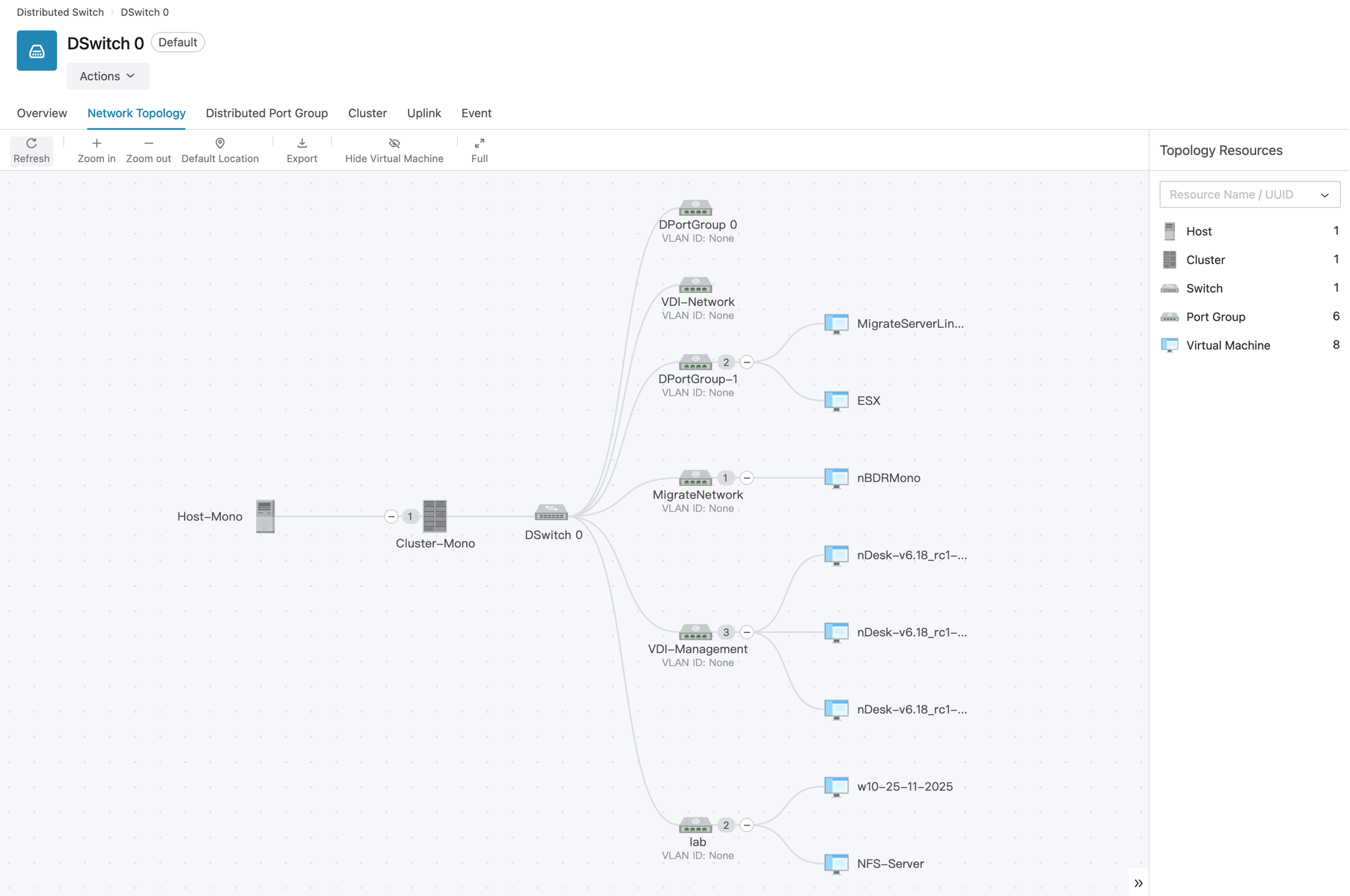
The DSwitch and portgroups looks familiar to you?
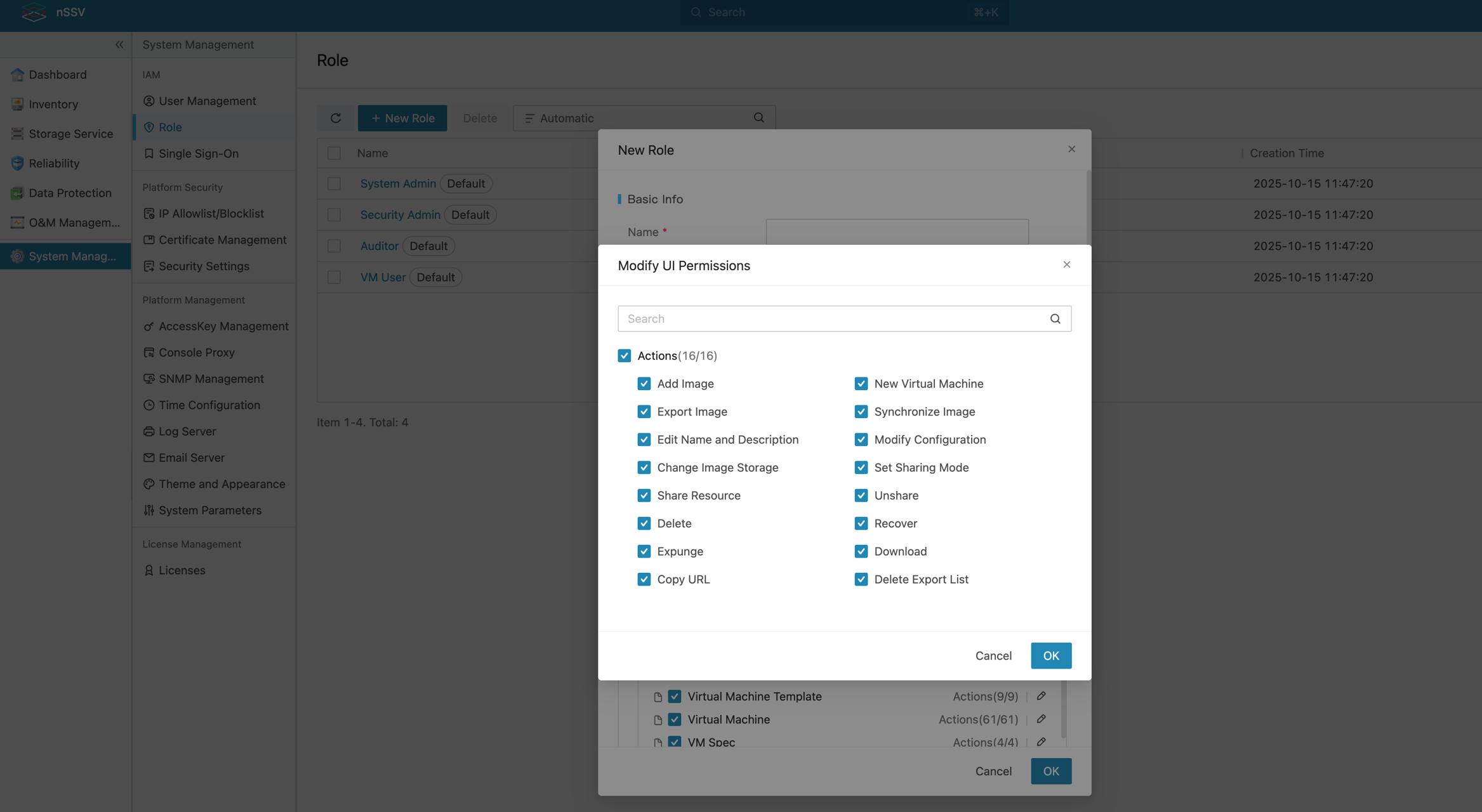
Security features include role-based access control (RBAC), encryption for data at rest and in transit, SSO/MFA, detailed auditing, and hypervisor-enforced distributed firewall rules that follow VMs during migrations. Micro-segmentation supports per-VM policies, and compliance tooling aligns with GDPR/HIPAA requirements. Open standards facilitate integration with external SIEM and monitoring systems.
Comparison with VMware: Present and Missing Features
Let's try to find out which features aren't present in nSSV.
Note: I'm not familiar with the platform just yet, so if any errors, just let me know in the comments and I'll make correction -:).
nSSV delivers a strong set of core virtualization capabilities that align closely with VMware vSphere's essentials, making migrations relatively smooth for many workloads.
Here's a clear breakdown of key features:
Present and well-implemented in nSSV:
- Live migration — Seamless VM movement between hosts (equivalent to vMotion).
- High Availability (HA) — Automatic VM restart on host failure.
- Distributed Resource Scheduler (DRS)-like functionality — Dynamic and predictive workload balancing across hosts.
- Distributed virtual switching — Advanced SDN with OVS-DPDK, port groups, VLANs, integrated DHCP/DNS, security groups, distributed firewall, and anti-spoofing.
- Snapshots, thin provisioning, and replication — For VM protection and data mobility.
- Resource pools and overcommitment — With ballooning, page sharing, and compression.
- Centralized web-based management — Single console for the entire stack.
- Open APIs and automation support — Extensive for scripting and integration.
- SR-IOV and hardware passthrough — For performance-critical VMs.
Missing or notably limited in nSSV (based on current public documentation and community info as of February 2026):
- Fault Tolerance (FT) — No continuous, zero-downtime VM replication (VMware's FT for mission-critical apps with no tolerance for even brief outages).
- Advanced cross-cluster mobility — Basic live migration between hosts is supported, but no full equivalent to cross-vCenter vMotion or Enhanced vMotion Compatibility for seamless moves across clusters with differing CPU generations.
- Advanced GPU virtualization — Basic SR-IOV passthrough exists, but no deep NVIDIA vGPU management, heterogeneous profiles, or workload-aware DRS for graphics-intensive VDI or AI workloads.
- Built-in Kubernetes runtime / Supervisor — No native Tanzu-like Supervisor cluster, integrated Harbor registry, or container orchestration; relies on external Kubernetes deployments.
- Advanced storage policy-based management — Solid SDS integration, but lacks VMware's full vVols depth or granular Storage Policy-Based Management (SPBM).
- Live patching / host update automation — No equivalent to vCenter's live ESXi patching or advanced lifecycle tools like Update Planner and Auto Deploy.
- Ecosystem maturity — Fewer certified third-party integrations (e.g., backup, monitoring, DR solutions) and a smaller partner/community ecosystem compared to VMware's vast, decades-old network.
These gaps are most relevant in ultra-high-availability scenarios (zero-downtime requirements), heavy GPU/VDI environments, native container orchestration, or massive-scale automated provisioning. For standard server virtualization, general-purpose VDI, or cost-optimized enterprises, nSSV covers the vast majority of day-to-day needs effectively.
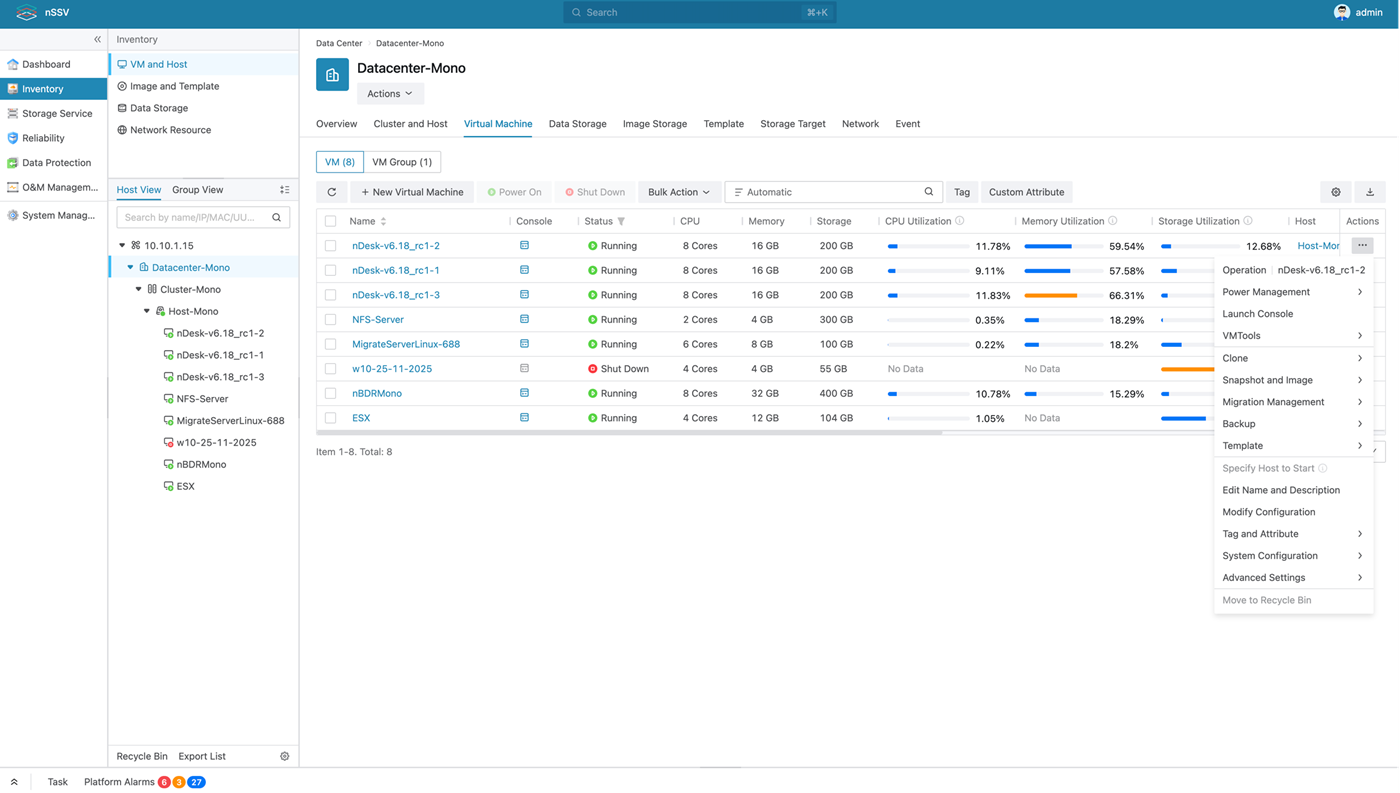
Screenshot from the VM operations
RBAC and Permissions
Use Cases and Real-World Insights
nSSV fits well for SMBs to mid-sized enterprises escaping VMware costs, running VDI on commodity hardware, edge deployments, or building flexible private/hybrid clouds. Community feedback on forums and LinkedIn praises its stability, quick VM imports/migrations (yes, there is an internal support for it), and API performance under load.
The main drawbacks from ecosystem size: more manual work for niche integrations, and less “out-of-the-box” maturity in edge cases compared to VMware.
They have their own backup system allowing incremental backups, but they are aware that integration with major backup players such as Veeam, Commvault or Cohesity would give them an edge. That's why they're in talks with Veeam! And also other players within the data-protection eco-system.
Conclusion
NexaVM nSSV brings mature, production-hardened virtualization technology – refined over roughly 15 years in demanding environments, including Alicloud use – to a broader audience through a fresh, open commercial offering. It nails the essentials (live migration, HA, DRS-equivalent balancing, advanced distributed networking via OVS-DPDK, and strong security) while delivering big savings and freedom from proprietary lock-in.
It falls short on zero-downtime FT, advanced GPU handling, native K8s supervision, and deep cross-cluster tools—but for many organizations, those aren't critical. If your setup prioritizes core reliability, performance, and cost control over VMware's most specialized features, nSSV deserves serious evaluation. Grab the free 90 days trial from nexavm.com and test it yourself. It's RockyLinux deployment ISO you'll already be familiar if you have deployed Veeam appliance!
To be honnest, I really liket the UI, and the way it looks and feel. (for now I haven't tried in my lab yet. Just saw an online demo). But yes, it's looks like a really solid and advanced platform which should have its place here. If you want to check the “look and feel” the best is to watch few videos throught their YT channel.
nSSV isn't the only product they have. In fact, they also have vCloud Director alternative: nCSSV Cloud Software Virtualization which is an alternative to VMware vCloud director, with isolation of tennants etc…. They also have vSAN alternative called nSAN, Distributed Storage Area Network to build the most reliable and scalable hyperconverged infrastructures (HCI).
While their webiste isn't the best (with my honnest oppinion, there is space to improve), their virtualization product (from what I saw so far) looks rock solid.
Links:
More posts from ESX Virtualization:
- Veeam Backup and Replication Upgrade on Windows – Yes we can
- Securing Your Backups On-Premises: How StarWind VTL Fits Perfectly with Veeam and the 3-2-1 Rule
- Winux OS – Why I like it?
- VMware Alternative – OpenNebula: Powering Edge Clouds and GPU-Based AI Workloads with Firecracker and KVM
- Proxmox 9 is out – What’s new?
- Another VMware Alternative Called Harvester – How does it compare to VMware?
- VMware vSphere 9 Standard and Enterprise Plus – Not Anymore?
- VMware vSphere Foundation (VVF 9) and VMware Cloud Foundation (VCF 9) Has been Released
- Vulnerability in your VMs – VMware Tools Update
- VMware ESXi FREE is FREE again!
- No more FREE licenses of VMware vSphere for vExperts – What’s your options?
- VMware Workstation 17.6.2 Pro does not require any license anymore (FREE)
- Two New VMware Certified Professional Certifications for VMware administrators: VCP-VVF and VCP-VCF
- Patching ESXi Without Reboot – ESXi Live Patch – Yes, since ESXi 8.0 U3
- Update ESXi Host to the latest ESXi 8.0U3b without vCenter
- Upgrade your VMware VCSA to the latest VCSA 8 U3b – latest security patches and bug fixes
- VMware vSphere 8.0 U2 Released – ESXi 8.0 U2 and VCSA 8.0 U2 How to update
- What’s the purpose of those 17 virtual hard disks within VMware vCenter Server Appliance (VCSA) 8.0?
- VMware vSphere 8 Update 2 New Upgrade Process for vCenter Server details
- What’s New in VMware Virtual Hardware v21 and vSphere 8 Update 2?
- vSphere 8.0 Page
- ESXi 7.x to 8.x upgrade scenarios
- VMware vCenter Server 7.03 U3g – Download and patch
- Upgrade VMware ESXi to 7.0 U3 via command line
- VMware vCenter Server 7.0 U3e released – another maintenance release fixing vSphere with Tanzu
- What is The Difference between VMware vSphere, ESXi and vCenter
- How to Configure VMware High Availability (HA) Cluster
Stay tuned through RSS, and social media channels (Twitter, FB, YouTube)


Leave a Reply