
With the recent release of Veeam Backup & Replication v13 in November 2025, the backup world has seen some exciting advancements in security, performance, and object storage support. One standout development is the deepened partnership between Veeam and Scality, culminating in the ARTESCA + Veeam Unified Software Appliance. This solution bundles Veeam VBR directly with Scality's ARTESCA S3-compatible object storage into a single, hardened platform.
If you're looking for a modern, ransomware-resilient backup target that goes beyond traditional setups, this integration deserves your attention. In this post, we'll dive technically into how it works, its key benefits, and why it often outperforms Veeam's default Hardened Repository for many environments.
What is Scality Artesca?
Scality ARTESCA is a lightweight, software-defined and high performance S3-compatible object storage solution designed specifically for edge, core, and backup use cases. Unlike massive-scale object storage like Scality's RING, ARTESCA targets mid-range deployments (20–440 TB usable) while delivering enterprise-grade features.
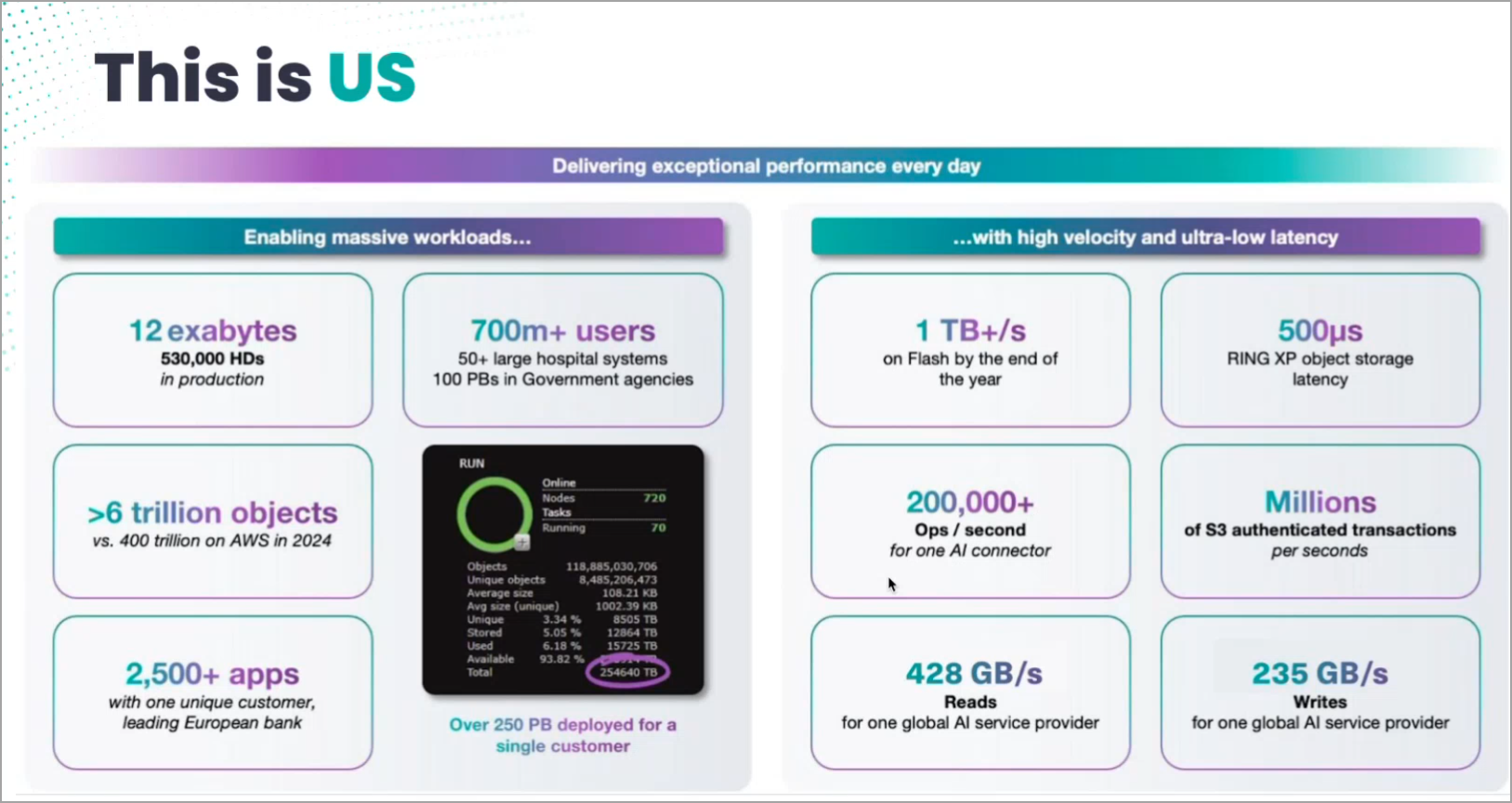
It's built on a Kubernetes-orchestrated architecture, runs on industry-standard hardware, and emphasizes cyber-resilience with Scality's CORE5 technology — five layers of protection including architectural immutability, zero-trust design, and no exposed endpoints.
ARTESCA is fully Veeam-ready, qualified as both repository and object storage, and supports S3 Object Lock for true immutability.
The ARTESCA + Veeam Unified Software Appliance
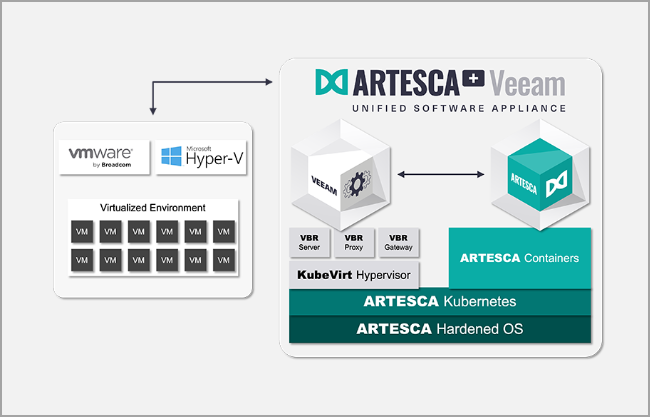
The real innovation here is the unified appliance. Instead of deploying Veeam VBR separately and then pointing it to an external S3 target, Scality packages everything together:
- Veeam Backup & Replication server runs inside a secure Windows VM (currently based on Windows Server 2022/2025; Linux-based Veeam Software Appliance coming with future updates).
- This VM is orchestrated via KubeVirt on the underlying ARTESCA Kubernetes platform.
- ARTESCA provides the S3 object storage backend, with the endpoint kept internal by default for maximum security.
Components like VBR Proxy and Gateway are also included in the appliance.
The result? A single deployable unit that handles both backup management and storage. You can still offload copies to external targets (cloud or another repository) for 3-2-1 compliance.
Veeam v13 compatibility is full — Scality has validated ARTESCA, including the unified appliance, against the latest build (13.0.1.180).
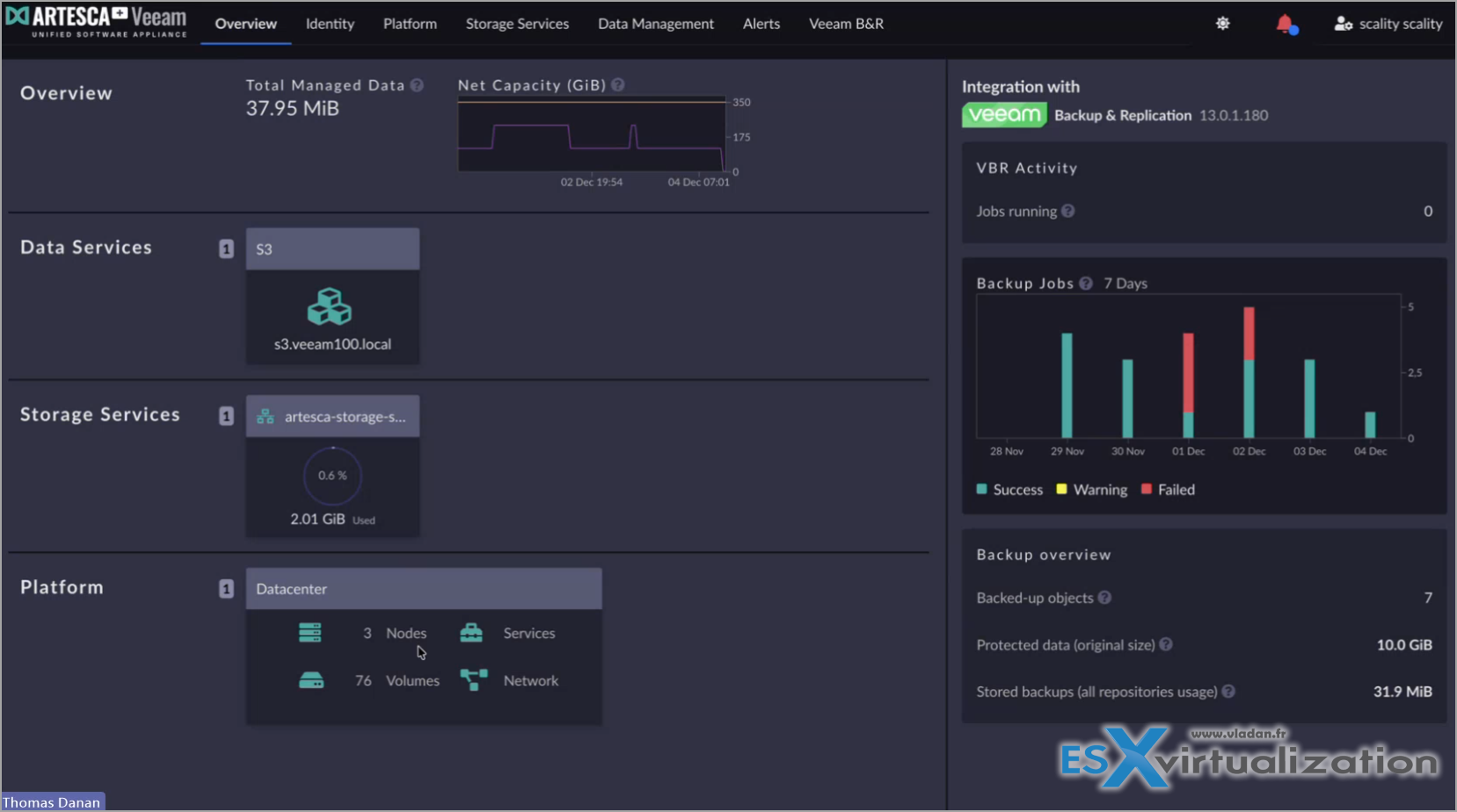
Screenshot from the dashboard where you can see the integration with Veeam, backup job activity etc.
Anton Gostev summed it very well on his Linked In post:
Great to see the initiative and momentum from our partner Scality who is leveraging new VSA capabilities to take their Veeam integration to the next level. The demo of their forthcoming unified Artesca+Veeam software appliance blew me away, particularly with the “triple HA” architecture that is second to none and will be very appealing to enterprise customers and service providers who are facing strict SLA, RTO and RPO requirements. It's built on three key HA pillars:
1. Object storage with cluster node-loss protection powered by local and network erasure coding keeps Veeam backup repositories available for backups and restores even in case of a complete server loss, while requiring much lower storage overhead than that of a classic replication.
2. Hosting Veeam configuration database on a highly available PostgreSQL instance, as opposed to on the VSA itself. This easy win for Scality is thanks to Artesca storage cluster already running a built-in PostgreSQL database in an HA configuration for its own needs. Having VSA leverage this instance ensures better uptime of the most critical component of the software appliance.
3. Out-of-the-box integration with the VSA High Availability feature. This ensures you always have a secondary software appliance standing by on another Artesca node, ready to take over within minutes in case of a hardware disaster or a planned downtime for maintenance. Because there's not much use from that redundant storage lawyer if you can't start restoring those backups right away!
Quite interesting indeed.
Cyber-Resilience and Immutability Details
Ransomware protection is non-negotiable today, and this integration shines here.
ARTESCA uses S3 Object Lock in compliance mode for true immutability — once locked, objects cannot be deleted or modified, even by root or admin users with full credentials. Veeam v13 fully leverages this for backup chains, GFS tapes, and more.
But Scality goes further with CORE5 cyber-resilience:
- Architectural immutability: Protection baked into the API layer.
- Zero-trust design: No root access, internal-only communications, no external DNS or shared keys.
- Hardened OS: Rocky Linux base with minimal attack surface.
- Multi-layer defense: Against deletion, encryption, and insider threats.
In the primary repository model, your first backup copy lands directly on immutable ARTESCA storage. The internal S3 endpoint means no exposed ports to the outside world.
Veeam v13 adds its own enhancements: better multiple-bucket mode for S3 repositories (automatic child bucket provisioning for scalability and performance), direct backups to object for enterprise apps, and broader immutability support.
Main Benefits?
- Simplified operations: One appliance, one dashboard, reduced management overhead.
- Faster deployment: Wizard-driven setup vs manual server builds.
- Superior scalability: Object storage distributes data across nodes; easy capacity expansion.
- Integrated monitoring: Real-time visibility into both backup jobs and storage health (Grafana dashboards included for deep dives).
- Hardware flexibility: Run on any standard x86 servers — no proprietary lock-in.
High Availability and Resilience in ARTESCA
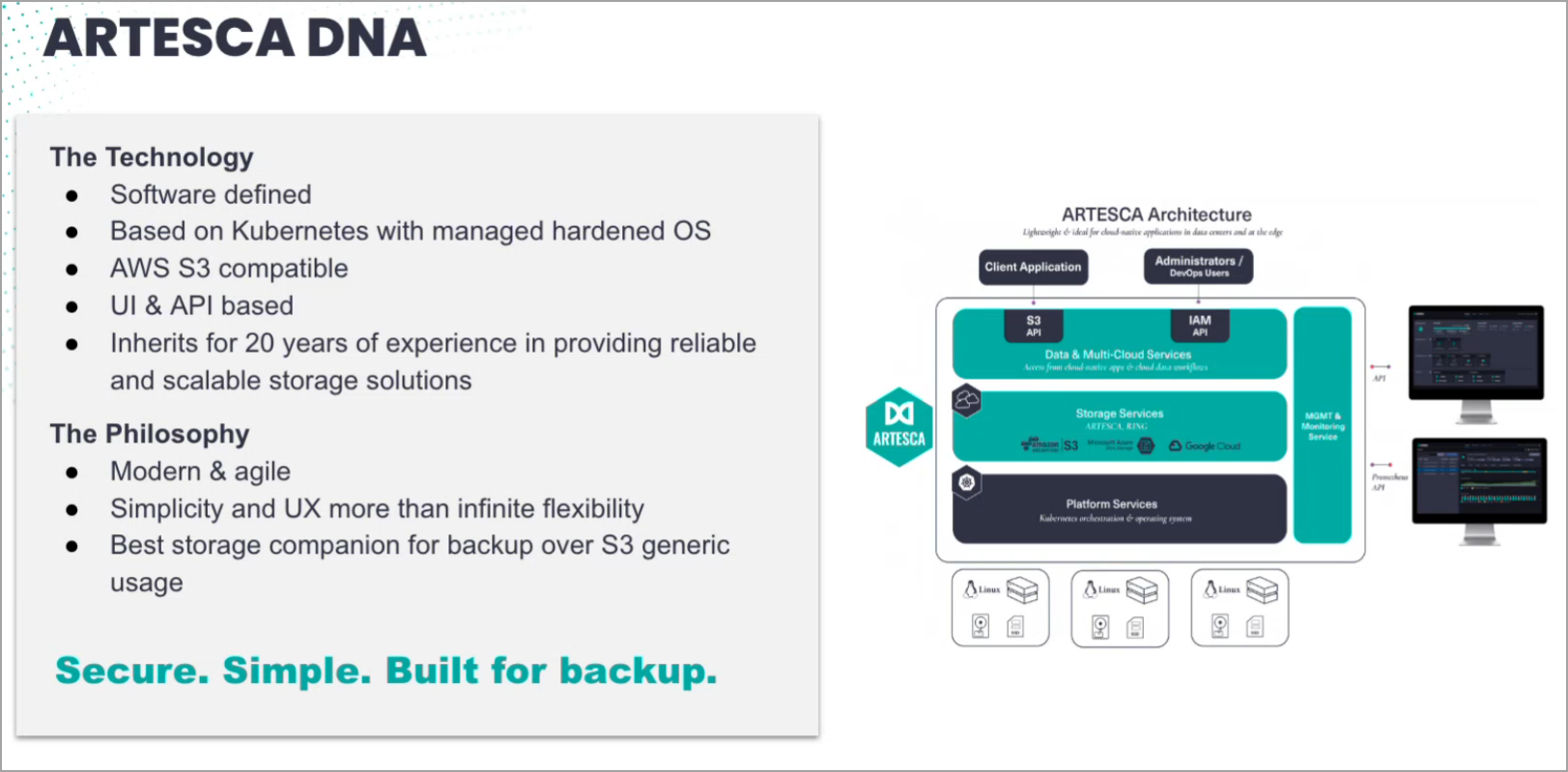
One of ARTESCA's strongest features is its built-in high availability for object storage, especially in clustered deployments (3+ nodes recommended for production HA).
- Cluster node-loss protection: Using network erasure coding (e.g., 2+1 parity in 3-node setups), ARTESCA tolerates the complete loss of an entire node without data loss or downtime. Backups and restores continue seamlessly as the cluster redirects traffic and self-heals.
- Dual-level erasure coding: Local protection within nodes (drive failures) plus network protection across nodes.
- Built-in PostgreSQL in HA configuration: Metadata and control plane use a highly available PostgreSQL cluster (based on Patroni/Spilo), ensuring no single point of failure for critical operations.
- Transparent failover: S3 endpoint remains available during failures.
Deployment scenarios
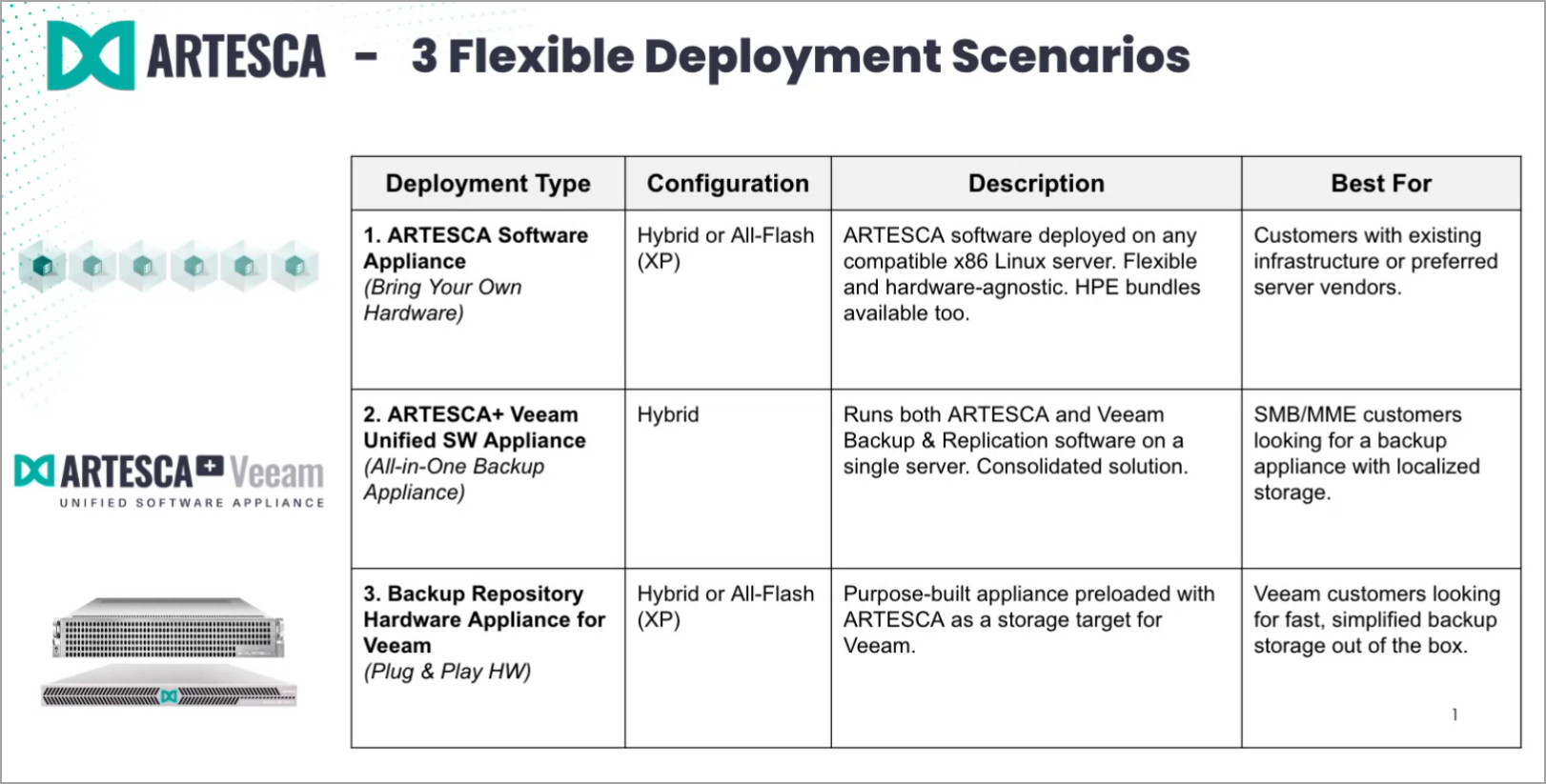
System Requirements:
(as per their website)
- Must be deployed on VMware vSphere 7.0 U2+ environment. (Note: this seems a bit old tbh, vSphere 7 is end of life since 2. October 2025!!!)..
- VM’s hardware must have, at minimum, version 14 (vmx-14), supported by ESXi 6.7 U2+ and later versions
- At least 8 vCPUs / 12 vCPUs recommended and default
- Supported CPU versions: Intel Haswell and later (Ex-xxx v3 +) / AMD CPU Jaguar or later
- 32GB RAM min / 64GB RAM recommended and default
- Minimum of 600GB available on the datastore.
- One static IPv4 address, routable to where the testing application runs
- Access to the DNS server(s)
- DNS server resolving ARTESCA specific FQDNs
- Access to NTP server(s)
Final Words
The Veeam VBR 13 integration with Scality ARTESCA, particularly via the unified software appliance, delivers a modern, highly available, and cyber-resilient backup platform. With cluster-level HA including node-loss protection, built-in PostgreSQL HA, and seamless support for Veeam's VSA High Availability, it's designed for environments demanding zero downtime and unbreakable protection.
If ransomware resilience and operational simplicity are priorities, this solution should be on your shortlist. Early adopters report fast deployments and robust performance.As always, test it in your lab — but the validation and features look solid.
Note that we have just scratched the surface… Stay tuned for more -:)
More posts from ESX Virtualization:
- Veeam Backup and Replication Upgrade on Windows – Yes we can
- Securing Your Backups On-Premises: How StarWind VTL Fits Perfectly with Veeam and the 3-2-1 Rule
- Winux OS – Why I like it?
- VMware Alternative – OpenNebula: Powering Edge Clouds and GPU-Based AI Workloads with Firecracker and KVM
- Proxmox 9 (BETA 1) is out – What’s new?
- Another VMware Alternative Called Harvester – How does it compare to VMware?
- VMware vSphere 9 Standard and Enterprise Plus – Not Anymore?
- VMware vSphere Foundation (VVF 9) and VMware Cloud Foundation (VCF 9) Has been Released
- Vulnerability in your VMs – VMware Tools Update
- VMware ESXi FREE is FREE again!
- No more FREE licenses of VMware vSphere for vExperts – What’s your options?
- VMware Workstation 17.6.2 Pro does not require any license anymore (FREE)
- Two New VMware Certified Professional Certifications for VMware administrators: VCP-VVF and VCP-VCF
- Patching ESXi Without Reboot – ESXi Live Patch – Yes, since ESXi 8.0 U3
- Update ESXi Host to the latest ESXi 8.0U3b without vCenter
- Upgrade your VMware VCSA to the latest VCSA 8 U3b – latest security patches and bug fixes
- VMware vSphere 8.0 U2 Released – ESXi 8.0 U2 and VCSA 8.0 U2 How to update
- What’s the purpose of those 17 virtual hard disks within VMware vCenter Server Appliance (VCSA) 8.0?
- VMware vSphere 8 Update 2 New Upgrade Process for vCenter Server details
- What’s New in VMware Virtual Hardware v21 and vSphere 8 Update 2?
- vSphere 8.0 Page
- ESXi 7.x to 8.x upgrade scenarios
- VMware vCenter Server 7.03 U3g – Download and patch
- Upgrade VMware ESXi to 7.0 U3 via command line
- VMware vCenter Server 7.0 U3e released – another maintenance release fixing vSphere with Tanzu
- What is The Difference between VMware vSphere, ESXi and vCenter
- How to Configure VMware High Availability (HA) Cluster
Stay tuned through RSS, and social media channels (Twitter, FB, YouTube)


Leave a Reply