Now that we are in the vSphere, the VM's hardware version is version 7. But what that is mean? There is quite a few enhancements over the previous release of VMware hypervisor.
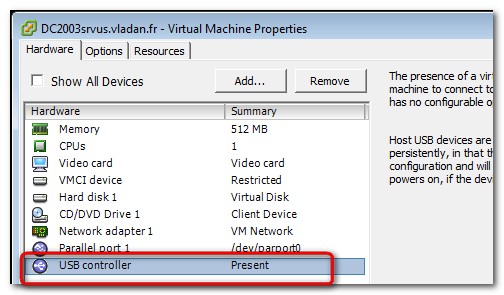
As you can see, the new ESX 4 supports USB. That's a good idea. Since a long time ago, present in a VMware Workstation, the USB controller finally make its apparition in vSphere 4. The new virtual hardware in ESX/ESXi 4.0 has significant new features like:
Virtual Machine Hot Plug Support— The new virtual hardware introduced in ESX/ESXi 4.0 provides support for adding and removing virtual devices, adding virtual CPUs, and adding memory to a virtual machine without having to power off the virtual machine.
See the Guest Operating System Installation Guide for the list of operating systems for which this functionality is supported.
Note that there is a little overhead (few percent), so use it only when needed. Also, good to know that you can hot add, but not hot-remove.

256GB RAM — Up to 256GB RAM can be assigned to ESX/ESXi 4.0 virtual machines.
VMXNET Generation 3 — VMXNET3 is the third generation para-virtualized NIC from VMware. New VMXNET3 features over the previous version of Enhanced VMXNET include:
- MSI/MSI-X support (subject to guest operating system kernel support)3
- Receive Side Scaling (supported in Windows 2008 when explicitly enabled through the device’s Advanced configuration tab)
- IPv6 checksum and TCP Segmentation Offloading (TSO) over IPv6
VLAN off-loading - Large TX/RX ring sizes (configured from within the virtual machine)
8-way Virtual SMP — ESX/ESXi 4.0 provides support for virtual machines with up to 8 virtual CPUs allowing larger CPU-intensive workloads to be run on the VMware ESX platform. It is also possible to assign any integer number of virtual CPUs between 1 and 8 to a VM. See the Guest Operating System Installation Guide for a list of guest operating systems that support 8-way SMP.
- Serial Attached SCSI (SAS) virtual device for Microsoft Cluster Service — Provides support for running Windows Server 2008 in a Microsoft Cluster Service configuration.
- IDE virtual device — Ideal for supporting older operating systems that lack SCSI drivers
Update: Note that VMware has done quite a jump forward since vmx-7 as the current vSphere 6.0 uses vmx-11.
Update 2: It seems that these posts are getting older and older…-:). The latest VMware vSphere 6.7 U2c has virtual hardware version 14.
More from ESX Virtualization
- Free VMware Performance Measure tool for HCI Systems
- VMware NSX-T 2.4 Released – What's New?
- Appliance (OS) root password is expired – vSphere 6.7
- What is vCenter Embedded Linked Mode in vSphere 6.7?
- Better Windows Shell and Terminal Emulator – Cmder
- VMware I/O Analyzer updated – what’s new?
- How to Patch VMware vCenter Server Appliance (VCSA) 6.7 Offline
Stay tuned through RSS, and social media channels (Twitter, FB, YouTube)








