
Veeam Backup and Replication 9 has been released. Just before X-mass the RTM version was made available to partners and folks being part of the Vanguard program (including me). The product has an easy installer allowing the upgrade process to be a snap. I have detailed the upgrade process in my post here. Get a Free trial with full functionality during 30 days here.
Many cool new features added to v9 of Veeam as well as many enterprises class functions providing better scalability when many remote offices. In this case, the new Guest Interaction proxy situated at the ROBO site does the heavy lifting as the Veeam sends only control commands from the main office.
The FLR at the ROBO site can now use a new mount server settings allowing avoiding the WAN traffic by specifying local mount point at ROBO site itself for mounting the backup.
Update: Get Latest ISO from Veeam with ALL patches INCLUDED. Veeam released new ISO. This new ISO from Veeam that has been announced by Anton Gostev includes the latest unannounced feature – Integrated Updates.
Quote:
From now on, you no longer have to download and install the latest update separately – it is included on the ISO and is installed automatically as a part of the product installation.
Check it out Veeam Backup & Replication 9.5 ISO With Update 1 – Get Your Copy!
What's New in Veeam Backup and Replication 9?
Tons of stuff. I'm listing the most important ones or the ones I could already test in the lab.
- Veeam Cloud Connect — Now with replication (Advanced image-based VM replication through Veeam Cloud Connect). Allows full site failover to a remote DR site from anywhere, through a secure web portal. Allows partial site failover to switch over to selected VM replicas only.
- Direct NFS Access – VMware backups are faster with reduced impact on your virtual environment by backing up directly from file-based (NFS) primary storage using Veeam’s proprietary NFS client.
- Veeam Explorer for Oracle – Oracle integration.
- Low-impact backups with EMC, NetApp, HP – integration of new storage devices – Backup from Storage Snapshots and Veeam Explorer for Storage Snapshots with EMC VNX and VNXe hybrid storage arrays.
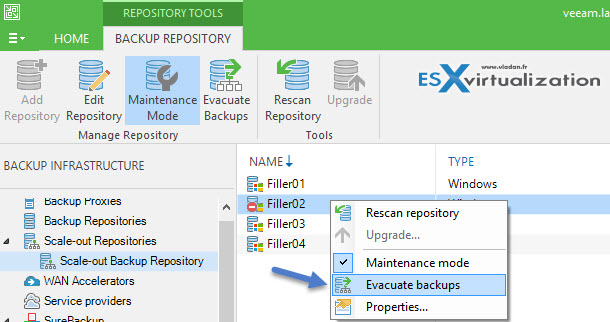
- Veeam Scale-out Backup Repository – simplify backup storage and backup job management through a single, software-defined backup repository encompassing multiple heterogeneous storage devices.
- Veeam Scale-out Backup Repository Maintenance Mode – (HD Video) allows to put a node to maintenance mode with possibility to evacuate VM backup files.
- ROBO enhancements – new Guest Interaction Proxy role for ROBO sites allowing to send only control commands over the WAN link. It will be the “local” Guest Interaction Proxy that will upload the guest interaction process to the processed VMs. WAN traffic will be minimized and while the load on the VBR server will be reduced. Single backup server will be able control multiple Guest Interaction Proxies. Also Remote Mount Server setting for every backup repo will allow FLR mounts at the remote site itself.
- Veeam (clean) Installation – (HD Install Video) – with new remote console install possibility.
- BitLooker – data reduction technology allowing to further reduce backup file size (up to 20%). Can:
- Exclude deleted file blocks
- Exclude swap and hibernation files
- Exclude user-specific files and folders
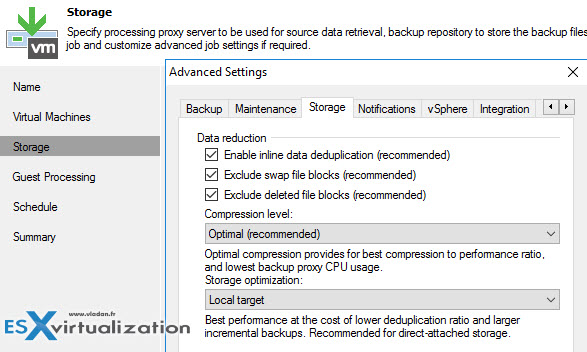
- Veeam Backup and Replication v9 Guest File Exclusion – (HD Video) – it's possible to exclude files from within a VM in order to reduce backup size. You can exclude whole directories or types of files, like Videos, MP3, ISOs can be targetted with this option.
- Advanced Tape Libraries support – newly it's possible to create media pools spanning multiple tape librairies. Support for tape devices without Microsoft Windows drivers! Parallel processing, native Grandfather-Father-Son (GFS) retention.
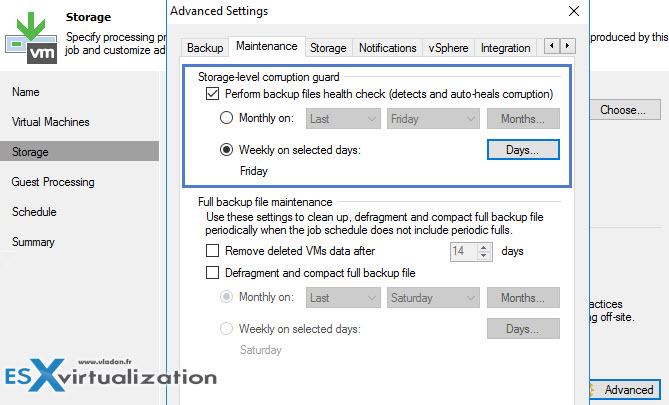
- Storage-level corruption guard – allows to check, detect and auto-heal data corruption. The checks are configurable.
There are also other enhancements:
- Veeam Explorer for Microsoft SQL Server – Table-level restores
- Veeam Explorer for AD – restores of Group Policy Objects, integrated DNS records and configuration partition objects
- Veeam Explorer for Microsoft SharePoint – full-site and site collection restores
Veeam Backup and Replication 9 is available for download.
Check this – How-to upgrade to Veeam Backup 9 – (Detailed Post + HD Video) – requirements, recommended practices (backing up Veeam SQL DBs) and step-by-step, the whole upgrade in a lab went quite smooth.
Try the full product during 30 days !

Check the release notes where you'll be able to find all the features that has been added.


Hi Vladan.
What do you think about page 21, step 11. in the Veeam Backup & Replication 9 Release Notes document in order to apply an update? That step says : “11. Reset CBT for all VMs in the environment. For more information, refer to Veeam support article KB1940”
It’s necesary that step?
Best regards
Juan Carlos
Existing CBT maps may already contain issues, which may result in inconsistent full backups in future, so yeah, it’s in your interests…
Dmitry…this even if you haven’t gone to ESXi patches that contain issues?
Well, all recent VMware releases had CBT issues (since like 5.5 I guess), so it’s recommended as a part of an upgrade. Consider it best practices=)