ESX Virtualization

VMware ESXi, vSphere, VMware Backup, Hyper-V... how-to, videos....

Nakivo Backup and Replication - #1 Backup solution for Virtual, physical, cloud, NAS and SaaS

Menu
  • Certification
      • VCP-VVF Administrator
          • vcp-vvf-2.
        • Close
      • VCP-DCV vSphere 8
          • vcp2024-125.
        • Close
    • Close
  • VMware
    • Configuration Maximums
    • vSphere
      • VVF 9 and VCF 9
      • vSphere 8.0
      • vSphere 7.0
      • vSphere 6.7
      • vSphere 6.5
      • vSphere 6.0
      • Close
    • VMworld
      • VMware EXPLORE 2024
      • VMware EXPLORE 2023
      • VMware EXPLORE 2022
      • VMworld 2019
      • VMworld 2018
      • VMworld 2017
      • VMworld 2016
      • VMworld 2015
      • VMworld 2014
      • VMworld 2013
      • VMworld 2012
      • VMworld 2011
      • Close
    • Close
  • XCP-NG
    • XCP-NG
    • Close
  • Proxmox
    • Proxmox
    • Close
  • Microsoft
    • Windows Server 2012
    • Windows Server 2016
    • Windows Server 2019
    • Windows Server 2025
    • Close
  • Categories
    • Tips – VMware, Microsoft and General IT tips and definitions, What is this?, How this works?
    • Server Virtualization – VMware ESXi, ESXi Free Hypervizor, VMware vSphere Server Virtualization, VMware Cloud and Datacenter Virtualization
    • Backup – Virtualization Backup Solutions, VMware vSphere Backup and ESXi backup solutions.
    • Desktop Virtualization – Desktop Virtualization, VMware Workstation, VMware Fusion, VMware Horizon View, tips and tutorials
    • How To – ESXi Tutorials, IT and virtualization tutorials, VMware ESXi 4.x, ESXi 5.x and VMware vSphere. VMware Workstation and other IT tutorials.
    • Free – Free virtualization utilities, ESXi Free, Monitoring and free backup utilities for ESXi and Hyper-V. Free IT tools.
    • Videos – VMware Virtualization Videos, VMware ESXi Videos, ESXi 4.x, ESXi 5.x tips and videos.
    • Home Lab
    • Reviews – Virtualization Software and reviews, Disaster and backup recovery software reviews. Virtual infrastructure monitoring software review.
    • Close
  • Partners
    • NAKIVO
    • StarWind
    • Xorux
    • Close
  • This Web
    • News
    • ESXi Lab
    • About
    • Advertise
    • Archives
    • Disclaimer
    • Privacy policy
    • PDFs and Books
    • Close
  • Free

PuTTyTray Is Free Improved Version of PuTTy

By Vladan SEGET | Last Updated: February 15, 2017

Shares

A quick post today about a neat free tool which will be added to my Free Tools page. PuttyTray is improved version of Putty, SSH client, and terminal emulator. It's heavy modified version, originally compiled by Barry Haanstra, now maintained by Chris West (Faux).

It's a free tool which can be personalized and which is cool. One of the personalization possibilities is, as you can imagine and according to its name, to have it running in Windows tray with eventually an option to open the window on simple click. The personalizations can be done via Right clicking the app > Change settings.

The tray icon is customizable and you can also set the “always on the top” so the app stays on top of other open windows. Other options allow windows transparency or URL hyperlinking. Setting up appearance or hyperlinks.
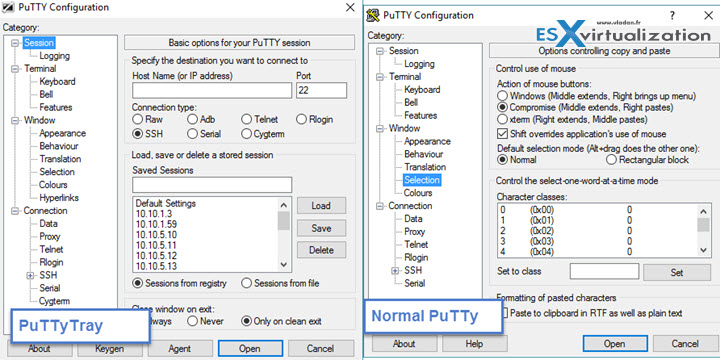
PuttyTray Free tool

PuTTyTray Features:

  • Minimizing to the system tray (on CTRL + minimize, always or directly on startup)
  • Icons are customizable
  • Blinks tray icon when a bell signal is received
  • Configurable window transparency
  • URL hyperlinking
  • Portability: optionally stores session configuration in files (for example: on a USB drive) like portaPuTTY
  • Easy access to the ‘always on top' setting (in the system menu)
  • Android adb support

PuTTyTray in action…
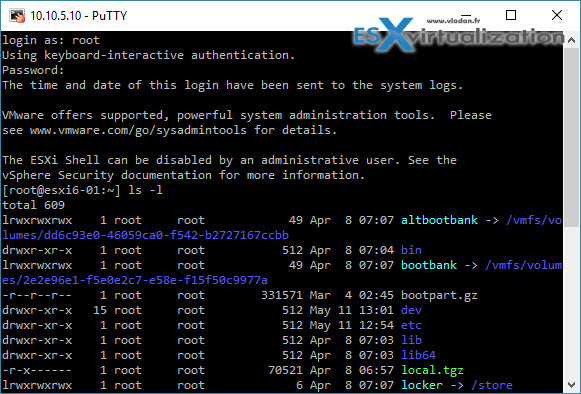
PuTTY Tray is an improved version of PuTTY

PuttyTray in Windows tray …

PuttyTray is an improved version of Putty

Worth to mention the funny disclaimer:

If this software does not work as expected, eats your PC or kills your cat, you should know that it comes without warranty of any kind. You install it at your own risk.

-:)

Source Website: PuttyTray

Putty as an SSH client is very popular. It's an essential tool to manage ESXi hosts. By using Putty from your desktop it's much more convenient for example to copy paste commands with arguments. If you're learning about VMware virtualization and using ESXi you can have a look at some ESXi commands to get you started:

  • ESXi Commands List – Getting started
  • ESXi Commands List – networking commands
  • ESXi Commands List – Snapshot Deletion Monitoring

Note that I also have free E-book which helps you setup Nested ESXi lab in VMware Workstation (or VMware Player). You may subscribe to download the book here…
Download Free E-book

Note that SSh clients can also be used directly from web browser. I have written about a Firefox and Chrome extension called FireSSH. Check it out!

5/5 - (1 vote)
Shares

| Filed Under: Free Stuff Tagged With: PuTTyTray - Free Improved Version of PuTTy

About Vladan SEGET

This website is maintained by Vladan SEGET. Vladan is as an Independent consultant, professional blogger, vExpert x17, Veeam Vanguard x11, VCAP-DCA/DCD, ESX Virtualization site has started as a simple bookmarking site, but quickly found a large following of readers and subscribers.

Connect on: Facebook. Feel free to network via Twitter @vladan.

Comments

  1. nick says

    May 12, 2016 at 2:55 am

    Hi Vladan, it’s good to see Putty evolving. I’ve discovered an awesome new OpenSSH UWA client for Windows 10 Desktop and Mobile called Token2Shell/MD. It’s better than SecureCRT and every other client I’ve looked at.

    It is also has an SFTP client built into the console.

    Tabs can be dragged out onto other monitors and joined back into other tabs, just like Chrome.

    http://choung.net/token2shell-md

    • Vladan SEGET says

      May 19, 2016 at 8:27 am

      Thanks for the comment Nick. I’ll look at it.

  2. lex says

    June 4, 2016 at 5:45 pm

    my favourite is xshell https://www.netsarang.com/products/xsh_overview.html
    this is also nice putty fork http://www.9bis.net/kitty/

    • Vladan SEGET says

      June 5, 2016 at 7:16 am

      Hi Lex,

      Thanks for sharing and ideas for a new post -:)

Private Sponsors


Featured

  • Thinking about HCI? G2, an independent tech solutions peer review platform, has published its Winter 2023 Reports on Hyperconverged Infrastructure (HCI) Solutions.
Click to Become a Sponsor

Most Recent

  • Windows 11 Installation Assistant 25H2 – upgrade your W10 or W11 with the help of this new tool from Microsoft
  • ResOps in Action – Commvault’s Big Moves at RSAC 2026: Okta Support, Satori-Powered Risk Analysis, ThreatScan Evolution & Sentinel Automation
  • StarWind V2V / P2V Converter Version 9 (build 848) – Multi-VM Conversions, Full CLI Support, Hot Migrations, and Cloud Improvements Make This Free Tool a Datacenter Must-Have
  • Nakivo 11.2 With Proxmox 9.1 and VMware vSphere 9 Support Released
  • Ready for Voyage? Try Voyager Linux Distro – A Slick, Hybrid Distro That Just Works
  • VMware Releases ESXi 8.0 Update 3i – Build 25205845: Bug Fixes, Security Patches, and How to Upgrade Your Hosts
  • WinBoat – Running Windows Apps on Linux with Seamless Integration? Yes, Please!
  • VMware Workstation Pro 25H2U1 Released: Why You Should Update Now
  • StarWind VSAN for Hyper-V: Synchronous Replication for High-Availability Shared Storage
  • Veeam Backup & Replication Cybersecurity Improvements – Recon Scanner 3.0 and Malware Scanning in Backups

Veeam Vanguard x12

Get new posts by email:


Deals

Support us on Ko-Fi


Buy Me a Coffee at ko-fi.com

Friendly Websites and Blogs

  • vBlog.io
  • VMware Engineer Jobs
 

YouTube

…

Find us on Facebook

ESX Virtualization

…

Copyright © 2026 ·Dynamik-Gen · Genesis Framework · Hosted with HostColor.com