
Veeam Backup & Replication (VBR) continues to set the pace in enterprise data resilience. With v13 having landed in November 2025 as a major architectural shift, Q1 2026 has delivered important post-GA refinements through patches, incremental workload enhancements, and the February 2026 introduction of Agent Commander. These additions build directly on the foundation of the Veeam Software Appliance, enhanced security posture, broader platform support, and AI-driven intelligence.
If you’re running v12.3.x or earlier, or even the early v13 builds, this is the right time to evaluate the move. In my lab (and from what I’ve seen across customer environments), the combination of Linux-native architecture, immutable-by-default repositories, fine-grained RBAC, and new threat detection capabilities makes a tangible difference in both RTO/RPO and operational overhead. Let’s break it down technically.
The Veeam Software Appliance (VSA) and Infrastructure Appliance – The New Deployment Possibility
One of the biggest changes introduced with v13 and refined in the Q1 2026 timeframe is the Veeam Software Appliance (VSA). This is a pre-built, pre-hardened, JeOS-based all-in-one backup server delivered as an ISO or OVA. You deploy it on physical hardware, VMs, or cloud instances, and Veeam maintains the entire stack — OS, backup engine, third-party components.
Technically, it follows DISA STIG hardening guidelines out of the box: restricted SSH access, MFA enforcement for sensitive operations, low-privilege service accounts, sandboxed custom scripts, and an immutable built-in repository. Backup admins no longer get root/OS-level privileges by default, which significantly reduces the attack surface and eliminates many of the “unpredictable OS changes” issues we saw in traditional Windows deployments.
The companion Veeam Infrastructure Appliance (VIA) lets you spin up dedicated roles (proxies, repositories, gateways) using the same hardened JeOS. Installation profiles include general-purpose, SAN-optimized (iSCSI/NVMe-oF), or hardened repository-only modes. Registration is passwordless via certificate thumbprint validation — a welcome change for large-scale or air-gapped environments.
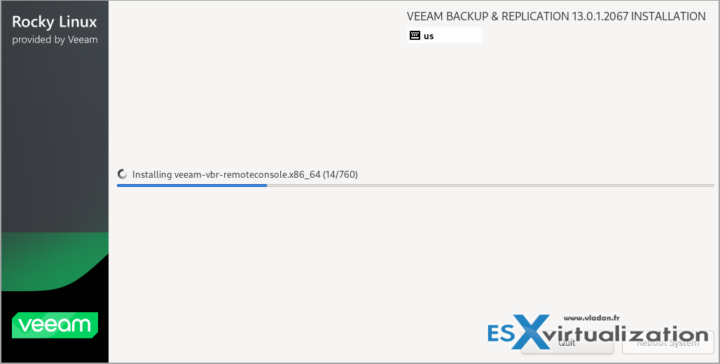
In Premium edition you can now cluster VSAs in active/passive HA mode with configuration DB replication (including encrypted secrets). Failover is one-click, with Veeam ONE acting as optional witness in Advanced edition. In my testing, this provides genuine resilience for the backup server itself — your “last line of defense.” Network latency tolerance is solid, and changes are cached during outages.
Deployment is dramatically simpler than the old Windows install. Disk partitioning is automated for performance and security. For ROBO or smaller sites you can achieve a true all-in-one immutable setup supporting thousands of workloads and petabytes of storage on properly sized hardware. Licensing requires Veeam Universal License (VUL); legacy socket-based licenses need conversion at renewal.
Web UI, RBAC, SSO, and Security Posture Improvements
v13 introduces a modern, browser-based Web UI that is WCAG-compliant and fully localized. The layout will feel immediately familiar, but it leverages full browser capabilities for better filtering, search, and handling of large inventories. Not everything has moved from the Windows console yet (some advanced settings remain there), but core operations — backup/copy jobs, repositories, Instant VM Recovery, file-level restores — are fully supported for vSphere and Hyper-V.
Enhanced RBAC is now truly enterprise-grade. You can create custom roles with scoped permissions: limit visible inventory (specific workloads or repositories), restrict restore targets and types, and apply this to >90% of workloads (host/agent-based, applications, unstructured data). Combined with SAML 2.0 SSO (Entra ID, Okta, etc.), this centralizes identity management and reduces password/TOTP sprawl. For VSA deployments this is especially powerful — you avoid complex local accounts entirely.
Q1 2026 patches (13.0.1.1071 in January and 13.0.1.2067 in March) addressed security vulnerabilities and improved stability, including authenticated RCE risks in certain roles. Always apply these promptly. Additional audit events for console access and RBAC changes feed nicely into Microsoft Sentinel or your SIEM.
Malware Detection, Threat Hunter, and Veeam Intelligence
Cyber resilience is no longer optional – we are in WAR agains ransomware and hackers which wants to erase your data. v13 brings Veeam Threat Hunter for malware detection on Linux workloads and cloud backups (Azure/AWS/GCP), with per-volume deleted file tracking and entropy analysis (excluding benign RPM packages). Linux mount servers now support ClamAV, ESET, and Sophos. You get proactive scanning on suspicious activity plus an Incident API for marking objects clean or suspicious.
Veeam Intelligence has Basic and Advanced modes. Advanced (requires Veeam ONE) unlocks AI agents such as the Malware Threat Analysis Agent (real-time anomaly detection, recovery guidance) and Deep Data Analysis Agent (natural language custom reports). The new Data Resilience Daily Summary email intelligently groups job issues and provides direct resolution links — a huge time-saver for large environments.
These capabilities matured further in Q1 2026 with tighter integration and Recon Scanner 3.0 visibility directly in the platform.
Workload Expansion and Application Supportv13 and early 2026 updates significantly broadened coverage:
- Nutanix AHV now has full integration with worker distribution, persistent agents, vTPM, and Projects backup. Inline malware detection and application-aware processing are production-ready.
- Support for Scale Computing HyperCore, Proxmox VE 9.0 (with VSS and malware scanning), and expanded oVirt/KVM capabilities.
- Universal CDP for any Windows machine (physical, virtual, cloud) targeting VMware Cloud Director (additional targets planned).
- Direct-to-S3 backups for AIX, Solaris, and enterprise application plug-ins. Immutability now extends to Google Cloud Storage.
- Microsoft Entra ID Intune policies protection, RDS SQL backups to object storage, SLA policies for AWS workloads, and centralized management of SQL Server plug-ins via Protection Groups.
- PostgreSQL 17/18, MongoDB 8, updated Oracle RMAN/SAP HANA, Exchange/SharePoint SE item-level recovery, and more.
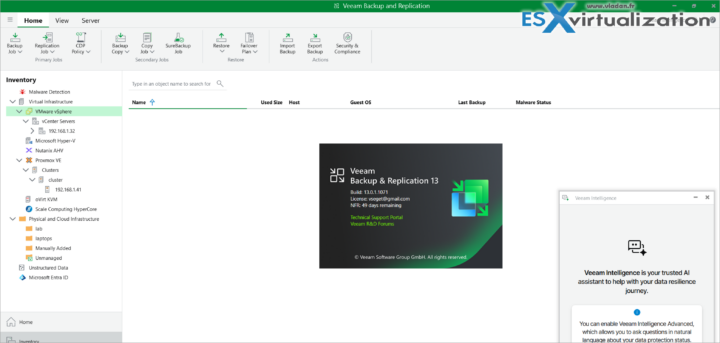
March 2026 updates added virtualization plugins for SQL, PostgreSQL, Oracle, AD, SharePoint, and Exchange with guest indexing and scans, plus full vSphere 9.0 support.
Linux infrastructure components (mount servers, gateways, etc.) are now first-class, with gRPC replacing older RPC/WMI, OpenSSL 3.0, and reduced port requirements. The backup engine itself is 64-bit only, uses BLAKE3 hashing (noticeable CPU savings), and scales to significantly more workloads/jobs with lower resource consumption.
Storage, Tape, and Recovery Enhancements
Object storage performance and immutability options have been strengthened across the board (S3-compatible direct backups, Google Cloud immutability, etc.). HPE StoreOnce and Dell Data Domain integrations include accelerated Direct Restore to Azure using sequential read/random write patterns, longer backup chains, and direct Cloud Bank support.
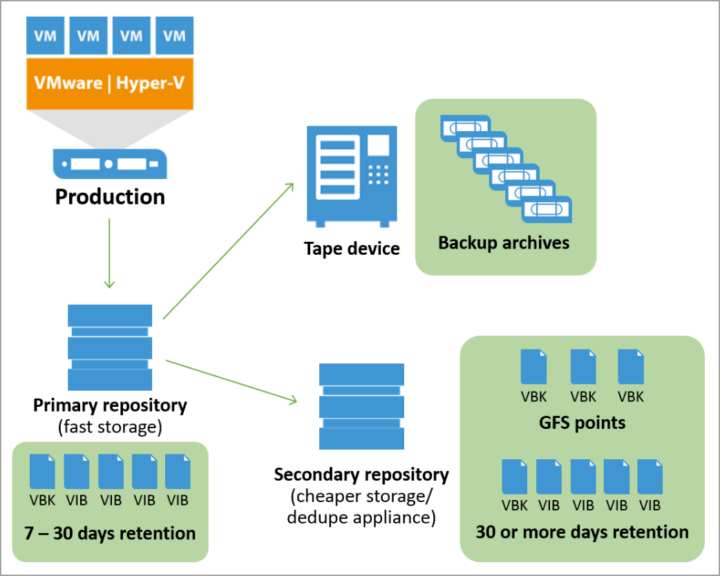
Tape sees LTO-10 native support, object storage export to tape, GFS retention for File-to-Tape jobs, and expanded virtual full capabilities. These changes make long-term, air-gapped archival more practical and policy-driven.Recovery options now include Instant Recovery to Microsoft Azure, faster Linux file-level recovery (up to 5x in some cases), and improved SureBackup workflows.
Agent Commander – The February 2026 AI Governance Layer
Announced on February 24, 2026, Agent Commander (the first major outcome of the Securiti AI acquisition) brings a unified control plane for detecting shadow AI agents, mapping data/AI/identity relationships via the Data Command Graph, enforcing granular policies, and precisely undoing AI-driven mistakes using backup data. It bridges data resilience, security, and AI governance in a way we haven’t seen before. Early access became available toward the end of March 2026, and it integrates deeply with the Veeam Data Platform.
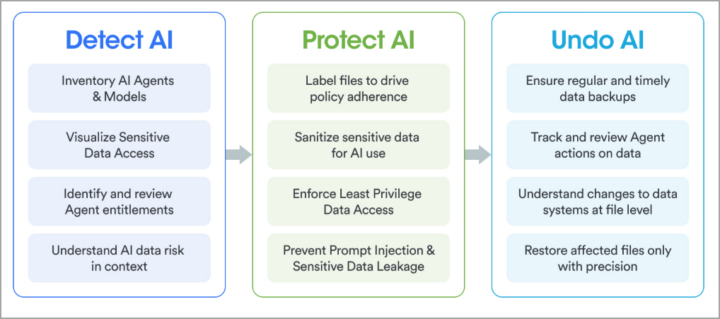
This is particularly relevant as organizations scale agentic AI. You can now see hidden AI risks before they impact production data and recover surgically if something goes wrong.
Upgrade Considerations and Practical Advice
Upgrading from v12.3.1+ to v13 (and then applying Q1 2026 patches) is straightforward on Windows, but the move to Linux-based VSA is the bigger architectural win for new deployments or greenfield sites. Always start with a configuration backup, disable jobs, and test in a lab first. Disk space requirements are calculated dynamically during upgrade — don’t get caught short.
The Windows console is still available for features not yet in the Web UI, and PowerShell/REST API enhancements (certificate auth, expanded coverage for agents, Backup Copy jobs, Hyper-V, etc.) make automation even more powerful.
Final Words
Q1 2026 refinements to Veeam Backup & Replication v13 — security patches, March workload/plugin updates, and the arrival of Agent Commander — reinforce Veeam’s focus on true Zero Trust Data Resilience, AI-powered protection, and operational simplicity. The combination of hardened Linux appliances, modern web management, granular security controls, broad workload support, and intelligent threat detection makes this one of the most compelling releases in years.
Whether you’re protecting traditional VMs, Kubernetes, cloud workloads, or now AI agents and their data, the platform has you covered with faster recovery, stronger immutability, and lower TCO.I strongly recommend spinning up the latest VSA ISO in your lab and testing the new Web UI, HA capabilities, and Threat Hunter features. The learning curve is low, but the gains are significant.As always, check the official What’s New document, release notes, and KB articles for your specific environment. More deep-dive posts on specific features (VSA HA in production, Agent Commander early experiences, etc.) will follow as I continue testing.
Do You Need to Migrate from Windows to the Veeam Software Appliance Anytime Soon?
This is one of the most frequent questions I receive from readers running large production environments on Windows-based Veeam Backup & Replication. The short answer in Q2 2026 is: No, you do not need to migrate immediately. You can safely stay on v13 for Windows for the foreseeable future while planning your transition at your own pace.
Veeam continues to fully support the traditional Windows-based installation of v13 (including the 13.0.1 patches released in Q1 2026). All core features — including the new Web UI, enhanced RBAC, Threat Hunter, Veeam Intelligence, and even integration with Agent Commander — work on the Windows version. The backup engine, job processing, and most infrastructure components (proxies, repositories, mount servers) benefit from the same architectural improvements, such as the shift to gRPC, BLAKE3 hashing, reduced port requirements, and deprecation of older protocols like RPC/WMI and NTLM (with Kerberos preferred).
Key points as of April 2026:
- There is no hard deadline or announced End-of-Support date forcing migration from Windows-based v13. Veeam v13 (both Windows and VSA) is supported until November 2028 according to the current product lifecycle. Windows-based deployments will continue receiving security patches and stability updates.
- The Veeam Software Appliance (VSA) represents the strategic long-term direction — hardened JeOS Linux base, immutable-by-default design, lower OS maintenance overhead, built-in STIG compliance, easier HA clustering in Premium edition, and reduced attack surface (no root access by default for admins). Many new and future enhancements will land first (or exclusively) on the Linux appliance model.
- .NET 8 reaches end-of-life in November 2026. Veeam has already confirmed that a .NET 10 update for v13 will be delivered later in 2026, so this is not an immediate blocker for Windows users.
Migration Path (Windows → Linux VSA)
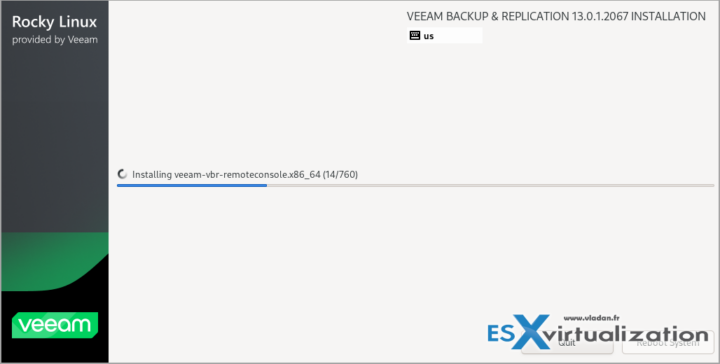
Note that I have labbed the upgrade process from v12.3 to 13 here.
Veeam published KB4800: Veeam Backup & Replication Platform Migration Guide (Windows to Linux) in February 2026. This is the official reference.The supported process works only from a Windows-based v13 deployment to the Veeam Software Appliance (Linux-based). You cannot migrate directly from v12 to VSA — you must first upgrade to v13 on Windows.High-level steps (always refer to the latest KB4800 as it is regularly updated):
- Ensure your Windows v13 installation is on the latest patch level (13.0.1 P2 or newer recommended).
- Perform a full Configuration Backup and test restore.
- Deploy a new Veeam Software Appliance (ISO or OVA) running v13.0.1 or later. Prepare it in parallel to minimize downtime.
- Use the platform migration tooling (currently assisted) to export configuration, jobs, repositories metadata, and credentials from Windows and import them into the VSA.
- Re-point infrastructure components (proxies, repositories, gateways) and re-scan inventories where needed. Existing backup files on object storage or deduplicating repositories can usually be imported without re-backup.
- Validate all jobs, SureBackup, and restore scenarios in a phased cutover.
Important realities in Q2 2026:
- The full self-service conversion toolkit is still under refinement and is expected to become broadly available with the v13.1 release (targeted for summer 2026). Until then, many customers are going through Veeam Support for assisted migration (there is a sign-up/queuing process via Veeam’s VSA conversion page).
- For smaller environments, some admins prefer a “rebuild and import” approach: deploy fresh VSA, import existing repositories, and recreate jobs from the configuration backup. This can be cleaner but requires more planning.
- Large or complex setups (heavy use of Veeam Cloud Connect, custom scripts, specific storage integrations) should engage Veeam Support early and test in a non-production copy first.
My practical recommendation:
- If your environment is stable on v13 Windows and you have no immediate drivers (security compliance mandates, desire for built-in HA, or reducing Windows OS patching), stay on Windows for now. Use this time to test the VSA in a lab or secondary site, validate the Web UI, and familiarize your team with Linux-based components (VIA for proxies/repositories).
- Plan the migration for late 2026 or 2027 when the self-service tooling matures with v13.1 and you have operational experience with the appliance model.
- New deployments or greenfield sites should start directly with the Veeam Software Appliance — it is clearly the preferred deployment method going forward.
In short: Windows v13 remains a fully supported, viable path today. The migration to VSA is optional and strategic rather than urgent. Veeam has designed v13 Windows explicitly as a smooth on-ramp to the Linux appliance world, giving you optionality without forcing a “big bang” change.
More posts from ESX Virtualization:
- Veeam Backup and Replication Upgrade on Windows – Yes we can
- Securing Your Backups On-Premises: How StarWind VTL Fits Perfectly with Veeam and the 3-2-1 Rule
- Winux OS – Why I like it?
- VMware Alternative – OpenNebula: Powering Edge Clouds and GPU-Based AI Workloads with Firecracker and KVM
- Another VMware Alternative Called Harvester – How does it compare to VMware?
- VMware vSphere 9 Standard and Enterprise Plus – Not Anymore?
- VMware vSphere Foundation (VVF 9) and VMware Cloud Foundation (VCF 9) Has been Released
- Vulnerability in your VMs – VMware Tools Update
- VMware ESXi FREE is FREE again!
- No more FREE licenses of VMware vSphere for vExperts – What’s your options?
- VMware Workstation 17.6.2 Pro does not require any license anymore (FREE)
- Two New VMware Certified Professional Certifications for VMware administrators: VCP-VVF and VCP-VCF
- Patching ESXi Without Reboot – ESXi Live Patch – Yes, since ESXi 8.0 U3
- Update ESXi Host to the latest ESXi 8.0U3b without vCenter
- Upgrade your VMware VCSA to the latest VCSA 8 U3b – latest security patches and bug fixes
- VMware vSphere 8.0 U2 Released – ESXi 8.0 U2 and VCSA 8.0 U2 How to update
- What’s the purpose of those 17 virtual hard disks within VMware vCenter Server Appliance (VCSA) 8.0?
- VMware vSphere 8 Update 2 New Upgrade Process for vCenter Server details
- What’s New in VMware Virtual Hardware v21 and vSphere 8 Update 2?
- vSphere 8.0 Page
- ESXi 7.x to 8.x upgrade scenarios
- VMware vCenter Server 7.03 U3g – Download and patch
- Upgrade VMware ESXi to 7.0 U3 via command line
- VMware vCenter Server 7.0 U3e released – another maintenance release fixing vSphere with Tanzu
- What is The Difference between VMware vSphere, ESXi and vCenter
- How to Configure VMware High Availability (HA) Cluster
Stay tuned through RSS, and social media channels (Twitter, FB, YouTube)





Leave a Reply