
If you're managing a mixed IT environment – and let's be honest, who isn't these days – you know the pain of juggling five different monitoring tools at once. One for VMware, one for storage, one for backup, one for databases… it gets messy fast. That's exactly why I keep coming back to XorMon. It's my go-to free, open-source tool that puts everything into a single pane of glass.
The Xorux team just dropped XorMon v2.2.0, and there's quite a bit to talk about. Let me break down what's new and why it matters.
Quick Recap: What Is XorMon?
If you're new here, XorMon is a full-stack infrastructure monitoring tool from Xorux. It covers servers (VMware, Proxmox, Nutanix, Hyper-V, IBM Power Systems), storage arrays from pretty much every major vendor (IBM, NetApp, Pure Storage, Dell EMC, Hitachi, HPE…), databases (Oracle, PostgreSQL, MS SQL, MongoDB), backup systems (Veeam, Veritas, IBM TSM, Commvault), SAN and LAN, containers, and cloud (AWS, Azure, Google Cloud).
It's published under the GPL v3 license, which means you can download it, use it, inspect the source code – all free of charge. There's a 2-month trial with full Enterprise features, after which it switches to a free edition with some restrictions. A commercial support contract is also available if you need it.
XorMon is the modern replacement for the older LPAR2RRD and STOR2RRD tools, which are still around but no longer actively developed beyond bug fixes. If you're still on those, it's time to migrate.
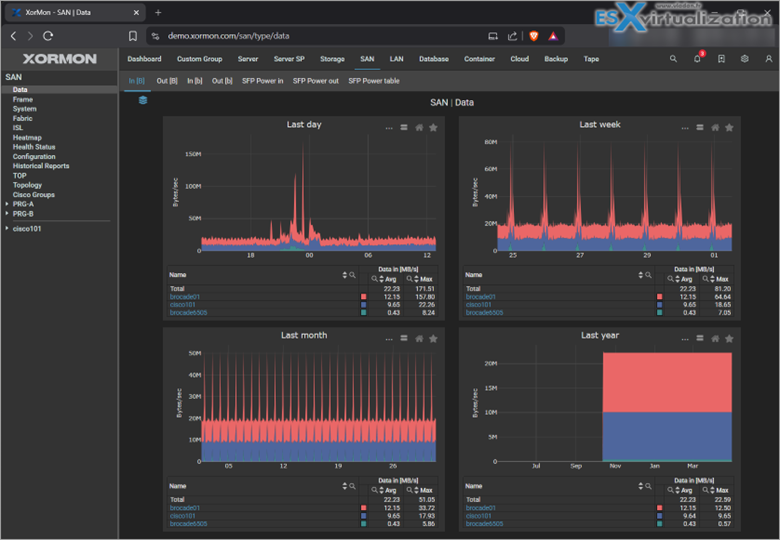
What's New in XorMon v2.2?
Node.js v24 Is Now Required – Before anything else – and this is important – XorMon v2.2.x requires Node.js v24. You need to upgrade Node.js before you upgrade XorMon, otherwise things will break. The Xorux team has a dedicated upgrade guide in their documentation, so make sure you follow it step by step.
Don't skip this. I know it's tempting to just run the upgrade and see what happens, but on this one, read the docs first.
New Device and Platform Support – Every XorMon release expands the already impressive list of supported platforms, and v2.2 is no exception. The focus this time is around HPE OneView, which has been highlighted in the release announcement. If you have HPE infrastructure in your environment, this is the update you've been waiting for.
This fits neatly into XorMon's broader strategy: cover everything, require nothing extra. No per-device fees, no middleware, no proprietary agents for most devices. You connect it to your environment and it just works.
Self-Health Monitoring – One of the features introduced in the v2.x line that deserves more attention is built-in self-health monitoring. XorMon now keeps an eye on itself – tracking its own performance, resource consumption, and operational state. For a monitoring platform running in production 24/7, this is genuinely useful. You don't want to discover that your monitoring tool was silently broken for three days.
MCP Server Support (AI Integration) – This is a newer addition that signals where XorMon is heading. Support for Model Context Protocol (MCP) servers means XorMon is moving towards tighter AI integration. Combined with the existing Xbot AI assistant (which lets you query your infrastructure in plain language instead of clicking through dashboards), this positions XorMon as more than just a metrics collector.
Xbot is already available and allows you to ask things like “what's the disk usage trend on my NetApp array?” or “are there any backup failures this week?” and get an actual answer. With MCP support, that capability is set to grow significantly.
A Quick Look Back at Recent Versions
It's worth putting v2.2 in context. Here's how XorMon has evolved recently:
XorMon NG 1.9.0 (May 2025) – Added Veeam Backup & Replication support via the Veeam One API, as well as IBM Storage Scale, Pure Storage FlashBlade, and Skytap. A big step forward for backup visibility. Details in our article here.
XorMon 2.0 (October 2025) – Major milestone. The NG branding was dropped and it became simply “XorMon”. This release added HMC 11 support for IBM Power Systems, LAN topology maps with SR-IOV and VLAN detail, SSO via Okta or Keycloak, SAN/LAN metrics in bits/sec and bytes/sec, and the OS Agent for deeper Linux insights (dmesg logs, NFS stats via nfsiostat, LVM topology). Details in our article here.
XorMon 2.1 (December 2025) – Added Commvault Backup and Recovery, MongoDB, OpenZFS, and several tape libraries (IBM TS2/3k, Imation LR, Dell PowerVault TL, Overland NEO). Details in our article here.
XorMon 2.2 (early 2026) – Now live, with HPE OneView improvements and the Node.js v24 requirement as the headline items.
Deployment Options
One thing I really appreciate about XorMon is the flexibility in how you can deploy it. You've got several options:
- Standard archive package for Linux
- VMware OVA (ready-to-deploy virtual appliance)
- Hyper-V image
- Docker container
For home labs or smaller environments, the Docker route is probably the quickest way to get started. For production, the OVA is clean and easy. There's also a live demo at demo.xormon.com (login: xormon/xormon) if you want to poke around the UI before committing to an install.
Should You Upgrade?
If you're already on XorMon 2.1, yes – but remember to upgrade Node.js first. The process is well-documented on the Xorux site.
If you're still running LPAR2RRD or STOR2RRD, I'd seriously recommend making the move to XorMon. Those tools will continue to receive bug fixes, but new features are going into XorMon exclusively at this point.
If you've never used any of these tools and you're managing a heterogeneous environment with multiple vendors and platforms, give XorMon a look. It's free, its Open Source, it supports 140+ technologies out of the box, and it doesn't require you to rip out your existing tooling. It just adds a unified layer on top.
Final Words
XorMon continues to evolve at a solid pace. The Xorux team releases regularly, adds meaningful platform support with every version, and the AI direction with Xbot and MCP support shows they're thinking about where infrastructure monitoring is heading, not just where it's been.
The Node.js v24 requirement in v2.2 is a bit of housekeeping but it's the right call – stay on modern runtimes, keep the platform healthy.
Download XorMon at xormon.com, check the release notes for the full list of changes, and as always, test in a lab before pushing to production.
For further details refer to release notes.
Download link, upgrade manual
Check out our demo site for new features.
- XorMon NG 2.1.0 – Enhanced Full-Stack Monitoring with New Backup, DB, and Storage Support
- Xormon 2.0 – Smarter Monitoring for IT Admins
- XorMon NG 1.9.0 Infrastructure Monitoring – now also with Veeam Backup Support
More posts from ESX Virtualization:
- Veeam Backup and Replication Upgrade on Windows – Yes we can
- Securing Your Backups On-Premises: How StarWind VTL Fits Perfectly with Veeam and the 3-2-1 Rule
- Winux OS – Why I like it?
- VMware Alternative – OpenNebula: Powering Edge Clouds and GPU-Based AI Workloads with Firecracker and KVM
- Another VMware Alternative Called Harvester – How does it compare to VMware?
- VMware vSphere 9 Standard and Enterprise Plus – Not Anymore?
- VMware vSphere Foundation (VVF 9) and VMware Cloud Foundation (VCF 9) Has been Released
- Vulnerability in your VMs – VMware Tools Update
- VMware ESXi FREE is FREE again!
- No more FREE licenses of VMware vSphere for vExperts – What’s your options?
- VMware Workstation 17.6.2 Pro does not require any license anymore (FREE)
- Two New VMware Certified Professional Certifications for VMware administrators: VCP-VVF and VCP-VCF
- Patching ESXi Without Reboot – ESXi Live Patch – Yes, since ESXi 8.0 U3
- Update ESXi Host to the latest ESXi 8.0U3b without vCenter
- Upgrade your VMware VCSA to the latest VCSA 8 U3b – latest security patches and bug fixes
- VMware vSphere 8.0 U2 Released – ESXi 8.0 U2 and VCSA 8.0 U2 How to update
- What’s the purpose of those 17 virtual hard disks within VMware vCenter Server Appliance (VCSA) 8.0?
- VMware vSphere 8 Update 2 New Upgrade Process for vCenter Server details
- What’s New in VMware Virtual Hardware v21 and vSphere 8 Update 2?
- vSphere 8.0 Page
- ESXi 7.x to 8.x upgrade scenarios
- VMware vCenter Server 7.03 U3g – Download and patch
- Upgrade VMware ESXi to 7.0 U3 via command line
- VMware vCenter Server 7.0 U3e released – another maintenance release fixing vSphere with Tanzu
- What is The Difference between VMware vSphere, ESXi and vCenter
- How to Configure VMware High Availability (HA) Cluster
Stay tuned through RSS, and social media channels (Twitter, FB, YouTube)





Leave a Reply