
ESX Virtualization

VMware ESXi, vSphere, VMware Backup, Hyper-V... how-to, videos....

Nakivo Backup and Replication - #1 Backup solution for Virtual, physical, cloud, NAS and SaaS

Menu
  • Certification
      • VCP-VVF Administrator
          • vcp-vvf-2.
        • Close
      • VCP-DCV vSphere 8
          • vcp2024-125.
        • Close
    • Close
  • VMware
    • Configuration Maximums
    • vSphere
      • VVF 9 and VCF 9
      • vSphere 8.0
      • vSphere 7.0
      • vSphere 6.7
      • vSphere 6.5
      • vSphere 6.0
      • Close
    • VMworld
      • VMware EXPLORE 2024
      • VMware EXPLORE 2023
      • VMware EXPLORE 2022
      • VMworld 2019
      • VMworld 2018
      • VMworld 2017
      • VMworld 2016
      • VMworld 2015
      • VMworld 2014
      • VMworld 2013
      • VMworld 2012
      • VMworld 2011
      • Close
    • Close
  • Proxmox
    • Proxmox
    • Close
  • Microsoft
    • Windows Server 2012
    • Windows Server 2016
    • Windows Server 2019
    • Windows Server 2025
    • Close
  • Categories
    • Tips – VMware, Microsoft and General IT tips and definitions, What is this?, How this works?
    • Server Virtualization – VMware ESXi, ESXi Free Hypervizor, VMware vSphere Server Virtualization, VMware Cloud and Datacenter Virtualization
    • Backup – Virtualization Backup Solutions, VMware vSphere Backup and ESXi backup solutions.
    • Desktop Virtualization – Desktop Virtualization, VMware Workstation, VMware Fusion, VMware Horizon View, tips and tutorials
    • How To – ESXi Tutorials, IT and virtualization tutorials, VMware ESXi 4.x, ESXi 5.x and VMware vSphere. VMware Workstation and other IT tutorials.
    • Free – Free virtualization utilities, ESXi Free, Monitoring and free backup utilities for ESXi and Hyper-V. Free IT tools.
    • Videos – VMware Virtualization Videos, VMware ESXi Videos, ESXi 4.x, ESXi 5.x tips and videos.
    • Home Lab
    • Reviews – Virtualization Software and reviews, Disaster and backup recovery software reviews. Virtual infrastructure monitoring software review.
    • Close
  • Partners
    • NAKIVO
    • StarWind
    • Xorux
    • Close
  • This Web
    • News
    • ESXi Lab
    • About
    • Advertise
    • Archives
    • Disclaimer
    • Privacy policy
    • PDFs and Books
    • Close
  • Free

Zerto Virtual Replication 3.1 released

By Vladan SEGET | Last Updated: May 7, 2020

Shares

Zerto has released another update to their product – Zerto Virtual Replication 3.1. This new release further improves Zerto's capability to protect workflows across remote sites and enhances the capability of Zerto's Cloud Manager (ZCM), which is basically a dashboard allowing to manage multiple data center's protection from single console. Zerto Virtual Replication 3.1 release brings also additional new features.

Zerto Virtual replication (ZVR) uses different technology than VMware vSphere replication (VR). Zerto does not uses snapshots and CDP. Instead Zerto's appliance, installed directly inside the virtual infrastructure,  is called VRA – “Virtual replication appliance”. The VRA is able to tap into a virtual machine’s IO stream causing no overhead or performance problems. The VRA uses the vSphere APIs to see the data flowing from the VM each time there is a read or write operation. Therefore, each time the virtual machine writes to its virtual disks, the write command is captured, cloned, and sent to the recovery site.

Zerto 3.1 New Features
Improved Zerto Virtual Replication Appliance

The ZCM is used as a start point for deployments of Zerto across multiple remote sites and now the ZCM also includes each UI of each Zerto Virtual Manager. (ZVM).

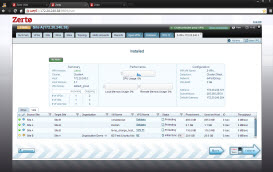
Better Zerto virtual replication appliance (ZVR) management brings new view of VRA through a new TAB, which shows all virtual protection groups (VPGs), their replications, statistics and configuration. Additional new feature has been added to migrate incoming VRA workloads to other VRAs which enables host maintenance or load balancing.

  • Zerto introduces simplified administration of BC/DR and protection of workloads within a Web based (HTML 5) console.
  • Flexible Journal – allows recovery to multiple points in time. The size of the journal automatically adapts depending of how much data is exchanged, which eliminates overhead of checking the size of the journal. There is no gap in replication even when application generated a data burst. The decrease of size of the journal is slower which allows to make sure that it follows a long term of application behaviour.
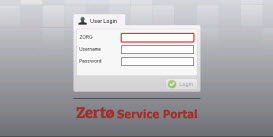
  • zerto-portalZerto self-service login portal – integrated in Zerto now. (Before it was a role of service provider to create the portal for client's access).
  • New Alerts and Events tab – allows to simplify management, with detailed alerts, which shows more details than before, where the details had to be viewed through log files only.
  • Centralized Tasks view allowing to manage all running tasks.

Additional features of ZVR 3.1:

  • Increased manageability of alerts and events with a new centralized tab for better cause/effect analysis
  • Expanded REST API capabilities for orchestration, events and alerts
  • Improved environment maintenance using new VRA tabs and workflows
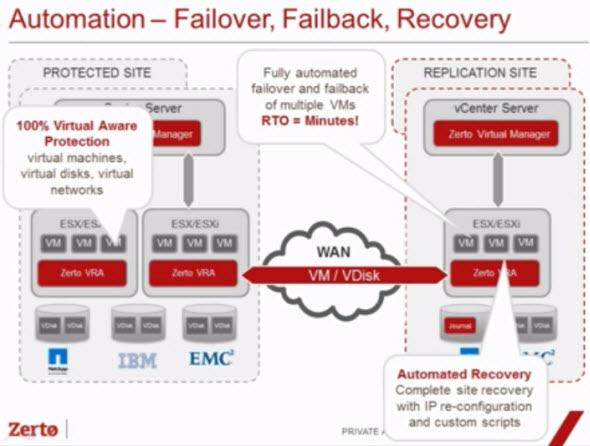
Automated Failover and FailbackLinks:

  • What's new in 3.1 PDF document
  • Press Release

I had an occasion to review the Zerto product and I found it very robust and very intuitive and polished. You can read the article here – Zerto Virtual Replication Product Review. (Note that the product was in version 2.0 during that time).

You might also want to check the differences of replication technology used between Zerto and vSphere Replication (VR) products in this post – VMware vSphere Replication and Zerto Virtual Replication 2.0 – Products with different features and technologies.

Vote !
Shares

| Filed Under: Backup Tagged With: Zerto Virtual Replication 3.1

About Vladan SEGET

This website is maintained by Vladan SEGET. Vladan is as an Independent consultant, professional blogger, vExpert x17, Veeam Vanguard x11, VCAP-DCA/DCD, ESX Virtualization site has started as a simple bookmarking site, but quickly found a large following of readers and subscribers.

Connect on: Facebook. Feel free to network via Twitter @vladan.

Private Sponsors


Featured

  • Thinking about HCI? G2, an independent tech solutions peer review platform, has published its Winter 2023 Reports on Hyperconverged Infrastructure (HCI) Solutions.
Click to Become a Sponsor

Most Recent

  • This is it – Most Popular Blog posts in 2025
  • VMware Releasing VMware ESXi 8.0 Update 3h and VMware vCenter 8.0 Update 3h
  • Veeam VBR 13 and Scality Artesca Integration: A Game-Changer for Cyber-Resilient Backups
  • Reviving Old School Laptops with PrimTux: Battling Obsolescence on a Budget
  • Proxmox Datacenter Manager 1.0 released – a real vCenter Server Alternative?
  • Recovering a Corrupted Exchange Database with Stellar Repair for Exchange
  • Commvault at AWS re:Invent 2025: Pioneering AI-Enhanced Cyber Resilience with Cloud Unity
  • How to Set Up pfSense Community Edition as a Firewall Using VMware Workstation Pro 17 (2025 Edition)
  • HPE Morpheus VM Entreprise and Morpheus VM Essentials updates released – v8.0.11
  • Veeam Backup and Replication Upgrade on Windows – Yes we can

Get new posts by email:


Deals

Support us on Ko-Fi


Buy Me a Coffee at ko-fi.com

Friendly Websites and Blogs

  • vBlog.io
  • VMware Engineer Jobs
 

YouTube

…

Find us on Facebook

ESX Virtualization

…

Copyright © 2025 ·Dynamik-Gen · Genesis Framework · Hosted with HostColor.com
