
ESX Virtualization

VMware ESXi, vSphere, VMware Backup, Hyper-V... how-to, videos....

Nakivo Backup and Replication - #1 Backup solution for Virtual, physical, cloud, NAS and SaaS

Menu
  • Certification
      • VCP-VVF Administrator
          • vcp-vvf-2.
        • Close
      • VCP-DCV vSphere 8
          • vcp2024-125.
        • Close
    • Close
  • VMware
    • Configuration Maximums
    • vSphere
      • VVF 9 and VCF 9
      • vSphere 8.0
      • vSphere 7.0
      • vSphere 6.7
      • vSphere 6.5
      • vSphere 6.0
      • Close
    • VMworld
      • VMware EXPLORE 2024
      • VMware EXPLORE 2023
      • VMware EXPLORE 2022
      • VMworld 2019
      • VMworld 2018
      • VMworld 2017
      • VMworld 2016
      • VMworld 2015
      • VMworld 2014
      • VMworld 2013
      • VMworld 2012
      • VMworld 2011
      • Close
    • Close
  • Proxmox
    • Proxmox
    • Close
  • Microsoft
    • Windows Server 2012
    • Windows Server 2016
    • Windows Server 2019
    • Windows Server 2025
    • Close
  • Categories
    • Tips – VMware, Microsoft and General IT tips and definitions, What is this?, How this works?
    • Server Virtualization – VMware ESXi, ESXi Free Hypervizor, VMware vSphere Server Virtualization, VMware Cloud and Datacenter Virtualization
    • Backup – Virtualization Backup Solutions, VMware vSphere Backup and ESXi backup solutions.
    • Desktop Virtualization – Desktop Virtualization, VMware Workstation, VMware Fusion, VMware Horizon View, tips and tutorials
    • How To – ESXi Tutorials, IT and virtualization tutorials, VMware ESXi 4.x, ESXi 5.x and VMware vSphere. VMware Workstation and other IT tutorials.
    • Free – Free virtualization utilities, ESXi Free, Monitoring and free backup utilities for ESXi and Hyper-V. Free IT tools.
    • Videos – VMware Virtualization Videos, VMware ESXi Videos, ESXi 4.x, ESXi 5.x tips and videos.
    • Home Lab
    • Reviews – Virtualization Software and reviews, Disaster and backup recovery software reviews. Virtual infrastructure monitoring software review.
    • Close
  • Partners
    • NAKIVO
    • StarWind
    • Xorux
    • Close
  • This Web
    • News
    • ESXi Lab
    • About
    • Advertise
    • Archives
    • Disclaimer
    • Privacy policy
    • PDFs and Books
    • Close
  • Free

vSphere Mobile Watchlist – Mobile app to manage critical VMs

By Vladan SEGET | Last Updated: February 12, 2014

Shares

vsphere mobile watchlist

New application for Android or IOs allows to monitor and remediate problems detected on your vSphere 5.x infrastructure. It took my attention and I'm interested on what it does and how to use it.

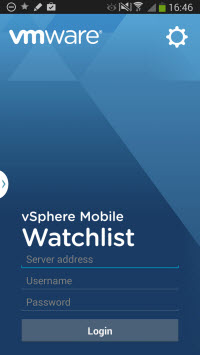
A screenshot from my phone showing the login screen. I have a new phone, it's Galaxy Note 3. Reasons why I picked up this phone is that it has large screen, good battery life, and it's fits my needs. I know many of you would probably prefer iPhone 5s, but as I'm trying to avoid buying third device – a tablet, and by going the “phablet” way this was a viable alternative.

I haven't tested the connection to my vSphere lab yet, as part of my lab is right now on a boat and second half (one host) is still in my suitcase… -:). But I'll promise to update this post as I'll progress with my installation in my house down here at Reunion Island and try to see the inside out, see the benefits of it.

As for now all I can say is that the application is available for vSphere infrastructure 5.0 and higher.

vSphere Mobile Watchlist  – The Features

  • Create VM watchlist – Select a subset of VMs from your VMware vSphere VM inventory to tell the app what VMs to track. Use multiple lists to organize these important VMs.
  • VMs at a glance – Review the status of these VMs from your device including: their state, health, console and related objects.
  • Suggested KB articles – Got an alert on your VM? Let VMware vSphere Mobile Watchlist suggest what KB Articles might help you or search the web to gather more information.
  • Remediate Remotely – Use power operations to remediate many situations remotely from your device.
  • Delegate to your team – For those situations where you are not able to fix an issue from the device, VMware vSphere Mobile Watchlist will enable you to share the VM and alert information along with any suggested KB articles and other web pages relevant to the current problem. Your colleagues back in the datacenter can use this context to resolve the issue.

I suppose that the application is using the vmtools to initiate the remediation actions (start, restart, stop …) and that it's possible to get some kind of notification to see which VMs are experiencing problems (or not).

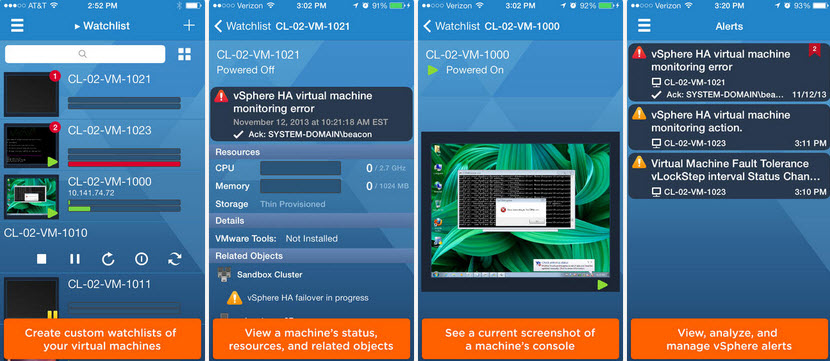
Here is a screenshot from VMware's website showing some error messages etc..
watchlist

As bein said earlier, I still have tons of things to get done and many administrative work with the change, but things will get done and everything will be back at normal.

Last but not least, check out the VMware Communities – vSphere Mobile Watchlist

Source: VMware vSphere Blog

Vote !
Shares

| Filed Under: Free Stuff Tagged With: vSphere Mobile Watchlist

About Vladan SEGET

This website is maintained by Vladan SEGET. Vladan is as an Independent consultant, professional blogger, vExpert x17, Veeam Vanguard x11, VCAP-DCA/DCD, ESX Virtualization site has started as a simple bookmarking site, but quickly found a large following of readers and subscribers.

Connect on: Facebook. Feel free to network via Twitter @vladan.

Comments

  1. SeanD says

    February 13, 2014 at 7:20 pm

    I just tried to connect to my vCenter v5.5 using the Watchlist app on my Android phone and I get an error “No peer certificate”. Any idea what this means?

    • Vladan SEGET says

      February 13, 2014 at 7:43 pm

      It’s because you shall enable the “trust all certificates” option. Disabled by default. (haven’t tested yet..)

      • SeanD says

        February 13, 2014 at 7:57 pm

        Thanks…found that option and turned it on and everything is good now.

Private Sponsors


Featured

  • Thinking about HCI? G2, an independent tech solutions peer review platform, has published its Winter 2023 Reports on Hyperconverged Infrastructure (HCI) Solutions.
Click to Become a Sponsor

Most Recent

  • Proxmox Datacenter Manager 1.0 released – a real vCenter Server Alternative?
  • Recovering a Corrupted Exchange Database with Stellar Repair for Exchange
  • Commvault at AWS re:Invent 2025: Pioneering AI-Enhanced Cyber Resilience with Cloud Unity
  • How to Set Up pfSense Community Edition as a Firewall Using VMware Workstation Pro 17 (2025 Edition)
  • HPE Morpheus VM Entreprise and Morpheus VM Essentials updates released – v8.0.11
  • Veeam Backup and Replication Upgrade on Windows – Yes we can
  • Commvault’s Cloud Unity Platform: Revolutionizing Enterprise Resilience in the AI Era
  • Securing Your Backups On-Premises: How StarWind VTL Fits Perfectly with Veeam and the 3-2-1 Rule
  • 3 New Advanced Certifications from VMware/Broadcom Released
  • VMUG Connect 2026: Your Ticket to Unlocking VMware’s Next-Gen Innovations

Get new posts by email:


Deals

Support us on Ko-Fi


Buy Me a Coffee at ko-fi.com

VMware Engineer Jobs

VMware Engineer Jobs

YouTube

…

Find us on Facebook

ESX Virtualization

…

Copyright © 2025 ·Dynamik-Gen · Genesis Framework · Hosted with HostColor.com
