ESX Virtualization

VMware ESXi, vSphere, VMware Backup, Hyper-V... how-to, videos....

Nakivo Backup and Replication - #1 Backup solution for Virtual, physical, cloud, NAS and SaaS

Menu
  • Certification
      • VCP-VVF Administrator
          • vcp-vvf-2.
        • Close
      • VCP-DCV vSphere 8
          • vcp2024-125.
        • Close
    • Close
  • VMware
    • Configuration Maximums
    • vSphere
      • VVF 9 and VCF 9
      • vSphere 8.0
      • vSphere 7.0
      • vSphere 6.7
      • vSphere 6.5
      • vSphere 6.0
      • Close
    • VMworld
      • VMware EXPLORE 2024
      • VMware EXPLORE 2023
      • VMware EXPLORE 2022
      • VMworld 2019
      • VMworld 2018
      • VMworld 2017
      • VMworld 2016
      • VMworld 2015
      • VMworld 2014
      • VMworld 2013
      • VMworld 2012
      • VMworld 2011
      • Close
    • Close
  • Proxmox
    • Proxmox 9
    • Close
  • Microsoft
    • Windows Server 2012
    • Windows Server 2016
    • Windows Server 2019
    • Windows Server 2025
    • Close
  • Categories
    • Tips – VMware, Microsoft and General IT tips and definitions, What is this?, How this works?
    • Server Virtualization – VMware ESXi, ESXi Free Hypervizor, VMware vSphere Server Virtualization, VMware Cloud and Datacenter Virtualization
    • Backup – Virtualization Backup Solutions, VMware vSphere Backup and ESXi backup solutions.
    • Desktop Virtualization – Desktop Virtualization, VMware Workstation, VMware Fusion, VMware Horizon View, tips and tutorials
    • How To – ESXi Tutorials, IT and virtualization tutorials, VMware ESXi 4.x, ESXi 5.x and VMware vSphere. VMware Workstation and other IT tutorials.
    • Free – Free virtualization utilities, ESXi Free, Monitoring and free backup utilities for ESXi and Hyper-V. Free IT tools.
    • Videos – VMware Virtualization Videos, VMware ESXi Videos, ESXi 4.x, ESXi 5.x tips and videos.
    • Home Lab
    • Reviews – Virtualization Software and reviews, Disaster and backup recovery software reviews. Virtual infrastructure monitoring software review.
    • Close
  • Partners
    • NAKIVO
    • StarWind
    • Xorux
    • Close
  • This Web
    • News
    • ESXi Lab
    • About
    • Advertise
    • Archives
    • Disclaimer
    • Privacy policy
    • PDFs and Books
    • Close
  • Free

Free Tool Friday – File Menu Tools

By Vladan SEGET | Last Updated: February 17, 2017

Shares

File Menu Tools is free utility (or rather set of utilities) which installs on x86 or x64 systems. The goal of this free application is to ease the pain (as usually) and to make the life of th admin easier. We all seek to make our lives easier, right? Than read on because this utility is simple a pure gold. If you want to expand your right click menus with command prompt here or see what's the size of a folder, those are just 2 features of this free software.

You can also manage the right-click menu on your system, where you can enable or disable individual menu items. (for example you want to get rid of some items but not other). I know that possibly going through some registry entries would do the same thing, but you would need to go deep into the registry. And it's probably not your intention.

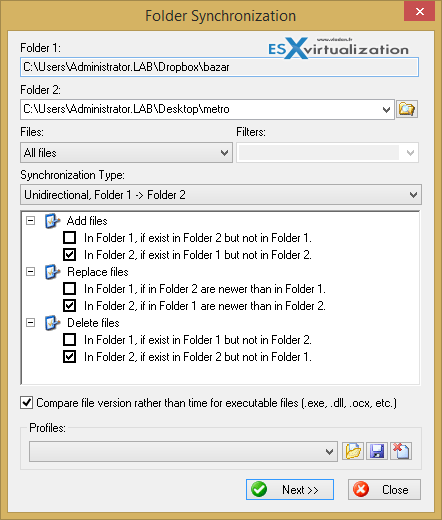
The utility has also built-in file synchronizer which allows you to synchronize directories. A Swiss knife too have in your toolbox? Sure thing -:). The right-click menu gets expanded with a commands which came in as pre-built commands (pre built menus), but those are fully customizable and expandable through the application.

The screenshots from the Right-Click view in Windows Explorer:
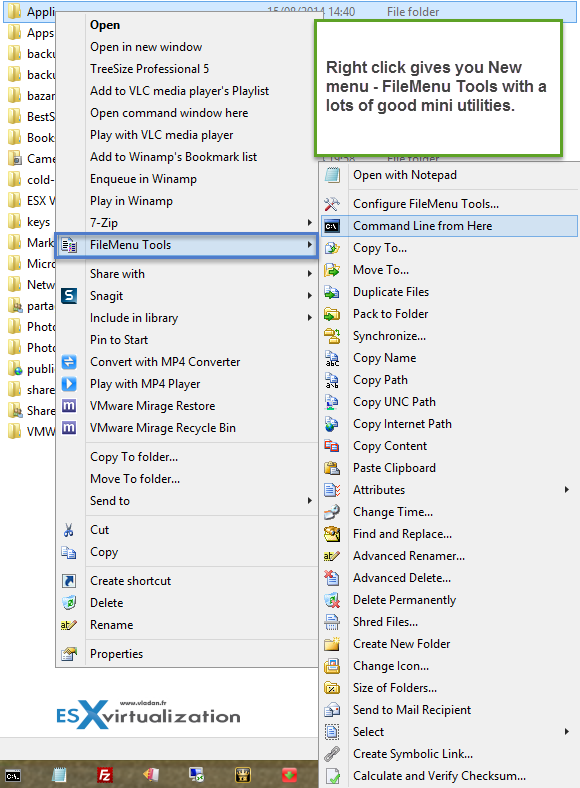
File Menu Tools Options

File Menu Tools Features:

Custom Commands to:

  • Run external applications
  • Copy/move to a specific folder
  • Delete specific file types
  • Send the selected files as attachments to e-mail recipient(s)
  • Rename the selected files using a set of rules
  • Configure the “Send to…” submenu
  • Enable/disable commands which are added by other applications to the context menu
  • Enable/disable commands which are added by other applications to the context menu

Screenshot showing the possibility to show size of a Folder (including subfolders)
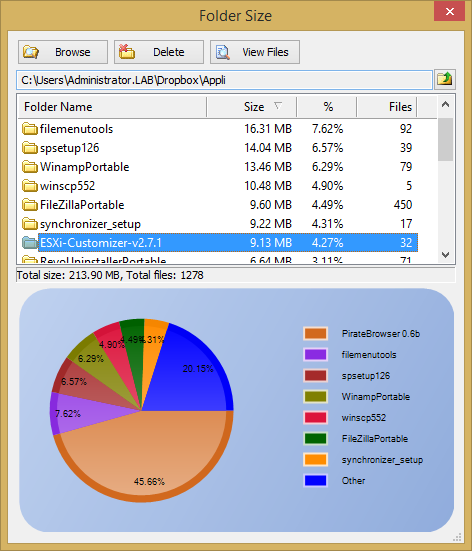
File Menu Tools - Folder Size

There is a portable version available too at the download location, in case you don't like to install just another software on your system. It is certainly more convenient. With he main program, the portable version creates 2 files (register File Menut tools and Unregister File Menu tools) allowing registering (unregistering) the applications.

However both versions, Installable and Portable version however wants you to install few apps (PriceGong and PlayWithMe) with the File menu tools which I don't like. So be careful when validating the NEXT button on WHAT you installing. You can easily SKIP the software that you DO NOT WANT, but as it's presented with the same colors and you usually don't read and just click the NEXT button you'll end-up with some applications that you certainly won't like because there are completely out of topic! I warned you.

Here is a screenshot from the main UI where you can see 3 tabs at the top. Each tabs allows personalization through the UI.
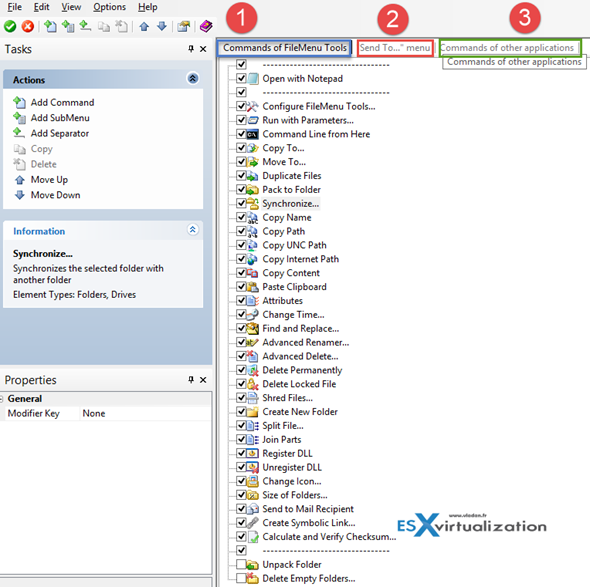
File Menu Tools User Interface

Worth to note that there is also a functions for shredding files or changing the date of creation. The utility is really packed with functions. Last week I talked about SyncBack Free which allows synchronization and backup of directories (bi-directional, mirror etc..). Well File Menu Tools has the same function built-in too.

One of the menu options has the synchronize option. You can:

  • Copy from folder 1 to folder 2
  • Copy from folder 2 to folder 1
  • Bi-Directional

File Menu Tools Syncronization Options

Certainly complete tool which is very cool. With small inconvenience when installing without taking much attention…. It's a bad idea IMHO and I'd recommend to the developper go rather different way. Provide a free version and paid version which would be packed with more tools.

Tools like this eases the admin's life and offers value, however they should not be packed with spyware, bloatware or something like that. So I recommend this program, but be careful what else wants to install as well!!!

You can download your copy here : Lopesoft.com

Shares
Vote !

| Filed Under: Free Stuff Tagged With: File Menu Tools

About Vladan SEGET

This website is maintained by Vladan SEGET. Vladan is as an Independent consultant, professional blogger, vExpert x17, Veeam Vanguard x11, VCAP-DCA/DCD, ESX Virtualization site has started as a simple bookmarking site, but quickly found a large following of readers and subscribers.

Connect on: Facebook. Feel free to network via Twitter @vladan.

Comments

  1. Dave Del Purgatorio says

    August 23, 2014 at 1:28 am

    Both Chrome (v.36) and ESET AntiVirus v7 are detecting both installers and portable as malicious/Adware. Fyi..

Private Sponsors


Featured

  • Thinking about HCI? G2, an independent tech solutions peer review platform, has published its Winter 2023 Reports on Hyperconverged Infrastructure (HCI) Solutions.
Click to Become a Sponsor

Most Recent

  • Commvault’s Cloud Unity Platform: Revolutionizing Enterprise Resilience in the AI Era
  • Securing Your Backups On-Premises: How StarWind VTL Fits Perfectly with Veeam and the 3-2-1 Rule
  • 3 New Advanced Certifications from VMware/Broadcom Released
  • VMUG Connect 2026: Your Ticket to Unlocking VMware’s Next-Gen Innovations
  • Veeam 100 Summit Prague 2025
  • Zorin OS 18: Ditch Windows 11’s Bloat – A Lighter, Smarter Linux Ride
  • Winux OS – Why I like it?
  • New Book Windows Server 2025 – Xavier Genestos
  • VMware Workstation 25H2: What’s New and why this change?
  • Veeam Backup Appliance 13.0 ISO automated installation

Get new posts by email:


Deals

Support us on Ko-Fi


Buy Me a Coffee at ko-fi.com

VMware Engineer Jobs

VMware Engineer Jobs

YouTube

…

Find us on Facebook

ESX Virtualization

…

Copyright © 2025 ·Dynamik-Gen · Genesis Framework · Hosted with HostColor.com