
StorMagic has been around since few years now and in the past their simple approach for mirroring data with two ESXi hosts was one of the solutions that I've been looking at to for small environments. The recent release of StorMagic 5.2 brought also some more data services like Write-back caching (using SSDs) or Data Migration between targets and some storage pool enhancements which might interests you.
Very interesting that SvSAN 5.2 can do Write back caching as it allows to write to cache immediately and to de-stage later to the permanent storage. It can leverage SSDs for acceleration of I/Os. SvSAN is certified storage solution on the latest vSphere 5.5 but also Hyper-V 2012R2 and offers iSCSI (block) based shared storage which is build up from local disks (Direct attached storage – DAS). You can check the requirements at VMware support page concerning SvSAN.
The shared storage is created from at least two hosts (it's synchronous mirror) and provides highly available storage for vSphere or Hyper-V clusters. Third host can act as quorum (Neutral Storage Host – NSH) to manage Split brain scenarios. NSH can be installed Windows or Linux OS and shall be installed on different host than the hosts participating in the mirror. SvSAN do not need many resources to run (1 vCPU with 1Gb of RAM) as well as 1Gb NIC.
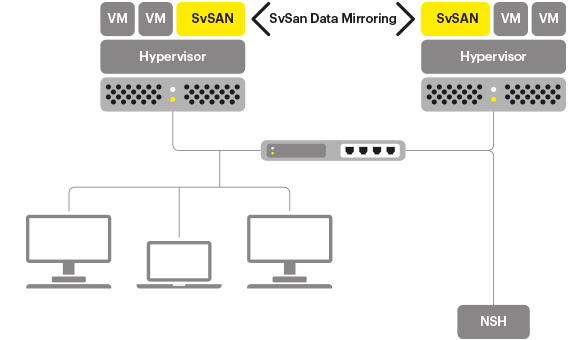
What's New in sVSAN 5.2?
Write-Back Caching – SvSAN 5.2 uses solid state disk (SSD) as a “staging” area, providing faster server I/O response time. Data is then de-staged from the cache to the final storage location at a later point. Write-back caching algorithms ensure the cache is optimally utilized, and storage tiering allows targets to span multiple storage types. In addition, per-target caching enables users to select the targets that can benefit from I/O acceleration, ensuring important data is prioritized.
Data Migration – This feature transparently and non-disruptively migrates SvSAN targets from one storage location to another, ensuring that targets are optimally distributed and load balanced over available SvSAN resources. Targets can be migrated between storage pools on the same SvSAN solution or to another SvSAN virtual storage appliance entirely.
Storage Pool Enhancements – by organizing the storage into a virtual pools, it's possible to take different types of disks based on performance (SATA, SAS, SSD) SvSAN for each virtual pool. 5.2 enables existing storage pool capacity to be expanded when underlying disks are grown, and allows storage pools to be categorized with user-defined labels.
Performance Monitoring – Granular, historical I/O transaction and throughput statistics are now available to users, presented in a simple and intuitive format. Reports are issued per iSCSI target, enabling customers to troubleshoot I/O performance issues or identify I/O trends or patterns.
SvSAN based highly available storage get an immediate interest for low cost ROBO scenarios or Small business use. At the end of the day, what interest the end users is the availability their applications. Not the latest hyper-converged architecture. And SvSAN needs only 2 hosts to run where hyper-converged solutions like Nutanix or VMware VSAN needs at least 3 nodes.
Interesting part concerning SvSAN, still with the SMB in mind. I found this in the FAQ document. It's when there is a power loss. It's fairly common that SMBs do not have full blown datacentr protected with petrol generators in case of longer power failures.What happens when the UPS's batteries just dies without properly shutting down the server hardware?
StorMagic SvSAN uses Linux virtual appliance which contains dual boot images
The VSA is designed to handle any unexpected power loss. On start up, it checks whether it was shut down normally on the previous run, and if not it runs a routine that checks to ensure all the configuration data is correct. The system contains dual boot images, so that if one becomes corrupted (e.g. due to a crash during upgrade) the system can be booted from the other. The boot image is used as a read-only root file system; transient changes occur in a RAM disk which overlays the boot image without altering it.
VMware VAAI has been supported since version 5.1 and allows to offload storage tasks to the SvSAN storage. The 5.2 release has also I/O performance stats per target via GUI. It's possible to show minimum, maximum or average per day/week/month/year.
SvSAN is supported on vSphere 5.0 and higher and on Hyper-V 2012R2 (Hyper-V 3.0).
You can download 60 days trial from StorMagic here and the quick deployment guide here.




