
ESX Virtualization

VMware ESXi, vSphere, VMware Backup, Hyper-V... how-to, videos....

Nakivo Backup and Replication - #1 Backup solution for Virtual, physical, cloud, NAS and SaaS

Menu
  • Certification
      • VCP-VVF Administrator
          • vcp-vvf-2.
        • Close
      • VCP-DCV vSphere 8
          • vcp2024-125.
        • Close
    • Close
  • VMware
    • Configuration Maximums
    • vSphere
      • VVF 9 and VCF 9
      • vSphere 8.0
      • vSphere 7.0
      • vSphere 6.7
      • vSphere 6.5
      • vSphere 6.0
      • Close
    • VMworld
      • VMware EXPLORE 2024
      • VMware EXPLORE 2023
      • VMware EXPLORE 2022
      • VMworld 2019
      • VMworld 2018
      • VMworld 2017
      • VMworld 2016
      • VMworld 2015
      • VMworld 2014
      • VMworld 2013
      • VMworld 2012
      • VMworld 2011
      • Close
    • Close
  • Proxmox
    • Proxmox
    • Close
  • Microsoft
    • Windows Server 2012
    • Windows Server 2016
    • Windows Server 2019
    • Windows Server 2025
    • Close
  • Categories
    • Tips – VMware, Microsoft and General IT tips and definitions, What is this?, How this works?
    • Server Virtualization – VMware ESXi, ESXi Free Hypervizor, VMware vSphere Server Virtualization, VMware Cloud and Datacenter Virtualization
    • Backup – Virtualization Backup Solutions, VMware vSphere Backup and ESXi backup solutions.
    • Desktop Virtualization – Desktop Virtualization, VMware Workstation, VMware Fusion, VMware Horizon View, tips and tutorials
    • How To – ESXi Tutorials, IT and virtualization tutorials, VMware ESXi 4.x, ESXi 5.x and VMware vSphere. VMware Workstation and other IT tutorials.
    • Free – Free virtualization utilities, ESXi Free, Monitoring and free backup utilities for ESXi and Hyper-V. Free IT tools.
    • Videos – VMware Virtualization Videos, VMware ESXi Videos, ESXi 4.x, ESXi 5.x tips and videos.
    • Home Lab
    • Reviews – Virtualization Software and reviews, Disaster and backup recovery software reviews. Virtual infrastructure monitoring software review.
    • Close
  • Partners
    • NAKIVO
    • StarWind
    • Xorux
    • Close
  • This Web
    • News
    • ESXi Lab
    • About
    • Advertise
    • Archives
    • Disclaimer
    • Privacy policy
    • PDFs and Books
    • Close
  • Free

New vCenter 4.1 performance whitepaper

By Vladan SEGET | Last Updated: August 21, 2010

Shares

There has been a new whitepaper released about vCenter 4.1 performance improvements and also Best practices.

vCenter is a tool which you're using everyday since you're managing you VI with VI client, and since there has been lot's of improvements made especially on the performance side, it's always interesting to see why you should upgrade to vCenter 4.1. Sure that you must first check with your backup vendor to see if your existing backup solution is vSphere 4.1 ready, but VDR (VMware Data Recovery), Veeam, and many others are ready and fully supports the 4.1 version.

The paper is very useful and you'll learn a lot since it gives you some exact case studies and examples on sizing your vCenter Server. You'll be presented with 3 exemples size of Virtual infrastructure and the guidelines shows you what size of Memory, disks or CPU you should use for your vCenter Server.

If you're not decided yet to make your move to vCenter 4.1, you'll find a grid with explanations what's changed and what's been improved compared to the vCenter 4.0.

– Improved performance at higher vCenter Server inventory limits – up to 7 times higher operational throughput and up to 75% reduced operational latency
– Improved performance at higher cluster inventory limits – up to 3 times higher operational throughput and up to 60% reduced operational latency
– Faster vCenter Server startup – around 5 minutes for maximum vCenter Server inventory size
– Better vSphere Client responsiveness, quicker user interaction, and faster user login
– Faster host operations and VM operations on standalone hosts – up to 60% reduction in latency
– Lower resource usage by vCenter agents by up to 40%
– Reduced VM group power-on latency by up to 25%
– Faster VM recovery with HA – up to 60% reduction in total recovery time for 1.6 times more VMs
– Better load balancing with improved DRS/DPM algorithm effectiveness
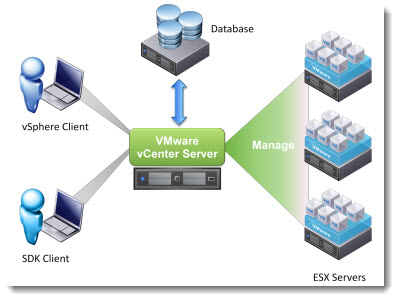
vCenter 4.1 performance and best practices guidelines

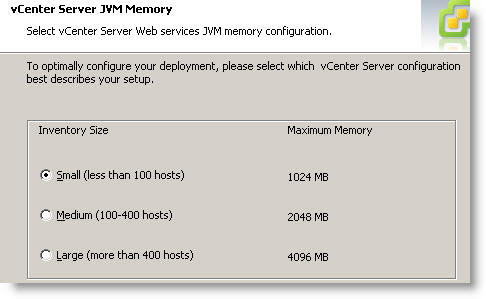
What I like with the new version of vCenter 4.1? It's the possibility to setup the maximum amount of RAM to be used by JVM during the installation steps. This is helpful for  installation of vCenter Server on hadware with less RAM even if 4Gigs is the bare minimum and I would not go below that. Especially when in most situations vCenter Server (if physical), is also used as a bakup server with a backup solution installed too….
HA scallability was also improved in vCenter 4.1, since vCenter now 4.1  supports 32 host with up to 3000 VMs…

HA, DPM and DRS best practices are also discussed in the whitepaper.

At the end there is a nice case study comparing the vCenter 4.0 and 4.1 in exact case with measures done by the VMware engineers.

The authors: Nikhil Bhatia, Chirag Bhatt, Lei Chai , Adarsh Jagadeeshwaran, Alper T. Mizrak, Xiaoyun Zhu

I can highly recommend to read (and to keep) this PDF.

Source: Vroom!

Vote !
Shares

| Filed Under: Featured Tagged With: vCenter 4.1 best practices, vCenter Performance best practice, vCenter VMware, VMware vSphere 4.1

About Vladan SEGET

This website is maintained by Vladan SEGET. Vladan is as an Independent consultant, professional blogger, vExpert x17, Veeam Vanguard x11, VCAP-DCA/DCD, ESX Virtualization site has started as a simple bookmarking site, but quickly found a large following of readers and subscribers.

Connect on: Facebook. Feel free to network via Twitter @vladan.

Private Sponsors


Featured

  • Thinking about HCI? G2, an independent tech solutions peer review platform, has published its Winter 2023 Reports on Hyperconverged Infrastructure (HCI) Solutions.
Click to Become a Sponsor

Most Recent

  • Proxmox Datacenter Manager 1.0 released – a real vCenter Server Alternative?
  • Recovering a Corrupted Exchange Database with Stellar Repair for Exchange
  • Commvault at AWS re:Invent 2025: Pioneering AI-Enhanced Cyber Resilience with Cloud Unity
  • How to Set Up pfSense Community Edition as a Firewall Using VMware Workstation Pro 17 (2025 Edition)
  • HPE Morpheus VM Entreprise and Morpheus VM Essentials updates released – v8.0.11
  • Veeam Backup and Replication Upgrade on Windows – Yes we can
  • Commvault’s Cloud Unity Platform: Revolutionizing Enterprise Resilience in the AI Era
  • Securing Your Backups On-Premises: How StarWind VTL Fits Perfectly with Veeam and the 3-2-1 Rule
  • 3 New Advanced Certifications from VMware/Broadcom Released
  • VMUG Connect 2026: Your Ticket to Unlocking VMware’s Next-Gen Innovations

Get new posts by email:


Deals

Support us on Ko-Fi


Buy Me a Coffee at ko-fi.com

VMware Engineer Jobs

VMware Engineer Jobs

YouTube

…

Find us on Facebook

ESX Virtualization

…

Copyright © 2025 ·Dynamik-Gen · Genesis Framework · Hosted with HostColor.com
