
How to patch ESXi 5 from command line. Usually the patching of VMware vSphere Cluster is done through vSphere Update Manager (VUM), but for this you need vCenter. In case you're managing single ESXi host without vCenter, you might be interested to know how to patch the ESXi host from the command line.
No need to say that I'm supposing that you don't use vCenter in purpose, and so that you want to patch your ESXi 5 standalone host or that you want to patch VMware ESXi 5 Free version without VUM.
You'll certainly like this! ESXi 5.5 Free Version – no more hard limit 32GB of RAM
Otherwise it's much more convenient using VUM which can automate the patching process by using vMotion to move the running VMs to other hosts inside of the cluster, putting the host which you want to patch into maintenance mode and do the restart.
The patching of VMware ESXi 5 is quite straightforward process, but there is one condition: SSH access
The SSH access can be easily enabled by using the VMware vSphere client through the GUI.
How to patch ESXi 5:
Step 0 – Enabling SSH access to the VMware ESXi 5 host
Yes, there is step 0 actually. How to do it? Simple:
– Through vSphere client click on the VMware ESXi 5 server > Confiure > Security Profile (services)
– SSh > Options >
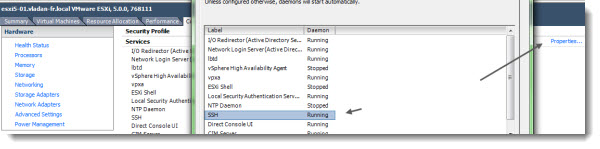
Step 1 – Stage the ESXi 5 patches to a Datastore accessible by the VMware ESXi 5 host
Via the vSphere Datastore browser upload the patch which you have downloaded from VMware Patch Website. This website lists all VMware ESXi Patches.
During the copy operation which can take some time, you have plenty of time to gracefully shut down all your VMs which runs at the moment on your host.

I have created a sub-folder for that purpose.
Step 2 – Connect via SSH by using putty for example
Putty is the most known SSH client.
Run this command and wait, because the decompression and installation take some time……
Use this command: esxcli software vib update
(Note: If you use esxcli software vib install then you will loose the custom drivers, CIM providers etc you have had installed previously… )
In my case, I executed this command:
esxcli software vib update -d /vmfs/drobo01/patches/<your-upgrade-bundle.zip>
The process will probably take some time.
You should screen confirming the installation and requiring the reboot of the host.
Step 3 – Reboot your VMware ESXi 5 host
Now when you reboot, the system will probably complain that the maintenance mode hasn't been enabled….
And you should see the version number change on your VMware ESXi 5 host.
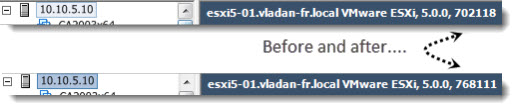
The ESXi 5 patching can be done by using PowerCLI, but I'll outline it in another article.
How to patch ESXi 5 on VMware Communities.
Enjoy.. -:)
Feel free to subscribe to our RSS Feed.


Would it be better if it goes to maintenance mode first ?esxcli software vib update –maintenance-mode –depot /vmfs/volumes//.zip
If you’re using a customized image, such as HP’s ESXi installation media (or the various other formats HP supplies), then the command “esxcli software vib install …” will render your ESXi server unusable. This appears to be because all of HP’s drivers, CIM providers and other “garbage” are deleted by the install process. Most likely your host will reboot and complain that no network drivers are available, and is thus inaccessible from the network.
The command: “esxcli software vib update …” seems to avoid this problem.
Trev,
TGood to know. I would imagine, however, that users having licensed version of ESXi, they rather use VUM.
Thanks for the comment.
Vladan
Thanks.