
UPdate ESXi 4.1 without Vmware Update Manager.
If you're using the free version of VMware Hypervisor you might want to know how to upgrade to the latest version if you don't have VMware Update Manager. I'll show you the exact steps which are necessary to be able to update ESXi 4.1 to ESXi 4.1 update 1 – free version of VMware Hypervizor.
If you just starting to test ESXi 4.1 Free version, it's ok, but if you put your Free ESXi in production, consider of buying a license. The vSphere Essentials Kit starts at $611. This permits you to manage 3 Hosts….. -:) and it does give you an access to update manager where you can manage you patches via the GUI.
You'll need few things before you can start the patching process. You'll need the upgrade file and VMware vCLI.
The steps:
01. First of all you'll need to download the update package for ESXi 4.1. Go to this adress and download the zip file (206 Mb).

02. Download VMware vCLI here and install it on your Windows box.
03. Copy the downloaded ZIP package – the update-form-esxi4.1-4.1_update01.zip to the bin directory of WMware vCli.
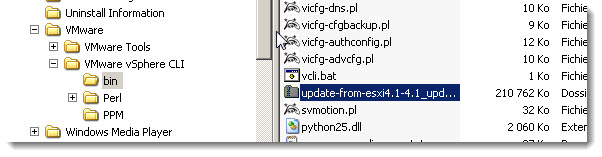
04. Open the vCLI command prompt and CD to the c:Program FilesVMwareVMware vSphere CLIbin directory
05. Now you will need to use the command vihost update in folowing format: vihostupdate –server host name or IP address -i -b location of the ESXi upgrade ZIP bundle -B ESXi4.1-to-ESXi4.1UPDATE01
Enter: “perl vihostupdate.pl –server 192.168.1.10 –username root –password password -i -b update-from-esxi4.1-4.1_update01.zip”
Now, if you don't put your host in maintenance mode first you'll get a message complaining about that….
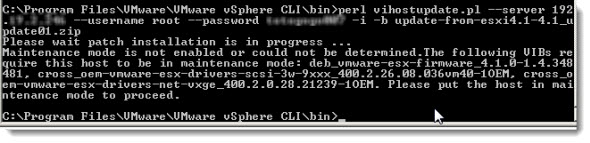
You'll see the updating process running and when you'll want to connect to your ESXi 4.1 host again with your vSphere Client, the vSphere client will update itself automatically…..
PS: Here you can find the updates for those 2 version of VMware in those 2 kb articles with the detailed information:
- ESX 4.1 to ESX 4.1 U1 – 472MB
- ESXi 4.1 to ESXi 4.1 U1 – 215MB
Sources:
– vSphere Command-Line Interface Installation and Scripting Guide





Hello,
there is a way to update without using vCLI. Just upload update file to one of your datastores, enable SSH and update using esxupdate command.
Go to /vmfs/volumes/DATASTORENAME
Listing updates:
esxupdate –loglevel=DEBUG –bundle UPDATEFILE -a scan
Installing update
esxupdate –loglevel=DEBUG –bundle UPDATEFILE -b BULLETIN update
Thanks for the info … -:)
is it me or you can also update you ESX 4.1 to Update 1 using Vmware Update Manager?
right?
If you have Update Manager (so …. you got vCenter..). Of course you can.
Cheers.
Vladan
Hi!
i got this Message on a esxi 4.0
Error connecting to server at ‘https://localhost/sdk/webService’: Perhaps host i
s not a vCenter or ESX server
Do i need a vcenter?
Write the command manualy ( do not copy and paste). This is typical perl behaviour.
If you have a VMware account you can utilized VMware GO to upgrade from 4.0 to 4.1. Also installs patches. It’s a “lite” Vcenter.
Oh, that’s good to know… -:)
Thanks for the info Deetechi.
Can’t open perl script “vihostupdate.pl”: No such file or directory
any how to fix that?
Try to verify that you did not misspell a directory/file. It’s often the case.
regards
Vladan
thanks vladan. I had to put the full path for the vihostupdate.pl and the update file also.
it works for me. I was hoping to fix an issue with an HP DL380 g7 server. It did not. The issue is when enabling the hyperthreading in the bios, the server crashes (reboots) as soon as i start any virtual machine
on the ESXi 4.1. I’m not sure if you guys have any idea what it could be.
Thanks. Worked like a charm!
thanks for this simple tutorial , but i faced the following problem and it didnt work.
my server is still esxi 4.1 free evaluation.
vmware -v : VMware ESXi 4.1.0 build-348481
but it didnt work. it gives
error connection to server at https://localhost/sdk/webService perhaps host is not a vcenter or esx server.
Hello,
I’m not a vmWare expert and I have a free ESXi 4.1 (update 0; build 260247) that I want to upgrade to 4.1 update 3.
I used your procedure in a test environment with the file:
“update-from-esxi4.1-4.1_update03” and It seems that all things are ok: I get now a build number 800380.
But my doubt is: does this update file include all other previous updates?
Thank you
You’re up to date. No need to worry about the previous updates, which are included in the U3.
Thank you very much for your answer.
I’ve spent some time on your site: a very good resource for vmWare world.
Bye