
The big VMware Exit continues and will continue over the next few years. With the ongoing shifts in the virtualization market following Broadcom's acquisition of VMware, many organizations are reevaluating their infrastructure strategies. Two-plus years after the acquisition, the licensing isn't just “changed”; it's become a straight-up extortion racket. Minimum 72-core purchases even for tiny servers, late-renewal penalties, no more perpetual licenses, cease-and-desist letters for expired support on stuff you already bought, partner ecosystem gutted, and prices that routinely jump 300–1500% depending on who you ask. 85–86% of customers are still actively trying to shrink or eliminate their VMware footprint because of unadapted licensing offering and packaging that Broadcom trying to push. For many, the costs just become unbearable.
The changes to VMware's licensing model – including the transition to subscriptions only, the elimination of perpetual licenses, and adjustments to minimum core requirements – have prompted a closer look at alternatives like Microsoft Hyper-V. At the end of the day, if you already paying Microsoft subscribtions or licenses, why not use their Hyper-V technology? You are already deep in with Active Directory/Entra ID, and, while Hyper-V technology poweres the whole Azure, why not try locally within your small datacenter? And speaking of Hyper-V, combined with software-defined storage solutions such as StarWind VSAN it all makes sense, because costs are one of the priorities.
In this article, we'll explore StarWind VSAN's capabilities for Hyper-V environments, with a particular focus on its synchronous replication features, compare them to native Windows Server options, and discuss why this combination can offer a more cost-effective path forward, particularly for those considering a shift away from VMware. We'll keep the focus technical while highlighting practical advantages.
StarWind VSAN Overview
StarWind VSAN is a software-defined, shared-nothing storage solution that enables high-availability (HA) shared storage using local disks across clustered servers. It mirrors data in real time between nodes, presenting the storage pool to Hyper-V as highly available volumes suitable for Cluster Shared Volumes (CSVs), live migration, and failover clustering.
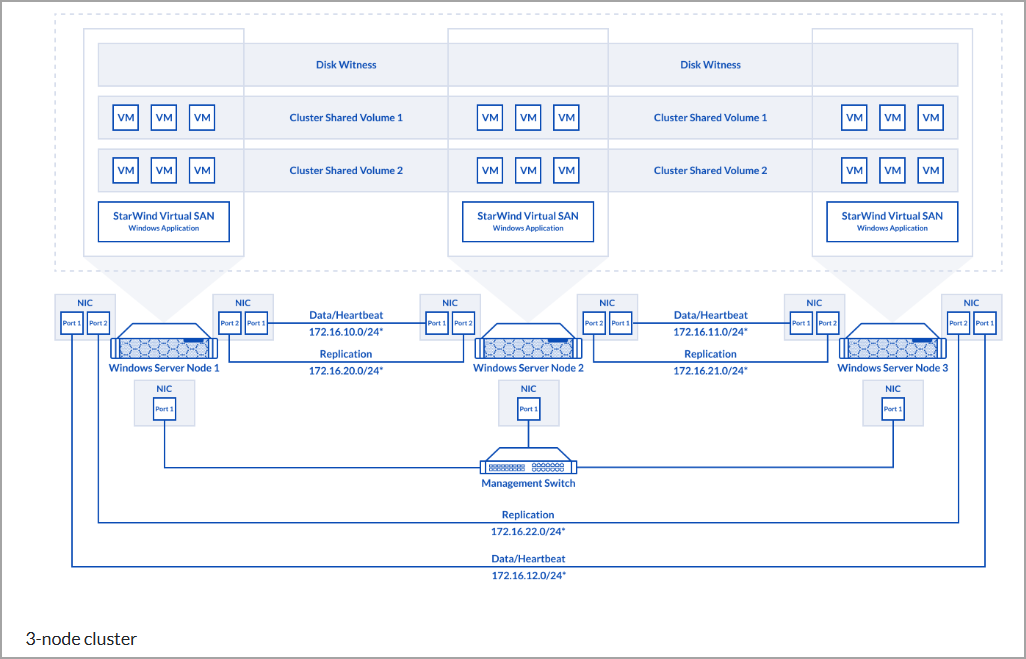
The solution supports 2-node and 3-node configurations, making it well-suited for small to medium deployments or edge locations. Many times, when you have remote offices, you would like some kind of redundancy for your storage (outside of hardware RAID). StarWind VSAN integrates natively with Windows Server and Hyper-V, running either as a Windows service or in a lightweight VM configuration.
Key technical aspects include block-level synchronous replication, RAM and SSD caching tiers for performance optimization, inline deduplication and compression (optional), and support for protocols like iSCSI, SMB3, and NFS.
In synchronous mode — specifically the “Synchronous Two-Way” (active-active) replication — writes are mirrored across nodes before acknowledgment, delivering zero Recovery Point Objective (RPO) for HA workloads.
Network requirements are straightforward: dedicated, low-latency links (10 GbE or higher recommended) for replication and heartbeat traffic to ensure reliable synchronization and split-brain prevention via priority-based failover logic.
Synchronous Replication: StarWind vs. Native Capabilities
Synchronous replication is essential for true high availability, ensuring no data loss during node failures. StarWind VSAN provides this through its Synchronous Two-Way Replication mode, where every write operation requires confirmation from both (or all participating) nodes before completion. This real-time mirroring at the block level supports load balancing across nodes, automatic resync on reconnection, and self-healing mechanisms. In 2-node setups, heartbeat channels combined with priority logic prevent split-brain scenarios, allowing the cluster to continue operations on a single surviving node with data integrity preserved.
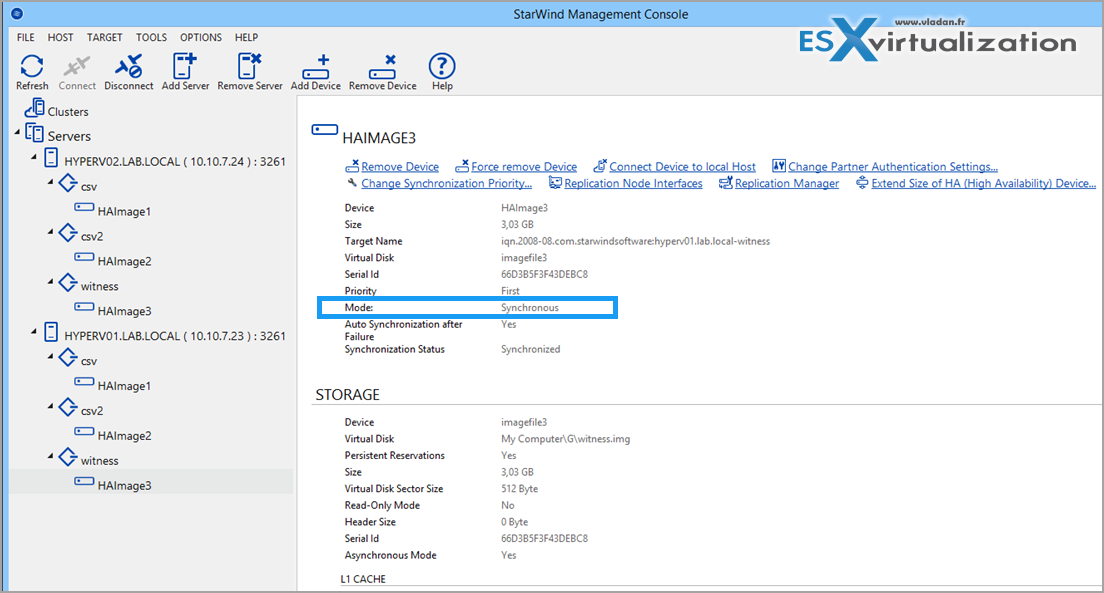
Microsoft's native offering in this space is Storage Spaces Direct (S2D), available in Windows Server 2016 and later. S2D delivers synchronous mirroring in HCI clusters, aggregating local drives into a resilient pool with data written to multiple nodes before completion. In 2-node configurations, it supports mirroring with automatic failover.
However, differences emerge in deployment and operational aspects:
Licensing and Scalability: S2D requires Windows Server Datacenter edition for full HCI functionality, including unlimited VMs per host. StarWind VSAN operates effectively with Windows Server Standard edition (which includes Hyper-V with up to two OSEs/VMs per license, or more with additional licensing), or even the free Hyper-V Server in some scenarios, potentially reducing overall licensing footprint.
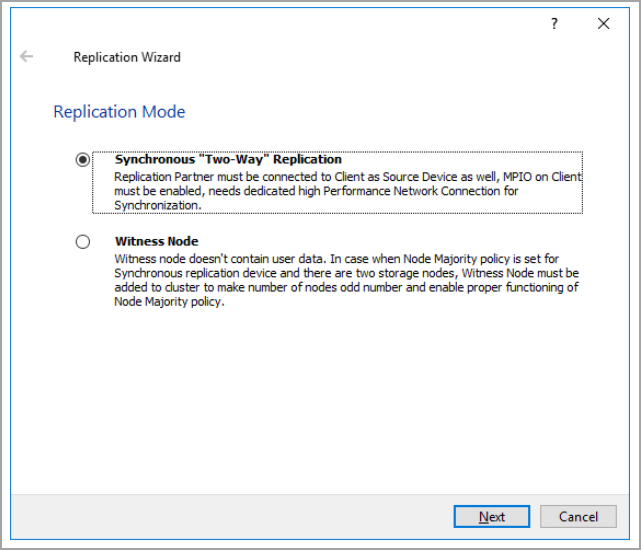
Setup and Management: S2D configuration often involves PowerShell scripting, hardware compatibility checks, and quorum witness setup (e.g., cloud or file-share witness in 2-node clusters). StarWind provides a graphical management console with wizards for device creation, replication pairing (selecting Synchronous Two-Way mode), and monitoring, which can simplify administration for teams without deep scripting expertise.
Additional Features: StarWind includes integrated call-home telemetry, predictive analytics, and easier extension to asynchronous DR replication. Native Hyper-V Replica remains asynchronous (configurable RPO from 30 seconds to hours), better suited for disaster recovery than synchronous HA.
While S2D offers robust native integration, StarWind often provides comparable or enhanced performance in benchmarks (particularly with NVMe caching and optimized I/O paths) while being more flexible in mixed or smaller environments.
Example diagram of 3-node cluster from StarWind website
Cost Considerations: Why Pure Virtualization Approaches Can Be More Economical
One of the primary drivers for exploring alternatives is cost predictability. Under Broadcom's VMware model (as of 2026), licensing has shifted fully to subscriptions, with per-core metrics and bundled offerings (e.g., vSphere Foundation or VMware Cloud Foundation). Historical adjustments included a proposed (and later revised) minimum purchase threshold, but the overall effect has been higher and less flexible costs for many deployments, especially smaller clusters or those with modest core counts.
In contrast, a Hyper-V-based setup with StarWind VSAN leverages Microsoft's per-host licensing model:
Windows Server Standard or Datacenter licenses cover the hypervisor (Hyper-V) at no extra charge once the OS is licensed.
For environments running mostly Windows VMs, Datacenter edition enables unlimited virtualization rights per host, avoiding per-VM stacking.
StarWind VSAN adds per-node licensing (typically more granular and subscription – or perpetual-friendly options), without forcing minimum core bundles unrelated to actual hardware.
This structure often results in lower total cost of ownership (TCO) for SMBs, ROBO sites, or mid-sized clusters — reusing existing hardware, avoiding forced over-provisioning of licenses, and maintaining predictable renewal cycles. Migration tools like StarWind's free V2V Converter further reduce transition expenses by handling VM format conversions (VMDK to VHDX) with minimal downtime.
Performance remains competitive: StarWind's local-disk access with caching frequently delivers strong IOPS and low latency, especially in hyper-converged setups where storage proximity to compute minimizes network hops.
Why This Combination Fits Many “Exit” Scenarios
For organizations planning a VMware transition, Hyper-V + StarWind VSAN addresses key pain points:
- High Availability Without Hardware SAN: Synchronous replication ensures business continuity similar to vSAN, but on commodity servers.
- Migration Simplicity: Tools support phased moves, including hybrid operation during cutover.
- Future-Proofing: The setup avoids vendor-specific lock-in on hypervisor storage, with options to extend to DR or scale modestly.
Real-world deployments (including enterprise case studies) demonstrate reliable operation in 2-3 node clusters, with features like automatic failover and monitoring reducing administrative overhead.
Quick Technical Setup Outline
Prepare 2–3 Windows Server hosts with Hyper-V enabled and dedicated NICs for replication.
Install StarWind VSAN and use the Management Console to create mirrored HA devices from local storage pools.
Configure synchronous replication partners (select Synchronous Two-Way mode) and heartbeat links.
Expose devices via iSCSI/SMB, connect as initiators on cluster nodes, and create CSVs in Failover Cluster Manager.
Validate failover by testing node isolation — VMs should continue without interruption.
Key Features for Windows Server + Hyper-V:
- Hyper-Converged Deployment: Run VMs and storage on the same physical nodes using StarWind VSAN as a Windows Application or as a Controller Virtual Machine (CVM).
- High Availability (HA): Achieved through multipath iSCSI access and synchronous replication between nodes.
- Performance: Delivers high performance by processing I/O locally using RAM, SSD cache, and disks—avoiding bottlenecks from external storage fabrics.
- Flexible Networking: Requires at least two network interfaces per node:
- One for iSCSI/StarWind heartbeat traffic (separate subnet).
- One for Synchronization traffic (dedicated link).
- Support for NVMe-oF: Available for reduced latency and improved cluster performance.
Setup Requirements:
- Install Failover Clustering, Multipath I/O (MPIO), and the Hyper-V role on all nodes.
- Use Windows Server 2016 or later (with support for newer versions like 2019/2022).
- Configure separate external virtual switches for iSCSI and synchronization traffic.
- Modify the StarWind.cfg file to enable iSCSI discovery (<iScsiDiscoveryListInterfaces value=”1″/>).
- Use StarWind Management Console or Web UI for configuration.
Deployment Options:
- As a Windows Application: Installed directly on Windows Server (GUI or Core).
- As a Controller VM (CVM): Deployed as a VM on each Hyper-V host, ideal for centralized management and scalability.
Official Guides:
- 2-Node Hyper-Converged Scenario with Windows Server 2016 (nothing much changes on Windows server since then).
- CVM Configuration Guide (Web UI)
- Best Practices & System Requirements: StarWind VSAN Best Practices
Final Words
StarWind VSAN enhances Hyper-V with enterprise-grade synchronous replication and HA storage in a way that's straightforward to deploy and manage. While native S2D provides similar core functionality, StarWind's approach often aligns better with cost-conscious or smaller-scale environments. In today's market, where licensing predictability matters more than ever, combining Hyper-V (included with Windows Server licensing) and StarWind VSAN can deliver strong technical capabilities at a potentially lower overall cost compared to subscription-heavy alternatives.
If you're evaluating options, start with a proof-of-concept — the trial process is quick and uses your existing hardware. As always, feel free to share your experiences or questions in the comments.
Note that StarWind also support other virtualization platforms, alternatives to VMware. Such as KVM (via RedHAT, oVirt, Oracle virtualization, or Linux bare metal.
More posts from ESX Virtualization:
- Veeam Backup and Replication Upgrade on Windows – Yes we can
- Securing Your Backups On-Premises: How StarWind VTL Fits Perfectly with Veeam and the 3-2-1 Rule
- Winux OS – Why I like it?
- VMware Alternative – OpenNebula: Powering Edge Clouds and GPU-Based AI Workloads with Firecracker and KVM
- Proxmox 9 (BETA 1) is out – What’s new?
- Another VMware Alternative Called Harvester – How does it compare to VMware?
- VMware vSphere 9 Standard and Enterprise Plus – Not Anymore?
- VMware vSphere Foundation (VVF 9) and VMware Cloud Foundation (VCF 9) Has been Released
- Vulnerability in your VMs – VMware Tools Update
- VMware ESXi FREE is FREE again!
- No more FREE licenses of VMware vSphere for vExperts – What’s your options?
- VMware Workstation 17.6.2 Pro does not require any license anymore (FREE)
- Two New VMware Certified Professional Certifications for VMware administrators: VCP-VVF and VCP-VCF
- Patching ESXi Without Reboot – ESXi Live Patch – Yes, since ESXi 8.0 U3
- Update ESXi Host to the latest ESXi 8.0U3b without vCenter
- Upgrade your VMware VCSA to the latest VCSA 8 U3b – latest security patches and bug fixes
- VMware vSphere 8.0 U2 Released – ESXi 8.0 U2 and VCSA 8.0 U2 How to update
- What’s the purpose of those 17 virtual hard disks within VMware vCenter Server Appliance (VCSA) 8.0?
- VMware vSphere 8 Update 2 New Upgrade Process for vCenter Server details
- What’s New in VMware Virtual Hardware v21 and vSphere 8 Update 2?
- vSphere 8.0 Page
- ESXi 7.x to 8.x upgrade scenarios
- VMware vCenter Server 7.03 U3g – Download and patch
- Upgrade VMware ESXi to 7.0 U3 via command line
- VMware vCenter Server 7.0 U3e released – another maintenance release fixing vSphere with Tanzu
- What is The Difference between VMware vSphere, ESXi and vCenter
- How to Configure VMware High Availability (HA) Cluster
Stay tuned through RSS, and social media channels (Twitter, FB, YouTube)





Leave a Reply