ESX Virtualization

VMware ESXi, vSphere, VMware Backup, Hyper-V... how-to, videos....

Nakivo Backup and Replication - #1 Backup solution for Virtual, physical, cloud, NAS and SaaS

Menu
  • Certification
      • VCP-VVF Administrator
          • vcp-vvf-2.
        • Close
      • VCP-DCV vSphere 8
          • vcp2024-125.
        • Close
    • Close
  • VMware
    • Configuration Maximums
    • vSphere
      • VVF 9 and VCF 9
      • vSphere 8.0
      • vSphere 7.0
      • vSphere 6.7
      • vSphere 6.5
      • vSphere 6.0
      • Close
    • VMworld
      • VMware EXPLORE 2024
      • VMware EXPLORE 2023
      • VMware EXPLORE 2022
      • VMworld 2019
      • VMworld 2018
      • VMworld 2017
      • VMworld 2016
      • VMworld 2015
      • VMworld 2014
      • VMworld 2013
      • VMworld 2012
      • VMworld 2011
      • Close
    • Close
  • XCP-NG
    • XCP-NG
    • Close
  • Proxmox
    • Proxmox
    • Close
  • Microsoft
    • Windows Server 2012
    • Windows Server 2016
    • Windows Server 2019
    • Windows Server 2025
    • Close
  • Categories
    • Tips – VMware, Microsoft and General IT tips and definitions, What is this?, How this works?
    • Server Virtualization – VMware ESXi, ESXi Free Hypervizor, VMware vSphere Server Virtualization, VMware Cloud and Datacenter Virtualization
    • Backup – Virtualization Backup Solutions, VMware vSphere Backup and ESXi backup solutions.
    • Desktop Virtualization – Desktop Virtualization, VMware Workstation, VMware Fusion, VMware Horizon View, tips and tutorials
    • How To – ESXi Tutorials, IT and virtualization tutorials, VMware ESXi 4.x, ESXi 5.x and VMware vSphere. VMware Workstation and other IT tutorials.
    • Free – Free virtualization utilities, ESXi Free, Monitoring and free backup utilities for ESXi and Hyper-V. Free IT tools.
    • Videos – VMware Virtualization Videos, VMware ESXi Videos, ESXi 4.x, ESXi 5.x tips and videos.
    • Home Lab
    • Reviews – Virtualization Software and reviews, Disaster and backup recovery software reviews. Virtual infrastructure monitoring software review.
    • Close
  • Partners
    • NAKIVO
    • StarWind
    • Xorux
    • Close
  • This Web
    • News
    • ESXi Lab
    • About
    • Advertise
    • Archives
    • Disclaimer
    • Privacy policy
    • PDFs and Books
    • Close
  • Free

Few tips when working with vSphere 5.5 web client – video

By Vladan SEGET | Last Updated: October 8, 2017

There is a couple of new videos which has been added at VMware YouTube TechPubs channel. I really like those videos as they're done professional way and shows really cool details.

The one I wanted to point to is the video showing the HTML 5 web based console vSphere 5.5 web client tipsand using the web based client and a second one showing 5 quick tips for vSphere Web client. 
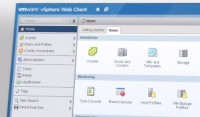
vSphere Web client supports Mozilla Firefox and Chrome natively so you can use the console access to the VM without installing additional software. Internet explorer is supported with browser integration plugin.

First video shows the overview of HTML 5 web based console and the second video shows 5 tips on using the vSphere web client:

  • Bookmarking URLs you're accessing frequently, or send through e-mail to someone else
  • Back and forth buttons to navigate where you've been previously
  • Comparing objects in a list (tabs and subtabs stays consistent)
  • Minimizing wizards and dialog boxes
  • Hiding and restoring Getting started tabs
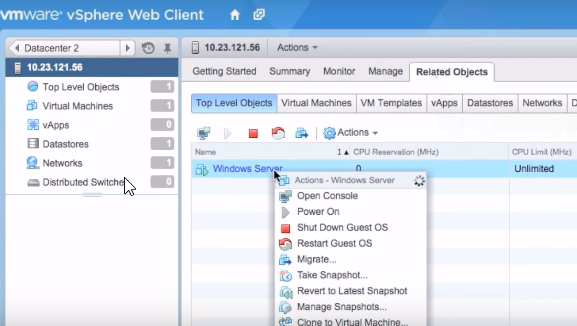
vSphere web client

As being said and as you could probably test already, the vSphere 5.5 web client is much faster, than the previous release. Good!!! More features has been added and the workflows simplified so you can do more in less time. If you haven't tested or don't know how to deploy vCenter server appliance (the management server), you can check out my post – vCenter Server 5.5 Linux Appliance – Install/config ESXi 5.5.

Here is the first video.

Second video shows 5 tips when using the web based client. It's just a short video.

Enjoy…

You can subscribe via e-mail, via RSS or follow me on Twitter @vladan , for future posts.

Source: YouTube TechPubs VMware

More from ESX Virtualization:

  • What is VMware Hot-Add RAM and How to use it?
  • How To Reset ESXi Root Password via Microsoft AD
  • What's New in vSphere 6.5 – New Training Course from PluralSight
  • VMware vCenter Server Standard vs Foundation – Differences
  • How to reset Single Sign-On (SSO) password in vSphere

Stay tuned through RSS, and social media channels (Twitter, FB, YouTube)

5/5 - (1 vote)
facebookShare on Facebook
TwitterPost on X
FollowFollow us
PinterestSave

| Filed Under: Videos

About Vladan SEGET

This website is maintained by Vladan SEGET. Vladan is as an Independent consultant, professional blogger, vExpert x17, Veeam Vanguard x11, VCAP-DCA/DCD, ESX Virtualization site has started as a simple bookmarking site, but quickly found a large following of readers and subscribers.

Connect on: Facebook. Feel free to network via Twitter @vladan.

Private Sponsors


Featured

  • Thinking about HCI? G2, an independent tech solutions peer review platform, has published its Winter 2023 Reports on Hyperconverged Infrastructure (HCI) Solutions.
Click to Become a Sponsor

Most Recent

  • StarWind Under DataCore: How the Acquisition Strengthens HCI for Edge, ROBO, and Existing Users
  • NAKIVO Backup & Replication v11.2.2: Full vSphere 9.1 + Proxmox VE 9.1/9.2 Support (and the Practical Bits That Matter)
  • TMOG Task Manager – The Original Creator of Windows Task Manager Is Back With Something Better
  • ScanPST Gave Up Again: Stellar repair for outlook (Desktop) vs. Online PST Repair Put to the Test
  • Application Backup Repository in Veeam Backup & Replication 13.1 – The Smart NFS Target Many Overlook
  • Veeam Agent for Microsoft Windows 13.1.1.700 (Free Edition) – Technical Overview and What You Can Achieve
  • Free Online EDB to PST Converter: Extract Mailbox Data Without Exchange Server
  • How to Recover Deleted Files from Virtual Machine
  • VMware Workstation Pro 26H1u1 Released – Security Fixes and Secure Boot Platform Key Remediation
  • StarWind Virtual HCI Appliance Free: Turn Your Servers into a Full HCI Cluster Without Spending a Cent

Veeam Vanguard x12

Get new posts by email:


Deals

Support us on Ko-Fi


Buy Me a Coffee at ko-fi.com

Friendly Websites and Blogs

  • vBlog.io
  • VMware Engineer Jobs
 

YouTube

…

Find us on Facebook

ESX Virtualization

…

Copyright © 2026 ·Dynamik-Gen · Genesis Framework · Hosted with HostColor.com