
ESX Virtualization

VMware ESXi, vSphere, VMware Backup, Hyper-V... how-to, videos....

Nakivo Backup and Replication - #1 Backup solution for Virtual, physical, cloud, NAS and SaaS

Menu
  • Certification
      • VCP-VVF Administrator
          • vcp-vvf-2.
        • Close
      • VCP-DCV vSphere 8
          • vcp2024-125.
        • Close
    • Close
  • VMware
    • Configuration Maximums
    • vSphere
      • VVF 9 and VCF 9
      • vSphere 8.0
      • vSphere 7.0
      • vSphere 6.7
      • vSphere 6.5
      • vSphere 6.0
      • Close
    • VMworld
      • VMware EXPLORE 2024
      • VMware EXPLORE 2023
      • VMware EXPLORE 2022
      • VMworld 2019
      • VMworld 2018
      • VMworld 2017
      • VMworld 2016
      • VMworld 2015
      • VMworld 2014
      • VMworld 2013
      • VMworld 2012
      • VMworld 2011
      • Close
    • Close
  • Proxmox
    • Proxmox
    • Close
  • Microsoft
    • Windows Server 2012
    • Windows Server 2016
    • Windows Server 2019
    • Windows Server 2025
    • Close
  • Categories
    • Tips – VMware, Microsoft and General IT tips and definitions, What is this?, How this works?
    • Server Virtualization – VMware ESXi, ESXi Free Hypervizor, VMware vSphere Server Virtualization, VMware Cloud and Datacenter Virtualization
    • Backup – Virtualization Backup Solutions, VMware vSphere Backup and ESXi backup solutions.
    • Desktop Virtualization – Desktop Virtualization, VMware Workstation, VMware Fusion, VMware Horizon View, tips and tutorials
    • How To – ESXi Tutorials, IT and virtualization tutorials, VMware ESXi 4.x, ESXi 5.x and VMware vSphere. VMware Workstation and other IT tutorials.
    • Free – Free virtualization utilities, ESXi Free, Monitoring and free backup utilities for ESXi and Hyper-V. Free IT tools.
    • Videos – VMware Virtualization Videos, VMware ESXi Videos, ESXi 4.x, ESXi 5.x tips and videos.
    • Home Lab
    • Reviews – Virtualization Software and reviews, Disaster and backup recovery software reviews. Virtual infrastructure monitoring software review.
    • Close
  • Partners
    • NAKIVO
    • StarWind
    • Xorux
    • Close
  • This Web
    • News
    • ESXi Lab
    • About
    • Advertise
    • Archives
    • Disclaimer
    • Privacy policy
    • PDFs and Books
    • Close
  • Free

VCS to VCVA Converter – Window to Linux Based vCenter Migration Tool

By Vladan SEGET | Last Updated: March 17, 2015

Shares

There is new utility which has been released by VMware Labs – VCS to VCVA Converter. It's a tool which allows migrate Windows based vCenter to VCVA (preconfigured vCenter on Linux based virtual appliance). The utility has won Fling contest 2013 and has just been released as v. 0.9. One of the requirements is that Widnows based vCenter is installed on a separate SQL database. (SQL express not supported either), which means the a lot of very small shops won't do the move as many of those installations are done with the limited (but free) SQL Express DB.

As with most utilities provided by VMware labs, the tool is not to mean to be used in production. VCS to VCVA converter has limitations and requirements which are quite strict. Think about vCenter as a critical piece of your infrastructure which provides services to other software products you might be using (backup, replication, monitoring tools…), so you might think twice before testing it in production.

It's true that VCSA 6.0 has been announced with the same features and scalability options as Widnows based vCenter (except Update manager, which still needs Windows based system). Usually VCSA was the choice of greenfield deployments and lab testing, because the VCSA is much simpler to deploy, patch or upgrade. But wait, this is just the first release and I'm sure that future releases with much less limitations will follow…

Image courtesy of VMware Labs
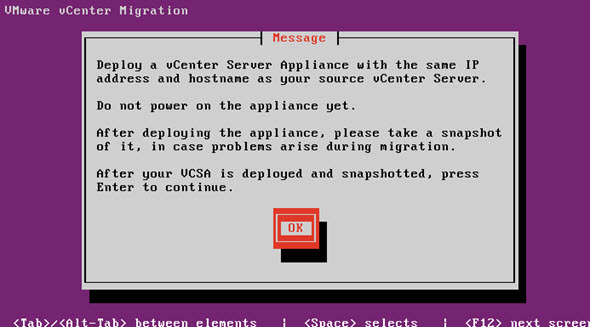
VCS to VCVA Converter

VCS to VCVA Converter – What exactly it does?

Instead of sayin that is a converter I'd rather say that it's a migration tool.

Quote:

It allows customers to migrate from Windows vCenter Server with an External Microsoft SQL Server Database to the vCenter Server Appliance with an embedded vPostgres database. The Fling migrates the vCenter database, roles, permissions, privileges, certificates and inventory service. The target appliance will run at the same IP address as the source vCenter.

System Requirements

  • vCenter Server running on Windows – vSphere 5.5 or greater
  • The Windows vCenter Server and the vCenter Server Appliance should be running the same version (e.g. vCenter Server Windows 5.5u1 to VCSA 5.5u1)
  • The vCenter Server Appliance should be deployed with at least the same number of CPUs and at least the same amount of memory as the Windows vCenter Server host
  • vCenter Components (Inventory Service, vSphere Web Client and VMware Single Sign On) must be running on the same host as the vCenter Server
  • External Microsoft SQL Server 2008R2 or later for the vCenter Database (VCDB)
  • vSphere Web Client Plugins connected registered with an Active Directory user
  • VMware Single Sign On User/Groups are currently not migrated (require re-registration)
  • Migration Appliance must be able to communicate with the Windows vCenter Server Database and its database as well as the new vCenter Server Appliance. The following ports are used for this communication and should be open on the vCenter Windows server and on the VCSA:
    ○ Ports: 22 (ssh), 443 (https), 445 (SMB)

Limitations:

  • Microsoft SQL Server and vCenter Server must be on separate hosts
  • Microsoft SQL Express Database is not supported in version 0.9
  • VMware Single Sign On Users and Groups are not migrated in version 0.9
  • Windows Local Users and Groups are not migrated in version 0.9
  • vCenter Alarm action scripts are not migrated in version 0.9
  • The migration will require some downtime for the vCenter Server
  • Linked Mode configuration is not migrated. Multiple vCenters must be migrated separately
  • Any VMware or 3rd party vSphere Web Client plug-ins (e.g. VUM, NSX) that are running on the same host as the vCenter Server will not be migrated

Thoughts:

I think it's a great deal that VMware continues to push Opensource to their management products and it's not finished yet. With this 0.9 release you can see that this is just first step. I'd expect the future release supporting not only the SQL express DB, but also support for older SQL DBs, and other DBs which are sometimes used for vCenter server (Oracle?). Also it's only one way migration tool. Perhaps folks are Windows lovers at the end, so why not give them possibility to for example migrate back?

Source: VMware Labs

Vote !
Shares

| Filed Under: Free Stuff Tagged With: VCS to VCVA Converter

About Vladan SEGET

This website is maintained by Vladan SEGET. Vladan is as an Independent consultant, professional blogger, vExpert x17, Veeam Vanguard x11, VCAP-DCA/DCD, ESX Virtualization site has started as a simple bookmarking site, but quickly found a large following of readers and subscribers.

Connect on: Facebook. Feel free to network via Twitter @vladan.

Private Sponsors


Featured

  • Thinking about HCI? G2, an independent tech solutions peer review platform, has published its Winter 2023 Reports on Hyperconverged Infrastructure (HCI) Solutions.
Click to Become a Sponsor

Most Recent

  • This is it – Most Popular Blog posts in 2025
  • VMware Releasing VMware ESXi 8.0 Update 3h and VMware vCenter 8.0 Update 3h
  • Veeam VBR 13 and Scality Artesca Integration: A Game-Changer for Cyber-Resilient Backups
  • Reviving Old School Laptops with PrimTux: Battling Obsolescence on a Budget
  • Proxmox Datacenter Manager 1.0 released – a real vCenter Server Alternative?
  • Recovering a Corrupted Exchange Database with Stellar Repair for Exchange
  • Commvault at AWS re:Invent 2025: Pioneering AI-Enhanced Cyber Resilience with Cloud Unity
  • How to Set Up pfSense Community Edition as a Firewall Using VMware Workstation Pro 17 (2025 Edition)
  • HPE Morpheus VM Entreprise and Morpheus VM Essentials updates released – v8.0.11
  • Veeam Backup and Replication Upgrade on Windows – Yes we can

Get new posts by email:


Deals

Support us on Ko-Fi


Buy Me a Coffee at ko-fi.com

Friendly Websites and Blogs

  • vBlog.io
  • VMware Engineer Jobs
 

YouTube

…

Find us on Facebook

ESX Virtualization

…

Copyright © 2025 ·Dynamik-Gen · Genesis Framework · Hosted with HostColor.com
