
ESX Virtualization

VMware ESXi, vSphere, VMware Backup, Hyper-V... how-to, videos....

Nakivo Backup and Replication - #1 Backup solution for Virtual, physical, cloud, NAS and SaaS

Menu
  • Certification
      • VCP-VVF Administrator
          • vcp-vvf-2.
        • Close
      • VCP-DCV vSphere 8
          • vcp2024-125.
        • Close
    • Close
  • VMware
    • Configuration Maximums
    • vSphere
      • VVF 9 and VCF 9
      • vSphere 8.0
      • vSphere 7.0
      • vSphere 6.7
      • vSphere 6.5
      • vSphere 6.0
      • Close
    • VMworld
      • VMware EXPLORE 2024
      • VMware EXPLORE 2023
      • VMware EXPLORE 2022
      • VMworld 2019
      • VMworld 2018
      • VMworld 2017
      • VMworld 2016
      • VMworld 2015
      • VMworld 2014
      • VMworld 2013
      • VMworld 2012
      • VMworld 2011
      • Close
    • Close
  • XCP-NG
    • XCP-NG
    • Close
  • Proxmox
    • Proxmox
    • Close
  • Microsoft
    • Windows Server 2012
    • Windows Server 2016
    • Windows Server 2019
    • Windows Server 2025
    • Close
  • Categories
    • Tips – VMware, Microsoft and General IT tips and definitions, What is this?, How this works?
    • Server Virtualization – VMware ESXi, ESXi Free Hypervizor, VMware vSphere Server Virtualization, VMware Cloud and Datacenter Virtualization
    • Backup – Virtualization Backup Solutions, VMware vSphere Backup and ESXi backup solutions.
    • Desktop Virtualization – Desktop Virtualization, VMware Workstation, VMware Fusion, VMware Horizon View, tips and tutorials
    • How To – ESXi Tutorials, IT and virtualization tutorials, VMware ESXi 4.x, ESXi 5.x and VMware vSphere. VMware Workstation and other IT tutorials.
    • Free – Free virtualization utilities, ESXi Free, Monitoring and free backup utilities for ESXi and Hyper-V. Free IT tools.
    • Videos – VMware Virtualization Videos, VMware ESXi Videos, ESXi 4.x, ESXi 5.x tips and videos.
    • Home Lab
    • Reviews – Virtualization Software and reviews, Disaster and backup recovery software reviews. Virtual infrastructure monitoring software review.
    • Close
  • Partners
    • NAKIVO
    • StarWind
    • Xorux
    • Close
  • This Web
    • News
    • ESXi Lab
    • About
    • Advertise
    • Archives
    • Disclaimer
    • Privacy policy
    • PDFs and Books
    • Close
  • Free

Performance best practices for SRM 4

By Vladan SEGET | Last Updated: February 15, 2017

Shares

New pdf from VMware available for SRM 4 for performance and best practices.

You can find the whitepaper at the VMware Website on the product page for SRM 4.
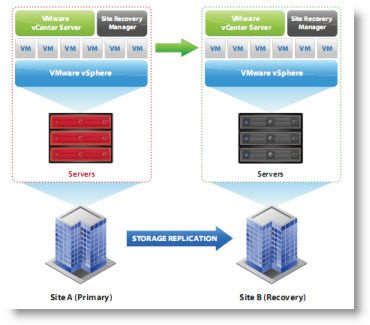
VMW-ARE-srm-4-best-practicesVMware vCenter Site Recovery Manager 4.0 is one of the products beeing used to protect against a disaster of entire datacenter. The product can recover in automated recovery steps to a failback remote site.

The beauty of the product is that you can do a recovery plan and do an actual test of your plan before the disaster actually happens – in non disruptive mode. It means without your production environment beeing affected. You can simulate the fail over to the remote site.

A new white paper, VMware vCenter Site Recovery Manager 4.0 Performance and Best Practices, is now available.

You will find out how to best setup SRM 4 in FC, iSCSI or NFS environments.

Also:

Site Recovery Manager 4.0 also ofers host failure resiliency (i.e. if any ESX host hosting a placeholder virtual
machine does not respond during a recovery because of any reason such as that the ESX host does not have
access to the recovered datastore, then Site Recovery Manager selects other available hosts to recover that
virtual machine on).

Source: VMware

Vote !
Shares

| Filed Under: Backup Tagged With: SRM 4 best practices, VMware SRM 4, VMware SRM 4 Performance best practices

About Vladan SEGET

This website is maintained by Vladan SEGET. Vladan is as an Independent consultant, professional blogger, vExpert x17, Veeam Vanguard x11, VCAP-DCA/DCD, ESX Virtualization site has started as a simple bookmarking site, but quickly found a large following of readers and subscribers.

Connect on: Facebook. Feel free to network via Twitter @vladan.

Comments

  1. best sports outdoors says

    May 17, 2017 at 2:05 pm

    This is an awesome and great item. Working exactly as expected product!
    It took me about an hour to get a grip on it, but after that,
    it was the best sports outdoors thing I have ever ridden. I
    highly recommend this to anyone who wants a Balancing Scooter.

Private Sponsors


Featured

  • Thinking about HCI? G2, an independent tech solutions peer review platform, has published its Winter 2023 Reports on Hyperconverged Infrastructure (HCI) Solutions.
Click to Become a Sponsor

Most Recent

  • Windows Server 2025 latest updates and Native NVMe Support
  • This is it – Most Popular Blog posts in 2025
  • VMware Releasing VMware ESXi 8.0 Update 3h and VMware vCenter 8.0 Update 3h
  • Veeam VBR 13 and Scality Artesca Integration: A Game-Changer for Cyber-Resilient Backups
  • Reviving Old School Laptops with PrimTux: Battling Obsolescence on a Budget
  • Proxmox Datacenter Manager 1.0 released – a real vCenter Server Alternative?
  • Recovering a Corrupted Exchange Database with Stellar Repair for Exchange
  • Commvault at AWS re:Invent 2025: Pioneering AI-Enhanced Cyber Resilience with Cloud Unity
  • How to Set Up pfSense Community Edition as a Firewall Using VMware Workstation Pro 17 (2025 Edition)
  • HPE Morpheus VM Entreprise and Morpheus VM Essentials updates released – v8.0.11

Get new posts by email:


Deals

Support us on Ko-Fi


Buy Me a Coffee at ko-fi.com

Friendly Websites and Blogs

  • vBlog.io
  • VMware Engineer Jobs
 

YouTube

…

Find us on Facebook

ESX Virtualization

…

Copyright © 2026 ·Dynamik-Gen · Genesis Framework · Hosted with HostColor.com
