
There is a new release of VMware vSphere PowerCLI 6.0 R2. The more and more popular command-line and scripting tool built on Windows PowerShell adds several new features and improvements like for example to gather informations about the underlying ESXi hardware (with cmdlets Get-VMHostHardware), new VASA cmdlets or possibility to connect vRealize Operations Manager (via Connect-OMServer).
This vSphere PowerCLI 6.0 R2 also supports the newly released vCloud Director 8.0 or SRM 6.1. Many new cmdlets for storage has been added, for NFS, for VASA and for VAIO Filtering framework. VAIO offers partners the ability to put their technology directly into the IO stream of a VM through a filter that intercepts data before it is committed to disk. For those of you interested in the VAIO program (it's for partners) you should check this post from VMware. The VAIO technology will benefit to users in the months to come.
Let's get back to our vSphere PowerCLI 6.0 R2 release.
What's new in vSphere PowerCLI 6.0 Release 2 ?
In this version, the License snap-in has been converted to a PowerShell module. As part of this change, PowerCLI scripts should be adjusted, where applicable, to check for module existence instead of snap-in existence. In this release the PowerCLI modules have also been moved to the PSModulePath environment variable allowing all users of a machine to access them.
A new module and cmdlets have been added to this release to allow access to vRealize Operations Manager. Access to the entire public API is available from the $global:DefaultOMServers variable using the ExtensionData property and full cmdlets have been included exposing the following areas:
Connection: Connect-OMServer, Disconnect-OMServer
Alerts: Get-OMAlert, Get-OMAlertDefinition, Get-OMAlertSubType, Get-OMAlertType, Set-OMAlert
Recommendations: Get-OMRecommendation
Resources: Get-OMResource
Statistics: Get-OMStat, Get-OMStatKey
User Management: Get-OMUser
vSphere Update Manager PowerCLI is no longer a separate downloadable component or installer and is now included in the core PowerCLI installer. It is an optional component that is selected to be installed by default in the PowerCLI installation wizard, which allows for simpler and quicker deployment and management of VMware products through PowerCLI.
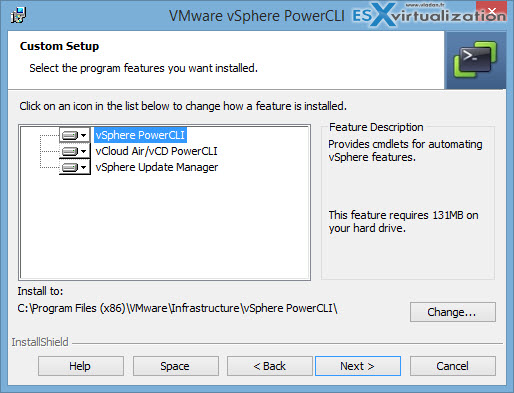
Enhancements have also been made to ensure a better backwards compatibility experience of this module, which now supports vSphere Update Manager 5.5 and later.
Note: If you have an earlier version of vSphere Update Manager PowerCLI installed on your machine, you must uninstall it before installing PowerCLI 6.0 Release 2.
- vCloud Air On-Demand – You can now connect to and manage vCloud Air On-Demand (vCA) instances by using the VCA parameter added to Connect-PIServer and the new Get-PIComputeInstance cmdlet to list all available compute instances. Existing cmdlets for managing vCloud Director and vCloud Air can be used to work with vCloud Air On-Demand where applicable. In addition to these enhancements, a new cmdlet named Get-OrgVdcNetwork has been added to enhance the ability to work with organization vDC networks.
- ESXi Hardware – New cmdlets have been added to work with ESXi host hardware. These cmdlets give the ability to query ESXi hosts and provide core system and hardware information. Two new cmdlets have been added to work with this functionality:
Get-VMHostHardware retrieves host information.
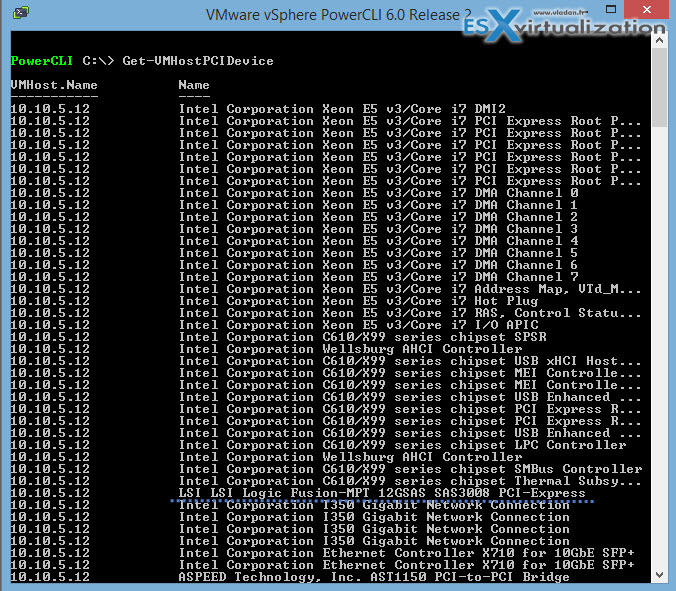
Get-VMHostPCIDevice lists all PCI devices.
Quick screenshot from the lab showing the specs of the PCI slots from the Supermicro X10SRH-CLN4F I'm using.
- Storage Module Improvements – A number of enhancements have been made to the Storage module introducing new cmdlets for working with VMware vSphere API for Storage Awareness (VASA), NFS version 4.1, and updated vSphere API for IO Filtering (VAIO) cmdlets. The following new additional cmdlets are now available:
New VASA cmdlets : New-VasaProvider, Remove-VasaProvider, Get-VasaProvider, and Get-VasaStorageArray
New NFS cmdlets: New-NfsUser, Remove-NfsUser, Get-NfsUser, and Set-NfsUser
New VAIO filtering cmdlet: Set-VAIOFilter
For ease of use and quicker interaction with the interactive console, the PowerCLI starting directory has now been changed from the full installation path of PowerCLI to the root of the installation drive.
- VMware SRM 6.1 Support – PowerCLI has been updated to support VMware vCenter Site Recovery Manager (SRM) 6.1 and additional functionality has been added to discover SRM servers when they are deployed in a “shared recovery model”.
- vCloud Director 8 Support – PowerCLI supports the VMware vCloud Director 8.0 features which are provided by the backwards compatibility of the vCloud Director API.
You can download PowerCLI 6.0 R2 from here.
Source: VMware





thanks for the info, do you have info install VMware vSphere PowerCLI 6.5 and work with vcenter appliance?