ESX Virtualization

VMware ESXi, vSphere, VMware Backup, Hyper-V... how-to, videos....

Nakivo Backup and Replication - #1 Backup solution for Virtual, physical, cloud, NAS and SaaS

Menu
  • Certification
      • VCP-VVF Administrator
          • vcp-vvf-2.
        • Close
      • VCP-DCV vSphere 8
          • vcp2024-125.
        • Close
    • Close
  • VMware
    • Configuration Maximums
    • vSphere
      • VVF 9 and VCF 9
      • vSphere 8.0
      • vSphere 7.0
      • vSphere 6.7
      • vSphere 6.5
      • vSphere 6.0
      • Close
    • VMworld
      • VMware EXPLORE 2024
      • VMware EXPLORE 2023
      • VMware EXPLORE 2022
      • VMworld 2019
      • VMworld 2018
      • VMworld 2017
      • VMworld 2016
      • VMworld 2015
      • VMworld 2014
      • VMworld 2013
      • VMworld 2012
      • VMworld 2011
      • Close
    • Close
  • XCP-NG
    • XCP-NG
    • Close
  • Proxmox
    • Proxmox
    • Close
  • Microsoft
    • Windows Server 2012
    • Windows Server 2016
    • Windows Server 2019
    • Windows Server 2025
    • Close
  • Categories
    • Tips – VMware, Microsoft and General IT tips and definitions, What is this?, How this works?
    • Server Virtualization – VMware ESXi, ESXi Free Hypervizor, VMware vSphere Server Virtualization, VMware Cloud and Datacenter Virtualization
    • Backup – Virtualization Backup Solutions, VMware vSphere Backup and ESXi backup solutions.
    • Desktop Virtualization – Desktop Virtualization, VMware Workstation, VMware Fusion, VMware Horizon View, tips and tutorials
    • How To – ESXi Tutorials, IT and virtualization tutorials, VMware ESXi 4.x, ESXi 5.x and VMware vSphere. VMware Workstation and other IT tutorials.
    • Free – Free virtualization utilities, ESXi Free, Monitoring and free backup utilities for ESXi and Hyper-V. Free IT tools.
    • Videos – VMware Virtualization Videos, VMware ESXi Videos, ESXi 4.x, ESXi 5.x tips and videos.
    • Home Lab
    • Reviews – Virtualization Software and reviews, Disaster and backup recovery software reviews. Virtual infrastructure monitoring software review.
    • Close
  • Partners
    • NAKIVO
    • StarWind
    • Xorux
    • Close
  • This Web
    • News
    • ESXi Lab
    • About
    • Advertise
    • Archives
    • Disclaimer
    • Privacy policy
    • PDFs and Books
    • Close
  • Free

Free Clipboard manager called Remembr – Friday Freebie

By Vladan SEGET | Last Updated: April 17, 2015

Today we'll have a look at this is a very lightweight Freeware called Remembr which allows keeping more than one item in your clipboard – it's Free Clipboard Manager. That's the always problematic when you can only keep single item in the clipboard that next time you copy some text you actually overwrite (and loose) the previous one.

The software has probbably nothing to do with virtualization, but rather with bloging and editing texts and rapports. So even if it directly has no relation with virtualization, it can be usefull for an IT admin as every IT and virtualization admin has to write rapports and edit text sometimes.

Sure we do hate this. But to make things easier I like to have tools for as many things as I can. Hence the clipboard tools as clipboard is one of the things you usually use multiple times through the day (at least we do). That's why we have already tested one of those clipboard managers called ClipX in the past (with good results so far) and this time we give it a shoot with Remembr.

The creators of Remembr are known for other apps, like JavaRa which is effective way to deploy, update and remove the Java Runtime Environment (JRE). It can assist in repairing or removing Java when other methods fail. Or other utility called CCEnhancer which turbocharges CCcleaner with over 1000 new programs and parameters.
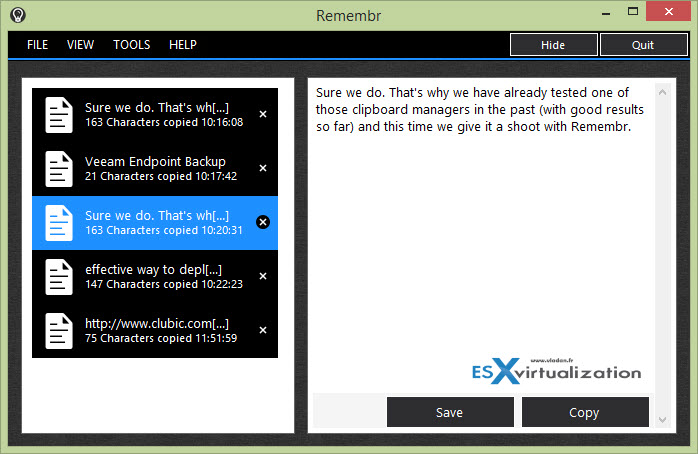
Remembr - A free Clipboard Manager

Quote:

Don’t you hate it when you copy something to the clipboard, then accidentally overwrite it with something else? Remembr preserves everything you copy to the clipboard so that you can recover it later.

Very simple to use, check it out.

New in this release of Remembr:

  • Added a ‘Clear System Clipboard’ tool
  • Added a save option for preserved images and text
  • Fixed issue where screenshots made in rapid succession were not saved
  • Fixed issues with dialog boxes being too large
  • The most recently added item is now highlighted when Remembr is opened

The latest update can be downloaded from the official Remembr page.

Do you know a small tool which makes you life easier on your daily tasks and you want to share? Don't hesitate to contact me through twitter (@vladan) or other social media channels. Enjoy and share -:).

Vote !
facebookShare on Facebook
TwitterPost on X
FollowFollow us
PinterestSave

| Filed Under: Server Virtualization Tagged With: Remembr Clipboard manager

About Vladan SEGET

This website is maintained by Vladan SEGET. Vladan is as an Independent consultant, professional blogger, vExpert x17, Veeam Vanguard x11, VCAP-DCA/DCD, ESX Virtualization site has started as a simple bookmarking site, but quickly found a large following of readers and subscribers.

Connect on: Facebook. Feel free to network via Twitter @vladan.

Comments

  1. Asem Shakra says

    April 20, 2015 at 10:32 am

    nice tool, need it so much thanks a lot

Private Sponsors


Featured

  • Thinking about HCI? G2, an independent tech solutions peer review platform, has published its Winter 2023 Reports on Hyperconverged Infrastructure (HCI) Solutions.
Click to Become a Sponsor

Most Recent

  • Free Online EDB to PST Converter by Stellar: A Practical Tool for Extracting Exchange Mailboxes Without a Live Exchange Server
  • How to Recover Deleted Files from Virtual Machine
  • VMware Workstation Pro 26H1u1 Released – Security Fixes and Secure Boot Platform Key Remediation
  • StarWind Virtual HCI Appliance Free: Turn Your Servers into a Full HCI Cluster Without Spending a Cent
  • Veeam Backup & Replication 13.1: The Features That Actually Matter (and Why You Should Move Now)
  • How to update your ESXi 7.x or 8.x to the latest ESXi 8.0U3k via command line
  • Veeam Live OS ISO: How to Recover Access to a Locked Veeam Software Appliance (Admin Guide)
  • AnduinOS: A Clean, Windows-Friendly Ubuntu Distro That Brings New Life to Older PCs
  • Veeam Backup & Replication 13.1 Released Today – Major Update to the Veeam Data Platform
  • StarWind V2V Converter: The Free Swiss Army Knife for VM Migrations and Its Powerful Automation Capabilities

Veeam Vanguard x12

Get new posts by email:


Deals

Support us on Ko-Fi


Buy Me a Coffee at ko-fi.com

Friendly Websites and Blogs

  • vBlog.io
  • VMware Engineer Jobs
 

YouTube

…

Find us on Facebook

ESX Virtualization

…

Copyright © 2026 ·Dynamik-Gen · Genesis Framework · Hosted with HostColor.com