
Time keeping for Windows VM’s best practices
Time keeping is one of the essential in VI.
Whether you are running your DC’s as a VMs or not, sooner or later you might be, so this article presents best practices for configuring time keeping in Windows Guest operating systems. There is still an older document, still valuable, with more information – see Timekeeping in VMware Virtual Machines (PDF). And also another excelent PDF called Virtualizing a Windows Active Directoy Domain Infrastructure - which goes even further and gives you much more details and considers all the aspects (DNS, replication, planning disaster recovery etc…) when you want to go All Virtual with Windows Domains.
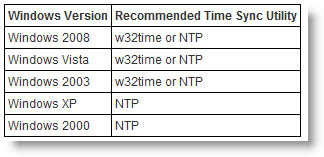
The update is from December 7th when it’s been published by VMware. So this is the new best practice of time keeping in Windows VMs. (KB1318)
You can use either NTP or w32time. Thus NTP is provided by third party utilities, and w32time is included already with windows VMs.
Fist to do is to configure w32time to use an NTP server. Vmware recommends using folowing registry values when modifying properties:
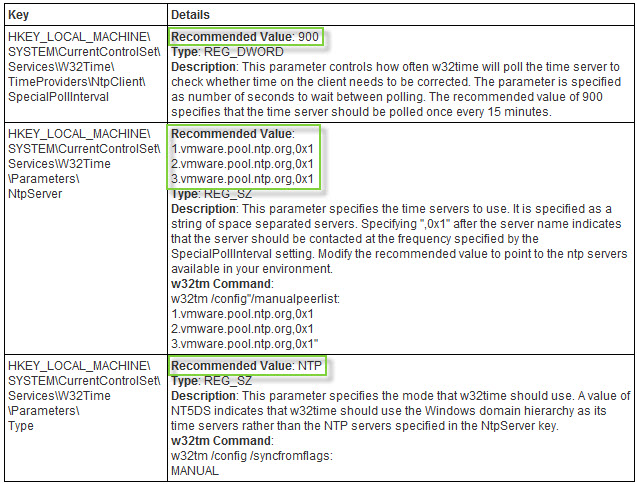
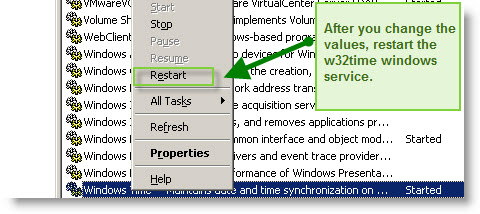
After that you must restart the windows time service. You can do it in the services.msc MMC snap in or you can do it in the command line by typing: “net stop w32time” and after “net start w32time“.
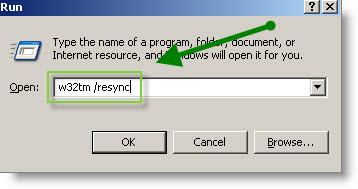
After restarting the w32time service, run the command w32tm /resync to force w32time to resync the time.
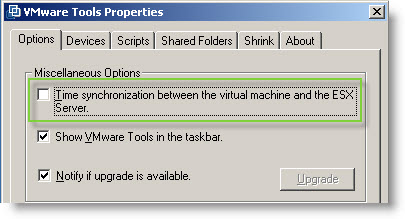
And the last thing, in your Windows VM just uncheck in the properties of VMware tools the checkbock for Time synchronization between the Virtual Machine and your Esx server. Please note that does not disable the tools sync on startup.
See the VMware KB article on how-to configure Time keeping for linux guests.
Source: VMware KB1318
Related Posts :
There is a new doc concerning some Performance Best Practices for vSphere. This book provides t ...
New pdf from VMware available for SRM 4 for performance and best practices. You can find the wh ...
VMware vCenter Site Recovery Manager Performance and Best Practices White Paper has been release ...
VMware vCenter Mobile Access - vCMA allows you to monitor and manage VMware Infrastructure from ...
Front end for VCB in beta... If you don't know all the vcb commands you can use a front end con ...
Other posts from Server Virtualization
- Disable web access on VMware vCenter
- VMware ESX - Configuration of Service console via CLI
- Basic VMware ESX CLI networking commands
- How to change the default location of updates in vCenter
- Did you know that ESX 3.5 general support will end in less than 90 days?
- Starwind iSCSI HA Connection to ESX Server
- See a list of Storage Array Type Plugins on ESX Server
- New whitepaper released on PVSCSI
- Enable Jumbo Frames in ESXi 4
- How-to troubleshoot iSCSI connection to your SAN
- Starwind with ISCSI SAN Software can do High Availability for you...
- Overview Video from the new vSphere Pro video training from Train Signal
- New upgrade webpage for ESXi 4 pushes us to the right direction?
- You know how to collect diag information when your ESXi does PSOD?
- Use PVSCSI or not for lower intensive workloads
- Hardening guides for vSphere 4
- NTLDR missing - silly but can happend
- How To Shrink VMware Virtual Disk Files and disable shrinking
- vSphere Quick Start guide bonus download..
- ESXi - the past, the present and the future
- Farm commander - management tool for VI and TS or Citrix Farms
- How to collect log information from vCenter Server 4
- How to know where is my VM if vCenter is down?
- New patches for ESX 4 and ESXi 4
- Use VMware Converter to import 3rd party VMs, for example Virtual Iron's VMs
- Windows XP installation as a VM - trouble to see the disk or not?
- Vmware HCL for ESXi 4
- Virtu-Al releasing 3rd update of PowerPack
- Not even tried Appspeed and new version is already available!
- Starwind active-active HA availability storage


Time keeping for Windows VM’s best practices (ESX Virtualization) http://bit.ly/8tihHl
This comment was originally posted on Twitter
blog post: Time keeping best practices in Windows VMs…@vladan: http://ping.fm/1bxjl
This comment was originally posted on Twitter
What about the vmtools mechanism for time keeping?
Why doesn’t Vmware recommend or even mention its own solution?
In the past there were recomendations for the vmtools way…
It’s because…..”However, at this writing, VMware Tools clock synchronization has a serious limitation: it cannot correct the guest clock if it gets ahead of real time (except in the case of NetWare guest operating systems).”
