
Today is an exciting day for Veeam users worldwide. Veeam Backup & Replication 13.1 (part of the Veeam Data Platform) became generally available on July 29, 2026. This point release builds directly on the significant architectural changes introduced in v13 and delivers refined capabilities, expanded workload support, improved stability, security enhancements, and better upgrade experiences.
If you are still on v12.x or running early v13 builds, this release is worth serious consideration. In my lab environments and across various customer deployments I have advised on over the years, these .1 releases often provide the maturity and polish needed for broad production adoption. Veeam continues to push the boundaries of data resilience while addressing real-world operational feedback. Let’s take a detailed technical look at what 13.1 brings to the table.
Core Improvements in Veeam Backup & Replication 13.1
Veeam Data Platform v13.1 focuses on closing protection gaps, accelerating recovery, and enhancing overall manageability. Key areas of enhancement include:
- Broader Workload Coverage and Platform Support: Continued expansion across VMware vSphere, Microsoft Hyper-V, Nutanix AHV, and agent-based protection for physical, cloud, and other environments. Refinements address Linux guest processing, proxy behaviors, and application-aware consistency for modern databases and services.
- Cyber Resilience and Security Posture: Building on Threat Hunter, immutable storage options, and granular RBAC introduced earlier, 13.1 includes targeted fixes and improvements that further harden the solution against ransomware and insider risks. Enhanced auditing and integration points with SIEM systems make compliance and incident response more straightforward.
- Performance and Scalability Tweaks: Optimizations in backup engine components, transport modes, and repository handling help reduce resource consumption while supporting larger job counts and bigger data volumes. BLAKE3 hashing and gRPC communications (where applicable) contribute to noticeable efficiency gains.
New hypervisors support / Expanded in v13.1
- Red Hat OpenShift Virtualization
- Citrix XenServer
- Vates XCP-ng
- Sangfor aSV (and related platforms)
The release notes are comprehensive and transparent. They provide clear guidance on known issues, limitations, and workarounds, which helps administrators plan deployments accurately.
Deployment of the Veeam Software Appliance (VSA)
One of the standout features of the v13 family, further refined in 13.1, is the Veeam Software Appliance (VSA). This pre-built, pre-hardened, JeOS-based all-in-one backup server (available as ISO or OVA) represents Veeam’s strategic direction for new deployments.
Deploying the VSA is remarkably straightforward compared to traditional Windows installations. You can deploy it on physical hardware, as a VM on any supported hypervisor, or in cloud environments. The appliance comes with automated disk partitioning optimized for performance and security, following DISA STIG hardening guidelines out of the box. This includes restricted SSH access, enforced MFA for sensitive operations, low-privilege service accounts, and an immutable built-in repository by default.
During deployment, you define basic networking, storage allocation, and the initial administrator account. Registration of additional components (proxies, repositories, gateways) uses passwordless certificate-based thumbprint validation — ideal for scaled or air-gapped setups. The companion Veeam Infrastructure Appliance (VIA) allows dedicated role-based deployments for larger environments.
In Premium editions, you can cluster VSAs in active/passive HA mode with configuration database replication. This provides true resilience for the backup server itself. From my testing, failover is reliable with low network latency tolerance, and Veeam ONE can serve as a witness.
Thanks Grok -:)
For ROBO sites or smaller organizations, a single VSA can handle thousands of workloads with petabyte-scale storage when properly sized. The reduced OS maintenance overhead (no manual Windows patching) and built-in immutability make it particularly attractive in ransomware-conscious environments. Licensing is handled via Veeam Universal License (VUL).If you are planning a fresh install with 13.1, I highly recommend starting with the VSA ISO/OVA rather than a traditional Windows server deployment.
Wo without further wait, start your download engines!

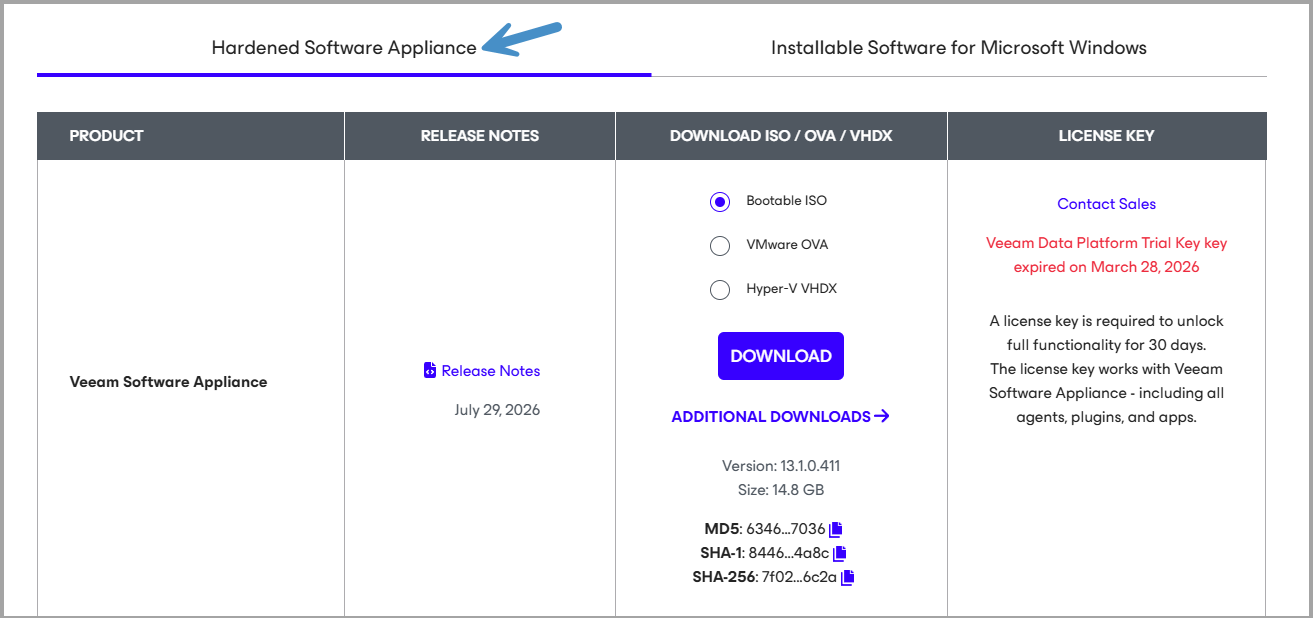
Here is the screenshot from Veeam website, pick the Hardened software appliance.
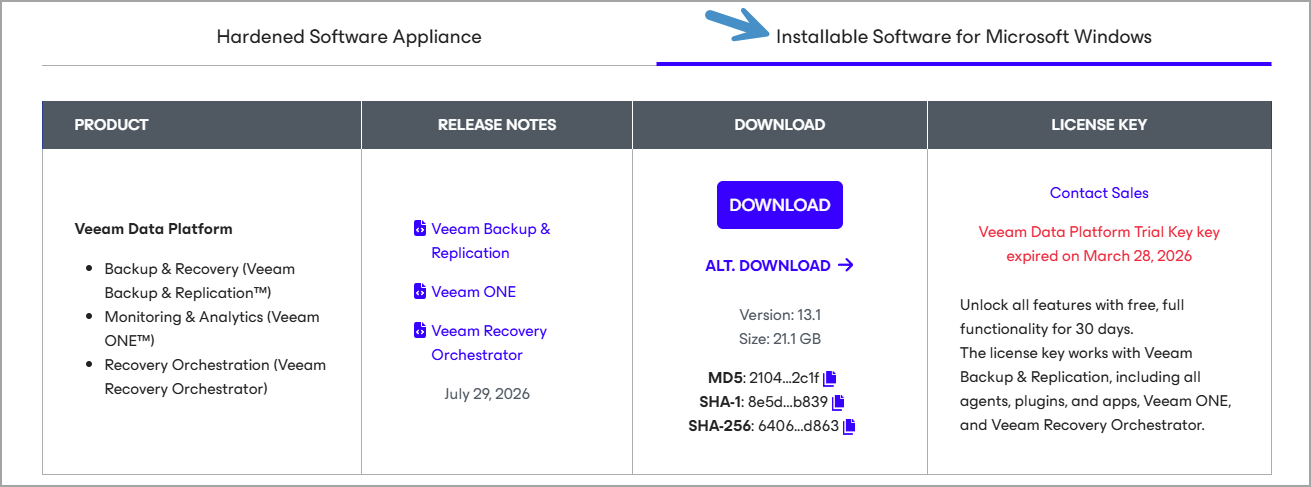
or the Windows version…
Technical Details and Known Considerations
The release notes highlight several environment-specific notes that administrators should review carefully:
For VMware Environments:
- Potential issues with Linux machines containing encoded spaces in fstab after upgrading from v12.
- RHEL 10 proxy requirements (libcrypt.so.1 library).
- Limitations around replication of encrypted VMs with datasets on newer vSphere versions, hot-add behaviors, DirectSAN multipathing, and specific disk naming conventions (e.g., @ symbol).
- DNS resolution requirements for certain Linux proxies and virtual proxy self-protection caveats.
Hyper-V and Microsoft Workloads:
- Behavior changes with VM configuration versions on newer hosts.
- VSS and checkpoint considerations, especially for domain controllers and specific guest OS versions.
- Guidance for Azure Local (formerly Azure Stack HCI) with WDAC policies.
CDP and Advanced Replication:
- Universal CDP refinements, with notes on feature availability compared to traditional CDP (e.g., planned failover and certain seeding options).
- I/O filter deployment considerations related to DNS and storage provider status.
General Infrastructure Notes:
- Improvements to object storage integrations, tape support (including LTO-10 advancements in the platform), and recovery workflows such as faster Linux file-level restores and enhanced SureBackup.
These details demonstrate Veeam’s commitment to transparency. While no platform is entirely limitation-free, the provided workarounds are practical and well-documented.
Upgrade Path and Practical Recommendations
Upgrading to 13.1 should be smoother than the initial jump to v13.
My standard advice remains:
- Backup Everything — Start with a full configuration backup and test its restore.
- Lab Validation — Replicate your production job mix, proxy types, and repository configurations in a test environment.
- Phased Rollout — Upgrade non-critical jobs first, monitor with Veeam ONE, then proceed to business-critical workloads.
- Windows vs VSA Strategy — Existing Windows-based v13 installations remain fully supported. You do not need to rush a migration to the appliance model. However, new projects or refreshes should lean toward VSA for its security and operational benefits. Future self-service migration tooling is expected to improve further with this release family.
- Post-Upgrade Tasks — Re-scan protection groups where needed, validate proxy assignments, and test key restores (full VM, file-level, application items).
Pay special attention to Linux proxy configurations and any custom scripts or pre/post processing.
In my experience, environments that combine VSA deployments with immutable object storage repositories (S3-compatible with immutability) and strong RBAC/SSO achieve the best balance of simplicity and security.
Final Words
Veeam Backup & Replication 13.1, released yesterday on July 29, 2026, is a timely and valuable update to the Veeam Data Platform. It reinforces Veeam’s leadership in unified data protection by delivering more control, faster recovery, broader coverage, and stronger defenses against modern threats.
The platform’s evolution toward hardened Linux appliances, modern web-based management, AI-assisted intelligence features, and extensive workload support makes it a compelling choice for organizations of all sizes. Whether you manage a few hundred VMs or multi-petabyte enterprise environments spanning on-premises, cloud, and hybrid setups, 13.1 provides tangible improvements in RTO, RPO, and operational efficiency.I recommend downloading the new version today and scheduling lab testing as soon as possible. Explore the VSA deployment model if you haven’t already — it truly changes the operational experience for the better.
As always, refer to the official release notes, What’s New guide, and Veeam Knowledge Base for the most current information tailored to your infrastructure. More hands-on posts covering specific 13.1 features, upgrade experiences, and performance benchmarks will follow as I dive deeper. Congratulations to the Veeam team on another strong release!
Resources:
More posts from ESX Virtualization:
- Veeam Bare Metal Recovery from Recovery partition
- Veeam Backup and Replication Upgrade on Windows – Yes we can
- Securing Your Backups On-Premises: How StarWind VTL Fits Perfectly with Veeam and the 3-2-1 Rule
- Winux OS – Why I like it?
- VMware Alternative – OpenNebula: Powering Edge Clouds and GPU-Based AI Workloads with Firecracker and KVM
- Another VMware Alternative Called Harvester – How does it compare to VMware?
- VMware vSphere 9 Standard and Enterprise Plus – Not Anymore?
- VMware vSphere Foundation (VVF 9) and VMware Cloud Foundation (VCF 9) Has been Released
- Vulnerability in your VMs – VMware Tools Update
- VMware ESXi FREE is FREE again!
- No more FREE licenses of VMware vSphere for vExperts – What’s your options?
- VMware Workstation 17.6.2 Pro does not require any license anymore (FREE)
- Two New VMware Certified Professional Certifications for VMware administrators: VCP-VVF and VCP-VCF
- Patching ESXi Without Reboot – ESXi Live Patch – Yes, since ESXi 8.0 U3
- Update ESXi Host to the latest ESXi 8.0U3b without vCenter
- Upgrade your VMware VCSA to the latest VCSA 8 U3b – latest security patches and bug fixes
- VMware vSphere 8.0 U2 Released – ESXi 8.0 U2 and VCSA 8.0 U2 How to update
- What’s the purpose of those 17 virtual hard disks within VMware vCenter Server Appliance (VCSA) 8.0?
- VMware vSphere 8 Update 2 New Upgrade Process for vCenter Server details
- What’s New in VMware Virtual Hardware v21 and vSphere 8 Update 2?
- vSphere 8.0 Page
- ESXi 7.x to 8.x upgrade scenarios
- VMware vCenter Server 7.03 U3g – Download and patch
- Upgrade VMware ESXi to 7.0 U3 via command line
- VMware vCenter Server 7.0 U3e released – another maintenance release fixing vSphere with Tanzu
- What is The Difference between VMware vSphere, ESXi and vCenter
- How to Configure VMware High Availability (HA) Cluster
Stay tuned through RSS, and social media channels (Twitter, FB, YouTube)





Leave a Reply