
Over the years, I've covered countless tools that make our lives as virtualization admins easier, especially when it comes to migrations. If you've been in the game since the early VMware days (or Hyper-V, or even Proxmox these days), you know how painful V2V or P2V conversions can get. Different disk formats, hypervisor quirks, downtime worries, and the eternal struggle with storage space.
While previously, the use of VMware converter was one of the things, nowadays, we’re facing massive VMware exit and the situation isn’t going to change anytime soon. While VMware converter moves workloads into VMware only. So rather useless today as everybody is looking to move elsewhere and as you know, VMware converter only converts into VMware. (P2V or V2V).
Enter StarWind V2V Converter (also known as P2V Migrator). It's a completely free tool from StarWind Software that has been quietly saving admins headaches for years. Unlike some built-in converters that are one-way or limited, this one handle bi-directional conversions across major platforms and does it smartly – often without extra copies or excessive downtime. In this detailed write-up, I'll walk you through what it is, why it stands out, step-by-step usage (GUI and CLI), and especially its automation capabilities that make it scriptable for larger environments.
Why StarWind V2V Converter Matters in 2025/2026
Virtualization isn't static. Companies switch hypervisors, move to the cloud, consolidate, or test new platforms like Proxmox. StarWind V2V supports:
- Hypervisors: VMware ESXi, Microsoft Hyper-V, Proxmox VE, oVirt, Oracle VirtualBox.
- Formats: VHD/VHDX, VMDK (various provisioning), QCOW2, IMG, RAW.
- Scenarios: V2V, P2V, V2C (to Azure/AWS), C2C, P2C, and direct server-to-server conversions.
Key advantages I've appreciated in practice:
- Direct conversions: No need to copy the entire VM to an intermediate location first. It pulls from source and writes to target on-the-fly. Huge time and space saver.
- “Hot” migration: Source VM can stay running while it syncs changes (snapshot-based).
- Free forever: No licensing tricks. Download, use, done.
- P2V support: Turns physical machines into VMs reliably.
Recent updates (Version 9+) added multi-VM conversions in GUI, better cloud support, and most importantly for us automation fans – the CLI.
GUI Usage: Step-by-Step for Beginners
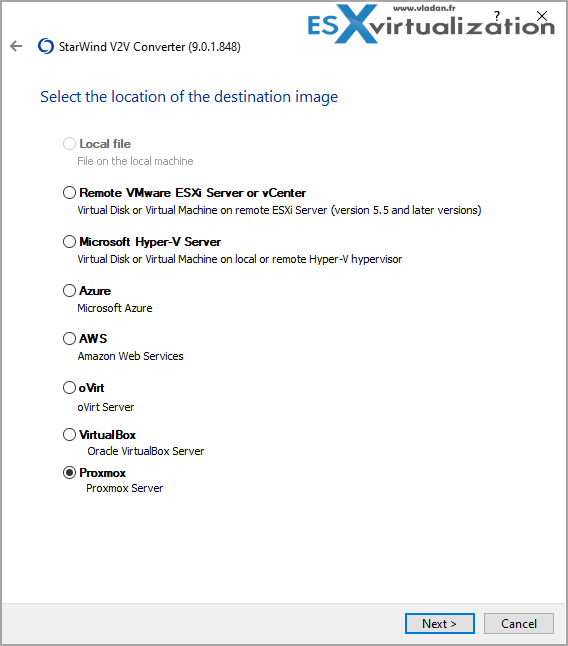
The wizard-driven GUI is perfect for one-off tasks. Here's how a typical Hyper-V to ESXi migration looks (one of the most common scenarios I see):
- Download and Install: Grab it from the official StarWind site (free registration for the download link). Install on a Windows machine with network access to source/target.
- Launch the Wizard: Select your conversion type (e.g., “Virtual to Virtual” or direct host-to-host).
- Source Selection: Choose host type (e.g., Microsoft Hyper-V). Enter credentials and select the VM. For local files, point to VHDX/VMDK.
- Target Configuration: Pick destination (ESXi), provide host details, datastore path, VM name, and disk type (thin/thick). Specify OS type if needed (Windows/Linux).
- Options and Review: Check for driver injection (useful for some targets like oVirt), generation (Gen1/Gen2 for Hyper-V), etc. Preview the plan.
- Execute: Start the conversion. Monitor progress. For hot migrations, it handles delta syncs.
- Post-Conversion: Power on the new VM, update network/settings, and test. Often, it boots straight into repair mode if needed for drivers.
I've used this for ESXi, Hyper-V, to Proxmox, and local file conversions. It's reliable and doesn't require deep expertise for basic jobs.
Pro Tip: Always test in a lab first. Check compatibility with your specific VM (e.g., UEFI vs BIOS, paravirtual drivers).
Automation Capabilities: Where It Shines for Scale
For single VMs, GUI is fine. But when migrating dozens or integrating into scripts/workflows, the Command Line Interface (CLI) is a game-changer. Added/enhanced in recent versions, it turns V2V into something you can batch, schedule, or orchestrate with PowerShell/BAT files.
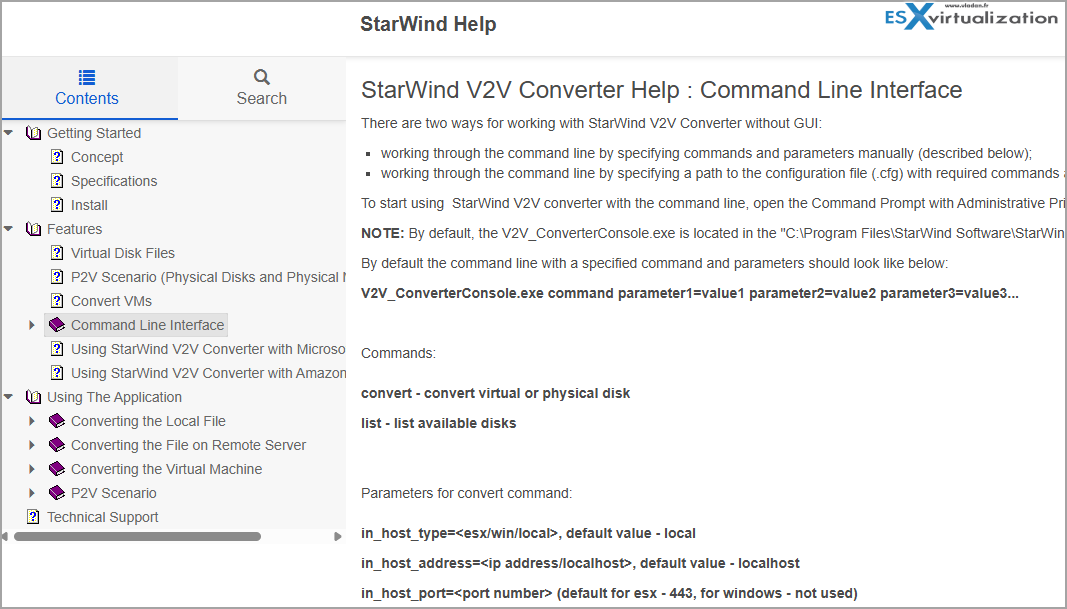
StarWind V2V Converter provides robust automation capabilities through its Command Line Interface (CLI), allowing IT administrators to script mass conversions and eliminate manual wizard interactions. The tool includes V2V_ConverterConsole.exe, which supports full VM-level conversions across major hypervisors like VMware ESXi, Microsoft Hyper-V, and Proxmox, as well as physical-to-virtual (P2V) migrations.
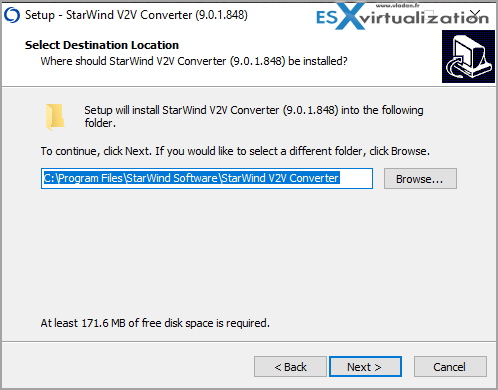
The tool installs as V2V_ConverterConsole.exe (usually in C:\Program Files\StarWind Software\StarWind V2V Converter).
Basic Syntax:
V2V_ConverterConsole.exe convert parameter1=value1 parameter2=value2 …
Or use a .cfg config file for complex/reusable setups.
Key Parameters (Source/In and Target/Out)
- in_host_type / out_host_type: esx, win (Hyper-V), proxmox, local.
- in_host_address / out_host_address: IP or hostname.
- Credentials: in_host_username, in_host_password.
- in_vm_name / out_vm_name.
- out_file_type: e.g., ft_vhdx_thin, ft_vmdk_esx_thin, ft_qcow2, etc.
- Proxmox extras: out_proxmox_storage, out_proxmox_node, out_proxmox_vmid.
- Others: out_vm_path, out_vm_os (Windows/Linux).
The CLI is available by default in the installation directory (C:\Program Files\StarWind Software\StarWind V2V Converter) and returns standard exit codes, making it suitable for integration into larger DevOps or infrastructure-as-code workflows
Configuration File Method
For complex migrations involving long paths or numerous parameters, StarWind recommends using a .cfg configuration file. This avoids command-line length limits and improves readability.
- Create a CFG File: Define the parameters in a text file (e.g., job.cfg) using the key=value format.
- Execute: Run the converter using the -c flag:
“C:\Program Files\StarWind Software\StarWind V2V Converter\V2V_ConverterConsole.exe” -c “C:\Scripts\migration_job.cfg”
- Templates: The tool supports templates for common scenarios like “Local VHD to Local VHDX” or “Remote VMDK to Remote VMDK,” which can be copied and modified.
PowerShell Batch Automation
For mass migrations, administrators typically wrap the CLI in a PowerShell loop. This allows for dynamic file discovery and error logging.
Automation Logic
- Discovery: Use Get-ChildItem to recursively find all source disks (e.g., *.vmdk) in an export folder.
- Looping: Iterate through each file, dynamically constructing the output path and filename.
- Execution: Call V2V_ConverterConsole.exe within the loop.
- Error Handling: Check the $LASTEXITCODE variable after each execution. A return code of 0 indicates success; any other value indicates failure, allowing the script to log errors and continue to the next VM without stopping the entire batch.
Getting Help
Check the StarWind help section for CLI.
Real-World Tips from the Trenches
- Performance: Run the converter on a machine with good network/disk I/O. Direct host-to-host is fastest.
- Linux VMs: Works well; just ensure paravirtual drivers if targeting certain hypervisors.
- Cloud: Supports Azure/AWS endpoints too.
- Multi-VM: Newer GUI versions let you queue several at once.
Alternatives: Built-in tools exist but are often limited (one-way, slower, or require more steps). StarWind shines in flexibility and zero-extra-copy mode.
In my tests and reader feedback over the years, success rates are high when prerequisites (connectivity, rights, compatible hardware gen) are met.
Final Words
StarWind V2V Converter isn't flashy, but it's one of those “just works” free tools every virtualization admin should have in their toolkit. The addition of robust CLI and automation makes it suitable not just for quick rescues but for systematic, repeatable migration processes – whether you're consolidating a few hosts or planning a bigger platform shift.
Download it, play in your lab, and script what you can. It might just save you a weekend or two.
More posts about StarWind:
- StarWind V2V / P2V Converter Version 9 (build 848) – Multi-VM Conversions, Full CLI Support, Hot Migrations, and Cloud Improvements Make This Free Tool a Datacenter Must-Have
- StarWind VSAN for Hyper-V: Synchronous Replication for High-Availability Shared Storage
- StarWind VTL: Boosting Immutability and Ransomware Protection in Your Own Datacenter
- StarWind HyperConverged Appliance with Proxmox VE: Perfect HCI Solution for Small Businesses
- Fortifying Your Backup Infrastructure Against Ransomware – StarWind VTL Best Practices
- FREE version of StarWind VSAN vs Trial of Full version
- Installation of StarWind VSAN Plugin for vSphere
- StarWind VSAN with new UI and deployment options
- Backup Appliance with NVMe Speed and GRAID – StarWind Backup Appliance
- Exploring StarWind VSAN: High Availability, Cost Savings, and Performance
- StarWind V2V Converter The Cutting-Edge Upgrade: StarWind V2V Converter’s April 2024 Innovations
- What is StarWind Tape Redirector (FREE) and what’s the benefits?
- 5 Easy Steps to be more resilient with Two Hosts only – StarWind VSAN
- How StarWind VSAN solution can save you money and energy in ROBO environments
- 2-Nodes clusters without Witness – StarWind VSAN Heartbeat Failover Strategy
- You can’t extend backup window – Check NVMe Backup Appliance from StarWind
- Replacing Aging Hardware SAN Device by a Software – StarWind VSAN
- StarWind V2V Converter (PV2 Migrator) FREE utility
- Cluster with 2-Nodes only – How about quorum?
- StarWind VSAN Latest update allows faster synchronization with storing synchronization journals on separate storage
- How to Update StarWind VSAN for VMware on Linux- Follow UP
- StarWind SAN & NAS software details for VMware and Hyper-V
- VMware vSphere and HyperConverged 2-Node Scenario from StarWind – Step By Step(Opens in a new browser tab)
- How To Create NVMe-Of Target With StarWind VSAN
- Veeam 3-2-1 Backup Rule Now With Starwind VTL
- StarWind and Highly Available NFS
- StarWind VSAN on 3 ESXi Nodes detailed setup
- VMware VSAN Ready Nodes in StarWind HyperConverged Appliance
More posts from ESX Virtualization:
- Veeam Backup and Replication Upgrade on Windows – Yes we can
- Securing Your Backups On-Premises: How StarWind VTL Fits Perfectly with Veeam and the 3-2-1 Rule
- Winux OS – Why I like it?
- VMware Alternative – OpenNebula: Powering Edge Clouds and GPU-Based AI Workloads with Firecracker and KVM
- Another VMware Alternative Called Harvester – How does it compare to VMware?
- VMware vSphere 9 Standard and Enterprise Plus – Not Anymore?
- VMware vSphere Foundation (VVF 9) and VMware Cloud Foundation (VCF 9) Has been Released
- Vulnerability in your VMs – VMware Tools Update
- VMware ESXi FREE is FREE again!
- No more FREE licenses of VMware vSphere for vExperts – What’s your options?
- VMware Workstation 17.6.2 Pro does not require any license anymore (FREE)
- Two New VMware Certified Professional Certifications for VMware administrators: VCP-VVF and VCP-VCF
- Patching ESXi Without Reboot – ESXi Live Patch – Yes, since ESXi 8.0 U3
- Update ESXi Host to the latest ESXi 8.0U3b without vCenter
- Upgrade your VMware VCSA to the latest VCSA 8 U3b – latest security patches and bug fixes
- VMware vSphere 8.0 U2 Released – ESXi 8.0 U2 and VCSA 8.0 U2 How to update
- What’s the purpose of those 17 virtual hard disks within VMware vCenter Server Appliance (VCSA) 8.0?
- VMware vSphere 8 Update 2 New Upgrade Process for vCenter Server details
- What’s New in VMware Virtual Hardware v21 and vSphere 8 Update 2?
- vSphere 8.0 Page
- ESXi 7.x to 8.x upgrade scenarios
- VMware vCenter Server 7.03 U3g – Download and patch
- Upgrade VMware ESXi to 7.0 U3 via command line
- VMware vCenter Server 7.0 U3e released – another maintenance release fixing vSphere with Tanzu
- What is The Difference between VMware vSphere, ESXi and vCenter
- How to Configure VMware High Availability (HA) Cluster
Stay tuned through RSS, and social media channels (Twitter, FB, YouTube)





Thanks Vladan for sharing this great tool .
Have you tested / compared with other tools ?
Sebastien
Is it possible to perform a V2V migration of a VM hosted on Oracle Private Cloud Appliance (PCA X5) using OVMM/XEN to an ESXi 8 hypervisor?
Ask the devs? Forum support?