
A couple of months ago I installed a lab (a nested virtual lab running under VMware Workstation) with XCP-NG and Xen Orchestra. This virtualization solution should be familiar to you, for those of you who follow my blog sinca a long time. There are many reasons why many home labbers like me or other admins previously using VMware, are switching to alternative hypervisors. But let's focus on the techicals only this time and see how easy is to update the lab. Note that I have build my Xen Orchestra from the sources as I have no official support from Vates (no need for a lab, right?).
Due to the constrainst I have for my lab, I only use virtual labs under VMware Workstation (FREE Software now). Like this I don't need a ton of hardware. I spin a lab when I need it only. If I need VMware lab, I spin VMware. If I need Proxmox lab, I spin Proxmox etc… Same for XCP-NG.
Beside that, I have other virtual labs, for backup software (Veeam, Nakivo etc…) It is very flexible and I can also use the desktop as a video editing rig as the underlying OS is W11.
Update your XCP-NG hosts
At first, I updated all my hosts running XCP-NG. I have just 3 hosts. That's all.
To update XCP-ng from the console, log in as root via SSH or the physical console (or via web browser – IP of the host) and use the yum package manager to apply patches and upgrades.
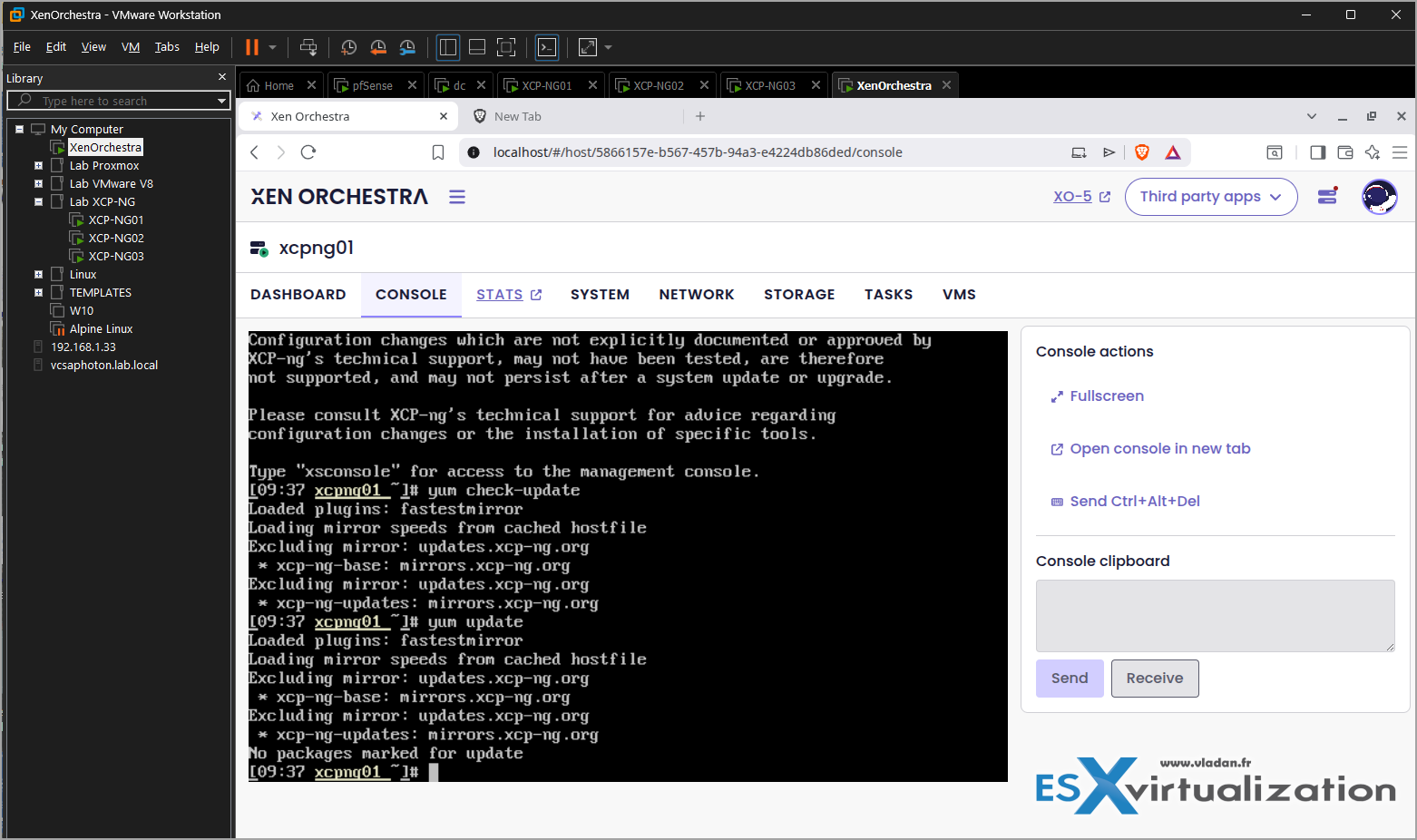
For routine updates (bugfixes and security fixes), run the following commands to check for available updates and install them:
yum check-update
yum update
It is that simple!
After updating, restart the toolstack or reboot the host if required. You can verify if a reboot is necessary by running needs-restarting -r. If you have LINSTOR installed, you must stop the controller and restart the satellite after updating all hosts without rebooting first:
systemctl stop linstor-controller
systemctl restart linstor-satellite
For major version upgrades (e.g., moving from version 8.1 to 8.2), using yum is only supported for certain point releases and is considered riskier than using the installation ISO. If performing a major upgrade via command line, ensure you have disabled third-party repositories and check the release notes for specific requirements. Note that XCP-ng 8.3 cannot be upgraded to using the yum method; the installation ISO is the recommended approach for such jumps.
Key Considerations:
- Pool Master: Always upgrade and reboot the pool master host first.
- High Availability: Disable HA before upgrading.
- Maintenance Mode: Do not use Maintenance Mode in XCP-ng Center during upgrades, as it moves the pool master.
- Backups: Unlike ISO upgrades, command-line updates do not create a system backup, so changes to the system are retained but a rollback is not possible without a reinstall.
Update Xen Orchestra
To update a self-built Xen Orchestra Appliance (XOA) from the console, you must first SSH into the VM, as the built-in updater is not available for source-built instances. Run the xo-install.sh script from the /opt/XenOrchestraInstallerUpdater directory to pull the latest updates and rebuild the instance.
Note: I have used script from Roni Väyrynen. The script is maintained by Roni Väyrynen and it's freely available on github. (if you like it, support the author – via PayPal!) The script can also do updates or rollbacks. It supports many Linux distributions or even containers. In my case, I used Kubuntu (based on Ubuntu 24.04,).
For a standard update, navigate to the installation directory and execute the update command:
cd /opt/XenOrchestraInstallerUpdater
sudo ./xo-install.sh –update
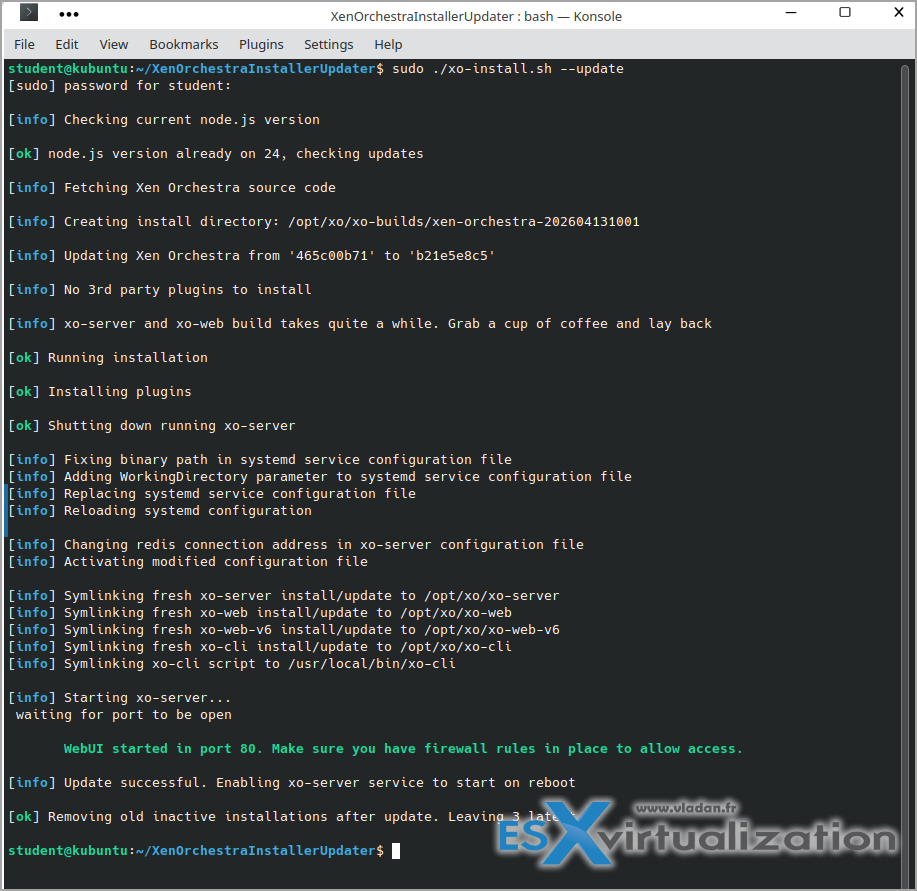
If you encounter issues or need a clean rebuild, you can force the update or switch to a specific release branch using the following commands:
- Force clean installation: sudo ./xo-install.sh –update –force
- Switch to next-release branch: sudo ./xo-install.sh –update -b next-release
Note that if you are running a version built from the ronivay/XenOrchestraInstallerUpdater repository, the updater script is located in /opt/XenOrchestraInstallerUpdater. If you are using the Jarli01 script, the command may be sudo ./xo-update -f to force a rebuild. Ensure you have sufficient disk space before running these commands, as the build process can be resource-intensive.
Stay tuned through RSS, and social media channels ( Twitter, FB, YouTube ). Happy hacking, and see you in the next post!
More posts from ESX Virtualization:
- Ready for Voyage? Try Voyager Linux Distro – A Slick, Hybrid Distro That Just Works
- VMware Workstation Pro 25H2U1 Released: Why You Should Update Now
- Thinware SimpleVM – A Free-Forever Hypervisor Alternative for VMware Admins Tired of Broadcom’s Rising Costs
- Veeam Backup and Replication Upgrade on Windows – Yes we can
- Securing Your Backups On-Premises: How StarWind VTL Fits Perfectly with Veeam and the 3-2-1 Rule
- Winux OS – Why I like it?
- VMware Alternative – OpenNebula: Powering Edge Clouds and GPU-Based AI Workloads with Firecracker and KVM
- Proxmox 9 (BETA 1) is out – What’s new?
- Another VMware Alternative Called Harvester – How does it compare to VMware?
- VMware vSphere 9 Standard and Enterprise Plus – Not Anymore?
- VMware vSphere Foundation (VVF 9) and VMware Cloud Foundation (VCF 9) Has been Released
- Vulnerability in your VMs – VMware Tools Update
- VMware ESXi FREE is FREE again!
- No more FREE licenses of VMware vSphere for vExperts – What’s your options?
- VMware Workstation 17.6.2 Pro does not require any license anymore (FREE)
- Two New VMware Certified Professional Certifications for VMware administrators: VCP-VVF and VCP-VCF
- Patching ESXi Without Reboot – ESXi Live Patch – Yes, since ESXi 8.0 U3
- Update ESXi Host to the latest ESXi 8.0U3b without vCenter
- Upgrade your VMware VCSA to the latest VCSA 8 U3b – latest security patches and bug fixes
- VMware vSphere 8.0 U2 Released – ESXi 8.0 U2 and VCSA 8.0 U2 How to update
- What’s the purpose of those 17 virtual hard disks within VMware vCenter Server Appliance (VCSA) 8.0?
- VMware vSphere 8 Update 2 New Upgrade Process for vCenter Server details
- vSphere 8.0 Page
- ESXi 7.x to 8.x upgrade scenarios
- VMware vCenter Server 7.03 U3g – Download and patch
- Upgrade VMware ESXi to 7.0 U3 via command line
- VMware vCenter Server 7.0 U3e released – another maintenance release fixing vSphere with Tanzu
- What is The Difference between VMware vSphere, ESXi and vCenter
- How to Configure VMware High Availability (HA) Cluster





Nice clear walkthrough — thanks for the practical steps. Quick question: when updating a pool with mixed host versions, do you recommend putting non-master hosts into any specific state before updating (besides disabling HA)? Also, for source-built XO, any tips to preserve custom plugins during xo-install.sh updates?
Thanks for your comment. You’d have to seek through XCP-NG forums or support. Unfortunately we don’t have an answer. ++