
What if I told you that there is a backup software which costs ZERO? Yes, it is absolutely true. AltaStor (https://altastor.com/) takes a different approach: the core Backup & Replication product is free and open-source. No license keys, no registration forms, no trial expiration. You download it, deploy it, and use it.
It is built on Linux, runs on your existing servers (no proprietary hardware required), and focuses on simplicity for VMware environments. For SMBs that want solid protection without perpetual subscription pressure, and for MSPs looking for a clean way to protect customer VMware estates, this is worth a closer look.
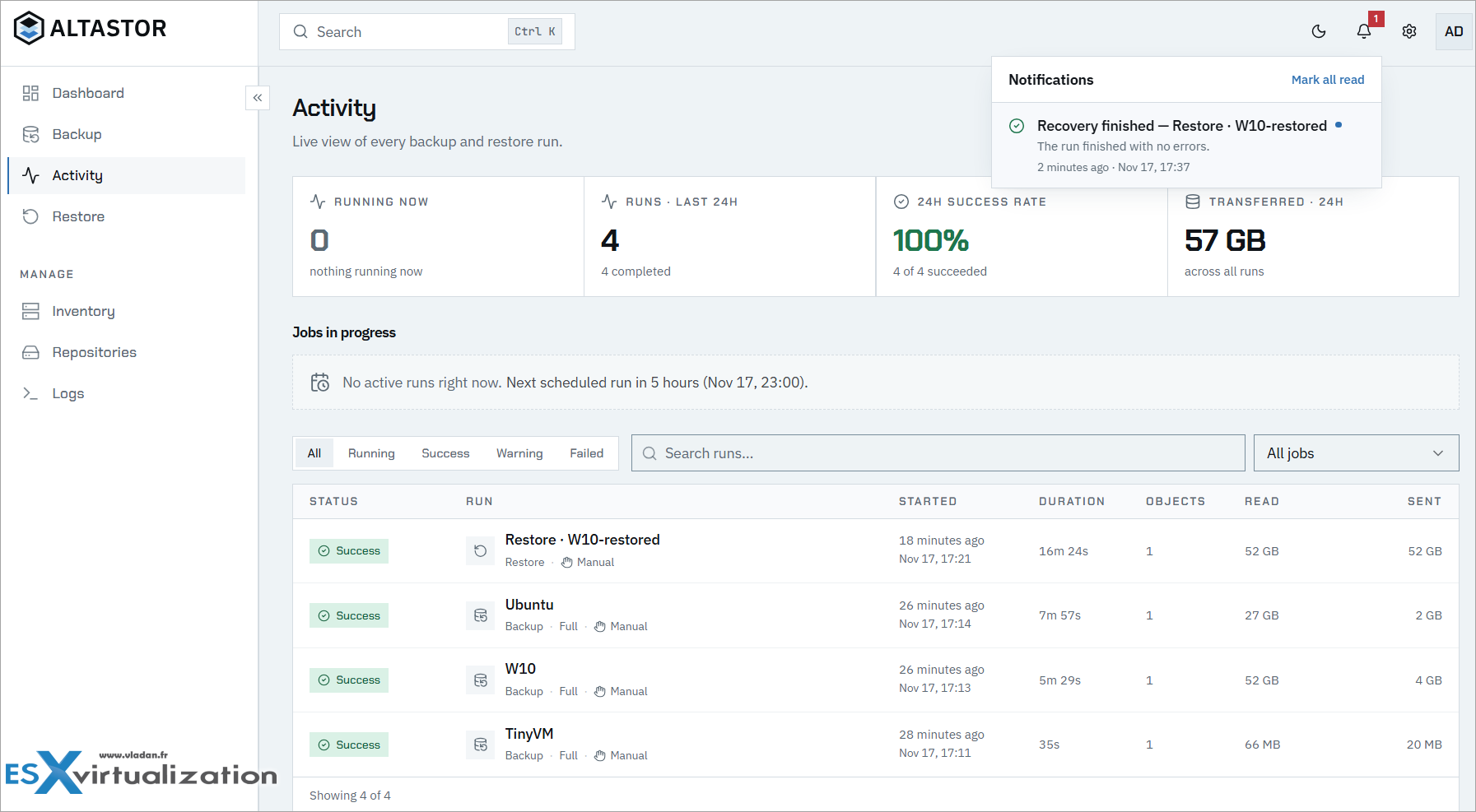
AltaStor Activity dashboard
What AltaStor Actually Delivers
At the time of writing, only the Backup & Replication software is available for download and use (current version referenced as v26.09). In my lab, I installed AltaStor B&R application on a Debian VM for testing.
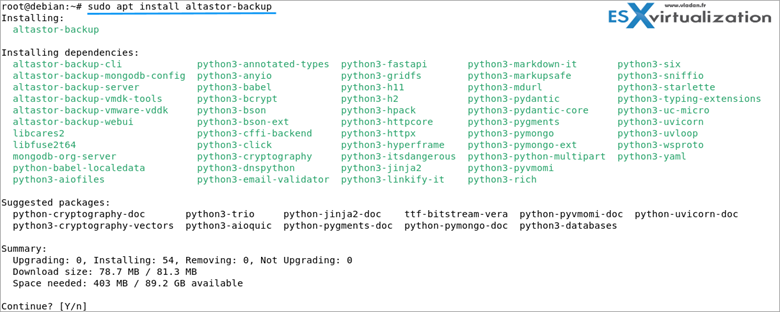
Installation of AltaStor package in my Debian VM
Other components shown on the site – Backup Appliance, V2V conversion utility, and Move migration tool – are listed but do not yet have public builds ready. Those are future products.
The focus remains on protecting, replicating and recovering supported VMware workloads with the free Linux-based core product.
The main goal is to remove unnecessary complexity. The workflow is straightforward: Deploy > Connect your VMware environment (vCenter or standalone ESXi) > Select the VMs > Protect (create recovery points) > Recover when needed.
You can be up and running in no time.
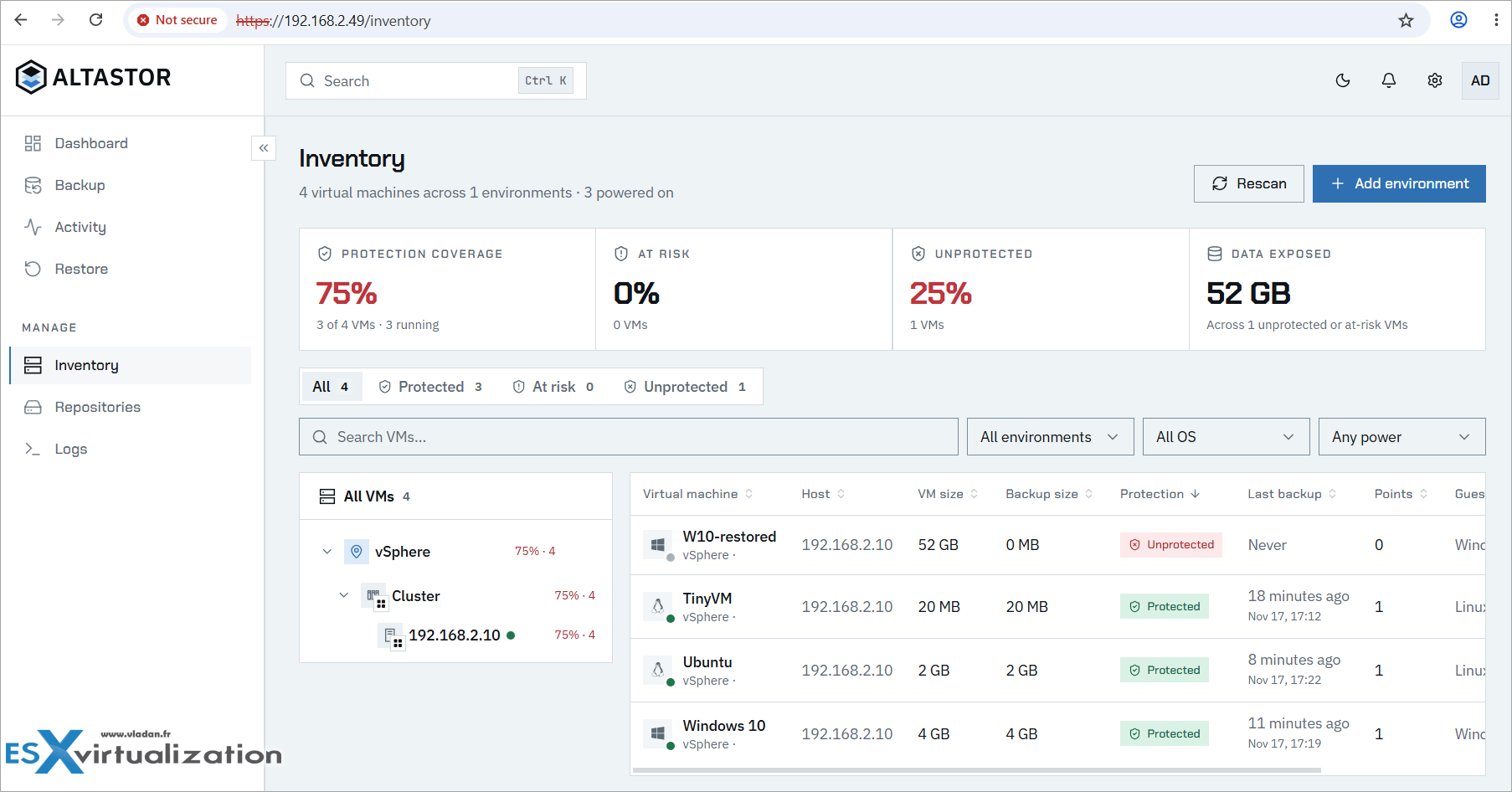
Running AltaStor in the lab – hooking it in my VMware lab cluster
From the product pages, a typical job setup is essentially one page: name the job, tick the VMs or group, set the schedule, and start.
Restore follows the same clean path – pick the machine and the recovery point. The console shows both backup and restore activity clearly.
Key technical points highlighted by AltaStor:
VMware focus with Changed Block Tracking (CBT) support for efficient incrementals.
- Replication alongside backup.
- Storage targets that can include immutable and encrypted options.
- Application consistency where supported.
- Encryption in transit and at rest options.
- Open development model – the free community version is the product, not a limited trial. Source is on GitHub under Apache License 2.0.
Roadmap items (directional, not yet GA) include Hyper-V backup next, followed by Nutanix AHV. Always check the official supported platforms page before evaluating, as exact compatibility lists are kept current there.
Why the Free Model Matters for SMB and MSP?
Most commercial VMware backup tools charge per VM, per socket, or via capacity-based subscriptions. For a small environment of 20–50 VMs, or an MSP managing many similar customer sites, those costs add up quickly and create ongoing administrative overhead (tracking licenses, renewals).
You can:
- Deploy the core AltaStor Backup product.
- Point it at your vSphere environment.
- Protect the workloads you care about.
- Keep recovery points on local or remote storage with the immutability (if on Object Storage) and efficiency features that the product has.
Note: I haven’t seen a file-level restore options so you’ll have to rely only on full VM restores. But this feature might be on the roadmap.
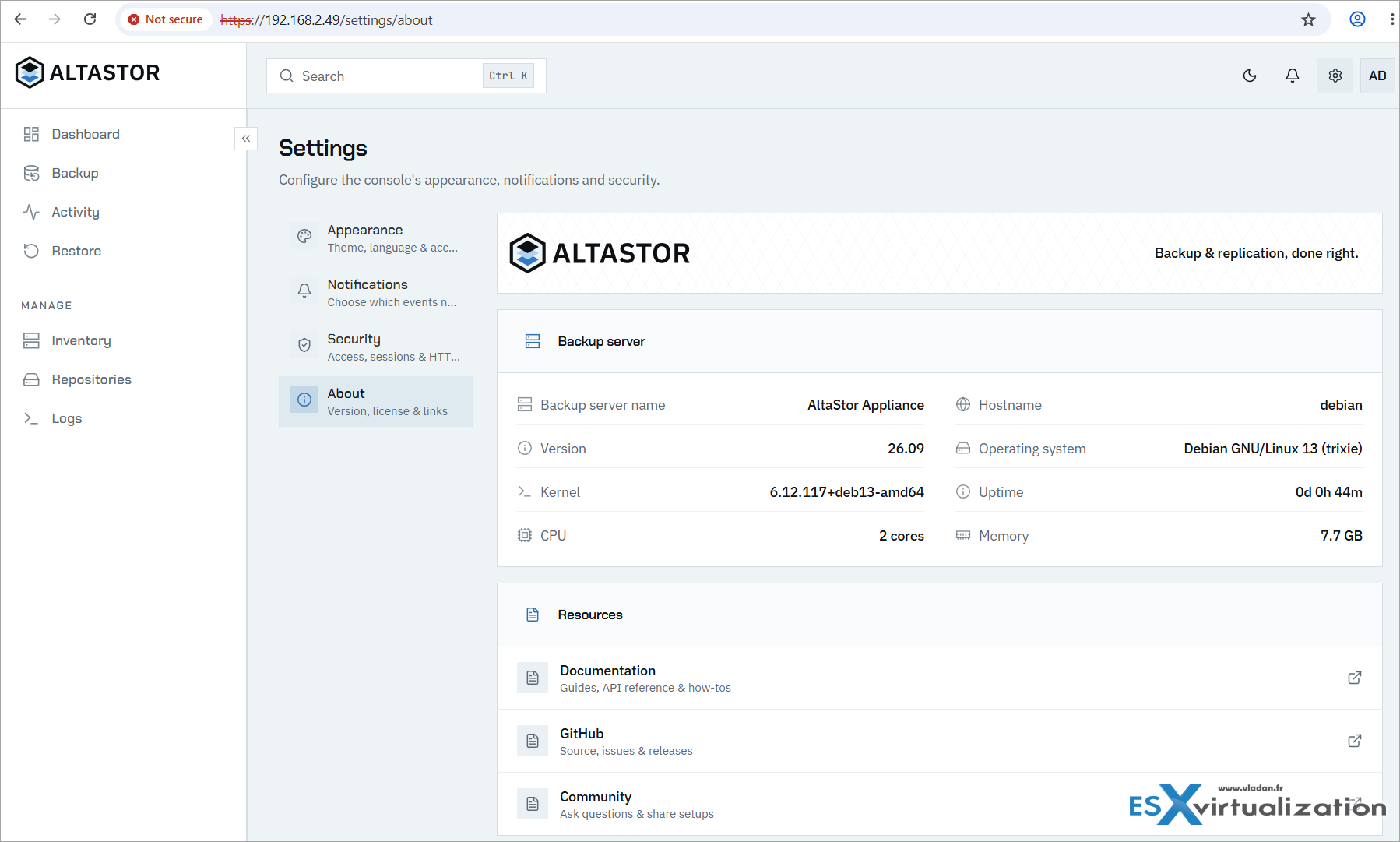
AltaStor Settings info page
No software license fees mean the budget goes toward hardware, storage capacity, or optional professional support instead of renewals. For labs, secondary sites, or cost-sensitive production environments this is attractive.
For MSPs it opens a path to offer standardized VMware protection without layering another expensive license stack on every customer.
Deployment and Operations
The design goal is clear: keep the operational surface small. Deploy the AltaStor core software on your Debian system, connect to vCenter/ESXi, select VMs (one tick for a whole group is supported), set the schedule, and let it run.
In my lab, I configured a Wasabi S3 object storage repository with immutability enabled in AltaStor B&R. Doing so, your backups cannot be deleted and are fully protected against ransomware attacks.
Here you can see a remote object storage repository configured at Wasabi.
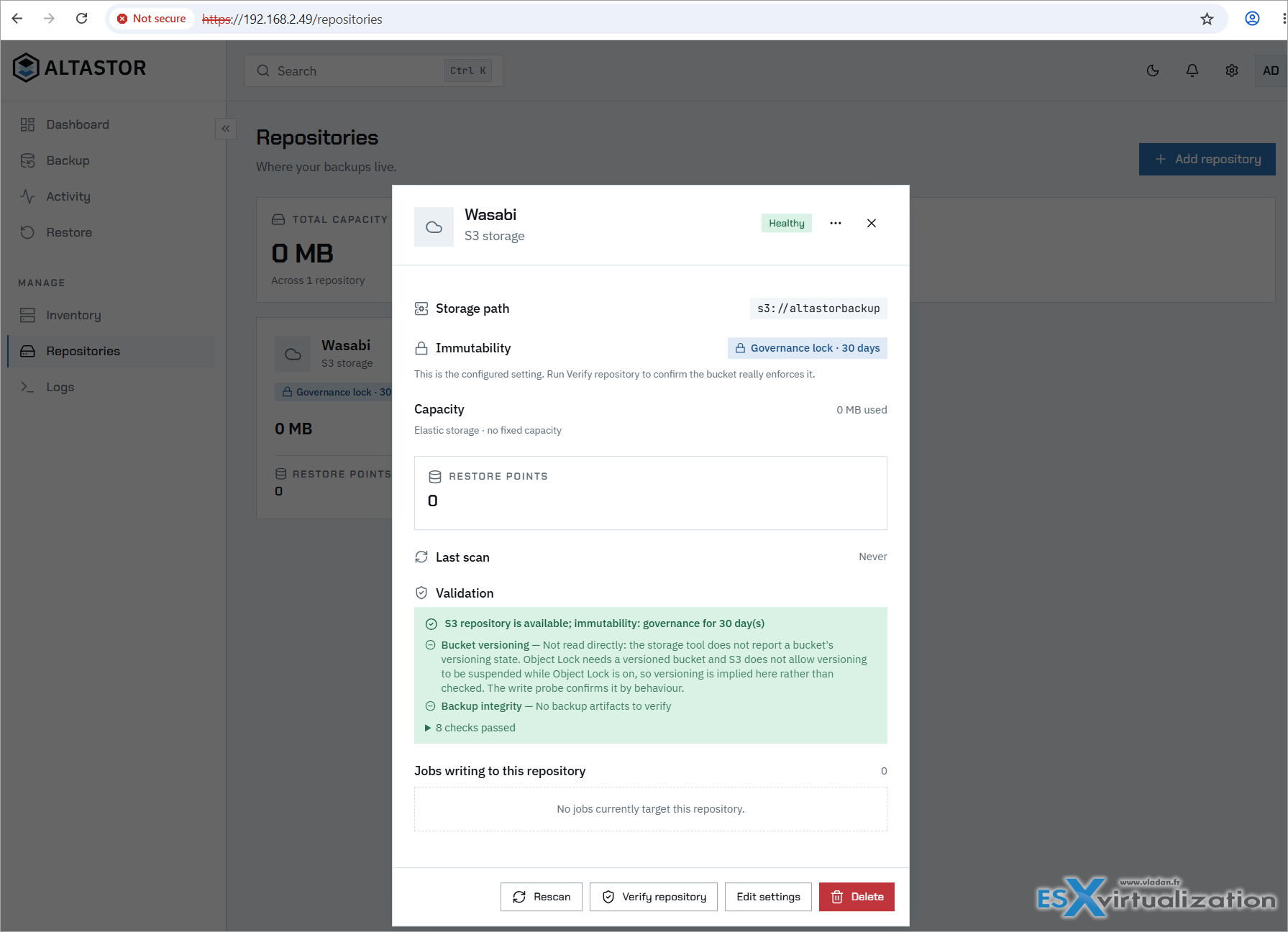
AltaStor backup repository at S3 Wasabi object storage with immutability
Because it is open-source and Linux-based, you retain full control over the host OS, networking, and storage presentation. There is no proprietary product lock-in. The AltaStor backup software simply packages the experience so you do not have to assemble everything yourself if you prefer a turnkey start.
Always verify checksums on download and review the current known limitations and supported VMware versions on the AltaStor site. As with any backup product, test restores regularly – especially the first few jobs in a new environment.
Support Model: Community First, Professional When You Need It
Documentation and the community forum are available to everyone at no cost. You can ask questions, view the source, follow the public roadmap, and (when the forms open) report bugs or suggest ideas through the structured channels.
For production environments that require defined response times, installation assistance, deployment reviews, upgrade guidance, direct troubleshooting, recovery help, migration assistance, or MSP-oriented support, AltaStor offers optional professional support.
A support agreement is not required to download or use the product.
This split is useful:
- SMBs can start free and add support later if the environment grows
- MSPs can standardize on the free core and sell managed services or higher-tier support around it.
Dark mode with look and feel.
The product has two themes, dark and clear. Depending on the environment you’re working in, or the time of the day, you can switch easily. Every modern piece of software today gives the choice and it is great to see that AltaStor has that feature too.
The Dark theme can relax your eyes is during evenings. And the defaults can be changed in the global settings of the software, along with other options.
The product is fast and responsive. I really enjoyed working with the smooth UI and have not experienced any glitches.
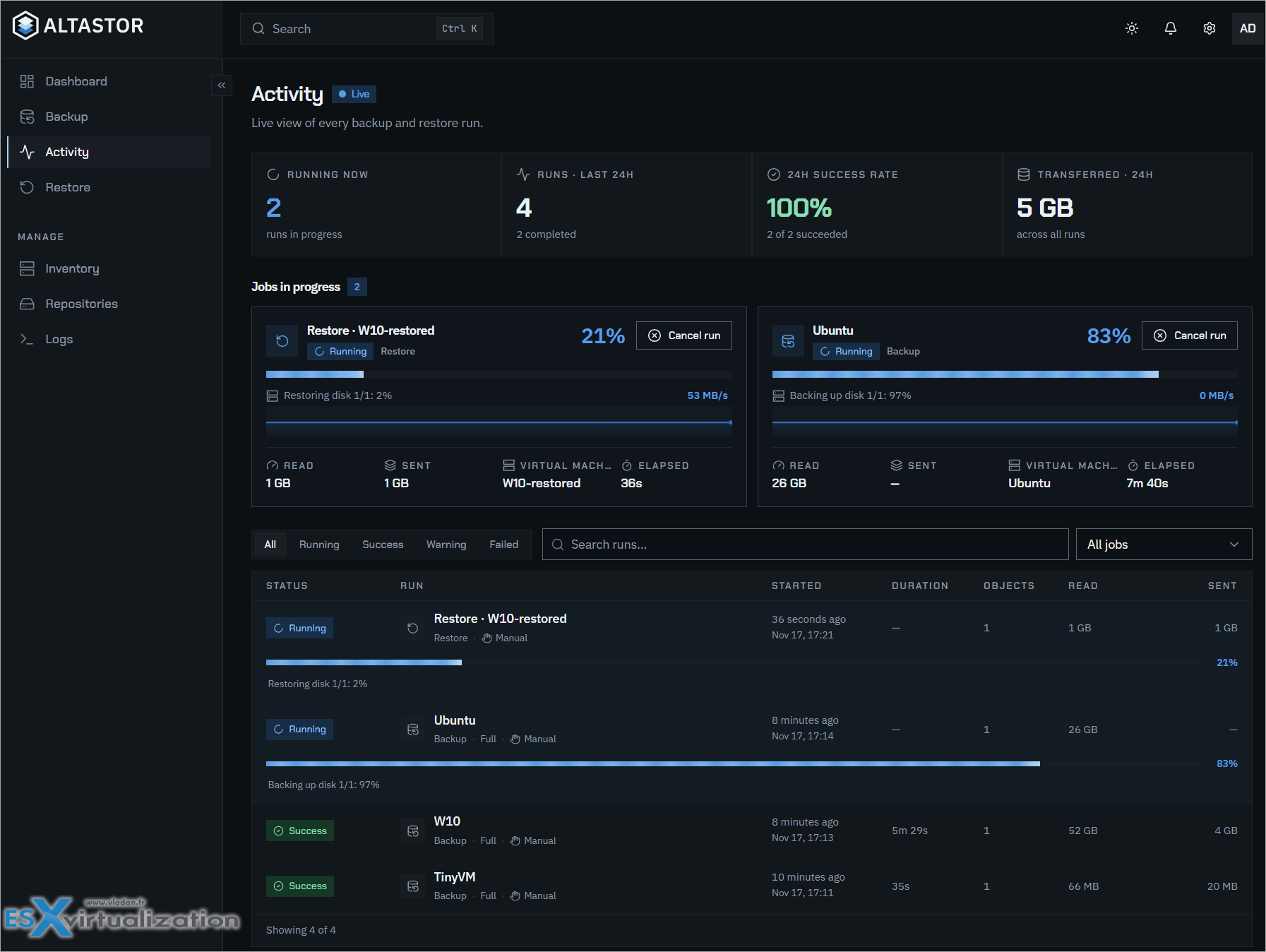
Dark theme – AltaStor
Final Words
AltaStor stands out because of the Free, open-source Backup & Replication offering is a full product, not a teaser. (There is no way to enter a license during install/configure steps).
The focus is on VMware simplicity; it addresses a real gap for smaller environments and service providers tired of license costs and complexity.
If you run VMware and want to evaluate a zero-software-cost option that still offers enterprise-grade support when required, head to https://altastor.com/, check the current supported platforms and download pages, and test it in a lab or non-critical environment first.
As always with backup software – you need to validate your recovery points before you rely on them. Worth keeping an eye on as Hyper-V and further platform support appear on the roadmap.
More posts from ESX Virtualization:
- How to update your ESXi 7.x or 8.x to the latest ESXi 8.0U3k via command line
- Veeam Bare Metal Recovery from Recovery partition
- Veeam Backup and Replication Upgrade on Windows – Yes we can
- Securing Your Backups On-Premises: How StarWind VTL Fits Perfectly with Veeam and the 3-2-1 Rule
- VMware Alternative – OpenNebula: Powering Edge Clouds and GPU-Based AI Workloads with Firecracker and KVM
- Another VMware Alternative Called Harvester – How does it compare to VMware?
- VMware vSphere 9 Standard and Enterprise Plus – Not Anymore?
- Vulnerability in your VMs – VMware Tools Update
- VMware ESXi FREE is FREE again!
- No more FREE licenses of VMware vSphere for vExperts – What’s your options?
- VMware Workstation 17.6.2 Pro does not require any license anymore (FREE)
- Two New VMware Certified Professional Certifications for VMware administrators: VCP-VVF and VCP-VCF
- Patching ESXi Without Reboot – ESXi Live Patch – Yes, since ESXi 8.0 U3
- Update ESXi Host to the latest ESXi 8.0U3b without vCenter
- Upgrade your VMware VCSA to the latest VCSA 8 U3b – latest security patches and bug fixes
- VMware vSphere 8.0 U2 Released – ESXi 8.0 U2 and VCSA 8.0 U2 How to update
- What’s the purpose of those 17 virtual hard disks within VMware vCenter Server Appliance (VCSA) 8.0?
- VMware vSphere 8 Update 2 New Upgrade Process for vCenter Server details
- What’s New in VMware Virtual Hardware v21 and vSphere 8 Update 2?
- vSphere 8.0 Page
- ESXi 7.x to 8.x upgrade scenarios
- What is The Difference between VMware vSphere, ESXi and vCenter
- How to Configure VMware High Availability (HA) Cluster
Stay tuned through RSS, and social media channels (Twitter, FB, YouTube)





Leave a Reply