
ESX Virtualization

VMware ESXi, vSphere, VMware Backup, Hyper-V... how-to, videos....

Nakivo Backup and Replication - #1 Backup solution for Virtual, physical, cloud, NAS and SaaS

Menu
  • Certification
      • VCP-VVF Administrator
          • vcp-vvf-2.
        • Close
      • VCP-DCV vSphere 8
          • vcp2024-125.
        • Close
    • Close
  • VMware
    • Configuration Maximums
    • vSphere
      • VVF 9 and VCF 9
      • vSphere 8.0
      • vSphere 7.0
      • vSphere 6.7
      • vSphere 6.5
      • vSphere 6.0
      • Close
    • VMworld
      • VMware EXPLORE 2024
      • VMware EXPLORE 2023
      • VMware EXPLORE 2022
      • VMworld 2019
      • VMworld 2018
      • VMworld 2017
      • VMworld 2016
      • VMworld 2015
      • VMworld 2014
      • VMworld 2013
      • VMworld 2012
      • VMworld 2011
      • Close
    • Close
  • Proxmox
    • Proxmox
    • Close
  • Microsoft
    • Windows Server 2012
    • Windows Server 2016
    • Windows Server 2019
    • Windows Server 2025
    • Close
  • Categories
    • Tips – VMware, Microsoft and General IT tips and definitions, What is this?, How this works?
    • Server Virtualization – VMware ESXi, ESXi Free Hypervizor, VMware vSphere Server Virtualization, VMware Cloud and Datacenter Virtualization
    • Backup – Virtualization Backup Solutions, VMware vSphere Backup and ESXi backup solutions.
    • Desktop Virtualization – Desktop Virtualization, VMware Workstation, VMware Fusion, VMware Horizon View, tips and tutorials
    • How To – ESXi Tutorials, IT and virtualization tutorials, VMware ESXi 4.x, ESXi 5.x and VMware vSphere. VMware Workstation and other IT tutorials.
    • Free – Free virtualization utilities, ESXi Free, Monitoring and free backup utilities for ESXi and Hyper-V. Free IT tools.
    • Videos – VMware Virtualization Videos, VMware ESXi Videos, ESXi 4.x, ESXi 5.x tips and videos.
    • Home Lab
    • Reviews – Virtualization Software and reviews, Disaster and backup recovery software reviews. Virtual infrastructure monitoring software review.
    • Close
  • Partners
    • NAKIVO
    • StarWind
    • Xorux
    • Close
  • This Web
    • News
    • ESXi Lab
    • About
    • Advertise
    • Archives
    • Disclaimer
    • Privacy policy
    • PDFs and Books
    • Close
  • Free

VCP-DCV on vSphere 8.x Objective 7.12.1 – Convert a non-encrypted virtual machine to an encrypted virtual machine

By Vladan SEGET | Last Updated: April 2, 2023

Shares

Today is a day where we go for another topic that is present on the latest VMware Blueprint, that covers all chapters of the VCP-DCV certification exam based on VMware vSphere 8.x. The topic is VCP-DCV on vSphere 8.x Objective 7.12.1 – Convert a non-encrypted virtual machine to an encrypted virtual machine. 

A short chapter that is easy to check and learn. If you have a lab, you can just test it. If you don't, then read on….

The study guide page VCP8-DCV with all those individual chapters helps you with learning towards VMware certification exam (2V0-21. 23) and to became VCP-DCV on vSphere 8.x. Check the Official VMware VCP-DCV 2023 exam guide (blueprint) here. Also please check the certification requirements (depends on if you hold already a VCP etc..)

VCP-DCV on vSphere 8.x Objective 7.12.1 – Convert a non-encrypted virtual machine to an encrypted virtual machine

Prerequisites

  • Establish a trusted connection with the KMS and select a default KMS.
  • Create an encryption storage policy, or use the bundled sample, VM Encryption Policy.
  • Ensure that the virtual machine is powered off.
  • Make sure your host has TPM v2 installed and it supports encryption

Host encryption mode must be set if you want to perform encryption tasks, such as creating an encrypted virtual machine, on an ESXi host. In most cases, host encryption mode is activated automatically when you perform an encryption task

Check that you have the required privileges:

  • Cryptographic operations.Encrypt new
  • If the host encryption mode is not Enabled, you also need Cryptographic operations.Register host.

Log in vSphere Client, and connect to vCenter Sever.

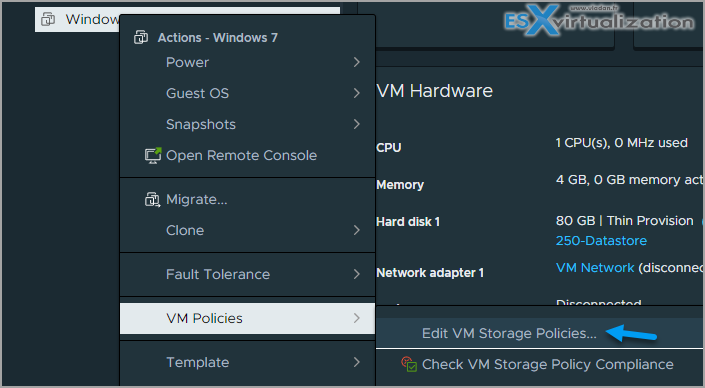
Right-click the virtual machine you want to encrypt, and select VM Policies > Edit VM Storage Policies.
In VM storage policy, select VM Encryption Policy. Click OK.

You can use per-dick configuration too…
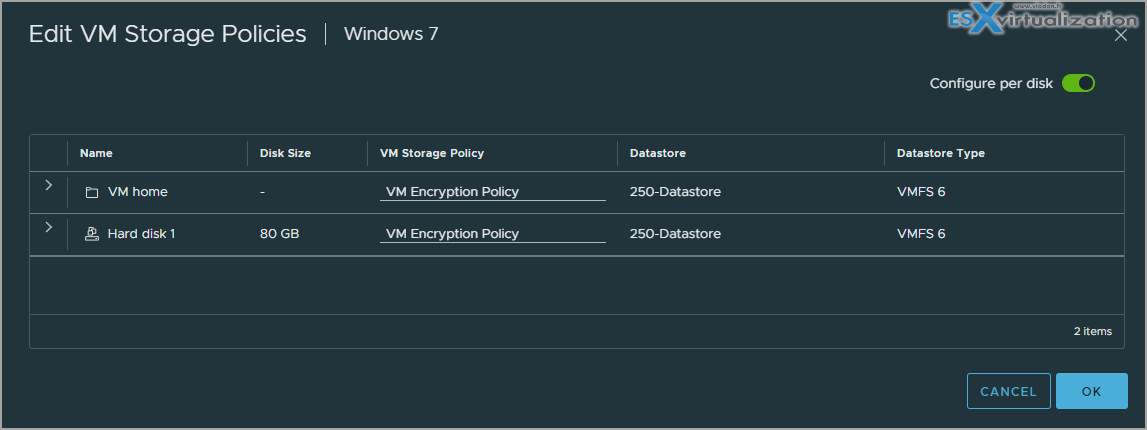
Click OK.

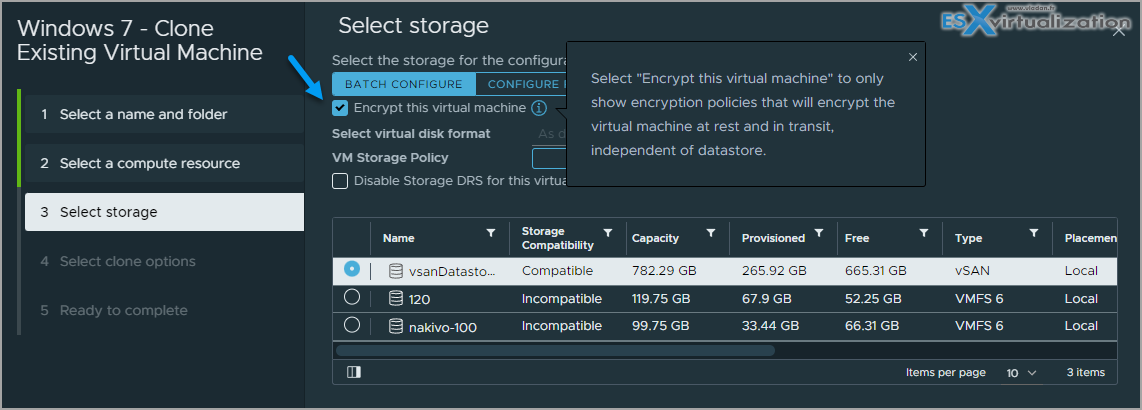
You can also make a clone of your VM and during the process you can check the box “Encrypt this virtual machine”.
Hopefully this chapter will help you to study towards VMware VCP-DCV Certification based on vSphere 8.x. Find other chapters on the main page of the guide  – VCP8-DCV Study Guide Page.

More posts from ESX Virtualization:

  • VMware vSphere 8.0 U1 Announced (NEW)
  • VMware vSAN 8.0 U1 What's New? (NEW)
  • vSphere 8.0 Page
  • Veeam Bare Metal Recovery Without using USB Stick (TIP)
  • ESXi 7.x to 8.x upgrade scenarios
  • A really FREE VPN that doesn’t suck
  • Patch your ESXi 7.x again
  • VMware vCenter Server 7.03 U3g – Download and patch
  • Upgrade VMware ESXi to 7.0 U3 via command line
  • VMware vCenter Server 7.0 U3e released – another maintenance release fixing vSphere with Tanzu
  • What is The Difference between VMware vSphere, ESXi and vCenter
  • How to Configure VMware High Availability (HA) Cluster
  • Homelab v 8.0 (NEW)
    • NXJ6412 Maxtang EHL30 TPM Alert in vCenter Server 8.0 BIOS Config
    • vSphere 8 Lab with Cohesity and VMware vExpert gift – Maxtang’s NX 6412 NUC
    • VMware Cohesity vExpert Gift VMware EXPLORE 2022 Barcelona

Stay tuned through RSS, and social media channels (Twitter, FB, YouTube)

Vote !
Shares

| Filed Under: Server Virtualization

About Vladan SEGET

This website is maintained by Vladan SEGET. Vladan is as an Independent consultant, professional blogger, vExpert x17, Veeam Vanguard x11, VCAP-DCA/DCD, ESX Virtualization site has started as a simple bookmarking site, but quickly found a large following of readers and subscribers.

Connect on: Facebook. Feel free to network via Twitter @vladan.

Private Sponsors


Featured

  • Thinking about HCI? G2, an independent tech solutions peer review platform, has published its Winter 2023 Reports on Hyperconverged Infrastructure (HCI) Solutions.
Click to Become a Sponsor

Most Recent

  • Veeam VBR 13 and Scality Artesca Integration: A Game-Changer for Cyber-Resilient Backups
  • Reviving Old School Laptops with PrimTux: Battling Obsolescence on a Budget
  • Proxmox Datacenter Manager 1.0 released – a real vCenter Server Alternative?
  • Recovering a Corrupted Exchange Database with Stellar Repair for Exchange
  • Commvault at AWS re:Invent 2025: Pioneering AI-Enhanced Cyber Resilience with Cloud Unity
  • How to Set Up pfSense Community Edition as a Firewall Using VMware Workstation Pro 17 (2025 Edition)
  • HPE Morpheus VM Entreprise and Morpheus VM Essentials updates released – v8.0.11
  • Veeam Backup and Replication Upgrade on Windows – Yes we can
  • Commvault’s Cloud Unity Platform: Revolutionizing Enterprise Resilience in the AI Era
  • Securing Your Backups On-Premises: How StarWind VTL Fits Perfectly with Veeam and the 3-2-1 Rule

Get new posts by email:


Deals

Support us on Ko-Fi


Buy Me a Coffee at ko-fi.com

Friendly Websites and Blogs

  • vBlog.io
  • VMware Engineer Jobs
 

YouTube

…

Find us on Facebook

ESX Virtualization

…

Copyright © 2025 ·Dynamik-Gen · Genesis Framework · Hosted with HostColor.com