
There has been a new free tool for customizing ISO images. The latest version is 2.7. This tool is unsupported by VMware but can be used in your home lab for integrating unsupported LAN drives for example.
The tool creator is a German VMware user – Andreas Peetz, which created this tool for his own use at first but you can support him by donating since he made this tool widely available.
It's actually a script which brings a GUI window, where you can specify:
1. The source VMware ISO image
2. The driver package you want to integrate
3. The destination folder of the final ISO
You can download the latest version here.
Update: Unfortunately, Adreas did not continue with the tool. Please use PowerCLI. Here is a guide on how to create a VMware ESXi ISO with the latest patches.
A quick quote from his website:
ESXi-Customizer is a user-friendly script that automates the process of customizing the ESXi install-ISO with drivers that are not originally included. Unlike other scripts and manuals that are available for this purpose ESXi-Customizer runs entirely on Windows and does not require any knowledge of or access to Linux.
Just for your information, a modification of ISO images and running production hosts on images built from such a modified ISOs it's not supported by VMware.
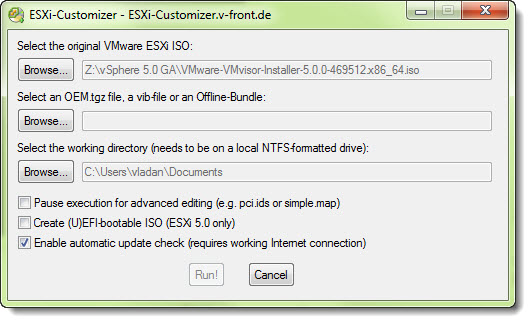
In the latest release of ESXi Customizer 2.6 – what's new?
– With this version, you are able to optionally create a (U)EFI-bootable ISO file for the installation of ESXi 5.0. (U)EFI stands for (Universal) Extensible Firmware Interface. (The original VMware ESXi ISO does support (U)EFI already, so If you want to keep this functionality in the rebuild ISOs, you might want to check that box.
– Additional script is included called Tgz2Vib5 – this converts an OEM.tgz-style driver package into a VIB file (for ESXi only).
You can check out my Free Tools page to find som TOP free tools for VMware vSphere Architecture here. You can also have a look at the Free collection of Technical Whitepapers in my Free Ressources Page Here.
Final words
I decided to update this post even if it's now obsolete because there are other options to customize VMware ESXi ISO. You can use PowerCLI or VMware vSphere Image Builder. I'm planning to write an article covering VMware Image builder in vSphere 7 soon so stay tuned. Here are two posts which will help so far:
- How to create a custom ESXi 6.5 ISO with VMware Image Builder GUI
- How To Create VMware ESXi ISO With Latest Patches (via PowerCLI)
To be honest, this post has been originally published somewhere in 2011 so it's been a while when you think. Yes, this blog runs for a very long time and many of the posts are simply outdated. That's life. I'm doing my best to cover new releases and new products or how-to articles, but it would be simply not possible to also update every single outdated post on this blog.
More from ESX Virtualization Blog.
- VCP6.7-DCV Study Guide – VCP-DCV 2019 certification
- VCP6.5-DCV Study Guide
- vSphere 6.5
- What Is VMware ESXi Lockdown Mode?
- VMcom Backup For VMware vSphere or ESXi Free
And some latest vSphere 7.0 posts here with also link to a dedicated vSphere 7.0 page on this blog. Enjoy…
- vSphere 7.0 Download Now Available
- vSphere 7.0 Page [All details about vSphere and related products here]
- VMware vSphere 7.0 Announced – vCenter Server Details
- VMware vSphere 7.0 DRS Improvements – What's New
- Upgrade from ESXi 6.7 to 7.0 ESXi Free
- What is VMware Skyline?
- What is vCenter Server 7 Multi-Homing?
Stay tuned through RSS, and social media channels (Twitter, FB, YouTube)





Do you have a link to download the new ESXi Customizer?
No download link for the customizer? This page is useless
The tool is outdated. The developper has not followed up with recent vSphere releases. You have the option to use PowerCLI instead. Check my guide here: https://www.vladan.fr/how-to-create-vmware-esxi-iso-with-latest-patches/