
With DataCore Puls8 officially launched on January 26, 2026 (GA release notes dated January 21, 2026), the obvious question for anyone running OpenEBS is whether the commercial version justifies a subscription. The answer depends entirely on where you sit on the operational complexity spectrum – and how many stateful pods you're managing in production.
Quick Background Recap
OpenEBS is a mature Cloud Native Computing Foundation (CNCF) Sandbox open-source project currently applying for Incubation level graduation. that provides container-native storage (CNS) for Kubernetes by turning local node disks into persistent volumes via CSI drivers. The project supports two main approaches: Local PV (hostpath, LVM, ZFS) for direct, non-replicated access, and Replicated PV via Mayastor for synchronous replication and high availability. Mayastor is the performance-oriented engine within OpenEBS, built on NVMe-oF (NVMe over Fabrics) and SPDK (Storage Performance Development Kit) to deliver near-disk performance with data protection. OpenEBS is free, community-driven, and widely deployed across everything from dev/test clusters to production databases.
DataCore Puls8 is DataCore's commercial layer built directly on top of OpenEBS. It's not a fork. It uses the exact same data engines and retains full compatibility. What Puls8 adds is a management plane with a GUI, automated node failure handling, integrated observability, and enterprise support. DataCore has been in the software-defined storage business since 1998, and Puls8 represents their extension into container-native environments.
Architecture Comparison
Both solutions are fully Kubernetes-native and use CSI for provisioning Persistent Volumes and Claims. The architectural divergence is in what sits above the data engines.
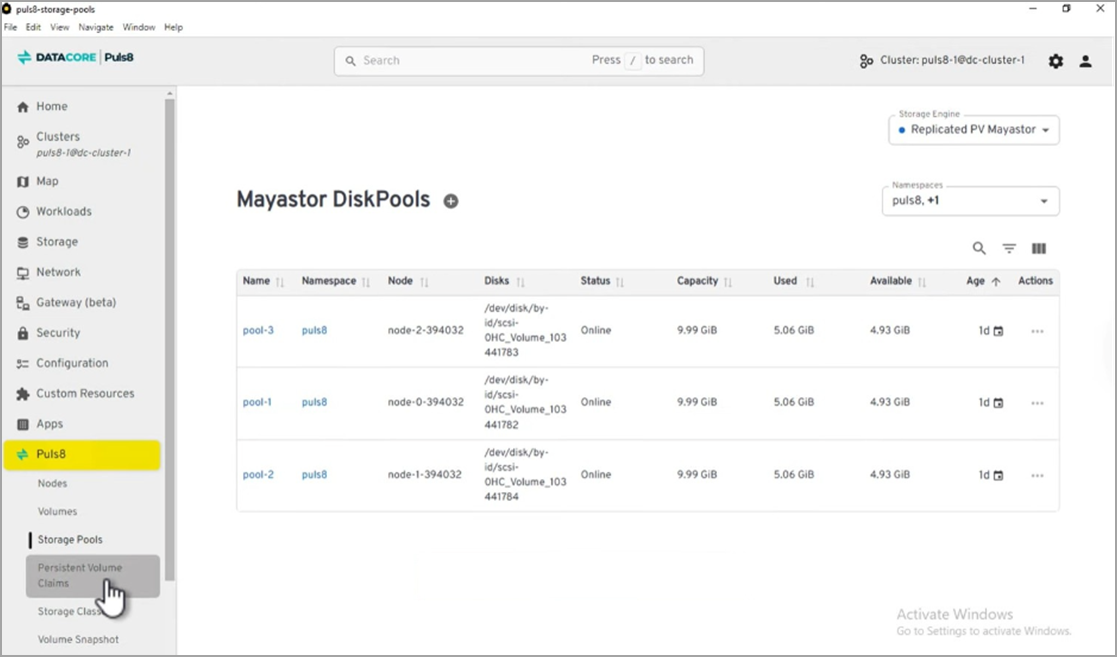
Figure 1: The DataCore Puls8 management plane GUI showing storage topology and volume management across Kubernetes nodes
OpenEBS gives you a control plane, data engines (including Mayastor for replication), and operators. You configure everything declaratively through YAML and CRDs. The storage engines break down into Local PV for non-replicated, low-latency access and Replicated PV (Mayastor) for synchronous replication over NVMe-oF/TCP or NVMe-oF/RDMA. This is powerful and flexible, but at scale – say 30+ nodes with mixed workloads – the manual configuration and troubleshooting burden adds up. OpenEBS users in larger environments often note that debugging replication issues or managing storage class sprawl through kubectl alone often becomes a real time sink.
Puls8 keeps all of this intact and adds a third layer: a Management Plane that sits above the OpenEBS control plane. This provides a GUI for storage lifecycle operations, integrated observability dashboards, and automated node failure protection that handles HA rescheduling and stateful-set restarts without manual intervention. The three-layer architecture – Management Plane, Control Plane, Data Engines – stays 100% containerized with no external appliances. If you've ever had to manually cordone a node, evict pods, and verify volume reattachment after a node failure, the automated failure protection is the feature that will catch your attention first.
Performance
Both solutions deliver NVMe-class speeds when backed by local SSDs or NVMe drives. Puls8 emphasizes “ultra-low latency” for latency-sensitive workloads (databases, AI/ML, analytics) and highlights benchmarks (e.g., outperforming cloud Persistent Disks when paired with Local SSDs). OpenEBS Mayastor is already SPDK-optimized for high IOPS/low latency, however Puls8 tunes and validates this further for enterprise consistency.
What matters more practically is that Puls8 doesn't add notable overhead on top of OpenEBS. The management plane operates separately from the data path, so your I/O performance remains the same. The real performance question for most teams isn't raw throughput – it's how quickly volumes reattach and pods reschedule after a failure. That's where Puls8's automated failover potentially saves minutes of downtime compared to manual OpenEBS recovery procedures.
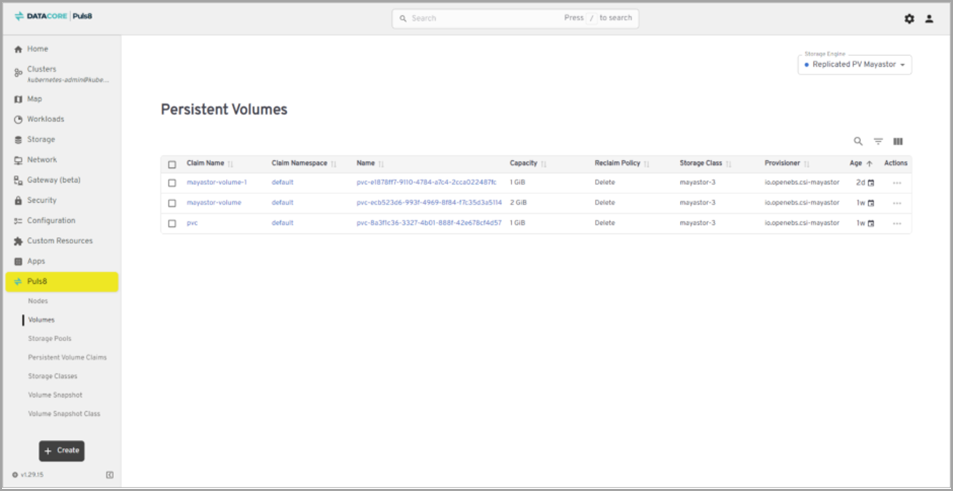
Figure 2: The DataCore Puls8 “Volumes” page, where you can see and create persistent volumes
Puls8's GUI provides visibility into the storage topology – which volumes live on which nodes, replication status, capacity utilization, and health – without running multiple kubectl commands and parsing YAML output. For mixed teams where not everyone is a Kubernetes expert, or for organizations where the storage admin and the platform engineer are different people, this reduces the knowledge barrier significantly.
Support and Cost
OpenEBS is free and community-supported. DataCore does offer paid SLA-based support for OpenEBS users, but most teams rely on GitHub issues, Slack channels, and community docs. The community is active but response times are unpredictable, and debugging a production storage issue at midnight with no SLA is a gamble most teams only take once.
Puls8 comes with DataCore's 24/7 enterprise support and SLAs. The subscription pricing isn't publicly listed – you'll need to contact DataCore for a quote, which typically means it scales with node count. The TCO argument DataCore makes is that the operational savings from the GUI, automated failover, and integrated tooling offset the subscription cost, particularly in clusters with 20+ nodes where the engineering time spent managing raw OpenEBS becomes substantial. Whether that math works out depends on your team's size and Kubernetes maturity.
When to Choose OpenEBS vs Puls8
OpenEBS makes sense when your team has deep Kubernetes expertise and prefers open-source flexibility. If you're running smaller clusters, dev/test environments, or you genuinely enjoy building your own tooling around storage management, OpenEBS gives you full control with zero licensing costs. The CNCF backing and large community also mean you're not dependent on any single vendor's roadmap.
Puls8 earns its subscription when operational overhead becomes the bottleneck. If you're running stateful workloads in production with uptime commitments – PostgreSQL, MongoDB, Cassandra, AI/ML training pipelines – and your team is spending hours each week on storage operations that should be automated, Puls8 is worth evaluating. The same applies if you need vendor-backed support for compliance reasons, or if your storage admins aren't Kubernetes specialists and need a GUI to operate effectively. Organizations already in the DataCore ecosystem for other storage products will find the integration familiar.
A reasonable heuristic: if you're managing fewer than 10 stateful pods and have a Kubernetes-savvy team, OpenEBS is probably all you need. Beyond that threshold, especially with SLA obligations, the engineering time saved by Puls8's automation and support starts to exceed the subscription cost.
Final Words
Both OpenEBS and Puls8 solve the same core problem – provide fast, resilient persistent storage in Kubernetes without legacy SAN/NAS overhead. Puls8 doesn't replace OpenEBS, but rather it elevates it for environments where “good enough” isn't sufficient for production stateful workloads. If you're already running OpenEBS successfully and don't need the extras, stick with it. But for teams pushing Kubernetes into mission-critical territory, Puls8's enhancements in management, resilience, and support make it a compelling upgrade.
Source links:
- Official Puls8 product page: https://www.datacore.com/products/puls8
- DataCore Puls8 launch press release (Jan 26/27, 2026): https://www.datacore.com/news-post/datacore-launches-puls8-to-deliver-enterprise-class-persistent-storage-for-kubernetes
- Puls8 Documentation Overview: https://docs.datacore.com/Puls8/Puls8-WebHelp/Overview_of_DataCore_Puls8.htm
- Puls8 Release Notes (v4.4, Jan 21, 2026): https://docs.datacore.com/Puls8/Puls8-WebHelp/Release_Notes.htm
- Persistent Storage for Kubernetes solution page: https://www.datacore.com/solutions/persistent-storage-for-kubernetes
More posts from ESX Virtualization:
- Veeam Backup and Replication Upgrade on Windows – Yes we can
- Securing Your Backups On-Premises: How StarWind VTL Fits Perfectly with Veeam and the 3-2-1 Rule
- Winux OS – Why I like it?
- VMware Alternative – OpenNebula: Powering Edge Clouds and GPU-Based AI Workloads with Firecracker and KVM
- Proxmox 9 (BETA 1) is out – What’s new?
- Another VMware Alternative Called Harvester – How does it compare to VMware?
- VMware vSphere 9 Standard and Enterprise Plus – Not Anymore?
- VMware vSphere Foundation (VVF 9) and VMware Cloud Foundation (VCF 9) Has been Released
- Vulnerability in your VMs – VMware Tools Update
- VMware ESXi FREE is FREE again!
- No more FREE licenses of VMware vSphere for vExperts – What’s your options?
- VMware Workstation 17.6.2 Pro does not require any license anymore (FREE)
- Two New VMware Certified Professional Certifications for VMware administrators: VCP-VVF and VCP-VCF
- Patching ESXi Without Reboot – ESXi Live Patch – Yes, since ESXi 8.0 U3
- Update ESXi Host to the latest ESXi 8.0U3b without vCenter
- Upgrade your VMware VCSA to the latest VCSA 8 U3b – latest security patches and bug fixes
- VMware vSphere 8.0 U2 Released – ESXi 8.0 U2 and VCSA 8.0 U2 How to update
- What’s the purpose of those 17 virtual hard disks within VMware vCenter Server Appliance (VCSA) 8.0?
- VMware vSphere 8 Update 2 New Upgrade Process for vCenter Server details
- What’s New in VMware Virtual Hardware v21 and vSphere 8 Update 2?
- vSphere 8.0 Page
- ESXi 7.x to 8.x upgrade scenarios
- VMware vCenter Server 7.03 U3g – Download and patch
- Upgrade VMware ESXi to 7.0 U3 via command line
- VMware vCenter Server 7.0 U3e released – another maintenance release fixing vSphere with Tanzu
- What is The Difference between VMware vSphere, ESXi and vCenter
- How to Configure VMware High Availability (HA) Cluster
Stay tuned through RSS, and social media channels (Twitter, FB, YouTube)





Leave a Reply