
If you have managed on-premises Exchange environments for any length of time, you have almost certainly run into situations where you need mailbox data out of an EDB file but the original Exchange server is no longer available, the database is offline, or native PowerShell cmdlets such as New-MailboxExportRequest simply fail.
In such situations where your Exchange server isn’t available and your users needs to have an access to their data, your only option is to extract and save the data as PST file and hand it to your co-workers or peers.
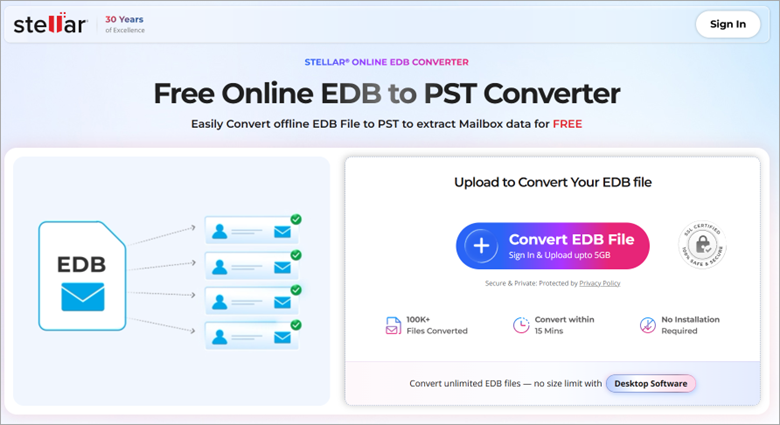
In those moments the ability to work directly with the offline EDB becomes essential. free online edb to pst converter by Stellar addresses exactly this need.
Common Scenarios Where the Online EDB to PST Converter Helps
Typical use cases I see in the field include:
- Archiving inactive or departed-user mailboxes from an old EDB for long-term retention or legal hold.
- Extracting data from a legacy Exchange 2003/2007/2010 database after a migration to Microsoft 365 or a newer on-premises version has already been completed and the original server has been decommissioned.
- Exporting specific mailboxes when New-MailboxExportRequest is not suitable for the required mailbox export workflow.
- Converting EDB files to PST for mailbox archiving, retention, or offline access while preserving the folder structure.
In all of these situations the goal is the same: get clean, usable PST files that preserve the original folder hierarchy, attachments, calendar items, contacts, tasks and notes.
How the Online EDB to PST Conversion Works?
The process is deliberately simple and requires no local Exchange installation or Outlook client.
- Navigate to the EDB to PST online converter page and click the “Convert EDB File” button. You sign in (or create a free account) and securely upload the EDB file. The transfer uses an encrypted connection.
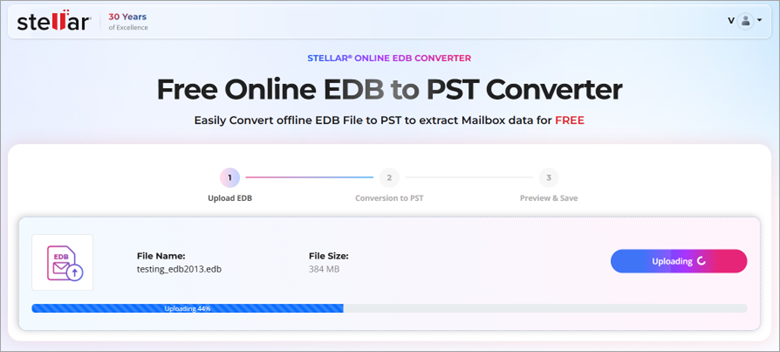
2. The online service analyses the database in a fully automated environment. No human intervention occurs on the Stellar side. The engine supports EDB files created on Exchange Server 5.5 through Exchange 2019 and Subscription Edition.
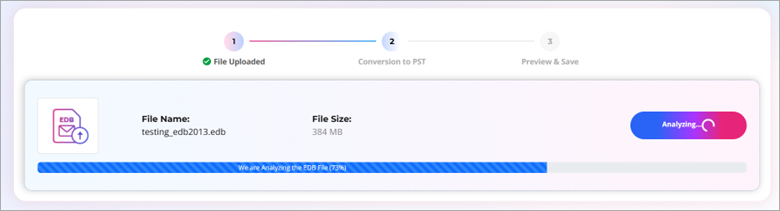
3. Once analysis finishes you receive a preview of the mailboxes folder structures, including item counts. This preview is useful for verification before you commit to the download.
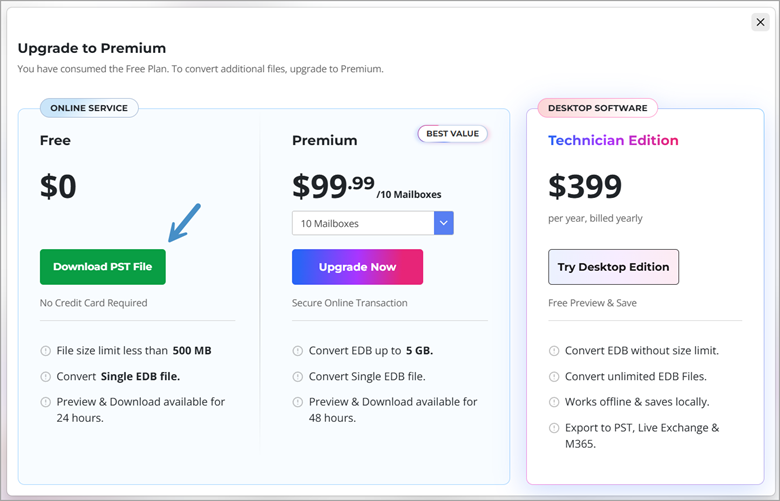
4. You then download a ZIP archive that contains one PST file per mailbox. Free-tier conversions remain available for 24 hours. Premium conversions stay available for 48 hours. After that window the data is permanently deleted from Stellar’s servers.
Important technical points:
- The original EDB file is never modified.
- Folder hierarchy and message properties (read/unread status, timestamps, etc.) are retained.
- You can convert files up to 500 MB for free with no credit-card requirement. Files up to 5 GB require the Premium plan ($99.99 for ten mailboxes). Larger databases or repeated conversions are better handled by the offline desktop edition of Stellar Converter for EDB, which has no size limit and can also export directly to a live Exchange server or Microsoft 365 tenant.
Why an EDB to PST Online Service Makes Sense for Smaller Jobs
For many administrators the biggest advantage is the complete absence of infrastructure requirements.
You do not need to:
- Set up Exchange Server or additional infrastructure.
- Install Outlook on the workstation.
- Install desktop conversion software for a one-time or smaller EDB conversion.
This is particularly convenient when you are working from a laptop in a remote office or when the only remaining copy of an old EDB is sitting on a USB drive. The preview capability also reduces risk: you can confirm that the expected mailboxes structure and item counts are present before downloading.
Security is handled by encrypted upload and automatic deletion of the uploaded EDB and resulting PSTs after the stated retention period. Still, for highly sensitive environments you may prefer the offline desktop product so that the data never leaves your network.
Limitations to Keep in Mind
The free online service processes one EDB file per session and is capped at 500 MB. Very large multi-mailbox databases will therefore require either the Premium online tier or the desktop Edition.
Conversion time scales with file size and the amount of mailbox data; larger files naturally take longer. Browser support covers current versions of Chrome, Edge, Firefox and Safari.
If you need to convert many EDBs and mailboxes, export directly into a live Exchange organization, or work with multi-terabyte databases, the desktop edition is the more appropriate choice. It can also save a scanned DAT file for later re-use, which is handy when you expect to revisit the same database.
The Desktop Version: Stellar Converter for EDB
When the online limits become a constraint, the desktop version of Stellar Converter for EDB is the natural next step. It is a full Windows application that runs completely offline, so the EDB never leaves your network. This is the edition I reach for when dealing with multi-gigabyte or multi-terabyte databases, repeated conversion jobs, or environments with strict data-residency requirements.
Key technical advantages of the desktop edition:
- No file-size limit. You can open and process EDBs of any size that your hardware can handle.
- Unlimited number of EDB files and mailboxes in a single license period
- Direct export options beyond PST: you can push recovered mailboxes straight into a live on-premises Exchange organization or into a Microsoft 365 tenant. This eliminates the intermediate PST import step when the destination is already available.
- Local processing and local storage of results. Everything stays on the machine you control.
- Ability to save a scanned DAT file after the first analysis. Subsequent conversion sessions can reopen that DAT file instead of re-scanning the entire EDB, which saves considerable time on large databases.
- Full preview of mailbox contents, folders, and individual items before any export, exactly as in the online tool but with richer filtering and search capabilities.
Installation is straightforward: download the installer from the Stellar site, run it on a Windows workstation or server (no Exchange binaries required), and point it at the EDB.
For archival work the ability to queue multiple EDBs and generate individual PSTs (or direct exports) in one session is a genuine time-saver.
Note: I’ve done a video about the desktop version here.
Final Words
The Online EDB to PST Converter by Stellar solves a recurring administrative pain point: extracting mailbox data from an offline Exchange database without standing up additional infrastructure. Basically, you don’t need a running Exchange server.
For databases under 500 MB the free tier is genuinely useful. But if you need anything larger the paid online premium or desktop options provide a clear upgrade path. In environments where native Exchange export tools are unavailable or unreliable, having a browser-based conversion option ready can save hours of time and reduce the risk of data loss.
If you regularly deal with legacy Exchange data, keep the link bookmarked. It is one of those small tools that proves its value the moment you actually need it.
More posts from ESX Virtualization:
- Veeam Backup & Replication 13.1: The Features That Actually Matter (and Why You Should Move Now)
- Veeam Bare Metal Recovery from Recovery partition
- Veeam Backup and Replication Upgrade on Windows – Yes we can
- Securing Your Backups On-Premises: How StarWind VTL Fits Perfectly with Veeam and the 3-2-1 Rule
- VMware Alternative – OpenNebula: Powering Edge Clouds and GPU-Based AI Workloads with Firecracker and KVM
- Another VMware Alternative Called Harvester – How does it compare to VMware?
- VMware vSphere 9 Standard and Enterprise Plus – Not Anymore?
- VMware vSphere Foundation (VVF 9) and VMware Cloud Foundation (VCF 9) Has been Released
- Vulnerability in your VMs – VMware Tools Update
- VMware ESXi FREE is FREE again!
- No more FREE licenses of VMware vSphere for vExperts – What’s your options?
- VMware Workstation 17.6.2 Pro does not require any license anymore (FREE)
- Two New VMware Certified Professional Certifications for VMware administrators: VCP-VVF and VCP-VCF
- Patching ESXi Without Reboot – ESXi Live Patch – Yes, since ESXi 8.0 U3
- Update ESXi Host to the latest ESXi 8.0U3b without vCenter
- Upgrade your VMware VCSA to the latest VCSA 8 U3b – latest security patches and bug fixes
- VMware vSphere 8.0 U2 Released – ESXi 8.0 U2 and VCSA 8.0 U2 How to update
- What’s the purpose of those 17 virtual hard disks within VMware vCenter Server Appliance (VCSA) 8.0?
- VMware vSphere 8 Update 2 New Upgrade Process for vCenter Server details
- What’s New in VMware Virtual Hardware v21 and vSphere 8 Update 2?
- vSphere 8.0 Page
- ESXi 7.x to 8.x upgrade scenarios
- VMware vCenter Server 7.03 U3g – Download and patch
- Upgrade VMware ESXi to 7.0 U3 via command line
- VMware vCenter Server 7.0 U3e released – another maintenance release fixing vSphere with Tanzu
- What is The Difference between VMware vSphere, ESXi and vCenter
- How to Configure VMware High Availability (HA) Cluster
Stay tuned through RSS, and social media channels (Twitter, FB, YouTube)





Leave a Reply