ESX Virtualization

VMware ESXi, vSphere, VMware Backup, Hyper-V... how-to, videos....

Nakivo Backup and Replication - #1 Backup solution for Virtual, physical, cloud, NAS and SaaS

Menu
  • Certification
      • VCP-VVF Administrator
          • vcp-vvf-2.
        • Close
      • VCP-DCV vSphere 8
          • vcp2024-125.
        • Close
    • Close
  • VMware
    • Configuration Maximums
    • vSphere
      • VVF 9 and VCF 9
      • vSphere 8.0
      • vSphere 7.0
      • vSphere 6.7
      • vSphere 6.5
      • vSphere 6.0
      • Close
    • VMworld
      • VMware EXPLORE 2024
      • VMware EXPLORE 2023
      • VMware EXPLORE 2022
      • VMworld 2019
      • VMworld 2018
      • VMworld 2017
      • VMworld 2016
      • VMworld 2015
      • VMworld 2014
      • VMworld 2013
      • VMworld 2012
      • VMworld 2011
      • Close
    • Close
  • XCP-NG
    • XCP-NG
    • Close
  • Proxmox
    • Proxmox
    • Close
  • Microsoft
    • Windows Server 2012
    • Windows Server 2016
    • Windows Server 2019
    • Windows Server 2025
    • Close
  • Categories
    • Tips – VMware, Microsoft and General IT tips and definitions, What is this?, How this works?
    • Server Virtualization – VMware ESXi, ESXi Free Hypervizor, VMware vSphere Server Virtualization, VMware Cloud and Datacenter Virtualization
    • Backup – Virtualization Backup Solutions, VMware vSphere Backup and ESXi backup solutions.
    • Desktop Virtualization – Desktop Virtualization, VMware Workstation, VMware Fusion, VMware Horizon View, tips and tutorials
    • How To – ESXi Tutorials, IT and virtualization tutorials, VMware ESXi 4.x, ESXi 5.x and VMware vSphere. VMware Workstation and other IT tutorials.
    • Free – Free virtualization utilities, ESXi Free, Monitoring and free backup utilities for ESXi and Hyper-V. Free IT tools.
    • Videos – VMware Virtualization Videos, VMware ESXi Videos, ESXi 4.x, ESXi 5.x tips and videos.
    • Home Lab
    • Reviews – Virtualization Software and reviews, Disaster and backup recovery software reviews. Virtual infrastructure monitoring software review.
    • Close
  • Partners
    • NAKIVO
    • StarWind
    • Xorux
    • Close
  • This Web
    • News
    • ESXi Lab
    • About
    • Advertise
    • Archives
    • Disclaimer
    • Privacy policy
    • PDFs and Books
    • Close
  • Free

VMware Converter 5.0 is ready for VMware Workstation 8.0

By Vladan SEGET | Last Updated: January 27, 2013

It's possible to convert VM or physical system to VMware Workstation 8.0 format. I was playing the other day with the new VMware converter 5.0 standalone which has been released recently and noticed that you can already convert virtual machines or physical systems to the VMware Workstation 8 format.

VMware converter permits not only to P2V  and convert physical systems directly to hardware version 8.0 compatible with VMware vSphere 5.0, but also do a conversions which has as a destination VMware Workstation 8. And so it seems that even that VMware Workstation 8.0 has not been released yet (I think that the release is quite imminent…. ) , the Converter standalone can already convert to Workstation 8 format.

VMware Workstation 8.0 is still in beta and some fellow bloggers did attend a session in Las Vegas during the VMworld 2011 and published some videos from the session. It seems that we all will love to work with this new release. Not only that you'll be able to connect and interract with VMs on ESX hosts, but also copying those VMs from your local drive to ESX host simplified by … drag and drop.

Also you'll be able to share your VMs – with the possibility to give rights via roles like in vCenter.. A shared VM will be able to be started from remote computer without the necessity to start the full workstation computer which shares the VM. We use to have this functionality on VMware Server, remember…?

The new Workstation will be a major release which for example introduces one small functionality which is quite big…..When upgrading from previous releases you'll be able to install the software without uninstaling the old version first.  A feature which many of us were quite waiting… -:)

On the screenshot below you can see option for the destination type by using VMware Converter 5.0:
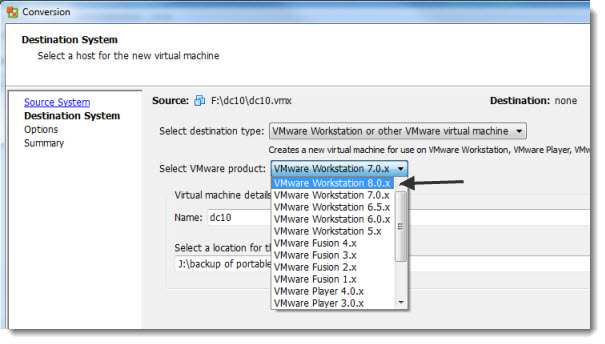
VMware converter 5 and as a destination of the conversion can be a VMware Workstation 8

Enjoy….-:)

And a quick video from vNinja.net showing the copy to host feature by drag and drop.

Source: vNinja.net

Vote !
facebookShare on Facebook
TwitterPost on X
FollowFollow us
PinterestSave

| Filed Under: Server Virtualization Tagged With: VMware Converter 5.0, VMware Workstation 8.0

About Vladan SEGET

This website is maintained by Vladan SEGET. Vladan is as an Independent consultant, professional blogger, vExpert x17, Veeam Vanguard x11, VCAP-DCA/DCD, ESX Virtualization site has started as a simple bookmarking site, but quickly found a large following of readers and subscribers.

Connect on: Facebook. Feel free to network via Twitter @vladan.

Private Sponsors


Featured

  • Thinking about HCI? G2, an independent tech solutions peer review platform, has published its Winter 2023 Reports on Hyperconverged Infrastructure (HCI) Solutions.
Click to Become a Sponsor

Most Recent

  • StarWind Under DataCore: How the Acquisition Strengthens HCI for Edge, ROBO, and Existing Users
  • NAKIVO Backup & Replication v11.2.2: Full vSphere 9.1 + Proxmox VE 9.1/9.2 Support (and the Practical Bits That Matter)
  • TMOG Task Manager – The Original Creator of Windows Task Manager Is Back With Something Better
  • ScanPST Gave Up Again: Stellar repair for outlook (Desktop) vs. Online PST Repair Put to the Test
  • Application Backup Repository in Veeam Backup & Replication 13.1 – The Smart NFS Target Many Overlook
  • Veeam Agent for Microsoft Windows 13.1.1.700 (Free Edition) – Technical Overview and What You Can Achieve
  • Free Online EDB to PST Converter: Extract Mailbox Data Without Exchange Server
  • How to Recover Deleted Files from Virtual Machine
  • VMware Workstation Pro 26H1u1 Released – Security Fixes and Secure Boot Platform Key Remediation
  • StarWind Virtual HCI Appliance Free: Turn Your Servers into a Full HCI Cluster Without Spending a Cent

Veeam Vanguard x12

Get new posts by email:


Deals

Support us on Ko-Fi


Buy Me a Coffee at ko-fi.com

Friendly Websites and Blogs

  • vBlog.io
  • VMware Engineer Jobs
 

YouTube

…

Find us on Facebook

ESX Virtualization

…

Copyright © 2026 ·Dynamik-Gen · Genesis Framework · Hosted with HostColor.com