
ESX Virtualization

VMware ESXi, vSphere, VMware Backup, Hyper-V... how-to, videos....

Nakivo Backup and Replication - #1 Backup solution for Virtual, physical, cloud, NAS and SaaS

Menu
  • Certification
      • VCP-VVF Administrator
          • vcp-vvf-2.
        • Close
      • VCP-DCV vSphere 8
          • vcp2024-125.
        • Close
    • Close
  • VMware
    • Configuration Maximums
    • vSphere
      • VVF 9 and VCF 9
      • vSphere 8.0
      • vSphere 7.0
      • vSphere 6.7
      • vSphere 6.5
      • vSphere 6.0
      • Close
    • VMworld
      • VMware EXPLORE 2024
      • VMware EXPLORE 2023
      • VMware EXPLORE 2022
      • VMworld 2019
      • VMworld 2018
      • VMworld 2017
      • VMworld 2016
      • VMworld 2015
      • VMworld 2014
      • VMworld 2013
      • VMworld 2012
      • VMworld 2011
      • Close
    • Close
  • Proxmox
    • Proxmox
    • Close
  • Microsoft
    • Windows Server 2012
    • Windows Server 2016
    • Windows Server 2019
    • Windows Server 2025
    • Close
  • Categories
    • Tips – VMware, Microsoft and General IT tips and definitions, What is this?, How this works?
    • Server Virtualization – VMware ESXi, ESXi Free Hypervizor, VMware vSphere Server Virtualization, VMware Cloud and Datacenter Virtualization
    • Backup – Virtualization Backup Solutions, VMware vSphere Backup and ESXi backup solutions.
    • Desktop Virtualization – Desktop Virtualization, VMware Workstation, VMware Fusion, VMware Horizon View, tips and tutorials
    • How To – ESXi Tutorials, IT and virtualization tutorials, VMware ESXi 4.x, ESXi 5.x and VMware vSphere. VMware Workstation and other IT tutorials.
    • Free – Free virtualization utilities, ESXi Free, Monitoring and free backup utilities for ESXi and Hyper-V. Free IT tools.
    • Videos – VMware Virtualization Videos, VMware ESXi Videos, ESXi 4.x, ESXi 5.x tips and videos.
    • Home Lab
    • Reviews – Virtualization Software and reviews, Disaster and backup recovery software reviews. Virtual infrastructure monitoring software review.
    • Close
  • Partners
    • NAKIVO
    • StarWind
    • Xorux
    • Close
  • This Web
    • News
    • ESXi Lab
    • About
    • Advertise
    • Archives
    • Disclaimer
    • Privacy policy
    • PDFs and Books
    • Close
  • Free

FreeNAS 11.2 Has a nice new UI and updates

By Vladan SEGET | Last Updated: December 14, 2018

Shares

FreeNAS has been in development over years. I still remember setting up one of my first iSCSI connections for my ESXi lab with FreeNAS. Yeah, FreeNAS has a long history. This new release has brought in a new UI and some backend updates that we'll talk about today – FreeNAS 11.2 Has a nice new UI and updates.

FreeNAS is used by many users for free use but also for enterprise workloads (with support). They also sell hardware appliances with FreeNAS preinstalled, as you for sure, know. FreeNAS can be installed on pretty much many systems, you can find many free resources which has lists of hardware which works, but as many new modern Linux distributions, FreeNAS works almost on everything.

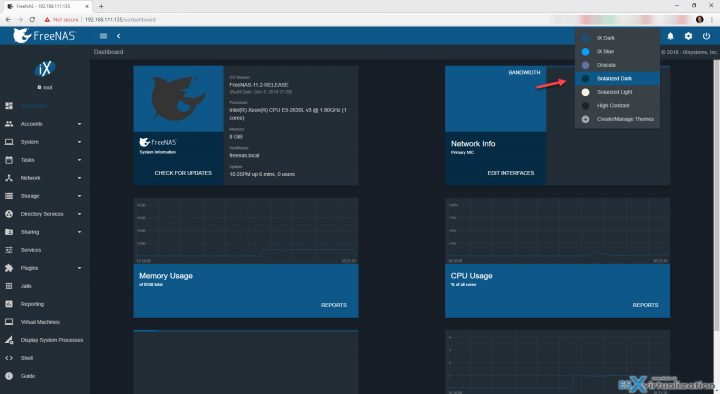
The new UI is based on Angular and Javascript. We'll show a few screenshots from the lab as well.

What do you need to install FreeNAS?

You need a standard PC hardware with a 64-bit processor and at least 8GB of RAM. FreeNAS is intended to be installed on USB Flash drive, with a recommended minimum size of 8GB. 16GB provides more room for boot environments.

Note: You can also use VMware Workstation (like me) if you want to take FreeNAS for a spin, check out the features.

FreeNAS supports many protocols. For example, there is CIFS for Windows users, NFS for Unix/Linux operating systems, or AFP for Mac OS X users. FreeNAS uses the ZFS file system to store, manage, and protect data.

ZFS has some advanced features like snapshots to keep old versions of files (you can snapshot a volume). You can have incremental remote backups to keep your data safe on another device. And this does not include some large file transfers

The FreeNAS also uses compression before those transfers, so the size is reduced so those transfers are faster.

Here is a screenshot from the lab. Installed by using VMware Workstation for testing.
And here is the online user guide.

More from the release notes:

  • Enhanced Encryption: Support for self-encrypting drives (SEDs). SEDs are FIPS 140-2 compliant, which is useful for government use, HIPAA, PCI, and GDPR.
  • ZFS Improvements: Latest up-to-date version of OpenZFS with performance and feature enhancement to improve ARC performance, scrub speeds, and vdev resiliency.
  • Robust API: Swagger-compliant REST and WebSockets API with integrated documentation, improved usability, and backward compatibility with the legacy API.
  • Mobile and Theming Support: Choose from several built-in themes or create your own custom theme. Built-in mobile support makes it easier than ever to access FreeNAS via your smartphone or tablet.

Release Notes for the full list of changes and improvements are here. Check it out.

What else you can do with FreeNAS?

FreeNAS has a large number of plugins. You can use those third-party software plugins, such as Plex Media Server which allows you to stream television shows, movies, and music to a wide variety of devices.

There are really tons of plugins for FreeNAS.

You can then set up an iSCSI or NFS and connect your ESXi host(s) to FreeNAS. You can use it as a shared storage for your lab etc. It can be multi-purpose box based on FreeNAS. Yes, FreeNAS is fun to play with and have it in the lab.

There is also a built-in Update Manager, allowing the administrator to determine when to apply system patches and new features. When the system is updated, a copy of the current operating system is added to the boot menu, making it easy to revert to the previous version of the operating system should the update fail.

More from ESX Virtualization

  • Free Up Disk Space On Windows 10 – The New Way
  • What is Microsoft MSIX Packaging Tool?
  • Install and Configure VMware vCSA 6.7
  • VMware DRS Entitlement Viewer – Free Tool
  • What is VMware UNMAP? – Dead Space Reclamation
  • What is VMware Skyline?

Stay tuned through RSS, and social media channels (Twitter, FB, YouTube)

Vote !
Shares

| Filed Under: Free Stuff, Home Lab Tagged With: Freenas

About Vladan SEGET

This website is maintained by Vladan SEGET. Vladan is as an Independent consultant, professional blogger, vExpert x17, Veeam Vanguard x11, VCAP-DCA/DCD, ESX Virtualization site has started as a simple bookmarking site, but quickly found a large following of readers and subscribers.

Connect on: Facebook. Feel free to network via Twitter @vladan.

Comments

  1. Vladan SEGET says

    December 14, 2018 at 10:11 pm

    Wow, I would not think FreeNAS was that popular -:).

Private Sponsors


Featured

  • Thinking about HCI? G2, an independent tech solutions peer review platform, has published its Winter 2023 Reports on Hyperconverged Infrastructure (HCI) Solutions.
Click to Become a Sponsor

Most Recent

  • Reviving Old School Laptops with PrimTux: Battling Obsolescence on a Budget
  • Proxmox Datacenter Manager 1.0 released – a real vCenter Server Alternative?
  • Recovering a Corrupted Exchange Database with Stellar Repair for Exchange
  • Commvault at AWS re:Invent 2025: Pioneering AI-Enhanced Cyber Resilience with Cloud Unity
  • How to Set Up pfSense Community Edition as a Firewall Using VMware Workstation Pro 17 (2025 Edition)
  • HPE Morpheus VM Entreprise and Morpheus VM Essentials updates released – v8.0.11
  • Veeam Backup and Replication Upgrade on Windows – Yes we can
  • Commvault’s Cloud Unity Platform: Revolutionizing Enterprise Resilience in the AI Era
  • Securing Your Backups On-Premises: How StarWind VTL Fits Perfectly with Veeam and the 3-2-1 Rule
  • 3 New Advanced Certifications from VMware/Broadcom Released

Get new posts by email:


Deals

Support us on Ko-Fi


Buy Me a Coffee at ko-fi.com

VMware Engineer Jobs

VMware Engineer Jobs

YouTube

…

Find us on Facebook

ESX Virtualization

…

Copyright © 2025 ·Dynamik-Gen · Genesis Framework · Hosted with HostColor.com
