
If you’re a virtualization enthusiast like me, you’ve probably spent the last couple of years watching VMware customers scramble for alternatives after the Broadcom acquisition turned licensing into a headache. I’ve been testing Proxmox VE for a while now (and even wrote about the official Proxmox Datacenter Manager 1.0 release), and one thing keeps coming up in every migration story I hear: the lack of a true vCenter-style centralized console. No single pane of glass for multiple clusters, no familiar DRS-like load balancing, and definitely no easy V2V migration path that feels like the old VMware workflows.
That’s exactly why ProxCenter caught my attention. It’s positioned as the missing piece for teams moving from vSphere to Proxmox – a modern, unified management platform with intelligent features, hypervisor migration tools, and Ceph integration that VMware veterans will instantly recognize. To get the real story and dig deeper into what it actually offers VMware customers, I reached out to the founder (the solo developer behind the project – Emmanuel REVY).
Note: My detailed article about the solution was published at StarWind blog – ProxCenter: The vCenter-Like Management Tool for Proxmox VE
He kindly agreed to an interview-style chat. So, grab a coffee, and let’s unpack what ProxCenter brings to the table.
Vladan: Why create ProxCenter in the first place? And why Proxmox specifically?
Emmanuel: “I’ve piloted VMware infrastructures for more than 10 years. When I migrated to Proxmox, the lack of an equivalent to vCenter was striking – no centralized tool, no consistent multi-cluster view, no unified management. That’s what pushed me to create ProxCenter: to fill this gap and offer IT teams migrating from VMware a tool they already know in spirit, but fully adapted to the Proxmox & Ceph ecosystem.”He went on to explain that the post-Broadcom reality has supercharged the need. Companies aren’t just looking for a cheaper hypervisor – they want something that feels familiar so their teams don’t have to relearn everything. Proxmox is the most mature open platform ready to welcome them, but without a proper management layer, large environments still feel fragmented.
ProxCenter changes that by giving you a single dashboard for everything: real-time cluster health, node metrics, VM/CT inventory, backup jobs, and alerts – all in one place.
For VMware admins, this means no more jumping between individual Proxmox web UIs. You get drag-and-drop customizable widgets, a unified storage view (including deep Ceph monitoring with AI-powered predictions), and network topology maps that echo the old vCenter experience. It’s self-hosted, agentless, and 100% focused on keeping your data in your infrastructure – no vendor lock-in.
Vladan: Who exactly is behind ProxCenter? Is this a big-company product or something more personal? This is where the story gets even more interesting.
Emmanuel: “ProxCenter is carried by me alone right now, with more than 15 years of experience in systems and network engineering. It’s a project born from a real field need, not a corporate initiative”.
He handles everything – development, community support via GitHub, and direct Enterprise support. That single point of contact is actually a selling point: “You get a responsive interlocutor who truly masters the product.”
Of course, he’s realistic: if ProxCenter grows (and the interest from VMware customers suggests it will), he’ll need to build a proper team with structure. The model is open-core and refreshingly transparent. The Community Edition is free forever (unlimited clusters, basic dashboard, monitoring, PBS management, and GitHub support under AGPL-3.0).
The Enterprise Edition adds the premium features most ex-VMware shops crave and comes with a custom annual license plus priority SLA support.
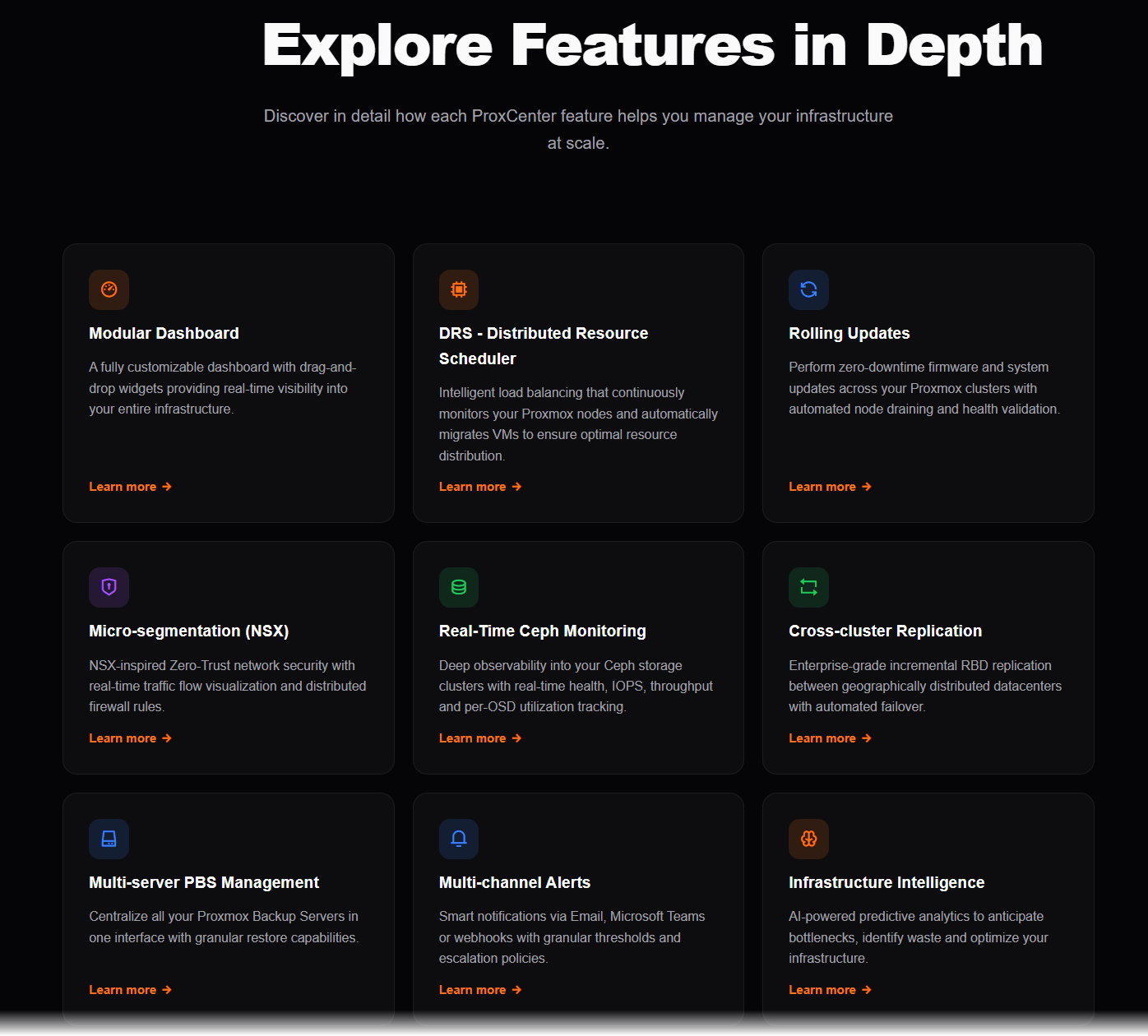
Vladan: Let’s talk about what ProxCenter actually offers VMware customers today. Walk us through the key features that make migration easier. Here’s where the “further detail” really shines.
Emmanuel: ProxCenter isn’t just another monitoring tool – it’s built to replicate the vCenter functionalities while leveraging Proxmox strengths. The modular dashboard gives you that single pane of glass we all miss: real-time health across clusters, CPU/RAM/storage I/O, backup status, and multi-channel alerts (email, Teams, etc. in Enterprise).
You can create custom role-based views so teams see only what they need – a security win that vCenter admins will appreciate.
Then there’s the intelligent DRS (Distributed Resource Scheduler) in the Enterprise edition for automatic load balancing – exactly the kind of thing VMware users expect when running multiple clusters.
Network micro-segmentation (NSX-style) and cross-cluster replication with disaster recovery orchestration (Zerto-like) round out the enterprise features.
Ceph monitoring is another standout: real-time dashboards with AI predictive analytics, unified storage views, and Green IT energy metrics. For anyone running hyper-converged Proxmox setups, this alone removes a huge pain point from raw Proxmox.
But the real game-changer for VMware clients is the hypervisor migration tool. More on that below.
Vladan: The V2V migration capabilities sound promising. How does the VMware-to-Proxmox migration actually work inside ProxCenter?
Emmanuel: This is the short-term priority. “We’ve focused first on V2V (Virtual-to-Virtual) migration directly from VMware ESXi,” he explained. “Companies can migrate their VMs to Proxmox straight from the ProxCenter interface, without friction.
”The process is orchestrated end-to-end: full VM migration with streaming disk transfer, automatic hardware config mapping, disk format conversion (VMDK to qcow2 or raw), pre-flight checks, and real-time progress tracking.
You point ProxCenter at your vCenter or ESXi hosts, select VMs, choose the target Proxmox cluster, and let it handle the rest. No manual export/import hassles, no third-party converters needed.
He’s already extended this to XCP-ng (with automatic VHD to qcow2 conversion) and Nutanix AHV (disk + config conversion) that are on the roadmap.
The vision is clear: make ProxCenter the go-to migration and management platform for any infrastructure converging on Proxmox.
Other interesting features
Rolling updates across clusters, CloudInit template management, change tracking, CVE vulnerability scanning, and custom compliance reports are all built in too.
It’s the kind of toolkit that lets ex-VMware teams quickly reproduce their original environment instead of spending weeks rebuilding processes.
Vladan: What does the roadmap look like? Where is ProxCenter headed next?
Emmanuel: “The priority in the short term is the V2V migration from VMware – making it as smooth as possible so enterprises can move without downtime or data loss. But the vision is broader. I’m actively working on deeper V2V support from XCP-ng, and the next steps include Nutanix and Hyper-V.”
The objective? Become the reference platform for both migration and ongoing centralized management of any environment that chooses Proxmox as its future.
Features like advanced RBAC with LDAP/AD/SSO, AI infrastructure intelligence, and site-recovery orchestration are already in Enterprise and will keep evolving based on real user feedback.
He’s keeping it pragmatic – community-driven where possible, with Enterprise features reserved for organizations that need SLA-backed support and the full production toolkit.
Final Words
After chatting with the founder, I came away impressed. ProxCenter isn’t vaporware or a corporate cash-grab – it’s a genuine field-born solution from someone who lived the VMware-to-Proxmox pain himself. For teams tired of VMware's new pricing but still craving that unified control plane, it feels like the right bridge.
The VMware “Brexit” isn’t a one-week event; it’s happening progressively as support deadlines loom (remember, vSphere 8 general support ends in 2027).
Companies don’t want to pay triple or quadruple what they used to. ProxCenter gives them a mature, familiar-feeling alternative that grows with them – from free Community Edition for labs or smaller setups all the way to fully supported Enterprise. I like it.
If you’re migrating or already running Proxmox at scale, I strongly recommend giving it a spin. The Community Edition installs in minutes with a simple curl command on any Linux server (Docker-based, reverse-proxy friendly for SSL). Head over to the official site, check the GitHub repo, or reach out for Enterprise licensing.
You can find everything at https://proxcenter.io/ and the open-source UI on GitHub at https://github.com/adminsyspro/proxcenter-ui.
Test the online demo!
https://demo.proxcenter.io/home
What do you think – ready to try ProxCenter in your lab?
More posts from ESX Virtualization:
- Veeam Backup and Replication Upgrade on Windows – Yes we can
- Securing Your Backups On-Premises: How StarWind VTL Fits Perfectly with Veeam and the 3-2-1 Rule
- Winux OS – Why I like it?
- VMware Alternative – OpenNebula: Powering Edge Clouds and GPU-Based AI Workloads with Firecracker and KVM
- Another VMware Alternative Called Harvester – How does it compare to VMware?
- VMware vSphere 9 Standard and Enterprise Plus – Not Anymore?
- VMware vSphere Foundation (VVF 9) and VMware Cloud Foundation (VCF 9) Has been Released
- Vulnerability in your VMs – VMware Tools Update
- VMware ESXi FREE is FREE again!
- No more FREE licenses of VMware vSphere for vExperts – What’s your options?
- VMware Workstation 17.6.2 Pro does not require any license anymore (FREE)
- Two New VMware Certified Professional Certifications for VMware administrators: VCP-VVF and VCP-VCF
- Patching ESXi Without Reboot – ESXi Live Patch – Yes, since ESXi 8.0 U3
- Update ESXi Host to the latest ESXi 8.0U3b without vCenter
- Upgrade your VMware VCSA to the latest VCSA 8 U3b – latest security patches and bug fixes
- VMware vSphere 8.0 U2 Released – ESXi 8.0 U2 and VCSA 8.0 U2 How to update
- What’s the purpose of those 17 virtual hard disks within VMware vCenter Server Appliance (VCSA) 8.0?
- VMware vSphere 8 Update 2 New Upgrade Process for vCenter Server details
- What’s New in VMware Virtual Hardware v21 and vSphere 8 Update 2?
- vSphere 8.0 Page
- ESXi 7.x to 8.x upgrade scenarios
- VMware vCenter Server 7.03 U3g – Download and patch
- Upgrade VMware ESXi to 7.0 U3 via command line
- VMware vCenter Server 7.0 U3e released – another maintenance release fixing vSphere with Tanzu
- What is The Difference between VMware vSphere, ESXi and vCenter
- How to Configure VMware High Availability (HA) Cluster
Stay tuned through RSS, and social media channels (Twitter, FB, YouTube)





Proxmox Datacenter 1.1 is availabe and brings some missing features.
Maybe he should try to organize a cccoperation with proxmox so that both sides have advantages.
Regards
rpr