
As an active Veeam Vanguard, I had the opportunity to attend Veeam 100 Summit 2026 in Lisbon last week. With other Vanguards, Legends, MVPs and Rising Stars, we had great insights into the latest developments from Veeam and its partners. One of the presenters was Scality and their software technology caught my attention. So today I want to look at Scality ARTESCA and how well it works with Veeam Backup & Replication – both as a primary backup repository or as a secondary/capacity target.
If you have been following backup and storage trends for a while, you already know that ransomware attacks almost always go after the backups. Having an immutable storage target has become non-negotiable.
Who is Scality?
Scality is a software company founded in 2009. They build software-defined storage – with no proprietary hardware lock-in. Their main product for large environments is Scality RING, which scales to multi-petabyte and even exabyte levels with both object and file access. In 2021 they launched Scality ARTESCA, a lighter-weight S3-compatible object storage platform aimed at mid-size deployments and especially backup workloads. It runs on standard x86 servers and focuses on simplicity and cyber-resilience. They also have another product, Scality ADI which is built for AI workloads that needs fast access for AI caching. In this post, we will focus on ARTESCA.
The company has engineering teams in San Francisco and Paris and is used by banks, telcos, hospitals and many other enterprises that need reliable, scalable storage.
Why ARTESCA works well for backups
ARTESCA is built as a S3 object storage target that backup applications can use directly. You can start with a relatively small single-node system (around 20 TB usable) and scale out by adding nodes and drives. It uses erasure coding for data protection, so you get good capacity efficiency without classic RAID limitations (ex. Have you ever tried to rebuild a 10TB RAID5 volume after a disk failure?).
Scality ARTESCA: key points for backup admins:
- Native S3 compatibility – Veeam (and many other tools) talk to it the same way they talk to any S3 target.
- Simple management UI with guided assistants.
- Good performance for sequential backup and restore traffic.
- Ability to run as a pure software appliance on your own hardware or as a pre-configured system.
Primary vs secondary use with Veeam
Yes, ARTESCA can be used as primary backup storage, as well as secondary.
In Veeam terms this means you can point a backup job directly at an ARTESCA S3 repository (performance tier / direct-to-object). The first backup lands on the immutable ARTESCA storage.
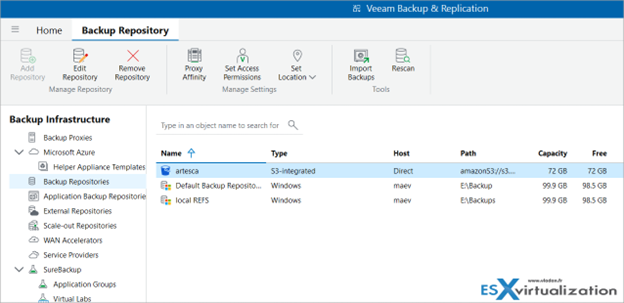
Screenshot from the lab
In Veeam VBR, right-click Backup Repositories > add Object storage > S3 Compatible
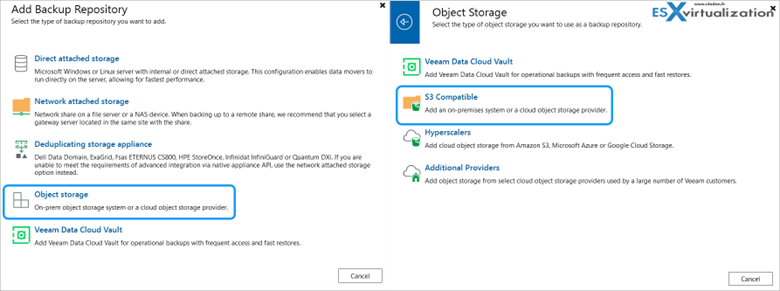
Example from the lab: where to add S3 compatible ARTESCA storage
You can also use it as a capacity tier for backup copy jobs if you prefer to keep a local disk/SSD repository as the first target and then offload to ARTESCA.
Typical use cases I see:
- All-in-one primary repository – Especially with the ARTESCA + Veeam Unified Software Appliance. Veeam and ARTESCA run on the same host(s). The first backup is written straight to the internal S3 target with Object Lock enabled. Simple, low attack surface, good for mid-size environments that want one appliance to manage.
- Primary repository on a dedicated ARTESCA cluster – You deploy ARTESCA on its own servers (or VMs), create a S3-compatible repository in Veeam, enable Object Lock, and send backup jobs directly to it. Useful when you already have (or plan) a multi-node ARTESCA cluster for capacity and availability.
- Hybrid / classic 3-2-1 style – Fast local disk or hardened Linux repository as the first (performance) target, then a backup copy job to ARTESCA as the immutable capacity tier. Still very common and perfectly valid.
- Microsoft 365 or other workloads – ARTESCA is also validated with Veeam Backup for Microsoft 365, so you can use it as the primary object storage target for M365 backups as well.
In all these cases the immutability comes from S3 Object Lock, so the protection level is the same whether the copy is the first or the second.
Integration with Veeam
ARTESCA is fully validated with Veeam Backup & Replication, Veeam Backup for Microsoft 365 and Kasten. It supports Veeam’s Smart Object Storage API (SOSAPI), so capacity information shows up cleanly inside the Veeam console.
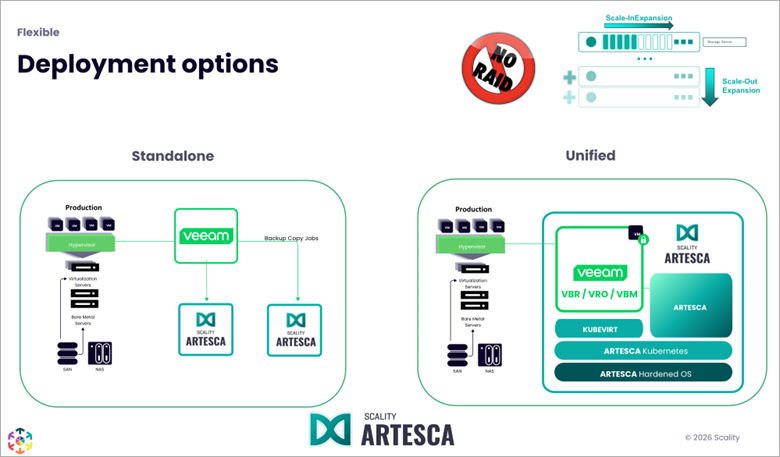
Scality ARTESCA deployment options
A built-in assistant in the ARTESCA UI helps create the account, bucket, Object Lock settings and credentials in a few clicks.
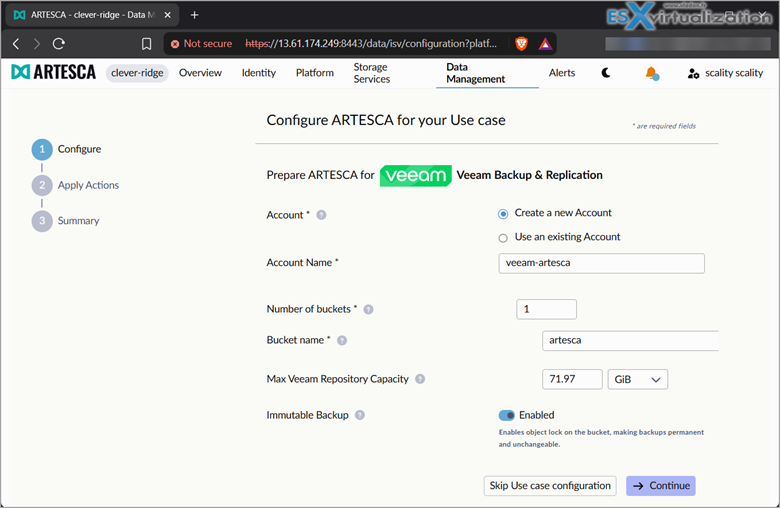
Configuration assistant within ARTESCA user interface
There is also the more integrated option – the Scality ARTESCA+ Veeam Unified Software Appliance (Launched in 2025). Veeam Backup & Replication (server, proxy and gateway) runs on the same host as ARTESCA. Communication between Veeam and the S3 storage stays internal – no external S3 endpoint is exposed by default. This reduces the attack surface compared with a classic setup where Veeam runs on a separate Windows server (or Linux appliance) and talks to an external object store across the network.
Installation options
To recap the different installation options here, you can integrate ARTESCA into your infrastructure in four different ways, depending on what you already have:
- Software appliance: on your own x86 servers (physical or virtual).
- Pre-configured hardware appliance: for faster time-to-production.
- Scality ARTESCA+ Veeam unified software appliance: single-node or multi-node HA versions.
- Consumption / pay-as-you-grow models: for MSPs or environments with unpredictable growth.
Single-node systems are fine for smaller or mid-size environments. For higher capacity and high availability, you move to three-node or larger clusters. You can grow as-you-go and scale out – they have it within their name – SCALITY!
Installation is normally done by Scality or a certified partner so that the system stays supported. More deployment details are on the ARTESCA deployment page.
S3 Object Lock and ransomware protection
For those of you who don’t know much about S3 Object Lock mechanism I want to say that this is probably the most useful feature ever invented for your backups. I’ve been blogging about S3 Object Locks for a couple years now and highly recommend that if you haven’t used it yet, you should ASAP.
S3 Object Lock is a mechanism defined in the S3 API that lets you set a retention period on an object (or a whole bucket). Once an object is locked in compliance mode, nobody – not even a root or administrative user – can delete, overwrite or modify it until the retention period expires. This is enforced by the storage system itself, so even if an attacker compromises the backup software credentials, they still cannot remove the locked backups.
Even as a Veeam backup admin, I cannot delete the test VM once it’s backed up to the S3 repo.
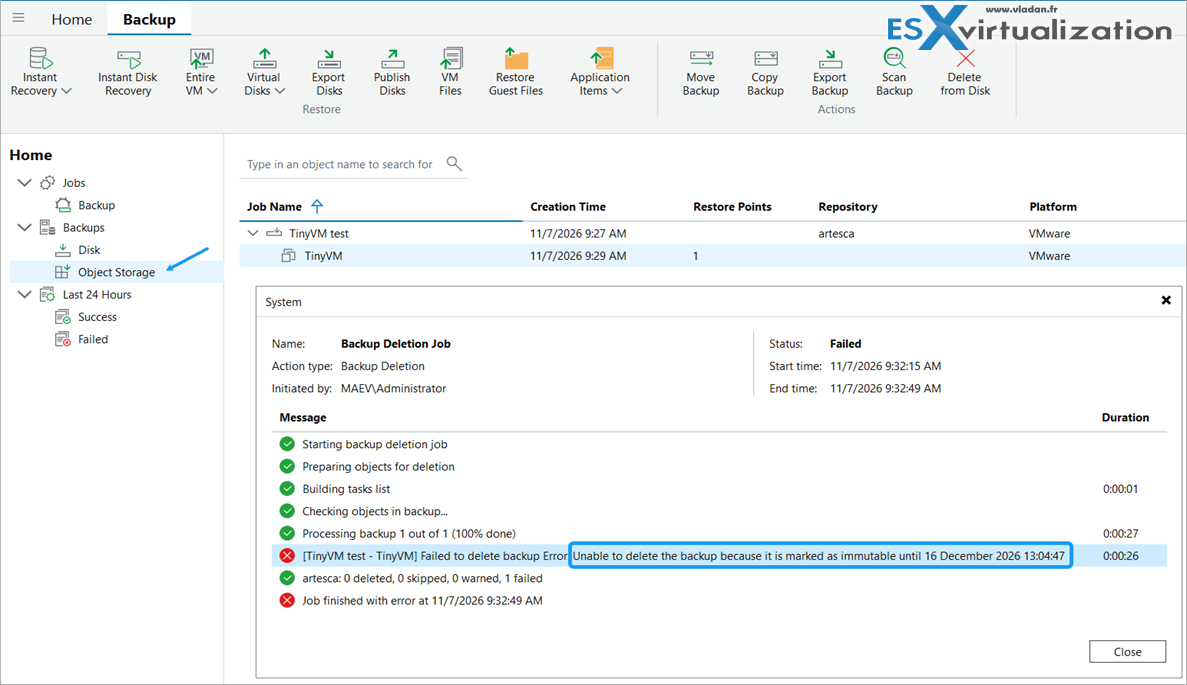
Example from the lab: trying to delete a VM residing on Scality ARTESCA storage protected by Object Lock.
Scality chose the S3 protocol many years ago, long before Object Lock became a mainstream ransomware defense. That early decision means ARTESCA has native, mature support for Object Lock instead of a proprietary alternative. Today almost every major backup product, including Veeam, has solid S3 Object Lock integration, and all Veeam admins know it. The result is a standardized, portable way to make backups immutable.
Scality ARTESCA adds its own CORE5 multi-layer security on top of Object Lock: hardened OS with minimal packages and no root access, zero-trust design, credential isolation, erasure coding that makes raw disk data hard to interpret, and optional multi-site replication.
In the unified Veeam appliance the internal-only data path further reduces exposure. More on the security approach is available on the ARTESCA cyber-resilience page.
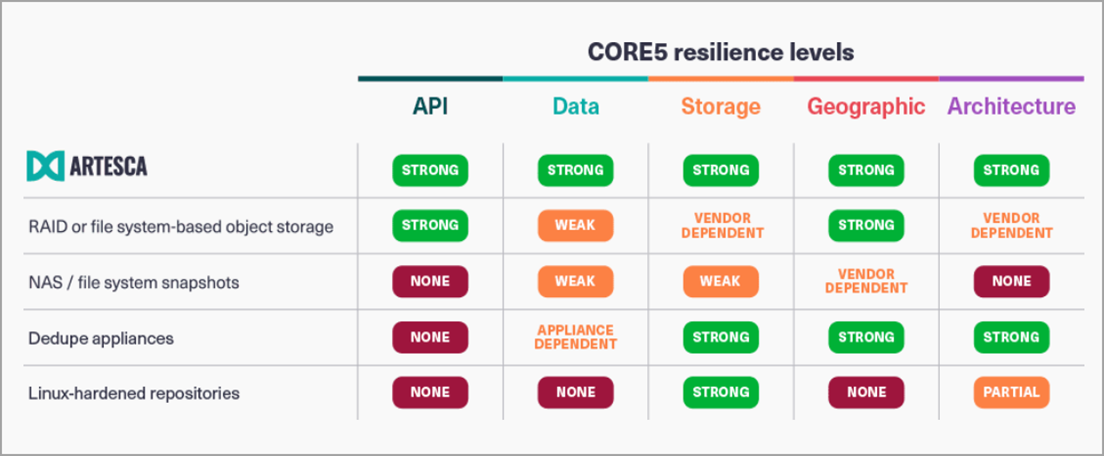
5 layers of defense with Scality ARTESCA, compared to other technologies
Scality ARTESCA: FREE test drive
You don’t need spare hardware to test ARTESCA. You don’t need to ask someone to bring a Scality box to your place. You can explore Scality ARTESCA now, through their free test drive. I connected my Veeam Backup server in the lab, in no time, for my 48H trial.
How to access the free 48 hour ARTESCA test drive:
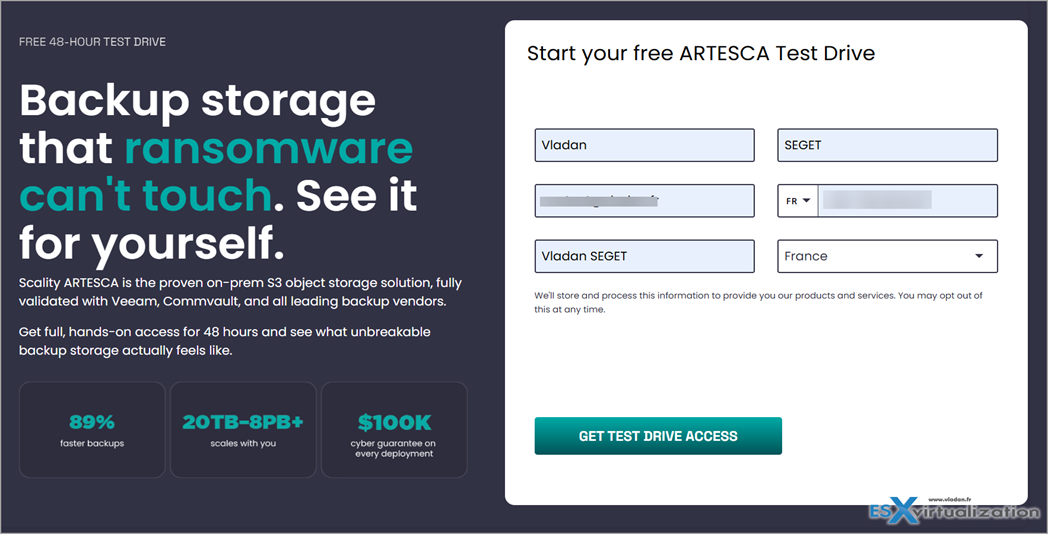
Free test drive for 48 hours
First, register on the site for a test drive. Wait for a confirmation email and then follow the instructions. Remember, the 48H test starts when you receive the email, not when you first connect, so be ready.
Final words
Ransomware groups continue to target backup infrastructure because destroying the recovery copies is the fastest way to force a payment.
A storage layer that can enforce immutability independently of the backup application credentials is one of the strongest practical defenses available. Because ARTESCA speaks standard S3 and supports Object Lock properly, it fits cleanly into existing Veeam environments — whether you use it as the primary repository or as a secondary immutable target.
If you are looking for an on-premises or hybrid S3 target that is simple to operate, scales reasonably, and gives you real immutability for Veeam backups, ARTESCA is worth a serious look. The deployment options are flexible and there is no hardware lock-in. Moreover, at the end of the V100 session we learned that Scality will introduce pull replication to ARTESCA in early 2027 so customers can build logically air gapped backup sanctuaries.
More posts from ESX Virtualization:
- How to update your ESXi 7.x or 8.x to the latest ESXi 8.0U3k via command line
- Veeam Bare Metal Recovery from Recovery partition
- Veeam Backup and Replication Upgrade on Windows – Yes we can
- Securing Your Backups On-Premises: How StarWind VTL Fits Perfectly with Veeam and the 3-2-1 Rule
- VMware Alternative – OpenNebula: Powering Edge Clouds and GPU-Based AI Workloads with Firecracker and KVM
- Another VMware Alternative Called Harvester – How does it compare to VMware?
- VMware vSphere 9 Standard and Enterprise Plus – Not Anymore?
- Vulnerability in your VMs – VMware Tools Update
- VMware ESXi FREE is FREE again!
- No more FREE licenses of VMware vSphere for vExperts – What’s your options?
- VMware Workstation 17.6.2 Pro does not require any license anymore (FREE)
- Two New VMware Certified Professional Certifications for VMware administrators: VCP-VVF and VCP-VCF
- Patching ESXi Without Reboot – ESXi Live Patch – Yes, since ESXi 8.0 U3
- Update ESXi Host to the latest ESXi 8.0U3b without vCenter
- Upgrade your VMware VCSA to the latest VCSA 8 U3b – latest security patches and bug fixes
- VMware vSphere 8.0 U2 Released – ESXi 8.0 U2 and VCSA 8.0 U2 How to update
- What’s the purpose of those 17 virtual hard disks within VMware vCenter Server Appliance (VCSA) 8.0?
- VMware vSphere 8 Update 2 New Upgrade Process for vCenter Server details
- What’s New in VMware Virtual Hardware v21 and vSphere 8 Update 2?
- vSphere 8.0 Page
- ESXi 7.x to 8.x upgrade scenarios
- VMware vCenter Server 7.03 U3g – Download and patch
- Upgrade VMware ESXi to 7.0 U3 via command line
- VMware vCenter Server 7.0 U3e released – another maintenance release fixing vSphere with Tanzu
- What is The Difference between VMware vSphere, ESXi and vCenter
- How to Configure VMware High Availability (HA) Cluster
Stay tuned through RSS, and social media channels (Twitter, FB, YouTube)





Leave a Reply