
VMturbo just released v 5.0 of their flagship software – VMturbo Operations Manager. The product matured over time with important releases but the 5.0 has added an important one – network control module.
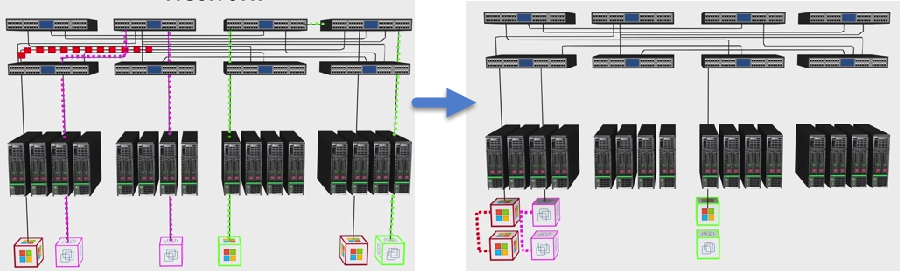
VMturbo places automatically workloads communicating often, together in order to minimize east-west traffic and reduce latency.
One could achieve the same using affinity rules, but this adds complexity and its only static. The product does also allow enhanced hybrid cloud control through a specific module. This allows for example to deploy applications and burst to specific public cloud for peak periods.
Latency will be the main problem as with 10 or 40 gigs networks. We'll get the expected throughput but the latency does change a little or stays the same. The choice of running workloads closer is crucial. By grouping them together the traffic does not has to travel across different switches by adding more hops and latency.
Quote from VMturbo's blog by Shmuel Kliger:
The key to combating latency is to localize those components (or workloads or containers) that communicate the most. Keep them together underneath the same switch (ideally on the same host) and you not only minimize latency but you reduce the potential points of failure – and in an internet bursting Netflix streams and high-velocity trades into 10, 40 or 50 gigabit switches, port overload is going to become a greater and greater issue.
What's new in VMturbo Operations Manager 5.0
Network control module
- Assure application performance by placing “chatty” workloads close to each other reducing inter application tier network latency
- Account for network topology and flow in making placement decisions to assure application performance
- Auto discover and group workloads into dynamic Virtual Pods (vPods) based on frequency of communication (NetFlow or sFlow)
- Maximize the value of high bandwidth top of rack switches and ports
- Reduce time spent configuring and managing affinity rules
Container control module
Benefits of containers are lower memory overhead and faster deployment (compared to VMs), but containers needs to have available resources if they run on bare metal or inside a VMs. VMturbo can automatize the placement of new containers in order to assure the memory and CPU requirements.
- Can move containers across hosts/clusters, datacenters or private/public clouds to deliver the best possible performance
- Can clone containers to auto scale applications based on real-time application transaction throughput.
- Allows to achieve best possible performance while maximizing efficiency.
VDI control module
Assure workload performance to maximize the performance and make the use the infrastructure as efficient as possible.
- redistribute the VMs during boot storms preventing high I/Os on the same datastore
- Improve workload density and hardware utilization
- Simulate and plan migrations to different environments (such as Daas – desktop as a service) or new datacenter.
Hybrid cloud control module
Allows to balance the application workloads between different cloud service providers and your private datacenter
- Migrate app. by proactively assuring availability, CPU storage and network resources.
- Automate workload placement
- Take into account the cloud provider's cost factor.
Get free 30 days trial from VMturbo or get the VMturbo Free Edition (monitor only).
More from ESX Virtualization:
- What is VMware DRS (Distributed Resource Scheduler)?
- What is VMware vSphere Hypervisor?
- What is VMware Orchestrated Restart?
- What is VMware Storage DRS (SDRS)?




