
VMware Data Recovery (VDR) – a GUI tool now.
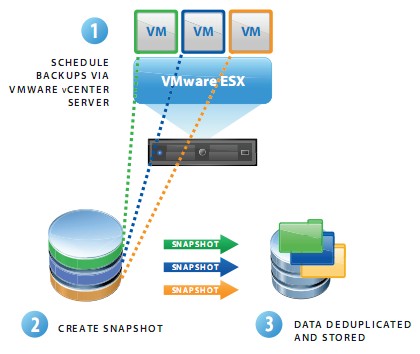
The VMware Data Recovery is an Agent-less disk based backup and recovery solution. Data Recovery can backup/restore your VMs or file level restores of Windows or Linux guess OS.
The principal features of VMware Data Recovery are:
– Disk-based backup and recovery to enable fast backup/restoration of your VMs
– Easy to deploy, because VMware Data Recovery is a virtual machine that runs on VMware ESX and ESXi hosts.
– You are able to restore individual files or entire images as needed.
– Easy to use Assistant and Scheduler to have the possibility schedule backups at night.
– Uses any kind of storage (local storage, NAS, Fibre Channel SAN, or iSCSI SAN support. ) for storing backup images.
During the recovery process of an entire virtual machine, VMware Data Recovery will present point-in-time restore points for each virtual machine. Once the desired restore point is selected, VMware Data Recovery will initiate the process of restoring the virtual machine to the destination host or resource pool by retrieving the specifc data blocks. When overwriting an existing virtual machine or virtual disk, VMware Data Recovery will efciently transfer only data blocks that have changed.
Enjoy… -:)
More on VMware Data Recovery:
- VDR connectivity and divers troubleshooting
- VMware Data Recovery 2.0 – the upgrade process from earlier version
- Troubleshooting tool for VDR
- VDR plugin do not connect to VDR appliance
- How-to enable verbose logging in VDR – VMware Data Recovery
- If you're trying to use Windows CIFS with VDR
- How to fix damaged restore points in VDR
- Using VMware Data Recovery without vCenter?
- VDR appliance not mounting automatically the backup destination after reboot
- VDR – how to get a log bundle before you call the support
- How-to update VDR to 1.2
- Do you want to see a little magic?
- VDR backup fail error
- VMware Data Recovery – a tool for Easy backups of your Virtual Infrastructure
- VMware VDR – vSphere Data Recovery – part 3 – Restore Your Data
- VMware Data Recovery – your first backup – part 2 video
- VMware Data Recovery – install and configure video- part1
- Data recovery – new GUI backup tool present in vSphere 4 – this post

