
When you are using Acronis True Image Echo Workstation (or Server) to backup and create an image file of your system, you can convert this file into Virtual Disk. You can imagine that you do your backups with Acronis on regular basics and so you can use this virtual disk in VMware ESX Server or WMware Workstation. How-to convert your Acronis file Backup into virtual disk.
Here is how-to convert your Acronis Image (.tib):
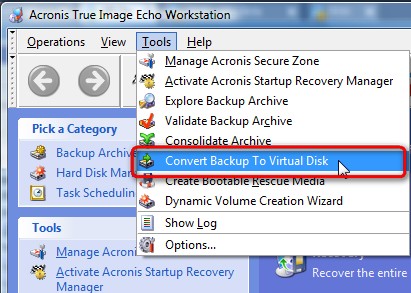
1.) Start Acronis and go to Tools-Convert Backup to Virtual Disk
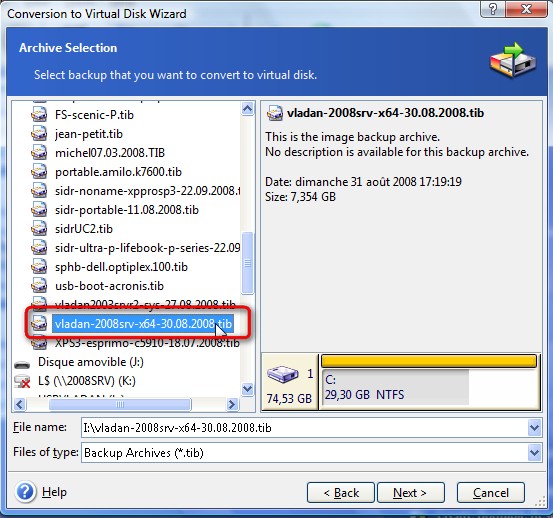
2.) Choose your image file (usually stored on external USB drive) and click on Next.
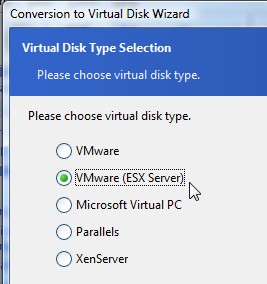
3.) Choose the format for your disk. You can choose from different formats of Virtual Disks (VMware Server, Microsoft Virtual PC, XenServer or Parallels).
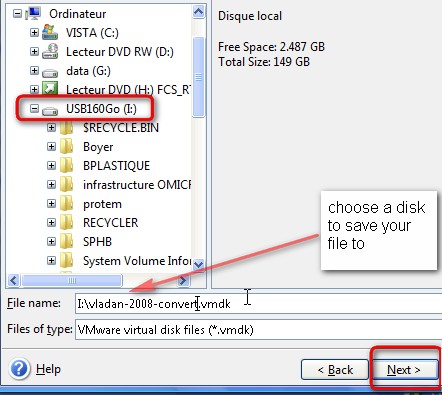
4.) Choose the destination of the conversion file. In my exemple I choosed my USB drive and I choosed to convert into VMware ESX type of file.
Hope that you enjoyed this little tutorial.
Aditionaly you can use VMware Converter Standalone, which can do the same job. As a source you select your .tib file, and as a destination you choose the VMDK. VMware Converter Standalone is a Free download from VMware Website, and can be installed on any workstation running Windows XP, Vista, Seven or Windows 8.
After Conversion Tasks
Yes there are some after conversion tasks to do as well. You can do without, but to get the best possible performance, you might want to check that as well.
- Start in safe mode first..
- Uninstall some of those: RAID management tools, network teaming or management software, wireless card management software, and video and sound drivers. Restart at the normal mode. Do not restart if prompted by an uninstall program, unless you finished with all un-istallations.
- Remove all unnecessary virtual hardware. (See removing ghosted devices here).
- If the source server is configured with multi-CPU hardware abstraction layer (HAL), and the destination virtual machine is configured to use a single CPU, you should change the HAL. See in my post here how to change the HAL.
- Install VMware Tools and restart
- Change back the MSconfig configuration to normal as it was done previously
- Configure your server with static IP address (from informations you saved as I invited you to do through the dos command prompt).
- Reconnect the Virtual NIC cards as needed
Did you liked this article? Subscribe to my RSS feed! You don't know what is RSS? Watch those videos to find out how to save your time with RSS.





I successfully converted my Acronis backup to a virtual disk but when I start this virtual disk I get the following error:
“This copy of windows must be activated with microsoft before you can log on.”
Any idea how I can solve this? There are many results when I google this but none that worked so far.
That is due to a ‘radical’ change in hardware, I can’t remember off-hand but perhaps Acronis Universal Restore would stop this from happening