
Today is a day where we go for another topic that is present on the latest VMware Blueprint, that covers all chapters of the VCP-DCV certification exam based on VMware vSphere 8.x. The topic is VCP-DCV on vSphere 8.x Objective 5.11 – Perform proactive management with VMware Skyline.
A short chapter that is easy to check and learn. If you have a lab, you can just test it. If you don't, then read on….
The study guide page VCP8-DCV with all those individual chapters helps you with learning towards VMware certification exam (2V0-21. 23) and to became VCP-DCV on vSphere 8.x. Check the Official VMware VCP-DCV 2023 exam guide (blueprint) here. Also please check the certification requirements (depends on if you hold already a VCP etc..)
VMware Skyline is a proactive and predictive analytics service that enables administrators to proactively manage their VMware environment. It helps identify potential issues and provides recommendations to avoid them, reducing the risk of downtime and ensuring business continuity.
Identify potential issues before they occur – VMware Skyline uses machine learning algorithms and analytics to identify potential issues in the VMware environment. It analyzes the environment for known issues and recommends solutions to avoid them. It also looks for patterns of behavior that may indicate an issue is likely to occur in the future. By identifying potential issues before they occur, Skyline can help avoid downtime and ensure business continuity.
Provide recommendations for best practices – VMware Skyline provides recommendations for best practices based on industry standards and VMware's own experience. It looks for areas where the environment can be improved to ensure optimal performance, security, and compliance.
For example, Skyline may recommend that virtual machines be moved to a different datastore to improve performance, or that security patches be applied to avoid potential security vulnerabilities. By following these recommendations, administrators can ensure that their VMware environment is running optimally and in compliance with industry standards.
Improve efficiency and reduce operational costs – VMware Skyline can help improve efficiency and reduce operational costs by automating routine tasks. It can perform tasks such as collecting logs and configuration data, and analyzing them for potential issues. This can save administrators time and resources, allowing them to focus on more strategic tasks.
Increase visibility and control – VMware Skyline provides administrators with increased visibility and control over their VMware environment. It provides a single pane of glass view of the environment, allowing administrators to easily identify potential issues and take action to address them.
Provide proactive support – VMware Skyline provides proactive support to customers. It can automatically create support requests for potential issues and provide recommendations for resolution. This can help ensure that issues are addressed quickly and efficiently, reducing the impact on business operations.
In addition, Skyline provides access to VMware technical support experts who can provide additional guidance and assistance if needed. This can help administrators feel confident that they have the support they need to keep their environment running smoothly.
Screenshot from VMware
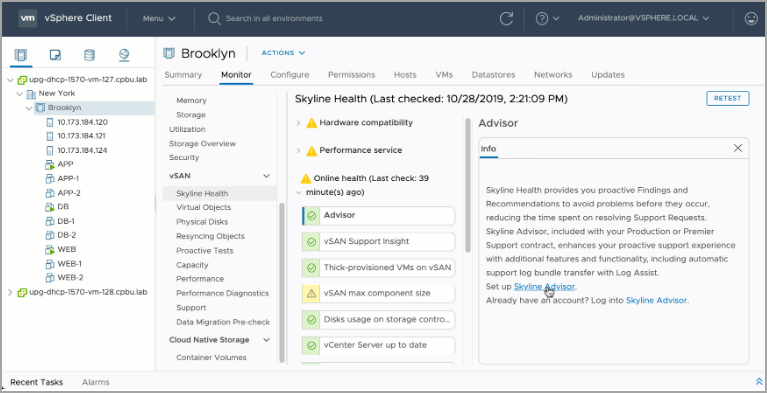
VMware Skyline is a powerful tool for performing proactive management of VMware environments. It can help identify potential issues before they occur, provide recommendations for best practices, improve efficiency and reduce operational costs, increase visibility and control, and provide proactive support. By leveraging the power of Skyline, organizations can ensure that their VMware environment is running optimally and in compliance with industry standards, while minimizing the risk of downtime and ensuring business continuity.
Hopefully this chapter will help you to study towards VMware VCP-DCV Certification based on vSphere 8.x. Find other chapters on the main page of the guide – VCP8-DCV Study Guide Page.
More posts from ESX Virtualization:
- VMware vSphere 8.0 U1 Announced (NEW)
- VMware vSAN 8.0 U1 What's New? (NEW)
- vSphere 8.0 Page
- Veeam Bare Metal Recovery Without using USB Stick (TIP)
- ESXi 7.x to 8.x upgrade scenarios
- A really FREE VPN that doesn’t suck
- Patch your ESXi 7.x again
- VMware vCenter Server 7.03 U3g – Download and patch
- Upgrade VMware ESXi to 7.0 U3 via command line
- VMware vCenter Server 7.0 U3e released – another maintenance release fixing vSphere with Tanzu
- What is The Difference between VMware vSphere, ESXi and vCenter
- How to Configure VMware High Availability (HA) Cluster
- Homelab v 8.0 (NEW)
Stay tuned through RSS, and social media channels (Twitter, FB, YouTube)




