
Hey folks, Vladan here. I’ve been writing about Veeam since version 3.0 back in the day — when it was still a relatively young VMware-centric tool and most of us were still figuring out CBT and Instant VM Recovery. Fast-forward to 2026 and we’re on Veeam Backup & Replication 13.1 (part of the Veeam Data Platform). This isn’t just another point release. It closes real gaps that many of us hit in production: identity recovery after a full compromise, multi-hypervisor freedom after Broadcom-related shifts, large-scale application protection, and stronger built-in cyber resilience.
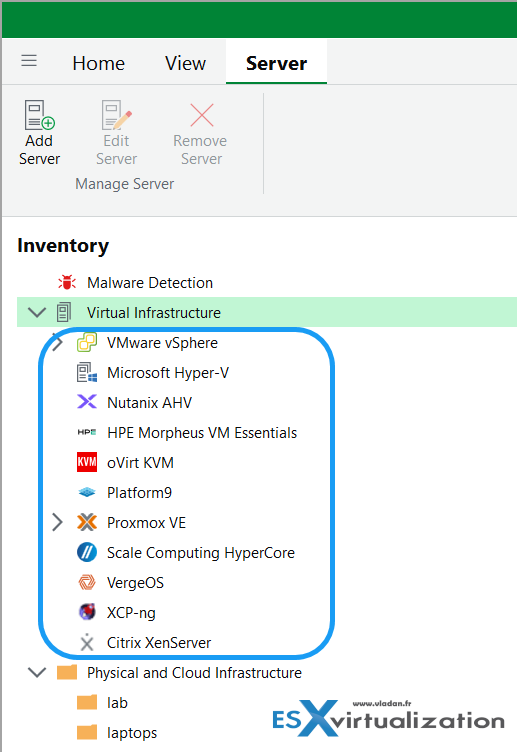
I’ve already covered the general availability announcement on the site. Today I want to focus on the most important new capabilities in 13.1, explain why they matter in real environments, and give you solid reasons to plan the migration (or at least start lab testing). One of the most important global features is the one that proves that Veeam Listens to its customers! And the customers wants multi-hypervisor platform! Check the screenshot below….
Lets have a look at some of the most important and innovative new features that has been added to the Veeam 13.1 software platform.
1. Automated Active Directory Forest Recovery — Identity Is the New Perimeter
This is the one that makes me sit up. When Active Directory is compromised (ransomware, insider, or full forest failure), recovery used to mean following 40+ manual Microsoft steps that only a handful of experts could execute under pressure. Veeam 13.1 turns that into a guided wizard: select the recovery point, define domain controllers per domain, choose source backups and targets, and the system orchestrates the rest — including post-restore AD startup. It covers single-domain, multi-domain, and multi-tree forests and works to both vSphere and Hyper-V.
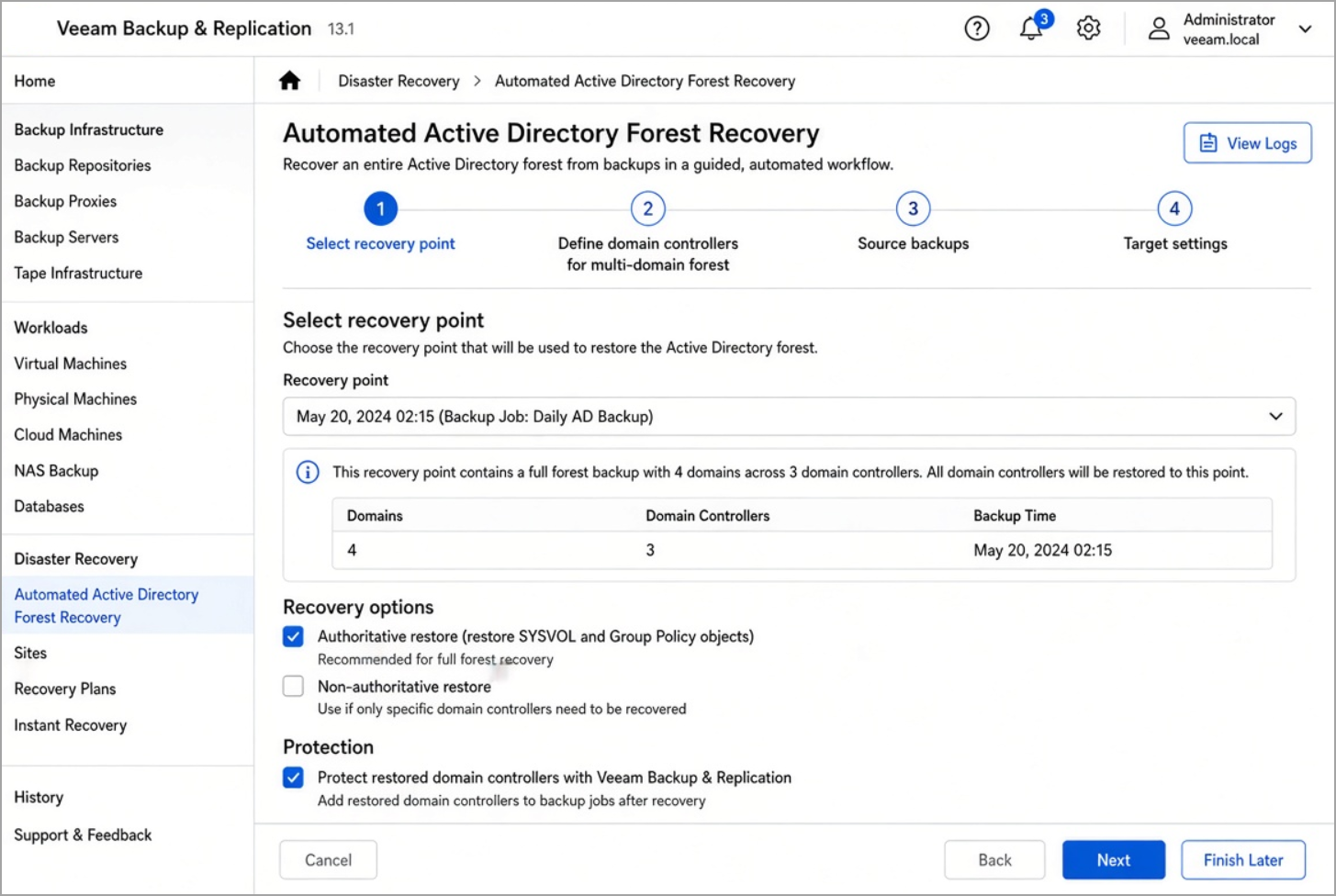
During backup, a guest component automatically collects the forest metadata so everything needed for rebuild is already there. In my lab and in conversations with customers who have lived through identity outages, this alone can shave days off recovery. Identity is the first thing attackers go after and the last thing most organizations can restore cleanly. If your AD forest is the backbone of authentication for everything else, this feature is a strong reason to move to 13.1. Read the full details in the Veeam What’s New document for Identity Protection and the community overview of Veeam Backup & Replication 13.1.
2. Expanded Microsoft Entra ID Protection
Closely related: Entra ID (formerly Azure AD) gets persistent original ID preservation so complex object relationships survive restore, plus coverage for Organization Contacts, device objects, and BitLocker recovery keys. There’s also context-aware restore for encrypted properties and proper RBAC so you can lock down who can back up or restore identity objects.
If you’re hybrid or cloud-first, incomplete identity restores used to leave you with broken relationships and manual cleanup. 13.1 reduces that pain significantly.
3. Multi-Hypervisor Freedom + Universal Hypervisor API (UHAPI)
The market is moving. Many of us are evaluating or already running alternatives to pure vSphere. 13.1 adds native support for:
- Sangfor aSV
- Citrix XenServer
- XCP-ng
- Platform9
- VergeOS
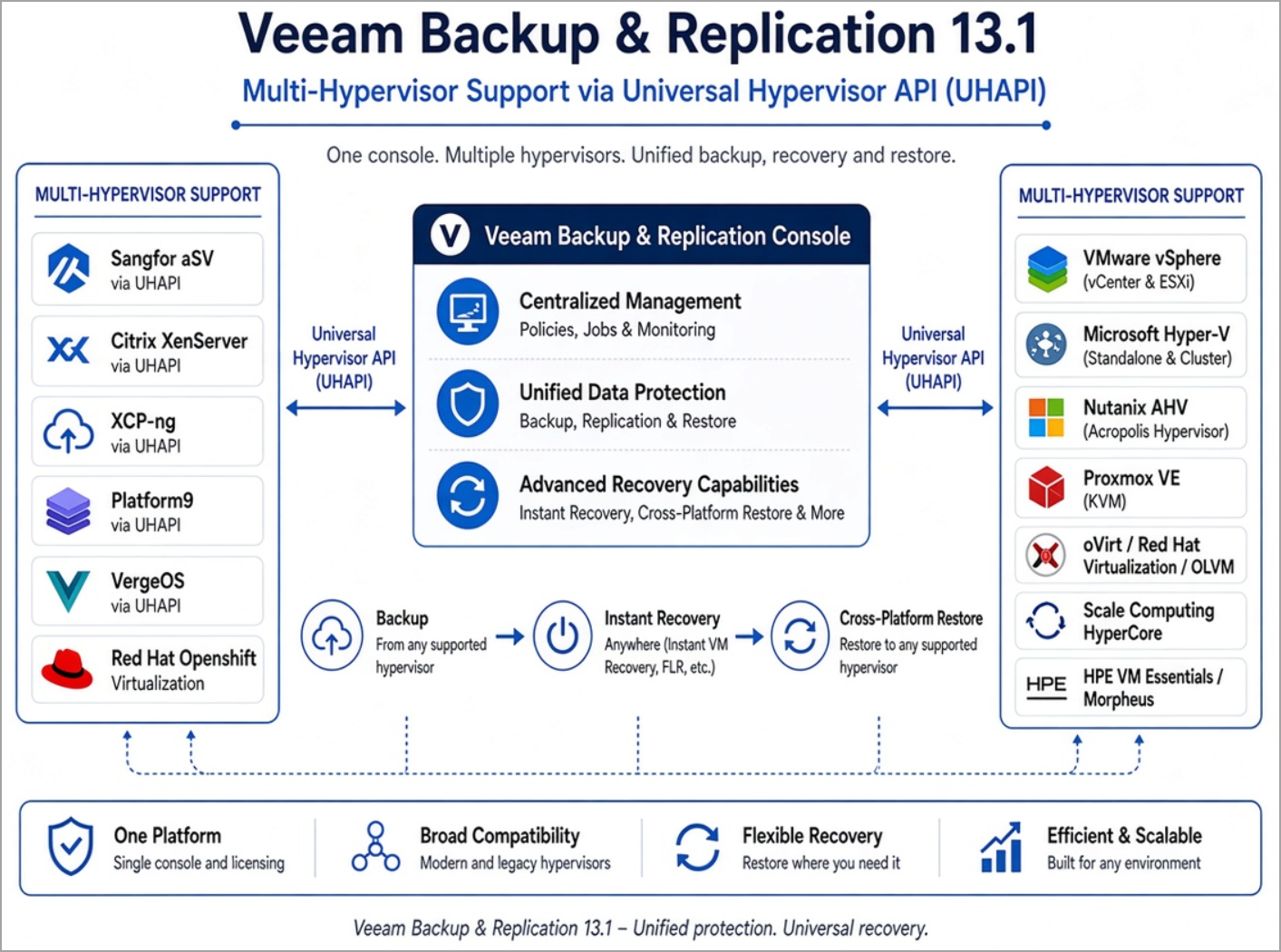
…with the new Universal Hypervisor API opening a certified path for more vendors. You get CBT, backup scanning (including Threat Hunter/YARA), entire-VM restore, Instant Recovery to several platforms, disk mount, file-level restore, export, and Veeam Explorer application-item recovery. Cross-platform recovery (restore a workload from one hypervisor/cloud to another) is first-class.
I’ve written a lot about Proxmox, XCP-ng and other alternatives over the years. Having agentless, consistent protection and portable recovery across them from one console removes a huge operational headache. If your hypervisor strategy is evolving, this is practical freedom rather than lock-in. See the multi-hypervisor details in the official Veeam Backup & Replication 13.1 What’s New PDF.
Multi-hypervisor is only possible if you keep the history of backups. You need it for legal purposes and that's why I think it is crucial to stay with Veeam (if you're already) and just switch the hypervisor. I know it is not easy but it is not impossible!
4. Application Backup Repository + Veeam Snap Scale
Two complementary pieces for enterprise apps:
- Application Backup Repository turns local (or hardened) storage into a managed pool of virtual volumes exposed as NFS targets. Perfect for Oracle RMAN Incremental Merge and any application (including IoT-style dumps) that can write to NFS. Immutable by design when built on the Hardened Repository.
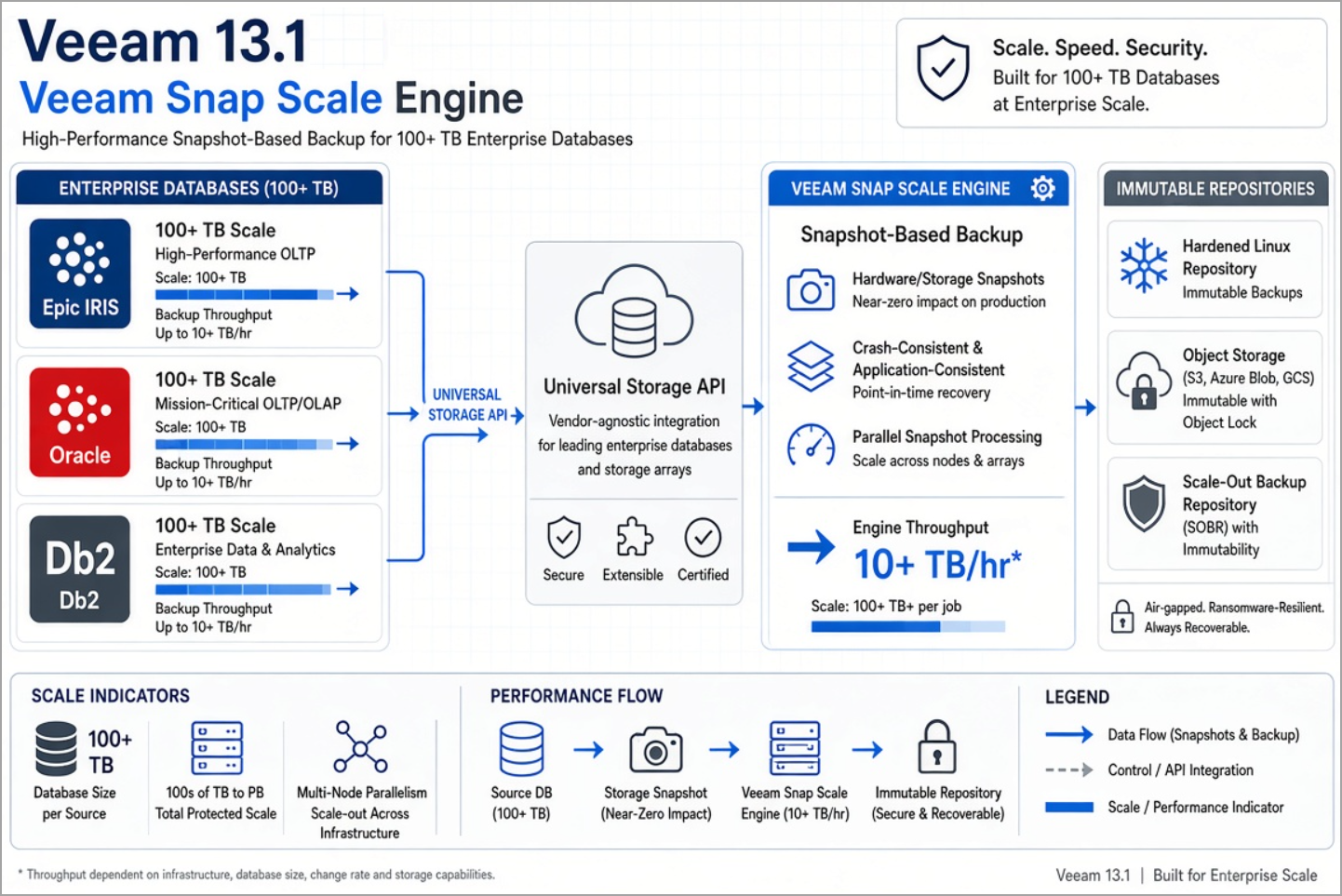
- Veeam Snap Scale engine for ultra-large databases (100+ TB scale) using the Universal Storage API. Includes native protection for Epic EHR on InterSystems IRIS and expanded Db2/Oracle support.
Previously many of these workloads needed separate tools or appliances. Now they sit inside the same Veeam Data Platform with the same immutability, malware scanning, and recovery options you already trust for VMs.
5. Broader Malware Detection + Hybrid FIPS + Post-Quantum Crypto
Malware detection (guest indexing, entropy analysis, Threat Hunter, YARA, IoCs) now covers more places: unstructured data / NAS, Azure VMs, the new hypervisors, AIX/Solaris agents, and more. Inline scanning continues to improve.
On the crypto side, 13.1 introduces hybrid FIPS + post-quantum cryptography for handshake and key exchange while keeping FIPS-certified AES for data at rest. This is future-proofing without forcing a full re-architecture.
Combined with the continued hardening of the Veeam Software Appliance (VSA) and infrastructure lockdown options, the security posture is meaningfully stronger. Check the security and malware detection sections in the Veeam Data Platform v13.1 What’s New guide.
Why Migrate to 13.1?
- Identity recovery is no longer a multi-day expert project.
- Hypervisor portability lets you choose platforms without rewriting your backup strategy.
- Enterprise applications that used to need special tooling now live inside the same console and immutability model.
- Security keeps pace with real threats (more scanning surfaces + quantum-aware crypto).
- Operational polish: better Web UI coverage, Veeam Intelligence improvements (natural-language job investigation, support-case integration, approved actions), REST API expansion, and continued VSA refinements.
If you’re still on 12.x, the jump to 13 brought the big architectural changes (full 64-bit, VSA option, etc.). 13.1 is the maturity and breadth release that makes production adoption safer. Upgrade path is documented; always take a configuration backup, test in the lab with your real job mix, and phase the rollout.
As always, read the official release notes and What’s New PDF before you touch production — known issues exist (as with every major release) and the Day-0 patches matter. Start with the Veeam Backup & Replication 13.1 Release Notes and the full What’s New document.
I’ve been living with Veeam long enough to know that the best features are the ones that quietly prevent 3 a.m. disasters. Lab it, test the AD Forest Recovery wizard and a couple of the new hypervisors, and see how it fits your environment.
More hands-on posts coming as I dig deeper into specific scenarios. Stay safe out there,
Short collection: 10 of the most recent Veeam articles from vladan.fr
Here are ten of the latest posts focused on Veeam technology (the recent ones, not the early-version archives):
- Veeam Backup & Replication 13.1 Released Today – Major Update to the Veeam Data Platform
- Veeam Live OS ISO: How to Recover Access to a Locked Veeam Software Appliance (Admin Guide)
- Migrating from Veeam Backup & Replication 12.x on Windows to Veeam 13 on Linux (Veeam Software Appliance)
- Veeam Backup & Replication Q1 2026 Updates: Deep Dive into v13 Capabilities, Patches, and Emerging AI Governance Features
- Veeam v13 Download Available – Start your download engines!
- Unlock your Veeam v13 With Windows-Based Console for VBR 13
- Veeam Backup and Replication Plug-in for XCP-NG Enters Public Beta: Powering Up Xen Hypervisor Backups
- Veeam Backup Appliance 13.0 ISO automated installation
- Veeam VHR ISO v2 – 2025 Download and Install
- FREE ISO to Download – Veeam Hardened ISO Repository As a Community Preview
More posts from ESX Virtualization:
- How to update your ESXi 7.x or 8.x to the latest ESXi 8.0U3k via command line
- Veeam Bare Metal Recovery from Recovery partition
- Veeam Backup and Replication Upgrade on Windows – Yes we can
- Securing Your Backups On-Premises: How StarWind VTL Fits Perfectly with Veeam and the 3-2-1 Rule
- VMware Alternative – OpenNebula: Powering Edge Clouds and GPU-Based AI Workloads with Firecracker and KVM
- Another VMware Alternative Called Harvester – How does it compare to VMware?
- VMware vSphere 9 Standard and Enterprise Plus – Not Anymore?
- Vulnerability in your VMs – VMware Tools Update
- VMware ESXi FREE is FREE again!
- No more FREE licenses of VMware vSphere for vExperts – What’s your options?
- VMware Workstation 17.6.2 Pro does not require any license anymore (FREE)
- Two New VMware Certified Professional Certifications for VMware administrators: VCP-VVF and VCP-VCF
- Patching ESXi Without Reboot – ESXi Live Patch – Yes, since ESXi 8.0 U3
- Update ESXi Host to the latest ESXi 8.0U3b without vCenter
- Upgrade your VMware VCSA to the latest VCSA 8 U3b – latest security patches and bug fixes
- VMware vSphere 8.0 U2 Released – ESXi 8.0 U2 and VCSA 8.0 U2 How to update
- What’s the purpose of those 17 virtual hard disks within VMware vCenter Server Appliance (VCSA) 8.0?
- VMware vSphere 8 Update 2 New Upgrade Process for vCenter Server details
- What’s New in VMware Virtual Hardware v21 and vSphere 8 Update 2?
- vSphere 8.0 Page
- ESXi 7.x to 8.x upgrade scenarios
- VMware vCenter Server 7.03 U3g – Download and patch
- Upgrade VMware ESXi to 7.0 U3 via command line
- VMware vCenter Server 7.0 U3e released – another maintenance release fixing vSphere with Tanzu
- What is The Difference between VMware vSphere, ESXi and vCenter
- How to Configure VMware High Availability (HA) Cluster
Stay tuned through RSS, and social media channels (Twitter, FB, YouTube)





Leave a Reply