
Hey folks, Vladan here. If you follow my blog for a long time, you already know I keep a close eye on backup tools that stay current with the hypervisors we actually run — VMware, Proxmox, mixed environments, physical boxes, NAS appliances. NAKIVO has been on that list for years because it stays lean, agentless where it counts, and doesn’t force you into a second mortgage.
The latest update is v11.2.2 (released 13 August 2026, publicly pushed early September). It’s not a flashy “everything changed” major release. It’s the practical kind of point release that keeps your protection jobs alive while you upgrade the rest of the stack. Full support for VMware vSphere 9.1, full support for Proxmox VE 9.1 and 9.2, Real-Time Replication now covering vSphere 9.1, extended physical OS coverage, cleaner NAS licensing, and a handful of solid bug fixes. Exactly what you want when you’re in the middle of platform upgrades.
VMware vSphere 9.1 – Full Support (Including Real-Time Replication)
NAKIVO already had solid vSphere 9.0 coverage in earlier 11.2.x builds. With 11.2.2 you get full support for vSphere 9.1 (vCenter + ESXi + VDDK). That means you can upgrade your hosts and vCenter without parking backup jobs or dropping into limited/compatibility mode.
Key capabilities that continue to work as expected:
- Agentless image-based backup and replication with CBT
- Instant VM recovery, file-level and application-object recovery
- Site Recovery orchestration (failover/failback + non-disruptive testing)
- Source-side AES-256 encryption, immutable repositories (local Linux, S3-compatible, cloud, dedup appliances), air-gapped options, and pre-recovery malware scan
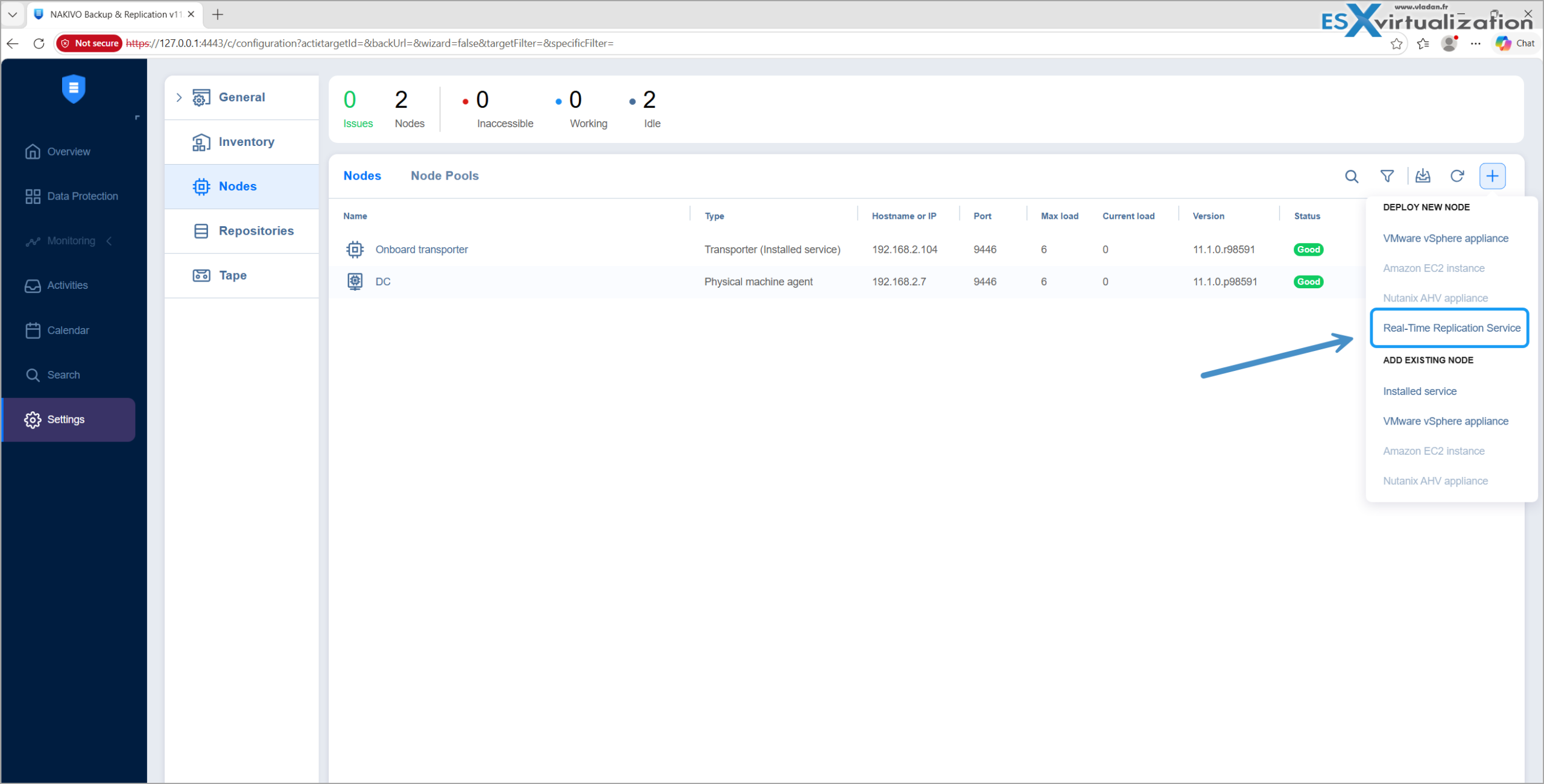
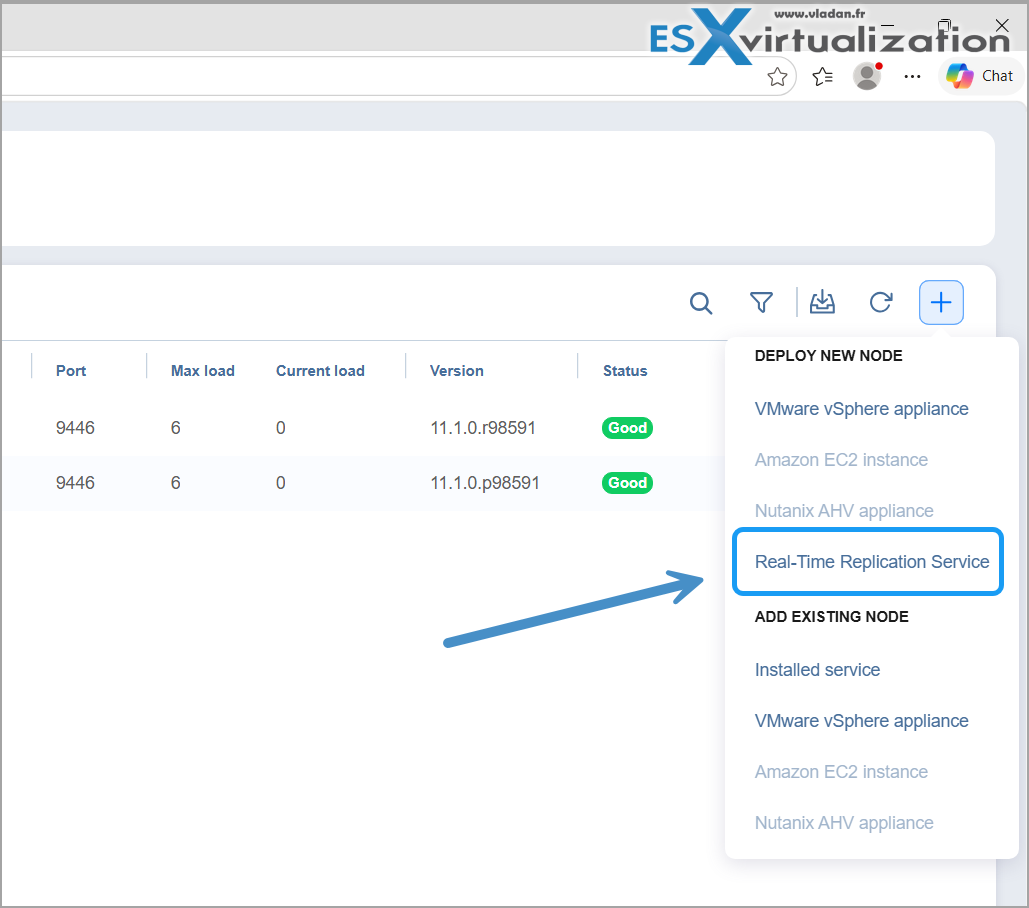
Above: Screenshot from the lab – deployment of the Real-Time replication service
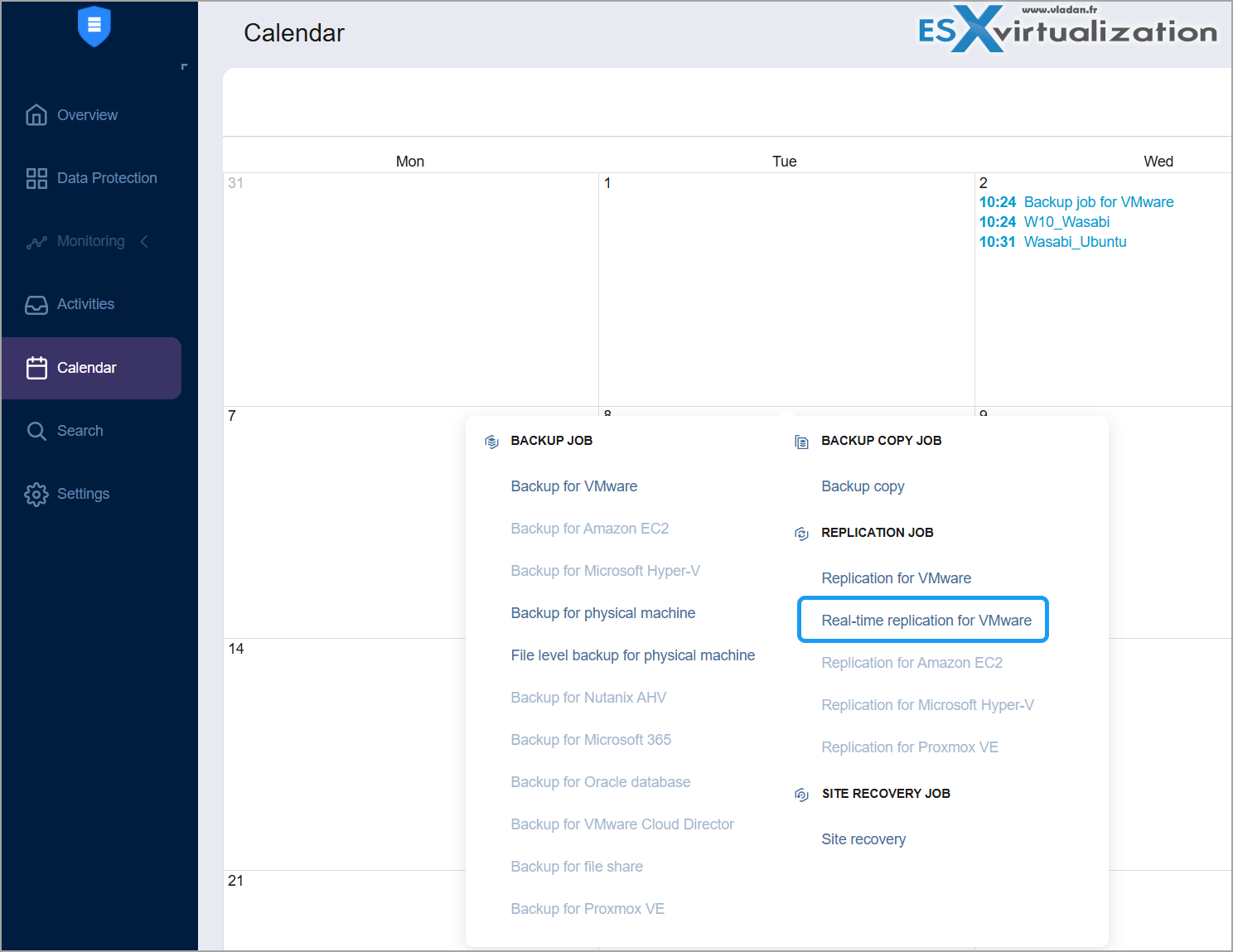
The important addition for DR-focused shops is Real-Time Replication support for vSphere 9.1. Continuous replica updates with RPOs (and RTOs) as low as 1 second. This was already available for earlier vSphere versions; now it covers 9.1 as well. If you have critical VMs that need near-zero data loss, you can keep using the same Real-Time Replication jobs after the upgrade.
NAKIVO Real-Time Replication (RTR) for VMware is an asynchronous continuous data protection (CDP-style) mechanism that keeps replica VMs updated with source changes as they occur, targeting RPOs as low as 1 second.It is not synchronous replication (which would wait for every write to be acknowledged on both sides). Instead, it intercepts writes at the hypervisor level and streams changes to a target journal, then applies them to the replica according to the configured RPO.
The technology relies on VMware VAIO (vSphere APIs for I/O Filtering) filter (NAKIVO’s proprietary filter, Broadcom-certified).
For installing the IO filters and configuring the jobs, check the help section Online at Nakivo here. You'll find the step-by-steps there…. Once you have installed the IO filters, you'll need also install Journal Service which is a
“software module that installs into the target transporter and manages the I/O Journal created per VM disk and which is a set of records of I/O operations that keeps reference recovery points (snapshots of data changes made to a source VM created at the moment the replication job is stopped) of a replica VM and can be used for failover.”
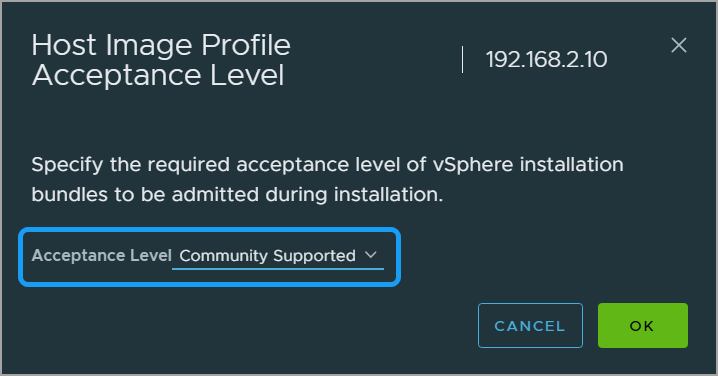
Above: Screenshot from the lab – changing the acceptance level to Community supported for the installation of the VIB.
VMware Cloud Foundation (VCF) 9.1 compatibility is also listed — the vSphere components inside VCF 9.1 are covered, so existing backup, replication, Site Recovery and Real-Time Replication workflows remain usable.
Proxmox VE 9.1 and 9.2 – Full Agentless Support
Proxmox continues to grow as a VMware alternative (edge, cost-sensitive production, or deliberate migration target). NAKIVO had full 9.0 support and 9.1 compatibility earlier; 11.2.2 brings full support for both 9.1 and 9.2.
What that means in practice:
- Agentless backup and replication at the host level (no guest agents)
- Faster incremental backups using native change tracking
- Instant recovery of entire VMs, templates, individual files or application objects
- Built-in replication for quick recovery / failover scenarios
- Same ransomware toolkit: immutability + encryption
If you’re running hybrid VMware + Proxmox (or planning a migration), you still manage everything from one console. I’ve covered the migration path before — back up the VMware VMs agentlessly, then restore directly to Proxmox. No export/import required. See my earlier notes on NAKIVO 11.2 with Proxmox 9.x and the more detailed 11.2 overview here.
A couple of Proxmox-specific fixes landed in this release (network mapping for replication and Transporter IP assignment issues).
Physical Machine OS Support Expanded
Useful if you still have physical servers or workstations in the mix. New supported guest OSes for physical backup include:
- Debian 13
- RHEL 10 / Rocky Linux 10 / Oracle Linux 10 / AlmaLinux 10
- Ubuntu 25.10 and 26.04 LTS
- SLES 16
- Windows 10 IoT and Windows 11 26H1
Bare-metal recovery also gained support for RAID volumes as targets. Combined with the existing Flash Boot / P2V options, this keeps mixed environments manageable.
NAS Licensing and Deployment Tweaks
File-share (NAS) backup now has clearer TB-based subscription SKUs. The licensing UI was improved so you can actually see purchased vs consumed capacity. Makes capacity planning less of a guessing game as unstructured data grows.
You can also deploy NAKIVO directly on Buffalo NAS devices running Windows OS (in addition to the existing Synology, QNAP, ASUSTOR, WD, NETGEAR, TrueNAS options). Running the Director + Onboard Transporter on the NAS itself remains one of the cleanest ways to turn storage hardware into a dedicated backup appliance. I wrote about that approach earlier this year — Turning Your NAS into a Backup Appliance with NAKIVO.Additional platform compatibility updates cover newer versions of ESXi, Nutanix, various Linux/Windows builds, Dell EMC, QNAP (including QuTS hero h6.0 and QTS 5.2.9), and Oracle RMAN. HPE StoreOnce VSA Gen4/Gen5 also received support bumps.
Other Fixes Worth Noting
The release notes list the usual reliability clean-ups: job scheduler behavior, shared-mailbox licensing edge cases, configuration export encryption, Nutanix skipped-disk handling, linked-job scheduling, etc. Nothing dramatic, but the kind of polish that reduces “why did that job skip?” tickets.
Note the platform announcements: ARM v7 is no longer supported for installation/updates starting with the 11.2 line, and Windows 8/8.1 support is being dropped in the next major (11.3). Plan accordingly if you’re still on older hardware or OS images.
Support Lifecycle Reminderv11.2.2 has End of Fix on 13 August 2027, security patches until 13 August 2028, and full End of Support on 13 August 2029. As always, stay within the supported window. Details are in the official Support Lifecycle Policy.
Practical Takeaway
If you’re already on NAKIVO and running (or planning) vSphere 9.1 or Proxmox VE 9.1/9.2, update to 11.2.2. The upgrade path is the usual one — check the release notes and the updating guide first. New to the product? The 15-day full-feature trial is still the easiest way to validate the agentless Proxmox support, Real-Time Replication behavior, and NAS deployment options in your own lab.
NAKIVO remains one of the more straightforward tools for heterogeneous environments — VMware, Proxmox, Hyper-V, Nutanix, physical, Microsoft 365, file shares — without forcing separate product silos or crazy licensing complexity. Deployment options stay flexible (Windows, Linux, VA, or directly on supported NAS).
Official product page and trial download: https://www.nakivo.com/
v11.2.2 release overview: Full release notes and help centre: https://helpcenter.nakivo.com/
Related posts on the blog
- NAKIVO Backup & Replication 11.2: Full Proxmox VE 9.0 Support…
- Nakivo 11.2 With Proxmox 9.1 and VMware vSphere 9 Support Released
- Turning Your NAS into a Powerful, Budget-Friendly Backup Appliance with NAKIVO
- Nakivo Backup and Replication v11.1 Released
- Major Release – Nakivo Backup and Replication v11
As always, test the update in a non-production instance first, verify a couple of restore scenarios, and keep an eye on the support lifecycle dates. Stay current, keep the backups immutable where it matters, and separate your backup infrastructure from production. Classic advice that still holds.
More posts from ESX Virtualization:
- How to update your ESXi 7.x or 8.x to the latest ESXi 8.0U3k via command line
- Veeam Bare Metal Recovery from Recovery partition
- Veeam Backup and Replication Upgrade on Windows – Yes we can
- Securing Your Backups On-Premises: How StarWind VTL Fits Perfectly with Veeam and the 3-2-1 Rule
- VMware Alternative – OpenNebula: Powering Edge Clouds and GPU-Based AI Workloads with Firecracker and KVM
- Another VMware Alternative Called Harvester – How does it compare to VMware?
- VMware vSphere 9 Standard and Enterprise Plus – Not Anymore?
- Vulnerability in your VMs – VMware Tools Update
- VMware ESXi FREE is FREE again!
- No more FREE licenses of VMware vSphere for vExperts – What’s your options?
- VMware Workstation 17.6.2 Pro does not require any license anymore (FREE)
- Two New VMware Certified Professional Certifications for VMware administrators: VCP-VVF and VCP-VCF
- Patching ESXi Without Reboot – ESXi Live Patch – Yes, since ESXi 8.0 U3
- Update ESXi Host to the latest ESXi 8.0U3b without vCenter
- Upgrade your VMware VCSA to the latest VCSA 8 U3b – latest security patches and bug fixes
- VMware vSphere 8.0 U2 Released – ESXi 8.0 U2 and VCSA 8.0 U2 How to update
- What’s the purpose of those 17 virtual hard disks within VMware vCenter Server Appliance (VCSA) 8.0?
- VMware vSphere 8 Update 2 New Upgrade Process for vCenter Server details
- What’s New in VMware Virtual Hardware v21 and vSphere 8 Update 2?
- vSphere 8.0 Page
- ESXi 7.x to 8.x upgrade scenarios
- VMware vCenter Server 7.03 U3g – Download and patch
- Upgrade VMware ESXi to 7.0 U3 via command line
- VMware vCenter Server 7.0 U3e released – another maintenance release fixing vSphere with Tanzu
- What is The Difference between VMware vSphere, ESXi and vCenter
- How to Configure VMware High Availability (HA) Cluster
Stay tuned through RSS, and social media channels (Twitter, FB, YouTube)





Leave a Reply